DataSimple is the simple lakehouse platform. Extract data from any source system, store it in your own cloud in open formats (Delta Lake, Apache Iceberg or Apache Parquet), keep it current with incremental loads, and build Bronze, Silver and Gold layers on top: one governed copy of your data for reporting, data science and AI. The data stays in your account in open formats, and what usually takes ingestion code, clusters, a catalog and a reporting tool is one application here.

Delta Lake is a trademark of LF Projects, LLC. Apache, Apache Iceberg, Iceberg, Apache Parquet and Parquet are trademarks of The Apache Software Foundation. The logos identify the open formats DataSimple reads and writes.
DataSimple connects to your source systems, copies them into one lake in Parquet, Delta and Iceberg, keeps the copies current (watermarks, database change logs, file drops, Kafka topics), turns the changes into Bronze and Silver tables, lets you transform the result in SQL and Python notebooks, runs that work on a schedule or in pipelines, governs every table through Unity Catalog, and shows you what happened in History, Log and Lineage. This guide walks through all of it in the order you will use it. Each chapter says how the feature works, the steps in the application, the SQL or Python to paste, the bookkeeping columns it produces, and where to read more.
Work the chapters top to bottom the first time. Afterwards each one stands on its own.
The platform at a glance#
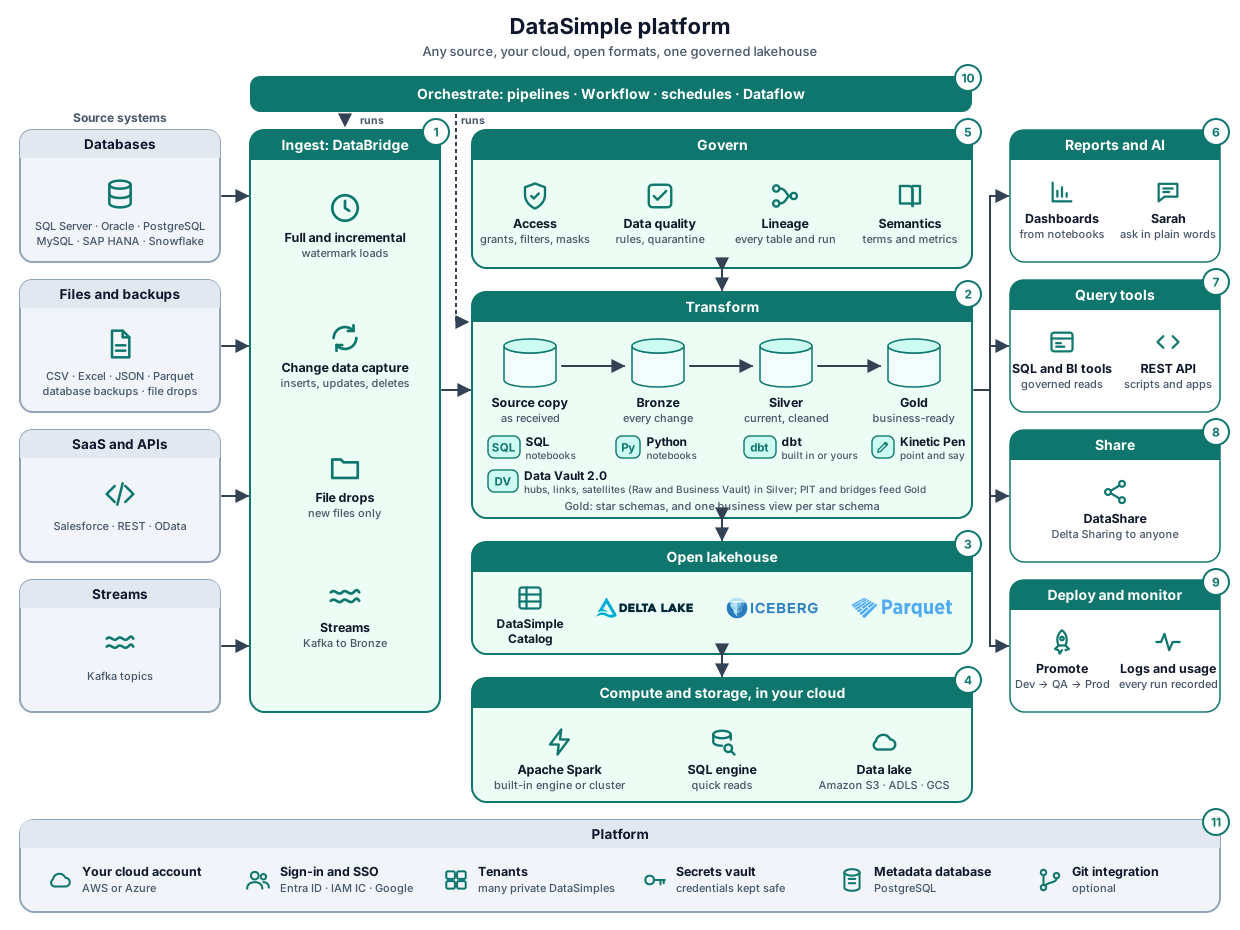
Data moves from left to right:
- Ingest: DataBridge copies your source systems into the lake and keeps them current (chapters 2 to 4).
- Transform: Bronze, Silver and Gold are built in notebooks, dbt (built in, or your own dbt) or declarative tables (chapters 5 to 8b and 15); a Data Vault model is generated from the Data Vault page (chapter 17).
- Open lakehouse: the DataSimple Catalog names every table; the data is stored as Delta Lake, Apache Iceberg or Apache Parquet (chapters 3 and 9).
- Compute and storage: Apache Spark and the SQL engine work on the data lake in your own cloud.
- Govern: access rules, data quality, lineage and semantics apply to every read and write (chapters 9 and 10).
- Reports and AI: dashboards and Sarah (chapter 14), ML models (chapter 19) and your own agents (chapter 20).
- Query tools: SQL and BI tools and the REST API read through the same governance.
- Share: DataShare gives governed tables to other organisations (chapter 9).
- Deploy and monitor: promote Dev to QA, and see every run in the logs (chapters 11 and 12).
- Orchestrate: pipelines, Workflow, schedules and Dataflow run the loads and the transformations in order, on time (chapter 8).
- Platform: your cloud account, sign-in, tenants, secrets and the metadata database.
Chapters#
- Sign in and the workspace: tenant, roles, the left rail, one active session.
- Connect source systems: Data Source panel, databases, files, APIs, Kafka, backups; what is stored.
- Lake targets and formats: Target_AWS / Azure / GCP, the lake layout, Parquet vs Delta vs Iceberg, catalog names and badges.
- Extract with DataBridge: the five-step wizard, full load, watermark, change-log CDC, file drop, backup drop, Kafka, keys, schedules, Load History, the API.
- Bronze: one row per key, delete markers, Parquet vs Delta Bronze, the Bronze CDC screen.
- Silver: Apply changes: Type 1, Type 2, snapshot diff; DataBridge's Silver option;
ds.apply_changesandAPPLY CHANGES INTO; DS Tables in short. - Notebooks: what a notebook is, your first notebook, cell types, the first-line options
%sql/%python/%md, Markdown, parameters, charts, Insert read, the Kinetic pen, scheduling, the run log.- 7a. Spark: the engine behind your cells, the SQL engine and your session, what is checked on every statement, performance tips.
- 7b. SQL reference: the commands at a glance for tables, views, materialized views and streaming tables; every SQL command by task (query, create, change,
MERGE,APPLY CHANGES, materialized views,CREATE STREAMING TABLE, drop and undrop, time travel, maintenance, grants, functions), with examples, and what to use instead of commands DataSimple does not have. - 7c. Python reference: PySpark DataFrames in short and every DataSimple helper (read, write, CDC, DS Tables, quality, access).
- 7d. Streaming, materialized views and incremental tables: continuous loads end to end: DataBridge CDC, Kafka and file drops, streaming tables that read only the new rows, materialized views and pipelines, with a 15-minute example.
- Pipelines and workflows: Pipelines, Dataflow, chat-built Workflows, Test vs Execute.
- 8a. Pipelines and Dataflow: tested walkthrough: a pipeline with parallel branches, a parameter and a failing step, then the same steps on Dataflow, with screenshots of every result.
- 8b. dbt from source to Gold: tested walkthrough: the Retail store system loaded by DataBridge, Silver and Gold built by dbt on DataSimple's Spark engine with business rules and 15 tests, then a day of source changes followed to Gold.
- Lakehouse governance: Unity Catalog, grants, row filters, column masks, lineage, Semantics, Data Quality, DataShare.
- Audit trail columns: every bookkeeping column in one table and the questions you can answer with them.
- Monitoring, logs and recovery: Load History, logs, Ingestion Jobs, History / Log / Lineage, time travel, snapshots, re-running loads.
- Deployment: Dev to QA to Prod: environments, the Deploy workflow, the Deployment screen, settings an administrator sets, migrations, backups, go-live checklist.
- 12a. Dev to QA to Prod: tested walkthrough with Git and with Deployment: one star schema and its lineage promoted through GitHub pull requests, another with the Deployment screen, every step done by hand, with the results.
- Reference: every snippet, the API endpoints, the open-source links.
- Sarah: ask for a report: one question in plain words becomes an executive dashboard from Gold, under your grants, with the SQL behind every number.
- DS Tables: declare the tables, their write mode and quality rules;
ds.run()builds them in the right order. A full Bronze to Gold example with real output, and star schemas and One Big Tables. - Everything: run DataSimple by talking to Sarah: how a spoken request is handled, what keeps it safe, who approves what, everything you can ask for (including metrics, quality rules and certification), and a full day with Sarah by voice.
- Data Vault: hubs, links and satellites from your Bronze tables; DataSimple scores the business keys, generates the Raw Vault, Business Vault, PIT tables and KPI views with their checks, as one notebook and pipeline. The Retail example step by step, and the Finance example tested from files in S3 (Demo Finance).
- What is tested: every feature and every code example in these guides, with whether it has been proven by a real run on the development server, when, and where to see the run in the application.
- ML Models: train a model on a lake table (one type, or AutoML), compare runs, promote a version, score a table into Gold, explain predictions, check drift; Quick ML for unusual periods, key drivers and AI text functions.
- Agent Studio: build your own agents from DataSimple's tools, chat, rate answers, test them with question sets, share them, and add the documents they search.
- Spaces: give Sarah one topic with its tables, instructions and business terms; trusted answers, benchmark accuracy, the fix queue, and deep answers.
- Table audit: one history per lake table: reads, writes with row counts, definition, access before and after, lineage, versions; filters, CSV and Verify. Practical guide and manual test cases: demo-table-audit.
Quick start for end users#
If you only want to load a table, write a notebook and schedule it, the shorter Quick start covers that in five pages. Screens are the same; this guide goes further.
Names you will see everywhere#
- A lake table is
datasimple.<layer>.<table>. Layers:source(copies of your systems, read-only),bronze(merged by key),silver(business shape),gold(reporting). - A DataBridge copy has one name per format:
dbo_Orders(Parquet),dbo_Orders_DELTA(Delta),dbo_Orders_ICEBERG(Iceberg). - A saved connection is
DS-<number>. You pick it from a list; passwords stay on the server. - Your tenant is a three-digit number (
001). Everything you see belongs to your tenant only.