DataSimple is the simple lakehouse platform. Extract data from any source system, store it in your own cloud in open formats (Delta Lake, Apache Iceberg or Apache Parquet), keep it current with incremental loads, and build Bronze, Silver and Gold layers on top: one governed copy of your data for reporting, data science and AI.
Move the pointer to run the loadrows at source · 0%
Delta Lake is a trademark of LF Projects, LLC. Apache, Apache Iceberg, Iceberg, Apache Parquet and Parquet are trademarks of The Apache Software Foundation. The logos identify the open formats DataSimple reads and writes.
A lakehouse keeps all of your data as files in your own cloud storage, in open table formats, and adds what used to need a separate data warehouse: reliable updates, a full history, a schema, access rules and one catalog of every table.
Open format
What it gives you
Delta Lake
Reliable updates and deletes (MERGE), version history and time travel, roll back to any earlier version
Apache Iceberg
Snapshots and rollback, readable by every Iceberg engine and catalog
Apache Parquet
The fastest plain copy; every analytics tool reads it
Why it matters:
One copy of the data for every use. Reports, data science, machine learning, AI assistants and partner sharing all read the same tables. No copies drifting apart.
Your data stays yours. It sits in your own storage account in open formats, so you are never locked into one vendor's engine.
Lower cost. You pay for storage, and for compute only while work runs.
Trust and audit. Every change is kept: who loaded what, when, and what the table looked like before. A bad load can be undone.
Governed once. Access rules, row filters and column masks are defined on the table and apply to every tool that reads it.
A lakehouse usually takes a team of specialists: ingestion code for every source, clusters to size and manage, layer designs, a separate catalog, and a separate reporting layer. DataSimple makes it a simple application:
Usually
With DataSimple
Ingestion code for each source system
Pick a Data Source, tick the tables; DataBridge copies them and keeps them current with incremental loads
Bronze, Silver and Gold designed by hand
The layers are built in: Bronze keeps every change, Silver applies them, Gold is ready for the business
Clusters to size, start and stop
Notebooks and pipelines run on a managed Spark engine; nothing to size
A separate catalog and access tool
One catalog with grants, row filters and column masks, included
A separate reporting layer
Business views on every Gold model; Sarah answers questions from them
Promotion scripts between environments
Deployment, or Git, moves objects from Dev to QA to Production
DataSimple helps you lift and shift data from your source systems to the cloud, and keep it up to date:
Extract from any source system: databases, SaaS applications, cloud warehouses, files and streams.
Store it in your own cloud storage (Amazon S3 or Azure Data Lake Storage) in open formats: Delta Lake, Apache Iceberg or Parquet. Any tool that reads those formats can read your data.
Keep it current with incremental loads. The first run copies the whole table. Every later run brings only what changed: new rows, updates and deletes.
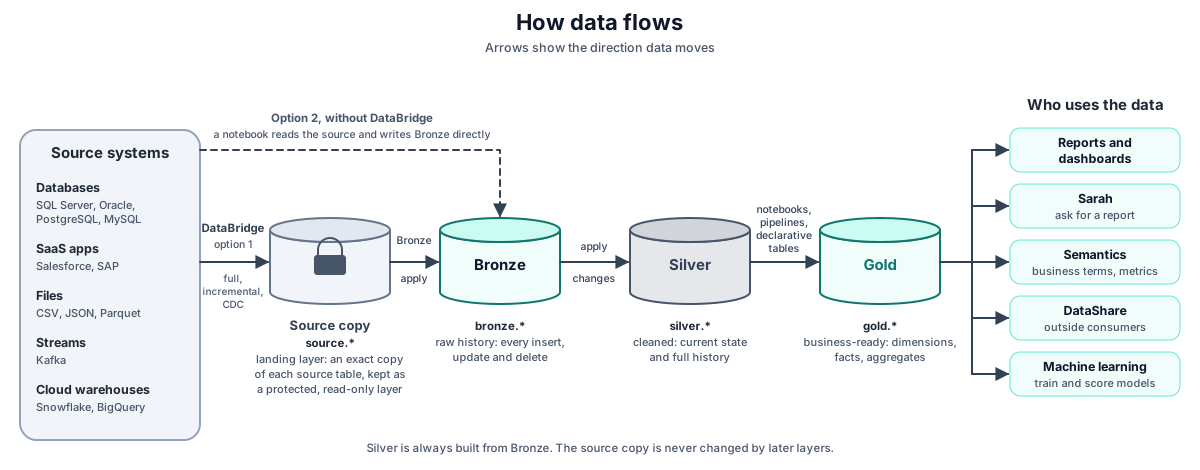
Transform it step by step. The raw copy is always kept as a secured layer, Bronze keeps the full history, Silver is where you transform, and Gold is ready for the business.
How data flows: source systems, the secured raw copy, Bronze, Silver, Gold and the people who use the data
Around this simple core, DataSimple gives you what you need to run it safely: one catalog with access rules, quality checks, schedules and pipelines, lineage, sharing with outside readers, and promotion from development to production.
Hubs, links and satellites from Bronze; business key scoring; Raw and Business Vault, PIT and KPI views generated with their checks; practical guides (Retail, a bank from files in S3); which scenarios are tested
Commands at a glance for tables, views, materialized views and streaming tables; every SQL command by task with examples (query, create, alter columns, MERGE, APPLY CHANGES, CREATE STREAMING TABLE, drop and undrop, time travel, maintenance, grants, functions); PySpark and every DataSimple helper; continuous loads end to end
Names in examples are neutral:gold.sales_by_region, silver.orders, and so on.
HTTP examples use https://<your-datasimple-host> and a personal API token (Authorization: Bearer <PERSONAL_TOKEN>). Create the token in Settings → Personal API tokens.
Limits are listed in each chapter, so you know what the product does not do yet.
No server addresses, credentials or installation details appear anywhere in the handbook. Questions about your installation go to your DataSimple administrator.