Back to the index · Previous: Monitoring, logs and recovery
How it works#
Two different things are called "deploy". Code (the application itself) reaches a host through the GitHub Deploy workflow, which builds a container image and replaces the running container; database migrations run when the container starts. Workspace content (notebooks, pipelines, workflows, schedules, Data Sources, data quality checks, terms, metrics) moves between running environments through the Deployment screen: you connect the next environment, compare, and promote the objects you pick. Each environment (Dev, QA, Prod) is a separate installation with its own URL, application database, lake and DS-xxxx connections; promotion never copies lake data or passwords. Items are paired across environments by a stable key assigned when they are created, so a renamed notebook updates its QA twin instead of creating a second copy, and the target keeps the definition it replaced so any hop can be rolled back.
Code: the Deploy workflow#
| What | In words |
|---|---|
| Who starts it | someone with rights on the GitHub repository: Actions → Deploy → Run workflow, choose dev, qa or prod and the branch. A push to the dev branch deploys to dev by itself. One deploy per environment runs at a time; a newer one waits. |
| What it builds | the application image, plus the dbt SQL gateway image, and (optional, a failure does not block) the integration sidecar and the Flink images, pushed to the container registry and tagged with the environment and the commit |
| What it does on the host | signs in to the registry, pulls the images, stops and removes the old containers, starts the new ones with that environment's environment file; the application container mounts a host folder for DataBridge state (job queue, schedules, positions, file ledger) so a redeploy never erases it, and refreshes DataBridge's Python packages |
| Migrations | run at container start, before the server listens (see below) |
| CI | on pushes and pull requests to main: install, a command-line smoke test, build. Deploy is separate and manual. |
After a code deploy, check the migration log and open /help on the target: the help pages are served from the deployed image.
Content: the Deployment screen#
There is also an optional second way to move content: Git integration, where developers commit to a branch, changes move by pull request, and each environment updates from its own branch. See Git integration and the tested walkthrough 12a.
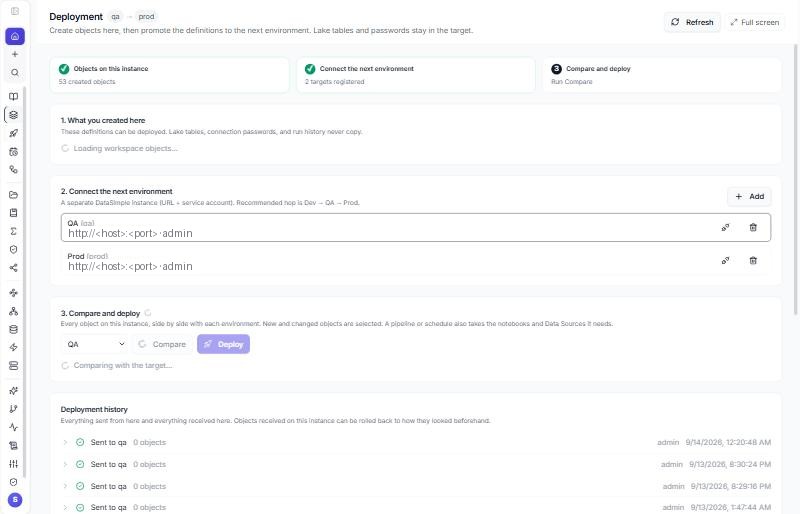
Card 1, Objects on this instance: what was created here. Card 2, Connect the next environment → Add: name (qa, lowercase), label, the target's URL, a service username and password of a target user who may create notebooks, the target tenant. Save environment, then Test (the plug icon) shows the target's notebook and pipeline counts. Card 3, Compare and deploy: pick the target, Compare; every object is listed as New, Changed, Same or Target only; tick and Deploy N. A pipeline pulls in the notebooks and Data Sources it needs. If a Data Source is missing on the target you can add it to the deploy or Deploy anyway. Deployment history lists sent and received deployments; on the receiving instance a received entry offers Roll back to the definitions it held before that hop (the rollback is itself in the history and can be undone).
| Moves to the target | Remapped on the way | Never copied |
|---|---|---|
| Data Source shell (name, engine, host, port, database) | — (password left empty until filled on the target) | passwords, tokens, keys |
| folders, notebooks and cells | DS-12 → the target's DS-n when a Data Source with the same name and engine exists there |
lake files |
| schedules, pipelines (steps, cron, retries) | notebook ids by pairing key; new schedules and pipelines land disabled | run history |
| data quality checks, glossary terms, semantic metrics, saved joins | DQ results, alerts | |
| workflows (tables, keys, mappings, boxes, steps, formats, catalog settings) | Data Source by name and engine; step and box notebooks by pairing key; DS-n in Flink steps; the scheduling pipeline by pairing key. A reference the target cannot resolve fails that workflow with a message; it never points at a wrong id |
run history (last_run) |
| missing lakehouse tables, views and materialized views, only when you tick "Create on target" | created empty with the same columns, types, format (Delta / Iceberg), partitioning and comment; a view with its stored definition; a materialized view with its definition and schedule | rows: data never moves |
| Sarah spaces (tables, instructions, terms, starter questions, shares, trusted answers, benchmark questions) | matched by name; an existing space is refreshed, trusted answers and benchmark questions matched by question; nothing removed | owner (the target's deploying user owns a new space), answers, fix queue, benchmark results |
| Agent Studio agents (instructions, tools by name, documents on/off, the spaces it may ask and a supervisor's agents, by name, starter questions, shares, test sets) | matched by name; an existing agent gets a draft version when Agent Studio keeps versions (Production untouched), otherwise it is changed in place; tools, spaces or agents the target does not have are left out and listed | owner (the target's deploying user owns a new agent), conversations, ratings, test results |
| grants, row filters and column masks of the objects created, only with "Copy grants" | users by username, groups by name; principals the target does not have are listed, not created | revokes: nothing is ever taken away |
Workflows. A workflow is a deploy kind like the others: Compare shows it New, Changed or Same, View changes shows its definition side by side, and Roll back puts the previous definition back. Deploying a workflow pulls in its Data Source and the notebooks its boxes and notebook steps use. A workflow has no schedule of its own; it is scheduled by a pipeline, and a pipeline new to the target lands disabled, like every promoted pipeline. If the workflow's pipeline is in the same deploy (or already on the target), the workflow is linked to it there; otherwise the target keeps its own link. Workflows are applied before pipelines, so a pipeline with a workflow step finds a workflow deployed with it.
Agents. An agent from Agent Studio is a deploy kind too (Agent in Compare). View changes shows both definitions side by side and names the fields that change (for example instructions (changed), starter_questions (added)) before you deploy. Spaces and agents are applied after every other object, since they only name tables and tools; spaces first, then agents, then supervisors, so each finds what it names. A space travels the same way (Space in Compare; spaces/<name>.yaml in Git). Roll back puts the agent's previous definition back; an agent the deploy created is archived, never deleted. The same agent travels through Git as agents/<name>.yaml; see Git integration.
Missing lakehouse objects. The check before every deploy lists the lakehouse tables and views the selected notebooks read or write (INSERT INTO, MERGE INTO) that the target's catalog does not have, plus the tables a missing view reads. Each one this instance's catalog describes has a Create on target checkbox (off by default):
- What is created: an empty table with the source's columns, types,
NOT NULL, format, partitioning and table comment (the table's location is the target's own lake); a view with the definition stored in the catalog (datasimple.view_definition); a materialized view with its definition and schedule from the materialized-view registry. The structure comes from the source's catalog only; the source's data is never read. - How: the target runs
CREATE SCHEMA | TABLE | VIEW | MATERIALIZED VIEW ... IF NOT EXISTSthrough its own SQL route as the deploy's service account, so the statement is checked, registered in the catalog and logged like one typed in a cell. Order: schemas, then tables, then views (a view after the views it reads), then materialized views, then the promoted objects. - What is never done: no
DROP,REPLACE,ALTER,INSERTorCREATE TABLE ... AS SELECT. An object that already exists on the target is skipped and reported; one that exists under another format or kind, or sits in the target's trash, is refused and left as it is. - Not creatable (shown with the reason): an object this instance's catalog has no entry or no column list for, a column type that cannot be copied, or a view definition that is not a single read-only query.
- Copy grants (needs at least one object ticked) adds the source's table and schema grants, row filters and column masks to the objects that deploy created, for users and groups that exist on the target. Also add grants to the tables these objects use that already exist extends that to existing tables; grants are only added, never revoked, and a row filter or column mask the target already has is left alone. Principals missing on the target are listed after the deploy.
- Recorded in both environments' history (kinds Schema, Table, View, Materialized view, Grant) and in the audit log (
deploy.create_objects,deploy.copy_grants). Roll back does not remove created lakehouse objects: a roll back never drops anything. Approval requests carry the choice, and approving runs it. - The target must run this version to create objects; an older target stops the deploy with a message before anything moves.
Recommended hop: Dev → QA → Prod, so Prod only receives what QA accepted. Each instance is labelled by an administrator (DEPLOY_ENV_NAME); the screen pre-selects the next stage. Anyone whose role includes the Deployment screen may compare, promote and roll back; adding, editing or removing environments and approving someone else's request stay with administrators.
PUT  /api/deploy/environments   { "name": "qa", "url": "https://<host>", "username": "svc_deploy", "password": "<password>", "tenant_target": "001" }
POST /api/deploy/environments/qa/test
GET  /api/deploy/compare?target=qa
POST /api/deploy/promote        { "target": "qa", "items": ["notebook:<key>", "pipeline:<key>"], "dryRun": true }
POST /api/deploy/promote        { "target": "qa", "all": true }
POST /api/deploy/promote        { "target": "qa", "items": ["notebook:<key>"], "createObjects": ["silver.orders"], "copyGrants": true }
GET  /api/deploy/history
POST /api/deploy/restore        { "deployment_uid": "<uid>", "createdMode": "disable" }
From Everything. Ask what is ready to go to QA? for the new and changed items, or deploy the sales pipeline to QA (or everything that changed). The approval card shows the dry run, including Data Sources or tables missing on the target; only an administrator can approve, and it never forces: with something missing it stops and says what. Same promote as this screen (POST /api/deploy/promote), same history and audit. Workflows deploy like other objects; creating missing tables and copying grants is offered on this screen only.
What is code and what is content#
| Code (Deploy workflow) | Content (Deployment screen) | Neither: lives in each environment |
|---|---|---|
| the application, DataBridge, the help pages, migrations, the notebook helpers | notebooks, pipelines, workflows, schedules, Data Source shells, DQ checks, terms, metrics, joins, agents; on request, the structure (never the rows) of missing lakehouse tables and views and their grants | lake data, DataBridge jobs and positions, passwords, users, groups and roles, run history |
Settings an administrator sets#
The environment file of each host. Names only; values are the installation's.
| Group | Variables | Meaning |
|---|---|---|
| Application database | DATABASE_URL |
the PostgreSQL connection of this environment |
| Service identity | NOTEBOOK_SERVICE_TENANT_ID (three digits), NOTEBOOK_SERVICE_USER_ID, NOTEBOOK_SERVICE_TOKEN |
how DataBridge, the Spark kernel and Dataflow call the application back (table registration, History and Log lines, schedule resolution); without the tenant and user id those calls are refused |
| DataBridge → application | DATASIMPLE_INTERNAL_URL |
the application's own address as DataBridge sees it |
| Governance | UNITY_CATALOG_DEFAULT_DENY (true = a table with no grants is readable by administrators only), UNITY_CATALOG_ADMIN_PRINCIPALS, UNITY_CATALOG_ENFORCE_GRANTS |
switch to deny-by-default once owners hold MANAGE |
| Tab guard | TAB_GUARD_MODE (enforce default, log, off) |
run a new environment in log for a day, fix the role grants that show up, remove the variable |
| Environment label | DEPLOY_ENV_NAME (dev, qa, prod) |
shown on the Deployment screen; a target must differ from it |
| Spark box (as a group) | DATABRIDGE_BULK_RUNTIME, the notebook server URL and token of the Spark box, ICEBERG_SPARK_WAREHOUSE, NB_ICEBERG_ENABLE |
needed for the bulk path, the Silver MERGE on Spark, Type 2 history and Iceberg in SQL cells |
| DataBridge memory | DATABRIDGE_MEMORY_BUDGET_MB, DATABRIDGE_STREAM_FULL_LOAD |
the memory budget of a job and whether full loads stream |
| Backup drop | RESTORE_WORKER_URL, RESTORE_WORKER_TOKEN |
the restore worker host |
| Spark warm window (optional) | NB_WARM_WINDOW (for example 07:00-19:00; 22:00-06:00 runs overnight), NB_WARM_TZ (default UTC, any time zone name such as America/New_York), NB_WARM_DAYS (default Mon-Fri; also Mon,Wed,Fri, Sat-Sun, daily), NB_WARM_MAX_KERNELS (default 3) |
keeps notebook Spark sessions warm during working hours, see below |
| Migrations | MIGRATIONS_FORCE, MIGRATIONS_STRICT, MIGRATIONS_SKIP |
see below |
Other variables (Dataflow scheduler, agent provider, dbt, Flink, retention) have defaults; the environment file's comments list them.
Spark warm window#
A notebook's Spark session takes about 30 to 40 seconds to start, and an idle one is shut down after about 10 minutes and given up for good after 8 hours without a run. The application already starts a user's session when they sign in, so most people never wait. The warm window is for teams who want the session ready all working day without anyone thinking about it.
It is off unless NB_WARM_WINDOW is set. When it is set:
- Inside the window, sessions that are already running are kept running for the whole window, however long nobody runs a cell.
- When the window opens (checked every 5 minutes), the application starts the sessions of the people who ran a cell in the last 7 days, most recent first, at most
NB_WARM_MAX_KERNELSof them and never more than the Spark box allows at once. When notebooks share one session per user, that is one session per person; otherwise it is the session of each person's latest notebook. - Outside the window, nothing changes: idle sessions are shut down as usual.
- The days apply to the day a window starts: with
Mon-Friand22:00-06:00, Friday night runs until Saturday 06:00 and Sunday night does not run. - A value that cannot be read (time, day list or time zone) turns the window off and the application log says why.
Cost. Each warm session holds about 1 to 2 GB of memory on the Spark box (the Spark driver plus its Python process) for as long as it stays warm, and while a session is idle it uses next to no CPU. With the default of 3, budget up to 6 GB of the Spark box's memory during the window. Set NB_WARM_MAX_KERNELS=1 on a small box, or leave the window off.
Migrations#
The application database gets its shape from migrations that run automatically on every start (also on every deploy), before the server listens: first the core tables, then one script per change in a fixed order, new scripts last in alphabetical order. Each script is recorded in the tracking table notebook_schema_migrations (name, applied at, duration, ok, error); a script recorded ok = true is skipped next time, one recorded ok = false is retried on every start and never stops the others, and two servers starting at once take turns on a database lock. All scripts are idempotent, so MIGRATIONS_FORCE=1 (or npm run db:migrate:force) reruns everything safely; npm run db:migrate runs migrations alone.
SELECT name, applied_at, duration_ms, ok, error FROM notebook_schema_migrations ORDER BY applied_at;
SELECT name, error FROM notebook_schema_migrations WHERE NOT ok;
DELETE FROM notebook_schema_migrations WHERE name = 'add-audit-columns.js';   -- rerun one script at the next start
Backups#
| Back up | Holds | Note |
|---|---|---|
| the application's PostgreSQL database | users, roles, tab permissions, notebooks and versions, schedules, pipelines and runs, Data Sources (passwords encrypted), the Unity Catalog (tables, grants, filters, masks, audit), lineage, History, Log, DQ results, semantics, shares, deployment history | a normal PostgreSQL dump |
| DataBridge's state folder on the host | the job queue and history, schedules, watermarks and positions (__cdc_lsn, __kafka_offsets), the file ledger, bulk manifests |
a SQLite file; pause schedules and copy it between runs |
| the lake bucket | every Parquet, Delta and Iceberg table, Bronze, Silver, managed tables | turn on object versioning; Delta and Iceberg history lives in the bucket |
Tenancy and roles, recap#
A tenant is three digits; one installation serves several tenants and nothing crosses between them. Roles are per tenant; administrator roles see every tab, other roles the tabs enabled for them, and the API enforces the same table. Governance actions need an administrator or MANAGE. Service calls from DataBridge and the kernel carry the configured service tenant and user.
Checklist before go-live#
- Code deployed to the target with the Deploy workflow; migration log shows
0 failed. - Environment file complete:
DATABASE_URL, the service identity (three-digit tenant, user id, token),DATASIMPLE_INTERNAL_URL,DEPLOY_ENV_NAME; the Spark box group if bulk loads, Silver on Spark or Iceberg are wanted; the restore worker if Backup drop is wanted. - First login as the seed administrator, password changed; users and roles created; tabs granted per role;
TAB_GUARD_MODE=logreviewed and removed. - Storage targets
Target_AWS/Target_Azure/Target_GCPcreated by an administrator; a test DataBridge load shows Match in three formats and appears in History and Log. - Settings → Unity Catalog → Bootstrap run once;
sourceis read-only; decide onUNITY_CATALOG_DEFAULT_DENY. - Same-named Data Sources created on the target so Deployment can remap
DS-xxxx; the Deployment environment registered and tested from the previous stage. - Backups scheduled for the application database, the DataBridge state folder and the bucket (versioning on).
- Schedules and pipelines that arrived disabled from the previous stage enabled on purpose.
Read more#
- Content promotion in depth: Environment deployment; migrations: Database migrations; roles and the API guard: Tab permissions.
Next: 13. Reference