Back to the index · Previous: Bronze
How it works#
A Bronze table fed by CDC is a feed: one row per change with a marker (_op_type I/U/D) and something that orders the changes (_load_ts, _source_ts, a sequence). What you want downstream is what the feed means: the current state of every row (Type 1: one row per key, deletes gone) and, when you need it, the history of every row (Type 2: one row per version with the interval it was valid for). Apply changes does that with a Spark SQL MERGE over Delta or Iceberg, sequenced so that an older or re-delivered change never overwrites newer state and a re-run changes nothing. It comes in two forms: DataBridge's Apply changes to Silver (MERGE) option, which runs after every load of a table, and the notebook forms ds.apply_changes(...), ds.apply_changes_from_snapshot(...) and SQL APPLY CHANGES INTO …, which you run on any feed or snapshot you can read, into any target you name. When there is no feed but only a full copy (a snapshot), the changes are worked out by comparing the snapshot with the target.
The rules#
Every stored row carries the sequence it was written with. An incoming change is compared with it:
| Incoming change | Type 1 (current state) | Type 2 (history) |
|---|---|---|
| Unknown key, not a delete | inserted | new version, __op = I |
| Known key, newer sequence, not a delete | row updated | current version closed, new version opened with __op = U |
| Known key, newer sequence, delete | row removed | current version closed, nothing opened |
| Known key, older or equal sequence | ignored | ignored |
| Unknown key, delete | ignored | ignored |
| Same batch, several changes for one key | only the last (by sequence) is applied | only the last is applied |
| Re-run of the same batch | no change | no change (a version with the same key and sequence is never inserted twice) |
| Snapshot: key missing from the snapshot | row removed | current version closed |
| Snapshot: row equal in every non-key column | untouched | untouched |
Null sequences sort last, so a change without one never wins over a stored row that has one.
Form 1: DataBridge's Silver option#
On step 4 of DataBridge, Apply changes to Silver (MERGE): Not now (raw copies only), Type 1: current state (deletes applied), or Type 1 + Type 2 history table. The merge needs a primary key (Check keys & watermark shows it); a table without one is loaded and the merge skipped with a note.
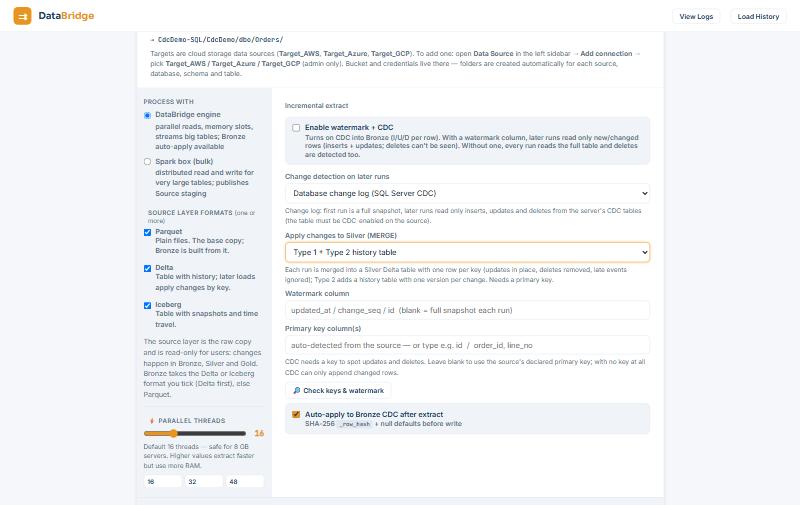
| Table | Rows | Columns | Deletes |
|---|---|---|---|
datasimple.silver.dbo_Orders |
one per key, what the source has now | source columns + _source_ts, __seq, __updated_at |
row removed |
datasimple.silver.dbo_Orders_HISTORY |
one per version of each key | source columns + __start_at, __end_at, __is_current, __op, __seq |
current version closed, no new version |
__seq is job id × 1 000 000 000 + position in the batch, so it grows across runs and keeps the order inside a run. On a full snapshot run (first run, Full load every run, a re-base) keys missing from the snapshot are removed (Type 1) or closed (Type 2); increments and change batches never do that. A watermark increment carries deletes only in two cases: a Salesforce object with Detect deletes on (records with IsDeleted = true, read with queryAll, arrive as _op_type = 'D' and are removed / closed here), and the key comparison of Detect deletes, which appends D events to the Bronze change log rather than to the batch, so they reach a Silver table built from that log with ds.apply_changes / APPLY CHANGES (below), not this option (4. Extract, Detect deletes). The merge runs before the change-log or Kafka position is advanced; if it fails the table shows an error, the position stays, and the next run reads and applies the same changes again. __start_at / __end_at come from the change's commit time in the source when the database provides it (SQL Server, PostgreSQL), else the load time. With the Spark box configured the merge runs on Spark (Delta by default, Iceberg with apply_changes_format = iceberg); without it Type 1 runs inside DataBridge and Type 2 reports needs the Spark box. API: "apply_changes": "scd1" | "scd2" on POST /api/databridge/api/convert; schedules keep the option. The dashboard line reads Silver: +inserted ~updated -deleted · history +n.
Form 2: in a notebook#
The example feed bronze.dbo_Orders has OrderID (key), CustomerName, Amount, Status, _op_type (I/U/D), _load_ts (orders the changes) and _source_ts.
Type 1, current state (Python cell)
ds.apply_changes(
    target="silver.orders_current",
    source="bronze.dbo_Orders",            # a catalog name (governed read) or a DataFrame
    keys=["OrderID"],
    sequence_by="_load_ts",
    apply_as_deletes="_op_type = 'D'",
    except_columns=["_op_type", "_source_ts"],
)
Prints ds.apply_changes: silver.orders_current +12 ~3 -1 (type 1) and returns {"target": "silver.orders_current", "type": 1, "inserted": 12, "updated": 3, "deleted": 1}. The first call creates the table (Delta by default) and registers it in Unity Catalog; it appears in the Lakehouse tree straight away. Every later call merges.
Type 2, history
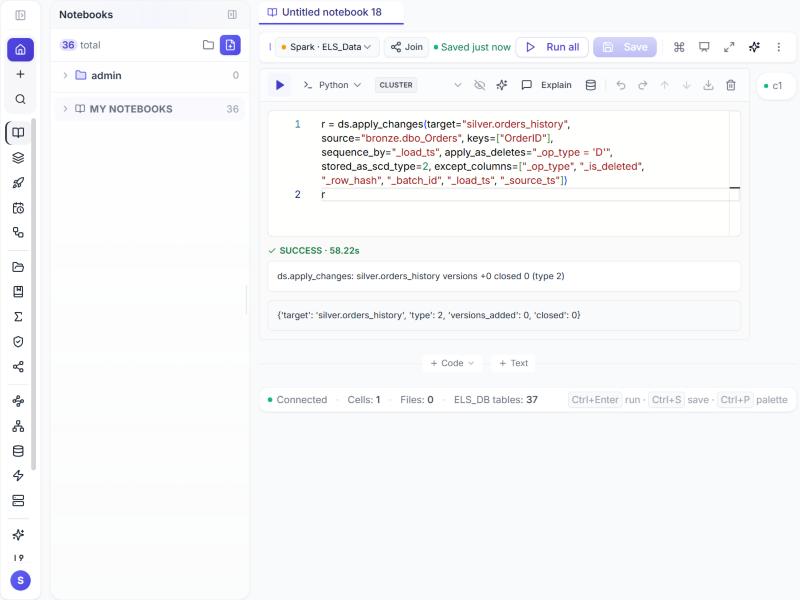
ds.apply_changes(
    target="silver.orders_history",
    source="bronze.dbo_Orders",
    keys=["OrderID"],
    sequence_by="_load_ts",
    apply_as_deletes="_op_type = 'D'",
    stored_as_scd_type=2,
    except_columns=["_op_type", "_source_ts"],
    track_history_except_columns=["Status"],   # a change only in Status opens no new version
)
Both at once: pass history_table="silver.orders_history" to the Type 1 call.
From a snapshot (for example source.dbo_Orders loaded by DataBridge)
ds.apply_changes_from_snapshot(
    target="silver.orders_current",
    snapshot="source.dbo_Orders",
    keys=["OrderID"],
    stored_as_scd_type=1,                 # or 2
    snapshot_version=20260118,            # int or timestamp; default: now
)
Create the target first (optional, idempotent)
ds.create_target_table("silver.orders_current", comment="Current orders",
                       columns="OrderID bigint, CustomerName string, Amount decimal(18,2), Status string")
ds.create_target_table("silver.orders_history", format="iceberg")   # no columns: created by the first apply
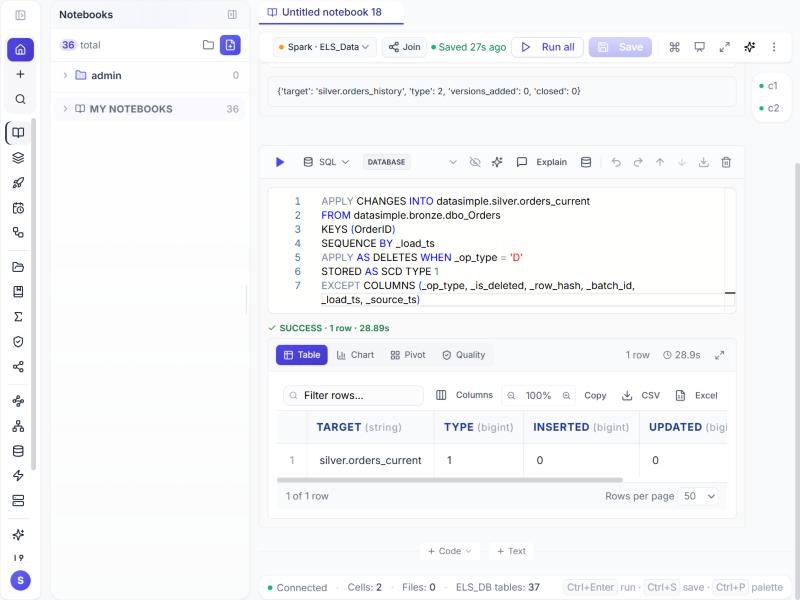
SQL (a SQL cell, interactive or scheduled; the result is one summary row)
APPLY CHANGES INTO silver.orders_current
FROM bronze.dbo_Orders
KEYS (OrderID)
SEQUENCE BY _load_ts
APPLY AS DELETES WHEN _op_type = 'D'
STORED AS SCD TYPE 1
EXCEPT COLUMNS (_op_type, _source_ts);

APPLY CHANGES INTO silver.orders_history
FROM (SELECT * FROM bronze.dbo_Orders WHERE Amount IS NOT NULL)
KEYS (OrderID)
SEQUENCE BY _load_ts
APPLY AS DELETES WHEN _op_type = 'D'
STORED AS SCD TYPE 2
EXCEPT COLUMNS (_op_type, _source_ts)
TRACK HISTORY EXCEPT COLUMNS (Status);

APPLY CHANGES FROM SNAPSHOT INTO silver.orders_current
FROM source.dbo_Orders
KEYS (OrderID)
STORED AS SCD TYPE 1
SNAPSHOT VERSION 20260118;
FROM takes a table name or a (subquery); the clauses after it may come in any order.
Form 3: DS Tables (declared tables with ds)#
DS Tables (DataSimple Tables) is the full chapter: 15. DS Tables, with an end-to-end example from Bronze to Gold. In short: instead of writing the steps, you declare the tables and the rules and let ds.run() work out the order: each declared table names its target, its write mode and its expectations; ds.read of a declared table builds it first; every table is written through the governed path and registered in the catalog. A notebook with such declarations is a small pipeline you can run interactively, schedule as a job, or put in a pipeline step.
@ds.table("silver.orders_clean", mode="merge", keys=["OrderID"], sequence_by="_load_ts",
          expectations=[{"name": "amount_set", "rule": "Amount IS NOT NULL", "action": "drop", "tag": "amount"}])
def orders_clean():
    df = ds.read("bronze.dbo_Orders").filter("_op_type <> 'D'")
    df = ds.expect(df, "positive_amount", "Amount >= 0", action="warn")   # a rule inside the body
    return df

@ds.table("gold.orders_by_customer", mode="overwrite")
def orders_by_customer():
    return ds.read("silver.orders_clean").groupBy("CustomerName").agg(F.sum("Amount").alias("total_amount"))

ds.run()          # builds silver.orders_clean, then gold.orders_by_customer; returns {table: rows}
| Element | Meaning |
|---|---|
@ds.table(name, mode, keys, sequence_by, expectations, comment) |
declare a target; mode is overwrite, append or merge (upsert on keys; with sequence_by a row only replaces a stored row with a smaller or equal sequence) |
expectations=[{name, rule, action, tag}] and ds.expect(df, name, rule, action=…, tag=…) |
data-quality rules on the table being built: fail stops the run, warn prints and keeps the rows, drop removes the failing rows and, when a tag is given, writes them to <table>__quarantine |
ds.read(name) |
read a declared table (built on demand) or any catalog table, governed |
ds.run() / ds.status() / ds.reset() |
build everything in dependency order / show the declarations and results / clear them |
ds.apply_changes, ds.apply_changes_from_snapshot, ds.create_target_table |
the CDC targets of Form 2 inside the same notebook: declare the current-state and history tables once, feed them on every run |
The three forms produce the same tables: DataBridge's Silver option runs the merge for you per load; the Python and SQL calls run it where you write them; the declarations run a whole set of tables at once. Older notebooks written with the dlt_* helper names keep working as aliases of ds.*.
Permissions#
The source is read the way read_table reads it: your grants, row filters and column masks apply. Writing the target needs MODIFY on it (or CREATE_TABLE on the schema the first time). The target is registered in Unity Catalog after every apply, so it shows in the Lakehouse tree and in Lineage.
Bookkeeping columns written here#
| Column | Table | Written by | Meaning |
|---|---|---|---|
__seq |
Silver Type 1 and Type 2 | DataBridge's Silver option | job id × 10⁹ + position in the batch |
__sequence |
Type 1 and Type 2 | ds.apply_changes, APPLY CHANGES INTO |
the SEQUENCE BY value of the change that produced the row, in its own type |
__updated_at |
Type 1 | both | when this row was last written |
__start_at, __end_at |
Type 2 | both | the sequence (or source commit time) the version became current at, and the one that closed it; __end_at null while current |
__is_current |
Type 2 | both | true for the open version of each key |
__op |
Type 2 | both | I the key's first version, U a later one; deletes close a version and add none |
A target created earlier by save_table without these columns gets them added on the first apply.
Worked example, end to end#
Verified 2026-10-18 on the Spark kernel against bronze.dbo_Orders (10 keys, 5 marked deleted):
| Step | Result |
|---|---|
Type 1 into silver.orders_current |
5 rows, no feed columns; rerun of the same cell +0 ~0 -0 |
Type 2 into silver.orders_history |
5 current versions with __start_at / __end_at / __is_current / __op; rerun adds 0 versions, closes 0 |
SQL form into silver.orders_current_sql |
5 rows and the summary row |
apply_changes_from_snapshot into silver.orders_snapshot, then a snapshot without one key |
exactly that key deleted |
| Unity Catalog | all four targets registered under silver |
And DataBridge's form on CdcDemo.dbo.Orders (2026-10-16): the first run seeded silver.dbo_Orders with 5 rows and 5 history versions; after one insert, one update and one delete at the source the next run read 3 rows and merged +1 ~1 -1: 1008 new, 1001 updated (its old version closed), 1002 gone from the current table and closed in history, 7 versions in silver.dbo_Orders_HISTORY.
SELECT OrderID, Amount, Status, __seq FROM datasimple.silver.dbo_Orders ORDER BY OrderID;
SELECT OrderID, Amount, Status, __op, __is_current, __start_at, __end_at
FROM datasimple.silver.dbo_Orders_HISTORY ORDER BY OrderID, __seq;
Read more#
- The step-by-step with screenshots: CDC with MERGE into Silver; the notebook forms: Apply changes.
- Kimball slowly changing dimensions: Type 1, Type 2.
- Delta
MERGE INTO: https://docs.delta.io/latest/delta-update.html · Iceberg Spark procedures: https://iceberg.apache.org/docs/latest/spark-procedures/
Next: 7. Notebooks