Back to the index · Previous: 8a. Pipelines and Dataflow: tested walkthrough · Reference: developer handbook chapter dbt
This chapter is a practical test, run on 2026-11-01 on the Retail demo. Data goes from the store system (SQL Server) into the lake with DataBridge, and dbt builds Silver and Gold on DataSimple's own Spark engine with business rules and tests. Then a day of changes in the source is followed all the way to Gold. Every step is done by a person; nothing runs by itself.
To build the same layers from your own dbt instead (VS Code, the dbt CLI or dbt's cloud IDE), with screenshots of each dbt command and of dbt's documentation site, see the developer guide: 11 · Build in DataSimple from your own dbt.
Store system (SQL Server)
   │  DataBridge: change log + updated_at watermark, Bronze applied automatically
   ▼
Bronze  bronze.retail_*                        every change received
   │  dbt (pipeline step "dbt run")
   ▼
Silver  silver.dbt_retail_stores / _products / _sales_lines / _returns
   │                                            current rows, business rules
   ▼
Gold    gold.dbt_retail_daily_store_sales / _product_performance
   │  dbt (pipeline step "dbt test", 15 tests)
   ▼
Reports, Sarah, sharing
Step 1. Load the source with DataBridge#
The Retail store system was first loaded in the Retail practical guide (Step 3): eight tables, change detection Database change log, Auto-apply to Bronze ticked. Every later run brings only what changed.
To run a delta load: left rail Monitoring → Ingestion → tab Ingestion Jobs → click the RETAIL_SQLServer job → Re-run (top right). It starts a new job with the same settings.
Step 2. The dbt project#
The project is the folder dbt/retail_dbt (it is in the list under dbt project folder in the pipeline builder).
dbt/retail_dbt/
  dbt_project.yml            silver models -> schema silver, gold models -> schema gold, Delta
  macros/current_rows.sql    latest change per key, deletes removed
  models/sources.yml         the Bronze tables DataBridge loads
  models/silver/             dbt_retail_stores, _products, _sales_lines, _returns
  models/gold/               dbt_retail_daily_store_sales, dbt_retail_product_performance
  models/schema.yml          tests on keys, relationships and allowed values
  tests/                     two business-rule tests
The business rules#
| Layer | Rule | Where |
|---|---|---|
| Silver | Bronze keeps every change; the current row is the latest change per key, and a key whose latest change is a delete is gone | macros/current_rows.sql |
| Silver | Gross = quantity × unit price; net = gross − discount | dbt_retail_sales_lines |
| Silver | A voided transaction is kept and flagged is_voided |
dbt_retail_sales_lines |
| Silver | Product list margin = unit price − unit cost | dbt_retail_products |
| Silver | A return carries the product and date of the line it returns | dbt_retail_returns |
| Gold | Sales per store and day exclude voided sales; refunds count on the return date; net after returns = net sales − refunds; average basket = net sales / transactions | dbt_retail_daily_store_sales |
| Gold | Per product: units, net sales, cost of goods at current cost, gross margin and margin %, return rate | dbt_retail_product_performance |
The Silver lines model, shortened:
with lines as ( {{ current_rows(source('bronze', 'retail_transaction_lines'), 'line_id') }} ),
     tx    as ( {{ current_rows(source('bronze', 'retail_sales_transactions'), 'transaction_id') }} )
select l.line_id, l.transaction_id, t.store_id, cast(t.transaction_ts as date) as sales_date,
       l.product_id, l.quantity,
       cast(l.quantity * l.unit_price as decimal(14,2))      as gross_amount,
       cast(coalesce(l.discount_amount, 0) as decimal(14,2)) as discount_amount,
       cast(l.line_amount as decimal(14,2))                  as net_amount,
       t.status = 'Voided'                                   as is_voided
from lines l join tx t on t.transaction_id = l.transaction_id
The tests#
uniqueandnot_nullon every key (stores, products, lines, returns, product performance).relationships: every line's product and store exist in Silver.accepted_values: channel is In-store, Online or Click & Collect.net_equals_gross_minus_discount: every line's net amount is quantity × price − discount, to the cent.gold_reconciles_to_silver: Gold net sales equal Silver net sales of non-voided lines.
Step 3. The pipeline#
Pipelines → New pipeline RETAIL dbt Silver and Gold, two steps:
| Step | Type | dbt project folder | Command | Warehouse | Depends on |
|---|---|---|---|---|---|
dbt_run |
dbt | dbt/retail_dbt |
run | This workspace (Spark / Delta) | — |
dbt_test |
dbt | dbt/retail_dbt |
test | This workspace (Spark / Delta) | dbt_run |
How to make it on the screen:
- Left rail Pipelines → Create Pipeline. General Info: name RETAIL dbt Silver and Gold; leave Trigger Schedule on Manual for the test.
- Pipeline Steps → Add Pipeline Step: Type
dbt, dbt project folderretail_dbt, Unique step keydbt_run, Commanddbt run, Schemasilver, Warehouse This workspace (Spark / Delta), On failure Stop Pipeline. - Add Pipeline Step again: the same, with key
dbt_test, Commanddbt test, Depends on upstream stepsdbt_run. - Workflow DAG View shows the order: wave 1
dbt_run, wave 2dbt_test. - Save Changes.
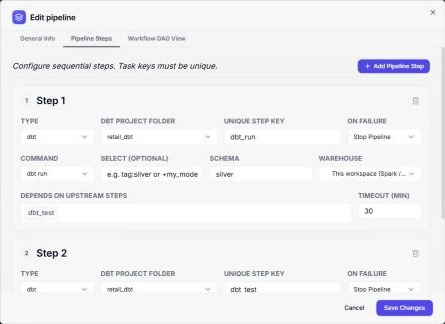
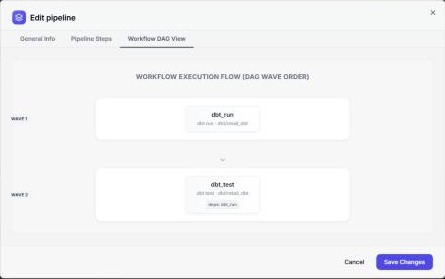
The pipeline is in the list; Run starts it.
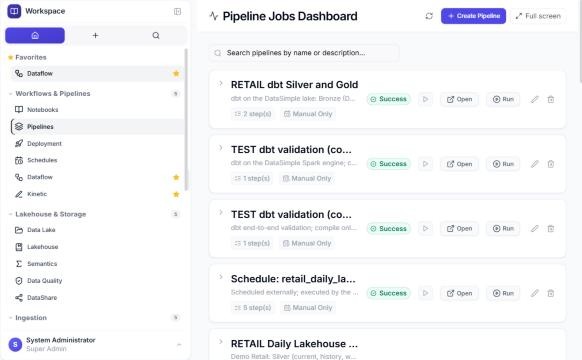
The first time dbt runs on the workspace it is installed on the Spark engine (a minute or two); later runs start straight away.
Step 4. Baseline run#
| Result | |
|---|---|
dbt_run |
6 of 6 models OK |
dbt_test |
15 of 15 tests pass |
| Silver sales lines | 443,341 (Bronze 443,357 rows: 8 older changes of the same lines and 8 deleted lines removed) |
| Gold transactions (not voided) | 120,204 (Bronze 120,709: 8 older changes and 497 voided removed) |
| Gold net sales | 28,042,204.89 |
| Last day in Gold | 30 Oct: 696 transactions, 292,351.53 net sales |
Where to see the result: Pipelines → open the pipeline's row (the arrow on the left) → Workflow history → the run → DAG steps results. Each dbt step lists dbt results (every model and every test with its time and status) and the dbt log.
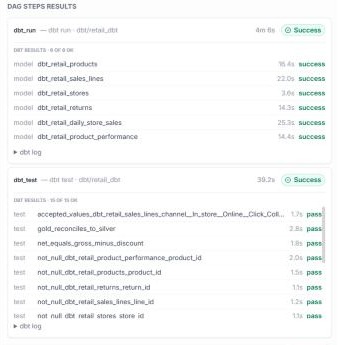
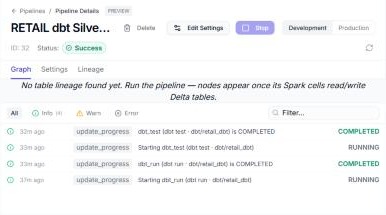
Open on the pipeline shows the event log of the run (each step started and completed).
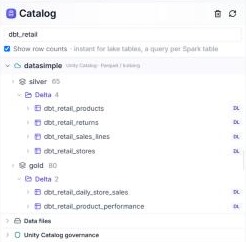
Where the tables are: all six are Delta tables in the lake, in the same managed folder as notebook tables, and registered in the catalog: Lakehouse → datasimple → silver → Delta (four tables) and gold → Delta (two). Typing dbt_retail in the catalog search shows only them.
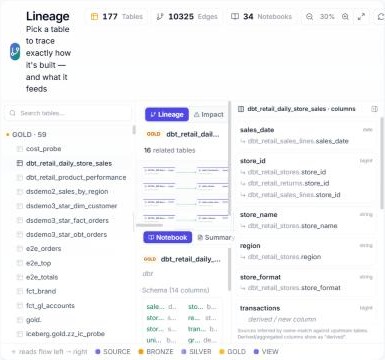
Monitoring → Lineage → dbt_retail_daily_store_sales: 16 related tables back to Bronze, and the source of each column.
Step 5. A trading day in the source#
The demo script docs/demo-projects/demo-retail/scripts/simulate_changes.py --seed 3 makes one day of changes in the store system:
| Change | Count |
|---|---|
| New sales transactions (today) | 400, with 1,376 lines |
| New returns | 40 |
| Earlier transactions voided | 4 |
| Lines deleted | 3 |
| Product price changes | 20 |
| Customer sign-ups, moves, tier changes | 25, 20, 15 |
Step 6. Delta load#
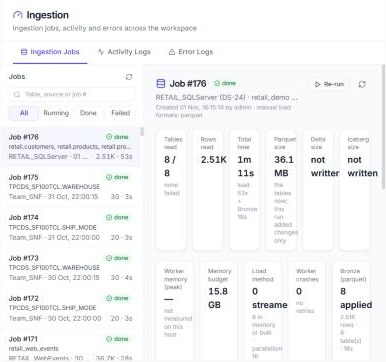
Monitoring → Ingestion → Ingestion Jobs → the Retail job → Re-run. The new job (8 of 8 tables, 2.51K rows, 1 min 11 s) brought only the changes:
| Table | Rows |
|---|---|
sales_transactions |
404 (400 new, 4 voided) |
transaction_lines |
1,379 (1,376 new, 3 deleted) |
returns |
40 |
products |
20 |
customers |
60 |
Bronze was applied automatically for every table.
Step 7. dbt again, and what changed#
Pipelines → RETAIL dbt Silver and Gold → Run: 6 of 6 models, 15 of 15 tests (the screenshot under Step 4 is this run).
| Before | After | Change | Why | |
|---|---|---|---|---|
| Silver sales lines | 443,341 | 444,714 | +1,373 | 1,376 new lines − 3 deleted |
| Silver voided lines | 1,710 | 1,727 | +17 | the lines of the 4 voided transactions |
| Silver returns | 10,633 | 10,673 | +40 | the new returns |
| Gold transactions | 120,204 | 120,600 | +396 | 400 new − 4 voided |
| Gold net sales | 28,042,204.89 | 28,182,978.12 | +140,773.23 | the new sales, less the voided ones |
| Gold refunds | 553,574.34 | 554,929.01 | +1,354.67 | the 40 returns |
| Last day in Gold | 30 Oct | 1 Nov | 400 transactions, 143,155.34 net sales; top store Atlanta Superstore |
Every figure is explained by the source changes, and gold_reconciles_to_silver passed.
Found and fixed during this test#
| What | Fix |
|---|---|
| dbt could not run on the workspace (not installed on the Spark engine, and the Spark engine cannot see the project folder) | installed on first use in a folder of its own; the project travels with each run |
| A run was shown as failed although dbt passed | fixed in the runner |
| dbt tables were written to the Spark engine's own disk | written to the lake's managed folder, like notebook tables |
+schema: gold built in silver_gold |
a model's schema is the schema it builds in |
| dbt read Bronze as it was when the Spark session started, missing the delta load | every source the project declares is refreshed before dbt runs |
| Lineage listed models a run did not build | only models the run built |
Repeat this test#
- Monitoring → Ingestion → Ingestion Jobs → Retail job → Re-run (or run the demo script first for a day of changes).
- Pipelines → RETAIL dbt Silver and Gold → Run; both steps succeed.
- Look at the step results (each model and test), Lakehouse →
gold.dbt_retail_daily_store_sales, and Lineage. - In a notebook:
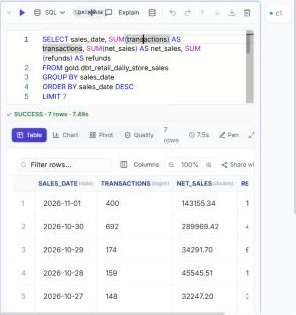
SELECT sales_date, SUM(transactions) AS transactions, SUM(net_sales) AS net_sales, SUM(refunds) AS refunds
FROM gold.dbt_retail_daily_store_sales
GROUP BY sales_date
ORDER BY sales_date DESC
LIMIT 7;
In a new notebook, type %sql on the first line of the cell, then the query, keep Where cells run on Spark, and press Ctrl+Enter. The test result: 1 Nov with 400 transactions and 143,155.34 net sales (the new day), and 30 Oct with 692 transactions, 4 fewer than before, because those 4 were voided in the source.
Next: 9. Lakehouse governance