Back to the index · Previous: Sign in and the workspace
How it works#
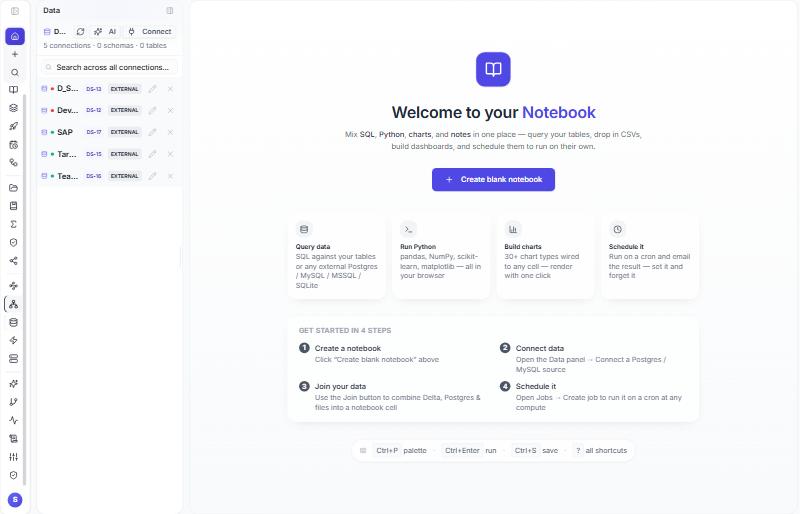
The Data Source panel is the registry of saved connections. One row per database, API, Kafka cluster, file location or storage target; each row gets a public number such as DS-16. From then on DataBridge, Workflows, notebooks and Deployment refer to the connection by that number, so hosts and passwords stay on the server and are never typed again. Passwords are encrypted at rest; the form shows *** and keeps the stored value unless you type a new one. Only the user who created a connection may edit it, and a second connection with the same name is refused. Storage targets (Target_AWS, Target_Azure, Target_GCP) are created by an administrator once and shared by the whole tenant; they are the destination of every DataBridge run and, under File drop, also the bucket the client drops files into.
Steps#
- Left rail → Data Source → Connect (or Add).
- Pick the system. Fill the form for it (table below). Test connection.
- Tick Save and assign a connection number (DS-xxxx) and save. The row appears with its
DS-nbadge; Edit and Delete are on the row.
| System | What you enter | Where the rest is chosen |
|---|---|---|
| SQL Server, PostgreSQL, MySQL, Oracle, Db2, Snowflake (account locator, warehouse, role), SAP HANA, and the other engines in the list | name, host or account, port, database, user, password, encryption options | databases and tables in DataBridge |
| SAP OData, Salesforce (Sign in with Salesforce) and other API sources | the endpoint or the sign-in | objects in DataBridge |
| Kafka | bootstrap servers (broker1:9092,broker2:9092), security protocol (PLAINTEXT, SSL, SASL_PLAINTEXT, SASL_SSL), SASL mechanism (PLAIN, SCRAM-SHA-256, SCRAM-SHA-512), user, password, optional CA certificate (PEM). Test connection reaches the brokers and counts the topics. |
topics, message format, key fields, op field, timestamp field and start offset are typed in DataBridge, per load, so one cluster connection serves many topics |
| Target_AWS / Target_Azure / Target_GCP (administrator) | bucket or container (a root folder may follow the bucket name), region, access key and secret; blank keys mean the server's own cloud role | nothing: you only pick it as the destination |
| File drop, Backup drop | saved from the DataBridge wizard when you type a drop folder or a backup file; the keys for the bucket come from a saved storage target when you pick one | DataBridge |
Non-database systems that DataBridge does not read natively can be served through an optional integration component when your installation includes it; the engine list in the Data Source panel is the authority for what is available on your server.
What is stored, and what is not#
| Stored on the Data Source | Not stored there |
|---|---|
| name, engine, host, port, database, user, encrypted password, SSL and engine options (for Kafka: security protocol, SASL mechanism, CA certificate) | tables, topics, formats, keys, watermarks, schedules: those belong to the DataBridge load |
A DataBridge schedule made from a saved connection remembers only the number (plus the user and tenant). Every run resolves the number again, so a changed host or password in Data Source is picked up at the next run, and a deleted Data Source stops the schedule with a clear message instead of using stale secrets.
The environment of a connection#
Each environment (Dev, QA, Prod) is a separate installation with its own Data Sources. Deployment copies a connection's shell (name, engine, host, port, database) to the next environment and leaves the password empty until someone fills it there. Notebooks and pipelines are re-pointed from DS-12 on Dev to, say, DS-80 on QA when a connection with the same name and engine exists on the target; create the same-named connection in every environment with that environment's host and password. Details in 12. Deployment.
API#
POST /api/notebooks/external-connections
{ "name": "HR-SQL", "engine": "mssql", "host": "<host>", "port": 1433,
  "database": "HR", "user": "svc", "password": "<password>" }
→ 201 { "connection": { "id": 18, "code": "DS-18", ... } }

POST /api/notebooks/external-connections            -- storage target, administrator
{ "name": "Target_AWS", "engine": "target_s3",
  "extraConfig": { "bucket": "<bucket>/<prefix>", "region": "<region>" },
  "user": "<access key id>", "password": "<secret>" }

GET    /api/notebooks/external-connections
PUT    /api/notebooks/external-connections/:id
DELETE /api/notebooks/external-connections/:id
Only engine and name are required. Engines: mssql, postgres, mysql, oracle, db2, snowflake, hana, sap_odata, salesforce, kafka, target_s3, target_adls, target_gcs, among others.
Read more#
- The DS number and how it is resolved: Data Source connection id.
- Kafka security settings: https://kafka.apache.org/documentation/#security