Back to the index · Previous: Pipelines and workflows
How it works#
Unity Catalog is the catalog of record: one catalog datasimple per tenant, the four schemas source, bronze, silver, gold, and every table with its format, columns, constraints, grants, row filters, column masks, lineage and audit. Access is by table, schema or catalog with inheritance downwards; privileges are SELECT, MODIFY, CREATE_TABLE, MANAGE, USE_SCHEMA, USE_CATALOG, BROWSE and the volume privileges. The first grant on a table turns protection on; after that only principals with a grant can read it (an administrator can switch the whole installation to deny-by-default). Row filters and column masks are stored in the catalog and applied whenever a table is read by name in a notebook, a scheduled run, a metric or the Agent. Every governance change is written to the catalog audit with its actor. Around the catalog sit Semantics (terms and runnable metrics), Data Quality (profiles, rules, quarantine, certificates, freshness), DataShare (Delta Sharing to the outside) and Lineage.
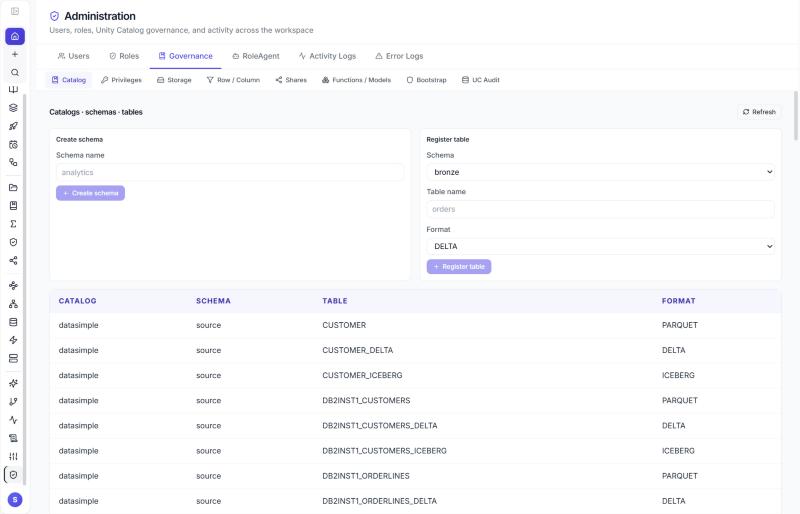
Schemas, layers and registration#
Right-click the catalog in Lakehouse → Create schema; right-click a schema → Create table (an empty Delta table), Delete schema, Copy name. Tables are registered by DataBridge (three names per source table), by Bronze and Silver applies, by save_table / create_managed_table / ds.* writers, by SQL CREATE TABLE, and by hand:
POST /api/notebooks/unity-catalog/schemas    { "name": "analytics" }
POST /api/notebooks/unity-catalog/register
{ "name": "orders", "layer": "bronze", "format": "DELTA", "tableType": "EXTERNAL",
  "storageLocation": "<storage location>", "columns": [{ "name": "id", "type": "bigint" }], "primaryKey": ["id"] }
An administrator runs Settings → Unity Catalog → Bootstrap managed storage + grants once per installation: it creates the storage credential and external locations, grants everyone (account users) USE_CATALOG and BROWSE on the catalog and USE_SCHEMA, BROWSE, SELECT, MODIFY, CREATE_TABLE, CREATE_VOLUME on bronze, silver and gold, and makes source read-only.
Grants#
Who may change governance: administrator roles, a configured grant administrator, or a principal holding MANAGE on that securable. Everyone else gets Changing grants requires an administrator or MANAGE privilege.
Three ways to grant SELECT on a table to analyst:
- Lakehouse → right-click the table → Permissions → user name → tick SELECT → Grant.
- A SQL cell:SQL
GRANT SELECT ON TABLE bronze.orders TO analyst; REVOKE SELECT ON TABLE bronze.orders FROM analyst; - A Python cell:
grant("SELECT", "bronze.orders", "analyst")andrevoke(...)(the kernel must be able to reach the application, which is the case on the deployed server).
POST   /api/notebooks/unity-catalog/grants
{ "securableType": "table", "fullName": "datasimple.bronze.orders", "principal": "analyst", "privileges": ["SELECT"] }
DELETE /api/notebooks/unity-catalog/grants      -- same body
GET    /api/notebooks/unity-catalog/access?full_name=datasimple.bronze.orders
GET    /api/notebooks/unity-catalog/grants?securable_type=table&full_name=datasimple.bronze.orders
GET    /api/notebooks/unity-catalog/audit?limit=100
A user without a grant on a protected table sees Missing privilege SELECT on table ….
Row filters and column masks#
Administration → Governance → Row / Column, per table and principal (principals: [] means everyone). Mask expressions are Spark SQL expressions.
POST /api/notebooks/unity-catalog/row-filters
{ "fullName": "datasimple.bronze.orders", "filterName": "eu_only", "filterExpr": "region = 'EU'", "principals": ["analyst"] }
POST /api/notebooks/unity-catalog/column-masks
{ "fullName": "datasimple.bronze.orders", "columnName": "email", "maskExpr": "concat(left(email, 1), '***')" }
From then on analyst running read_table("bronze.orders") or SELECT … FROM datasimple.bronze.orders sees EU rows with masked emails. Where governance is enforced: notebook reads by catalog name (interactive, scheduled, pipeline, headless), GRANT SQL and the grant() helper, table registration (CREATE_TABLE on the schema), the dbt SQL gateway (deny by default), Delta Sharing (refuses tables with filters or masks). Not enforced: a Python read of a raw storage path, because the Spark session carries the lake credentials; use catalog names.
Lineage#
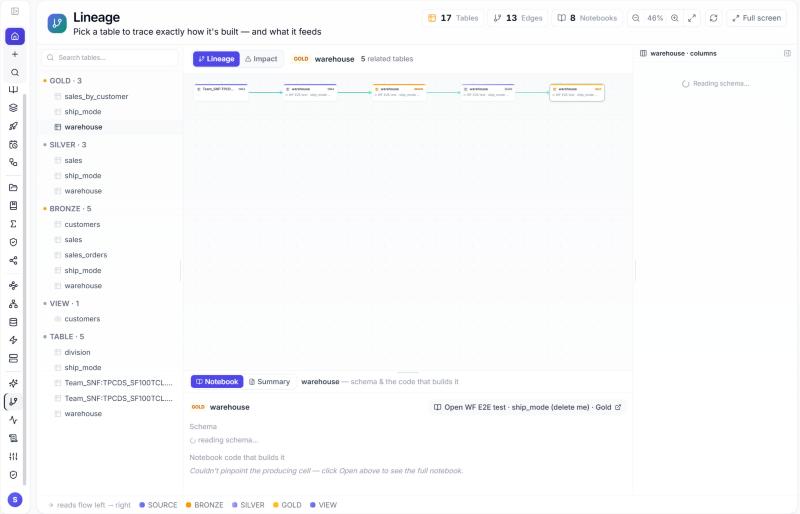
Left rail → Lineage → pick a table. Left: what it was built from; right: what depends on it; Impact mode shows what would break if you changed it; column lineage is inferred on Spark; Explain transformation opens the cell that wrote the table. Lineage is recorded when a cell runs save_table, write_delta, merge_delta, ds.* or a SQL write, when a Workflow runs, and when a DataBridge job finishes (source system → lake copies → Bronze → Silver). A table nobody writes any more shows no producer.
GET /api/notebooks/lineage-graph                                  -- whole tenant
GET /api/notebooks/spark/lineage?table=bronze/orders              -- upstream and downstream of one table
GET /api/notebooks/spark/column-lineage?table=silver.orders
GET /api/notebooks/unity-catalog/lineage?limit=200
information_schema#
The catalog has one Information Schema: datasimple.information_schema, the last schema in the Lakehouse tree. It is a set of read-only SQL views over the catalog registry itself — the same rows the tree, grants and lineage read — so it is always current. No copy, no snapshot: a table registered a second ago is in information_schema.tables now. Identifiers are lower-case, like Postgres' own information_schema. The tenant is implicit: every query is limited to the tenant you are signed in to, and no tenant column appears in a result.
Query it from a SQL cell (the cell is answered from the catalog, Spark is not started), click a view in the tree to insert the SELECT, or call the API. A cell holds one statement, and that statement may name only information_schema views, so each query below goes in its own cell; to combine the result with lake data, read it in Python with read_table("information_schema.<view>") and join there.
-- namespace
SELECT schema_name, comment FROM datasimple.information_schema.schemata;
SELECT table_schema, table_name, table_kind, data_source_format, storage_location
  FROM information_schema.tables WHERE table_schema = 'silver';
SELECT column_name, data_type, is_nullable, is_pii, mask_style
  FROM information_schema.columns WHERE table_schema = 'silver' AND table_name = 'orders'
 ORDER BY ordinal_position;
-- constraints: declared keys, plus Data Quality rules that enforce on write as CHECK
SELECT constraint_name, constraint_type, table_name, is_enforced FROM information_schema.table_constraints;
SELECT k.constraint_name, k.column_name, k.ordinal_position
  FROM information_schema.key_column_usage k JOIN information_schema.table_constraints c USING (constraint_name)
 WHERE c.constraint_type = 'PRIMARY KEY';
SELECT constraint_name, referenced_table_name, referenced_columns FROM information_schema.referential_constraints;
SELECT table_name, rule_name, check_clause FROM information_schema.check_constraints;
-- privileges and policies
SELECT grantee, privilege_type, table_schema, table_name FROM information_schema.table_privileges;
SELECT grantee, column_name, is_masked FROM information_schema.column_privileges WHERE table_name = 'customers';
SELECT table_name, filter_name, filter_expr, principals FROM information_schema.row_filters;
SELECT table_name, column_name, mask_expr FROM information_schema.column_masks;
-- objects
SELECT routine_name, routine_definition FROM information_schema.routines;
SELECT volume_name, storage_location FROM information_schema.volumes;
SELECT source_table, target_table, job, recorded_at FROM information_schema.table_lineage ORDER BY recorded_at DESC;
SELECT table_name, tag_name, tag_value FROM information_schema.table_tags;
SELECT kind, count(*) AS runs, sum(spark_seconds) AS spark_seconds FROM information_schema.usage GROUP BY kind; -- usage, chapter 11
SELECT table_name, bytes, runs_30d, spark_seconds_30d FROM information_schema.table_usage;
cols = read_table("information_schema.columns")          # a Spark DataFrame, every column as a string
orders = read_table("datasimple.silver.orders")
cols.filter("table_name = 'orders'").show()
GET  /api/2.1/unity-catalog/information-schema                       -- the views and their columns
GET  /api/2.1/unity-catalog/information-schema/tables?schema_name=silver&limit=100
POST /api/2.1/unity-catalog/information-schema/query {"sql": "SELECT ... FROM information_schema.<view> ..."}
The rules: one SELECT or WITH statement, no ;, no writes, no functions that reach outside the views, no table outside information_schema. Scheduled SQL cells follow the same path. The views list is in the reference.
Every developed object is recorded#
Every table, view and materialized view that is created or changed is recorded with its full SQL or code, who, when and how, and its catalog entry is updated so information_schema shows the truth. This covers every way an object is made:
Method (method) |
When |
|---|---|
sql_cell |
a SQL cell: CREATE / CREATE OR REPLACE / ALTER / RENAME / DROP / UNDROP of a table, view or materialized view |
python_cell |
a Python cell that writes with save_table, with Spark directly (df.write.saveAsTable(…), .insertInto(…), df.writeTo(…).create() / .createOrReplace() / .append()), or runs DDL through spark.sql("…"). A table written directly with Spark is registered in the catalog too (Delta, Iceberg and Parquet) |
ds_tables / apply_changes |
a DS Tables notebook, ds.apply_changes / APPLY CHANGES INTO |
scheduler |
the same, in a scheduled or pipeline run |
uc_api / databridge |
a table registered through the Unity Catalog API, or by a DataBridge load |
dbt |
DDL from a dbt client |
agent / pipeline_build |
a change the agent proposed and a person approved; the agent's Bronze/Silver/Gold build |
- Nothing is cut. The whole statement or cell code is kept.
- Views are registered. CREATE VIEW puts the view in the catalog: it appears in the Lakehouse tree and in
information_schema.viewswith its definition. DROP VIEW removes it from both. - Created means created.
information_schema.tablestakescreatedandcreated_byfrom the first create, so re-running a notebook does not reset them, and addslast_altered,last_altered_by,last_altered_methodanddefinition(the latest DDL or code). - Failed DDL is recorded too, with
status = 'error'and the error. - Temporary views are session-only and are not recorded.
-- how was this built, and who changed it?
SELECT changed_at, action, method, changed_by, definition
  FROM information_schema.object_history
 WHERE table_schema = 'gold' AND table_name = 'sales_by_region'
 ORDER BY changed_at DESC;
-- views and their current definition
SELECT table_schema, table_name, view_definition FROM information_schema.views;
-- who created and last changed each Gold table
SELECT table_name, table_type, created, created_by, last_altered, last_altered_by, last_altered_method
  FROM information_schema.tables WHERE table_schema = 'gold';
The same history is at GET /api/notebooks/unity-catalog/object-history?full_name=gold.sales_by_region (needs SELECT on the object), and the agent answers "how was gold.sales_by_region built?" from it. The log is the table notebook_object_log; the code is server/lib/object-log.js. Objects created before this existed have no history until their next change.
Materialized views#
A materialized view keeps the result of a query as a table and refreshes it on demand or on a schedule. Heavy Gold reports, dashboards and Sarah read the ready result instead of recalculating it every time. Spark has no materialized views of its own, so DataSimple runs them: it keeps the definition, builds the result as a Delta table of the same name, and refreshes it.
-- create it: built straight away, then refreshed every weekday at 07:30 India time
CREATE MATERIALIZED VIEW gold.mv_sales_revenue_by_region_daily
  SCHEDULE CRON '30 7 * * 1-5' TIMEZONE 'Asia/Kolkata'
AS SELECT region, order_date, SUM(net_amount) AS revenue, COUNT(*) AS orders
     FROM gold.sales GROUP BY region, order_date;

REFRESH MATERIALIZED VIEW gold.mv_sales_revenue_by_region_daily;               -- refresh now
ALTER MATERIALIZED VIEW gold.mv_sales_revenue_by_region_daily SET SCHEDULE CRON '0 * * * *';   -- every hour
ALTER MATERIALIZED VIEW gold.mv_sales_revenue_by_region_daily DROP SCHEDULE;   -- refresh on demand only
CREATE OR REPLACE MATERIALIZED VIEW gold.mv_sales_revenue_by_region_daily AS SELECT ...;   -- change the query
DROP MATERIALIZED VIEW gold.mv_sales_revenue_by_region_daily;                  -- soft drop, like a table

SELECT * FROM gold.mv_sales_revenue_by_region_daily;                           -- read it like any table
Naming. <gold|silver>.mv_<subject>[_<measure>][_<grain>]: lower-case letters, digits and _, at most 60 characters, in gold (or silver for a shared, cleaned intermediate). Examples: gold.mv_sales_revenue_daily, gold.mv_customers_churn_monthly, silver.mv_orders_latest. A name that breaks the rules is refused with a corrected one: gold.Revenue_By_Region_MV → Try gold.mv_revenue_by_region. The schedule and format never go in the name.
Rules.
- The query is one read-only
SELECTorWITH. - Creating needs CREATE_TABLE on the schema; refreshing or changing the schedule needs MODIFY on the view, or owning it; dropping follows the table rules (owner or MANAGE).
- An existing table with the same name is never replaced;
CREATEon an existing materialized view says to useCREATE OR REPLACEorREFRESH. - The schedule is a 5-field cron, in the given time zone (Asia/Kolkata when none is given). A changed schedule without
TIMEZONEkeeps the one it had. Scheduled refreshes run as the owner and need the scheduler on (ENABLE_SCHEDULER). - Sarah and the Agent may propose a new materialized view (with an approval), but never replace or drop one.
Where you see it. The Lakehouse tree shows it as a materialized view; information_schema.tables has table_type = 'MATERIALIZED VIEW'; information_schema.views has its query with is_materialized = 'YES'; every create, refresh and change is in object_history; freshness is here:
SELECT table_name, refresh_schedule, timezone, last_refreshed, next_refresh, last_status, row_count, refresh_ms, owner
  FROM information_schema.materialized_views;
The definitions live in notebook_materialized_views; the code is server/lib/materialized-views.js.
Business meaning of tables and columns#
Every table should say what one row is, what each column means and how it joins to other tables. The AI agent, Sarah and the Pen read only the approved meanings. When a question depends on a table with no agreed meaning, they say so instead of guessing.
Write it in SQL. Run these in a SQL cell. They change the catalog only; Spark is not involved.
COMMENT ON TABLE  datasimple.gold.orders IS 'One row per order line, net of returns';
COMMENT ON COLUMN datasimple.gold.orders.amount IS 'Net amount after discount [unit: USD]';
COMMENT ON COLUMN datasimple.gold.orders.status IS 'Order state [values: OPEN, SHIPPED, CANCELLED]';
ALTER TABLE datasimple.gold.orders ALTER COLUMN amount COMMENT 'Net amount after discount';
COMMENT ON TABLE  datasimple.gold.orders IS NULL;   -- removes the meaning
ALTER TABLE datasimple.gold.orders ADD CONSTRAINT fk_cust
  FOREIGN KEY (customer_id) REFERENCES datasimple.gold.customers (customer_id);
[unit: …]and[values: …]are optional tags inside the text. They become the column's unit and allowed values.- The table must be in the catalog and the column must exist on it, otherwise the cell says what is wrong.
- Describing a table needs ownership of it or MANAGE, the same as dropping it.
- Do not put a semicolon inside the meaning; use a comma.
Or use the screen. Left rail → Semantics → Meaning. It shows coverage per schema: tables and columns described, tables with a key, joins, and drafts waiting. A schema is Ready when every table and column is described. Pick a schema, then a table, to fill in the table meaning and each column's meaning, unit and allowed values.
Draft with AI. On a table, Draft with AI proposes a meaning for the table and every column, and suggests joins as ALTER TABLE … FOREIGN KEY statements. Drafts are marked AI draft and never replace an approved meaning. Read each one, fix what is wrong, then Approve. Suggested joins are only declared when you run them in a SQL cell.
A whole schema at once. On a schema (Gold first), Draft all tables with AI drafts every table you may describe that is not fully described yet. Before writing, it reads five stored rows and the row count of each table (as you, through the governed SQL path), so codes, units and allowed values come from the data, not only from column names; a guess it is unsure of ends with (check). Tables already described, or not yours to describe, are skipped. The suggested joins for the whole schema are listed to run in a SQL cell. Approve all N drafts in gold approves them in one go (owner or MANAGE per table); open a table first to read and fix any draft. Only approved meanings reach Sarah, scenarios, the Pen and the agent. API: POST /api/notebooks/semantic/meaning/draft-schema {schema} and /meaning/approve-schema {schema}.
Every table gets a meaning by itself. When a table, view or materialized view is created in any layer, the AI writes its meaning about half a minute later, reading a few of its rows. It does this whether the table was made by SQL, Python, DS Tables, a DataBridge load, dbt or a schedule. The meaning is approved automatically: the workspace decided on 2026-10-26 that every table should have one. An approved meaning is never replaced by the AI, and anyone allowed can edit it. A sweep every six hours does the same for any table that still has no meaning.
Settings:
MEANING_AUTOAPPROVE=falsekeeps the AI's meanings as drafts for the owner to approve.MEANING_AUTODRAFT_SCHEMAS=gold,silverlimits which layers are covered (default*, every schema).MEANING_AUTODRAFT=falseturns it off.MEANING_AUTODRAFT_DELAY_MSandMEANING_AUTODRAFT_SWEEP_MSset the timing.
Quarantine and test tables are skipped. AI-written meanings are signed ai-autodraft (auto-approved).
Read it back. SELECT * FROM information_schema.business_meaning lists every meaning with its unit, allowed values, status and who changed it last. SQL on a table copies its approved meanings as COMMENT ON statements, for Git or another environment.
Semantics: terms and metrics#
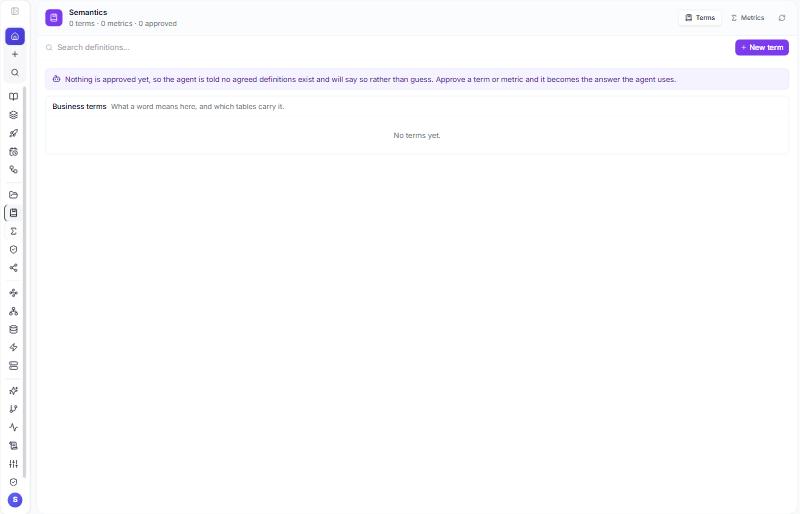
Left rail → Semantics → Terms (what "Net revenue" means and which tables carry it) or Metrics (a name plus the SELECT that computes it) → + New → for a metric Validate, then save → status draft, approved or deprecated. The Agent answers from approved entries only.
A metric runs. On the Metrics tab every row has Run; in the editor the same thing is Test. The SQL runs on your own Spark kernel like a SQL cell (catalog names, grants, filters, masks apply). Two ways to write it: a full query (SELECT region, SUM(net_amount) AS net FROM datasimple.gold.sales GROUP BY region, run as written with LIMIT 200 added), or just the measure (SUM(net_amount) plus a Source table and optional Dimensions, wrapped into a SELECT … GROUP BY). {{name}} placeholders work as in notebook cells. The row then shows a last run badge: when, rows, duration and, for a one-number result, the value, which the Agent quotes.
POST /api/notebooks/semantic/terms
{ "term": "Net revenue", "definition": "Gross sales less refunds and discounts", "tables": ["datasimple.gold.sales"], "status": "approved" }
POST /api/notebooks/semantic/metrics
{ "name": "net_revenue", "definition": "Gross sales less refunds", "sql": "SELECT SUM(net_amount) FROM datasimple.gold.sales", "status": "approved" }
POST /api/notebooks/semantic/metrics/12/run
{ "params": { "yr": 2026 }, "filters": { "region": "EMEA" }, "dimensions": ["channel"], "limit": 100 }
→ { "sql", "columns", "rows", "rowCount", "ms", "ran_at" }
Data Quality#
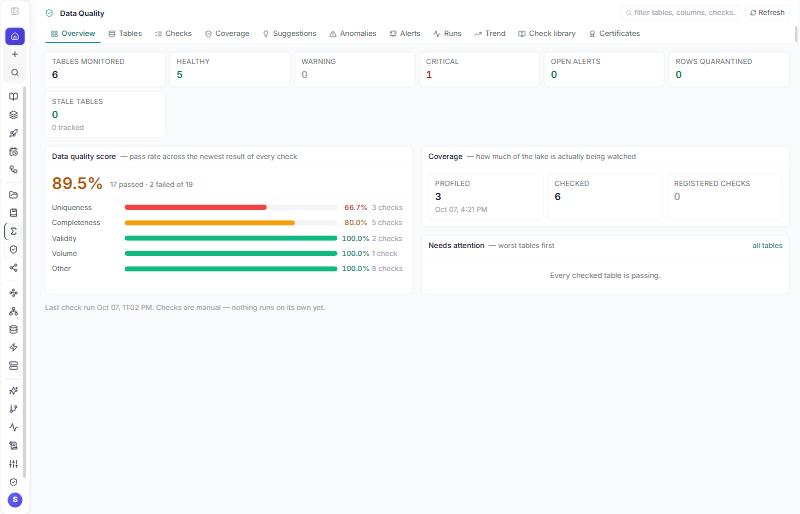
Left rail → Data Quality. The overview shows a score, coverage and tables that need attention; tabs for Tables, Checks, Coverage, Suggestions, Anomalies, Alerts, Runs, Trend, Check library, Certificates. Open a table → Rule (OrderID IS NOT NULL) → Validate → save; a rule marked enforce on write keeps bad rows out of the table and puts them in <table>_errors (quarantine). Column governance (PII type, sensitivity, mask style) is on the same page and drives masks in notebooks, the dbt gateway and DataShare. Certificate → Issue once checks pass, the profile is current and rules are approved; the badge shows in the Lakehouse; revoking needs a reason. Issuers: administrator roles and the governance roles your administrator designates.
From a notebook:
profile_table("silver.orders_scored")
check_table("silver.orders_scored", lambda c: c.isComplete("OrderID").isUnique("OrderID"))
table_freshness("silver.orders_scored")
print(suggest_checks("silver.orders_scored", top=5))
POST /api/notebooks/dq/checks
{ "table": "silver.orders_scored", "name": "order key present", "code": "OrderID IS NOT NULL", "dimension": "completeness", "level": "Error", "enforceOnWrite": false }
GET  /api/notebooks/dq/certificates/eligibility?table=silver.orders_scored
POST /api/notebooks/dq/certificates    { "table": "silver.orders_scored", "note": "Q4 sign-off" }
PUT  /api/notebooks/governance/columns { "table": "silver.orders", "column": "email", "piiType": "email", "sensitivity": "confidential" }
DataShare (Delta Sharing)#
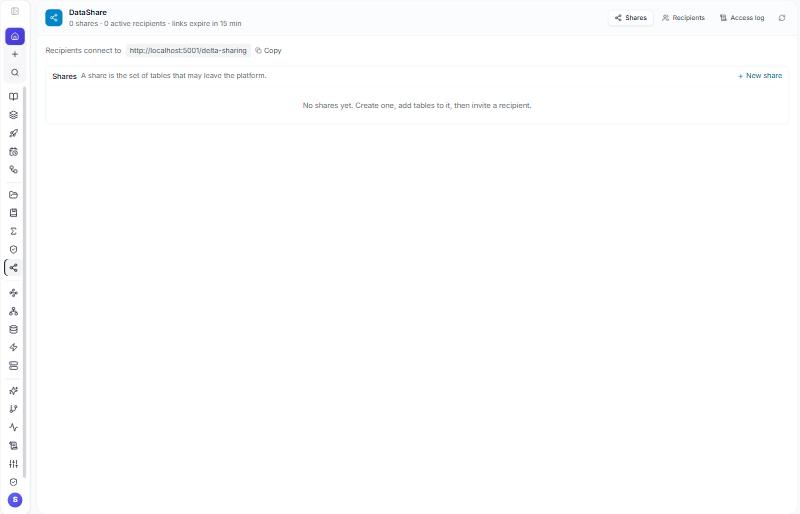
Left rail → DataShare → + New share → name and one fully qualified table per line (or right-click a Lakehouse table → Share) → Recipients → New recipient → name, shares, expiry → the profile file (endpoint and bearer token) is shown once; copy it. The recipient reads live data with any Delta Sharing client (Python, Power BI, Spark) without an account. Access log lists every read; Revoke ends it. Parquet, Delta and Iceberg tables are served; a table with a row filter, a column mask or a PII mask is refused on purpose. In a notebook: read_share("partner_orders", "orders").
POST /api/notebooks/sharing/shares      { "name": "partner_orders", "objects": ["datasimple.gold.orders_by_customer"] }
POST /api/notebooks/sharing/recipients  { "name": "Acme", "shares": ["partner_orders"], "expiresInDays": 30 }
GET  /api/notebooks/sharing/access-log?limit=50
Connect Power BI (no compute, no wait)#
Power BI Desktop and the Power BI service have a built-in Delta Sharing connector. It reads the shared tables' files directly, so a report never waits for a Spark session to start and costs no compute on the DataSimple side.
- In DataSimple: DataShare → + New share with the Gold tables the report needs, then Recipients → New recipient for the report owner (set an expiry). Copy the endpoint and the token from the downloaded profile; the token is shown once.
- In Power BI: Get data → Delta Sharing. Paste the endpoint (
https://<your DataSimple address>/delta-sharing) as the server URL and the token as the bearer token. Choose the tables and load. - Refresh pulls the current version of each table; a new commit to the table is visible on the next refresh. Revoke the recipient in DataShare to cut access at once; every read is in the access log.
Recipients see only the tables in their shares, under the tenant that created the share. The columns come from the table itself; audit trail columns (_tenantid, _load_ts …) are included, so hide them in the report or share a Gold view without them.
Volumes, functions, models#
Created and listed under Administration → Governance → Storage and Functions / Models (POST /api/notebooks/unity-catalog/{volumes,functions,models}); volumes default to <lake>/<schema>/_volumes/<tenant>/<name>. Volume grants are enforced like table grants: once a volume, its schema or its catalog has any grant, listing its files needs READ_VOLUME and changing them needs WRITE_VOLUME (MANAGE covers both; the creator and administrators always pass). MANAGE on a share lets someone change and delete it like its creator; only a table's owner, a MANAGE holder or an administrator can put a table in a share.
The Agent#
Left rail → Agent. Ask in plain words ("Which gold tables changed this week?", "What breaks if I change bronze.orders?"). Reads happen at once; anything that writes or grants waits in Approvals for a person to approve and runs under the approver's session, so every rule above still applies.
AI guardrail: Sarah and the Agent never delete#
Sarah and the Agent can read, and can propose adding or updating data. They can never delete data or change a table's structure, for any user, admins included. No setting turns this off.
| The AI may | Only with an approval | Never |
|---|---|---|
| SELECT, WITH, SHOW, DESCRIBE, EXPLAIN | INSERT INTO, UPDATE, MERGE without DELETE, CREATE TABLE (new), COPY INTO | DROP, DELETE, TRUNCATE, ALTER, INSERT OVERWRITE, REPLACE WHERE, CREATE OR REPLACE, REPLACE TABLE, MERGE … THEN DELETE, VACUUM, RESTORE, GRANT / REVOKE in SQL, CALL, EXECUTE IMMEDIATE, and any statement it does not recognise |
When you ask for something in the last column, the reply is: "I can't delete data or change a table's structure. You can do it yourself in Notebooks if your role allows." In a notebook cell the same SQL runs as you, and your Unity Catalog grants decide.
Pipeline builds never replace a table. When the Agent builds Bronze, Silver and Gold from a source, each layer would be written over. So it only builds tables that do not exist yet. If one exists, it says so and offers a new name (for example orders_v2) or building only the missing layers; rebuilding an existing table is a person's action in Notebooks or Pipelines. Checked before the build is queued, again when it runs, and at /spark/agent-pipeline for AI calls.
Where it is checked. In three places, so one missed check is not enough: when the Agent proposes a change, before it is queued; when an approved change runs; and at the Spark SQL endpoint for every call Sarah or the Agent makes. Quoted text, quoted names and comments are read the way Spark reads them, so SELECT 1; /* ; */ DROP TABLE t is caught.
Who may approve.
- Adding or updating data needs MODIFY on the target table. A new table needs CREATE_TABLE.
- Access changes (grant, revoke, row filters, column masks) need the table's owner (MANAGE) or an admin.
- Nobody but an admin approves their own request.
- An approval card for a pipeline or schedule whose saved notebook code drops or deletes says Contains destructive steps. A person wrote that code, so it may still be approved.
Audit. Every refused attempt is written to the audit log: ai.guardrail_blocked (the SQL endpoint), agent.guardrail_blocked (refused before queuing) and agent.approval_refused (approver without the role). Admins see them in Audit Log. The code is server/lib/ai-guardrail.js.
Read more#
- Quick start: Browse, protect and share; what the catalog does and does not do yet: Unity Catalog status and plan.
- Unity Catalog OSS: https://docs.unitycatalog.io/ · Delta Sharing is part of Delta Lake: https://docs.delta.io/latest/
Next: 10. Audit trail columns