Back to the index · Previous: Extract with DataBridge
How it works#
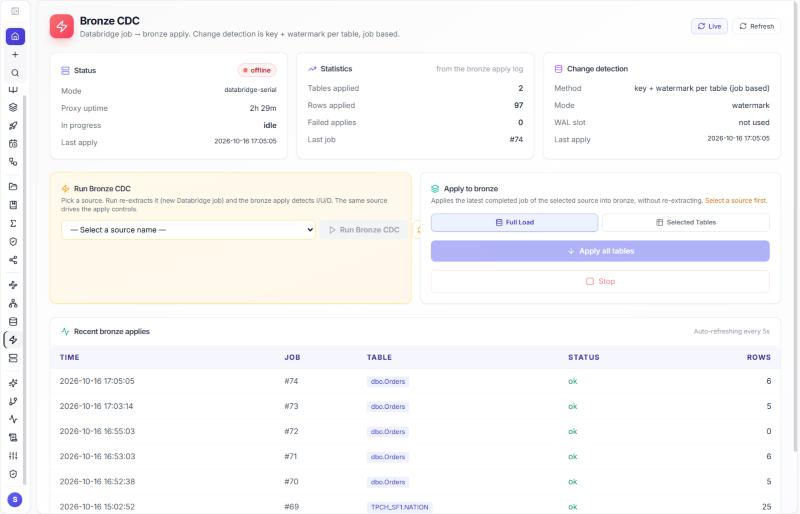
The source copies keep rows as they arrived, deletes included as tombstones. Bronze is the first cleaned layer: datasimple.bronze.<schema>_<table> holds one row per key, the last change applied, deletes marked rather than dropped, and the per-row bookkeeping kept. It is built from the latest DataBridge load of a table, automatically after every run when Auto-apply to Bronze CDC after extract is ticked (the default), or on demand from the Bronze CDC screen. Change detection for Bronze is key plus watermark per table, driven by DataBridge jobs; there is no database replication slot behind the screen. The Bronze format follows the run: Delta when Delta was ticked, else Iceberg, else Parquet.
Parquet Bronze and Delta Bronze#

Delta Lake is a trademark of LF Projects, LLC. Apache, Apache Iceberg, Iceberg, Apache Parquet and Parquet are trademarks of The Apache Software Foundation. The logos identify the open formats DataSimple reads and writes.
| Bronze format | What an apply does | Query live rows |
|---|---|---|
| Delta or Iceberg | merges by key: new keys inserted, changed keys updated, deleted keys kept with _op_type = 'D' and _is_deleted = true |
WHERE NOT _is_deleted |
| Parquet | appends every run; the I/U/D events of a change run are also written under cdc/ next to the table |
latest event per key (see below) |
The default rule, in the wizard and in the API: Bronze is Delta whenever Delta is among the source formats. A scripted run that leaves bronze_format out gets the same default, so rows do not stack.
Steps#
- Tick Auto-apply to Bronze CDC after extract on step 4 of DataBridge (default). After the copies are written the run merges the batch into Bronze; the dashboard line shows the Bronze rows.
- Or left rail → Bronze CDC → pick the source name → Full Load (every table of its latest load) or Selected Tables (tick the ones you want) → run. Stop stops between tables. The screen shows tables and rows applied, failures, the last apply and the recent applies.
- A failed apply can be run again from Administration → Ingestion Jobs → Retry Bronze on the job, or from the Bronze CDC screen.
Query Bronze#
-- current rows (Delta or Iceberg Bronze)
SELECT * FROM datasimple.bronze.dbo_Orders WHERE NOT _is_deleted;

-- what the last run changed
SELECT OrderID, _op_type, _batch_id, _load_ts FROM datasimple.bronze.dbo_Orders
WHERE _batch_id = 74 ORDER BY OrderID;

-- Parquet Bronze (append): the latest event per key
SELECT * FROM (
  SELECT b.*, ROW_NUMBER() OVER (PARTITION BY OrderID ORDER BY _load_ts DESC, _batch_id DESC) AS rn
  FROM datasimple.bronze.dbo_Orders b) WHERE rn = 1 AND NOT _is_deleted;
live = read_table("bronze.dbo_Orders").filter("NOT _is_deleted")
File ingest into Bronze#
A file-ingest run (the scheduled S3 files connection, or the workflow's Files step) loads every file under the folder that it has not loaded before, by key and ETag.
- One new part file per run:
bronze/parquet/<table>/part-<id>.parquet, plus_common_metadatawith the table's columns. The catalog entrydatasimple.bronze.<table>points at the folder, and Spark reads every part. A run never rewrites earlier parts and never replaces Bronze with only the newest batch. - Checkpoint after the write: files count as loaded only after their part is written. A run retried after a failure writes the same part name, so it replaces its own part and adds no copy.
- Tables from before this change: a table stored as one object (
bronze/parquet/<table>.parquet) is carried into the folder as its first part on its next run. Every row is kept and the old object is left in place. An old object that cannot be read stops the run before anything is written. - Columns: a new column is added; a column of the same kind is converted to the table's type (whole numbers to a wider whole number, for example). Text arriving in a number column is refused with a message, and nothing is written.
- One run per source and table at a time. A second run that starts while one is writing is refused with status
busyand a message, before it reads anything. SetDATABRIDGE_FILE_INGEST_LOCK_WAIT_SECONDSto make it wait instead. A lock left by a stopped or crashed run is taken over (DATABRIDGE_FILE_INGEST_LOCK_TTL_SECONDS, default 6 hours, is the upper limit). - Reconcile (tombstones for keys gone from the source) marks
_deleted_atinside the parts and rewrites only the parts that change.
Bookkeeping columns written here#
Every Bronze row keeps the copy's columns (_row_hash, _source_ts, _load_ts, _batch_id = the job that applied it, _datasource, _user, _op_type I/U/D, _is_deleted) ; with Delta Bronze there is one row per key already, with Parquet Bronze the latest event for a key is the one with the highest _load_ts (then _batch_id). Meanings: 10. Audit trail columns.
API#
POST /api/bronze-replication/apply/74            {}                                   -- apply job 74 to Bronze
POST /api/bronze-replication/start-snapshot      { "mode": "full" | "selected", "source_name": "CdcDemo-SQL", "tables": ["dbo.Orders"] }
POST /api/bronze-replication/stop
GET  /api/bronze-replication/tables?source_name=CdcDemo-SQL
GET  /api/bronze-replication/stats
GET  /api/databridge/api/bronze/apply-history?limit=20
Read more#
- Requirements and gaps of the Bronze step: Bronze CDC requirements.
- Delta
MERGE: https://docs.delta.io/latest/delta-update.html
Next: 6. Silver: Apply changes