Back to the index · Previous: Lakehouse governance
How it works#
Every row DataBridge writes carries bookkeeping columns, and every Bronze and Silver apply adds its own. They are ordinary columns: you query them like any other, and they are what lets you answer "which run loaded this row", "what changed since yesterday", "what did this table look like at 18:58", "which rows arrived twice" and "which file or message did this value come from" without a separate audit store. Columns with one underscore (_load_ts) describe the row as it arrived; columns with two underscores (__seq, __is_current) describe the row's place in a Silver table; positions (__cdc_lsn, __kafka_offsets) are not columns in your tables but the watermark values DataBridge keeps per table, visible in Load History and in the job result.
Showing and hiding them#
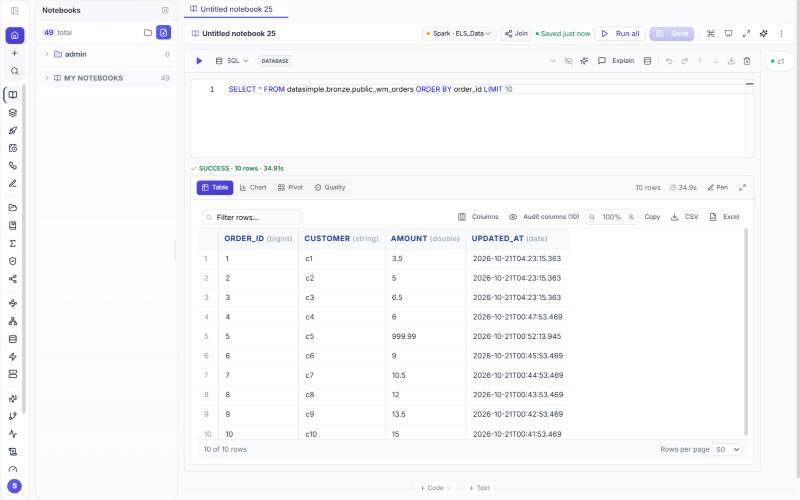
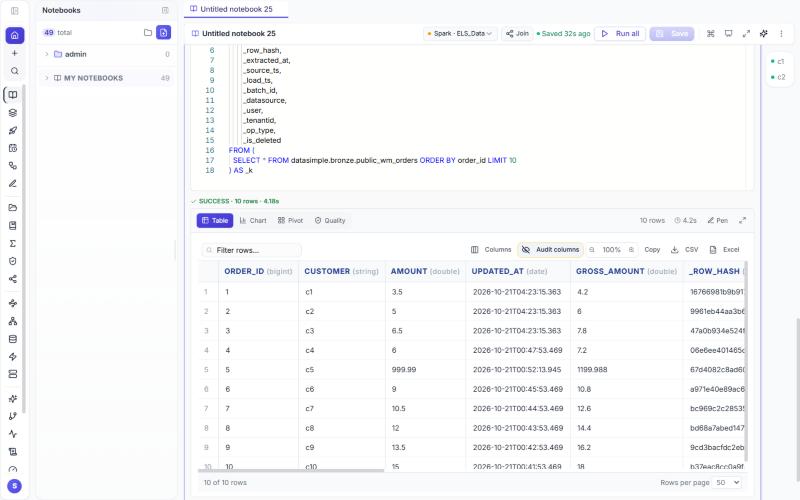
In every notebook result and on the Kinetic page, the audit trail columns (every column whose name starts with _) are hidden by default, so the grid shows your business columns first. The Audit columns (n) button next to Columns shows them; press it again to hide them. The choice is remembered in your browser. While they are hidden, the column picker lists them greyed out. CSV, Excel and Copy export the columns you see.
A column you add with a formula or the Kinetic pen is placed after your business columns and before the audit trail columns, in the generated SQL and Python as well as in the preview.
The columns#
On every source copy (Parquet, Delta, Iceberg) and carried into Bronze#
| Column | Written by | Meaning | Example |
|---|---|---|---|
_row_hash |
DataBridge, before the write | SHA-256 over all source columns (nulls replaced by typed defaults first); the same input always gives the same hash, so an unchanged row is never counted as changed | 9f2c…e41a |
_extracted_at |
DataBridge | when the read from the source finished | 2026-10-16 18:58:02 |
_source_ts |
DataBridge | the row's change time in the source: the watermark or a recognised change column (updated_at, modified_at, …), the change-log commit time (SQL Server LSN mapped to time, PostgreSQL commit time), the file drop change time column, or the Kafka timestamp field |
2026-10-16 18:57:49 |
_load_ts |
DataBridge | when the row was written to the lake | 2026-10-16 18:58:10 |
_batch_id |
DataBridge | the job id of the run that wrote the row (the same number as in Load History) | 74 |
_datasource |
DataBridge | the Data Source name (or the Source Name typed for a manual connection) | CdcDemo-SQL, Kafka-Test |
_user |
DataBridge | who or what started the run: the user name or the run label given through the API; scheduled runs carry nightly:schedule:<id> <name> |
admin, nightly:schedule:5 Kafka-Test |
_op_type |
DataBridge | I insert, U update, D delete, as seen by this run (first run: all I) |
U |
_is_deleted |
DataBridge | true for a tombstone: the key was deleted at the source (change log, delete marker, snapshot comparison) | true |
_row_seq |
DataBridge | 1..N in extract order within the load | 1017 |
_is_duplicate |
DataBridge | true for the second and later occurrence of a key in one load; the first occurrence is the kept row, so WHERE NOT _is_duplicate is the unique set |
false |
_tenantid |
DataBridge; the notebook writers (save_table, write_delta, create_managed_table, merge_delta, ds.apply_changes, ds.apply_changes_from_snapshot, @ds.table, CREATE TABLE … AS SELECT, MERGE CHANGES) |
the tenant that wrote the row, three digits. A DataFrame that already carries _tenantid keeps it; one that lacks it (including one where it was dropped in Python) gets the cell's tenant on write |
001 |
File drop#
| Column | Written by | Meaning | Example |
|---|---|---|---|
_source_file |
DataBridge, file drop | the object the row was read from | drop/CUSTOMER/inc-2026-10-14.parquet |
_file_etag |
DataBridge, file drop | the storage ETag of that object at read time; a re-dropped file with new content gets a new ETag and is read again | "5d41402a…" |
Kafka#
| Column | Written by | Meaning | Example |
|---|---|---|---|
_kafka_topic, _kafka_partition, _kafka_offset |
DataBridge, Kafka source | where the message sat | orders, 2, 8 |
_kafka_timestamp |
DataBridge | the broker's message time | 2026-10-18 09:05:00 |
_kafka_key |
DataBridge | the message key as text | {"order_id": 5} |
_kafka_error |
DataBridge | set when the message could not be decoded in the chosen format; the data columns are then null | Expecting value: line 1 column 1 |
_src_db, _src_table, _src_lsn, … |
DataBridge, Debezium format | scalar fields of the Debezium source block |
orders |
Positions kept per table (not columns in the table)#
| Name | Kept by | Meaning | Example |
|---|---|---|---|
__cdc_lsn |
DataBridge, change-log CDC | the log position the next run starts from: a SQL Server LSN, or the PostgreSQL WAL position as 16 hex digits; advanced only after the copies and Silver were written | 0x0000002C000005700005 |
__kafka_offsets |
DataBridge, Kafka | the next offset to read per partition, as JSON; advanced the same way | {"0": 7, "1": 7, "2": 9} |
__kafka_schema |
DataBridge, Kafka | the column schema recorded on the first run; every later batch is aligned to it, so a key-only delete or an integer in a double column cannot change the copies |
The job result (GET /api/databridge/api/jobs/<id>) shows cdc_lsn_before / cdc_lsn_after and kafka_offsets_before / kafka_offsets_after.
Bronze#
| Column | Written by | Meaning | Example |
|---|---|---|---|
_batch_id |
Bronze apply | the job whose batch last touched this key | 74 |
_op_type, _is_deleted |
Bronze apply | the latest operation for the key; a deleted key stays as a marker | D, true |
_cdc_seq |
DataBridge change-log and Kafka readers | order of the change inside one batch (PostgreSQL logical decoding, Kafka partition and offset order); used to keep the last change per key before the copies are written | 10432 |
_tenantid |
Bronze apply, notebook writers | the tenant that wrote the row, as on the source copies | 001 |
Silver, Type 1 (current state)#
| Column | Written by | Meaning | Example |
|---|---|---|---|
__seq |
DataBridge's Silver option | job id × 10⁹ + position in the batch; a MERGE clause only wins when the incoming __seq is greater |
77000000002 |
__sequence |
ds.apply_changes, APPLY CHANGES INTO |
the SEQUENCE BY value of the change that produced the row, in its own type (a timestamp if you sequenced by _load_ts) |
2026-10-16 18:58:10 |
__updated_at |
both | when this row was last written | 2026-10-16 18:58:23 |
_source_ts |
DataBridge's Silver option | kept from the batch row | |
_tenantid |
both | the tenant that wrote the row; stored and updated like the other system columns, never compared as a data column (a snapshot row that differs only in _tenantid is not an update) |
001 |
Silver, Type 2 (history)#
| Column | Written by | Meaning | Example |
|---|---|---|---|
__start_at |
both forms | when the version became current: the source commit time (DataBridge, when the database provides it) or the SEQUENCE BY value (ds.apply_changes) |
2026-10-16 18:40:11 |
__end_at |
both | when it was closed; null while current | 2026-10-16 18:58:23 |
__is_current |
both | true for the open version of each key | true |
__op |
both | I the key's first version, U a later one (DataBridge also writes D on the event that closed a version) |
U |
__seq / __sequence |
DataBridge / notebook form | as above | |
_tenantid |
both | the tenant that wrote the version; a system column, so a change in it alone opens no version and TRACK HISTORY EXCEPT COLUMNS never needs to name it |
001 |
Protected columns#
_tenantid on lake tables and tenantid on application-database tables are protected: no SQL cell, Python cell, scheduled job, pipeline or ds call may drop, rename or retype them. The server refuses ALTER TABLE … DROP COLUMN[S], RENAME COLUMN, ALTER COLUMN … TYPE, CHANGE COLUMN and a REPLACE COLUMNS list that leaves the column out, in either spelling, before Spark is involved; the kernel repeats the check for every spark.sql() call made from Python, and for CREATE OR REPLACE TABLE / INSERT OVERWRITE with an explicit column list that lacks _tenantid on a table that has it. The message is _tenantid is a protected column: every lake table keeps the tenant that wrote it. ds.apply_changes(except_columns=…) and APPLY CHANGES … EXCEPT COLUMNS (…) may not name it either. A df.drop("_tenantid") in Python is not intercepted, but every write helper stamps the column back, so the written table always has it. CREATE TABLE … AS SELECT gains '<tenant>' AS _tenantid when the query does not already produce the column; a plain INSERT INTO <lake table> SELECT … is left as written, so include _tenantid in such a SELECT (or write through save_table / write_delta, which add it). Reads do not filter by _tenantid, tenancy of reads is the catalog's; as defence in depth, read_table on a table that carries _tenantid only yields the cell's tenant's rows (rows written before the column existed, where it is NULL, still show).
Questions you can answer with them#
Which batch loaded a row, and what else came with it
SELECT OrderID, _op_type, _batch_id, _load_ts, _user
FROM datasimple.source.dbo_Orders_DELTA WHERE OrderID = 1003;

SELECT _op_type, COUNT(*) FROM datasimple.source.dbo_Orders_DELTA
WHERE _batch_id = 74 GROUP BY _op_type;                       -- what job 74 did
Rows changed since a time
SELECT * FROM datasimple.bronze.dbo_Orders
WHERE _load_ts > TIMESTAMP '2026-10-16 18:00:00' ORDER BY _load_ts;        -- by load time

SELECT * FROM datasimple.bronze.dbo_Orders
WHERE _source_ts > TIMESTAMP '2026-10-16 18:00:00';                        -- by the time it changed in the source
Live rows, deletes, duplicates
SELECT COUNT(*) FROM datasimple.source.dbo_Orders_DELTA WHERE NOT _is_deleted;          -- live
SELECT OrderID, _batch_id, _load_ts FROM datasimple.source.dbo_Orders_DELTA WHERE _is_deleted;   -- deleted keys and when
SELECT * FROM datasimple.source.CUSTOMER WHERE _is_duplicate;                           -- repeated keys in one load
SELECT OrderID, COUNT(*) FROM datasimple.silver.dbo_Orders GROUP BY OrderID HAVING COUNT(*) > 1;  -- must return nothing
Which file or message a value came from
SELECT _source_file, _file_etag, COUNT(*) FROM datasimple.source.CUSTOMER GROUP BY 1, 2;
SELECT order_id, _kafka_partition, _kafka_offset, _kafka_timestamp FROM datasimple.source.orders
WHERE order_id = 7;
SELECT * FROM datasimple.source.orders WHERE _kafka_error IS NOT NULL;                   -- undecodable messages
State as of a time (Type 2)
SELECT * FROM datasimple.silver.dbo_Orders_HISTORY
WHERE __start_at <= TIMESTAMP '2026-10-16 18:58:10'
  AND (__end_at IS NULL OR __end_at > TIMESTAMP '2026-10-16 18:58:10');

SELECT * FROM datasimple.silver.dbo_Orders_HISTORY WHERE __is_current;   -- current state from the history
SELECT OrderID, Amount, Status, __op, __start_at, __end_at
FROM datasimple.silver.dbo_Orders_HISTORY WHERE OrderID = 1001 ORDER BY __start_at;   -- one key's life
Which run last touched a Silver row, and whether a batch was applied
SELECT OrderID, __seq, FLOOR(__seq / 1000000000) AS job_id, __updated_at FROM datasimple.silver.dbo_Orders;
SELECT COUNT(*) FROM datasimple.silver.dbo_Orders WHERE FLOOR(__seq / 1000000000) = 77;   -- rows written by job 77
Replay a run (what the lake looked like before job 77, Delta copy)
DESCRIBE HISTORY datasimple.source.dbo_Orders_DELTA;      -- one version per run, with timestamp and operation
SELECT * FROM datasimple.source.dbo_Orders_DELTA VERSION AS OF 1;
before = read_delta_at("source.dbo_Orders_DELTA", version=1)
after  = read_table("source.dbo_Orders_DELTA")
after.join(before, "OrderID", "left_anti").show()            # keys job 77 added
Tenant#
Every table in the application database also stores who the row belongs to: column tenantid, exactly three digits (000..999, zero-padded), NOT NULL. A few older platform tables keep the name tenant_id; the meaning is the same. The code stamps it from the logged-in session (or the parent row for background work) and a write without a tenant is rejected by the database, never filled with a default. The column is protected: it cannot be dropped, renamed or retyped from a SQL cell, Python, psql or a migration, and a new table cannot be created without it unless it is on the explicit global list. The rule, the exempt list and the guard are in TENANT-STANDARD.md.
Read more#
- How each column is produced: 4. DataBridge, 5. Bronze, 6. Silver; undoing a run: 11. Recovery.
- Delta time travel: https://docs.delta.io/latest/delta-batch.html#query-an-older-snapshot-of-a-table-time-travel