Overview#
The Workflow builder generates a medallion flow for one saved Data Source. You pick the source tables. The builder (or Sarah, the chat assistant) sets keys, watermarks, history, the Silver mapping, the Gold aggregate and masks. Each stage box owns a generated notebook that you can open and edit. Extra steps such as data quality, SQL, file ingest, optimize, a notebook or a webhook can be placed between the stages. Lines drawn between boxes decide what runs after what.
Data engineers use it to stand up a new source end to end without writing the Bronze, Silver and Gold code by hand, then put the result on a schedule.
Where it is in the app: left rail → Workflow. + New workflow (ask Sarah) starts one from a chat message. The canvas shows the boxes, their last status and the buttons Execute workflow, Execute step, Test, Stop, Re-run failed, Runs, Lineage and Schedule as pipeline.
How it fits the platform: the raw copy goes through DataBridge; Bronze, Silver and Gold run as notebooks on the Spark engine; built tables are registered in the catalog. A workflow is scheduled by wrapping it in a one-step pipeline. See Architecture.
Key concepts#
| Term | Meaning |
|---|---|
| Workflow | A saved plan over one Data Source (connectionId) and a list of source tables. |
| Stage | A fixed medallion box: connection, source (raw copy into the lake), bronze, silver, gold, governance. Only connection is required. |
| Step | An extra box placed after a stage: notebook, sql, dq (data quality), files (file ingest), optimize, webhook. |
after |
The stage a step follows. It must be a stage name: source, bronze, silver, gold or governance. |
| Line (edge) | { from, to, on } between two boxes. on is success, failure or always. |
| Join | Per box: all (AND, every incoming line must fire) or any (OR, one is enough). |
| Gate | An AND or OR box that does no work; it only joins lines. |
| Box notebook | The notebook a stage, SQL, data quality or optimize box owns. Generated from the box settings; once you edit it, the box runs your code. |
| Test | Run one Raw copy, Bronze, Silver or Gold box on a sample (1,000 rows) into <layer>_test tables. |
| Execute step | Run one box for real. With "Run from here", also every box its lines lead to. |
| Run states | Run: running, ok, error, cancelled. Box: queued, running, ok, error, skipped. |
| Silver history (SCD2) | A per-table option that keeps versions of changed Silver rows with __start_at and __end_at. |
Architecture#
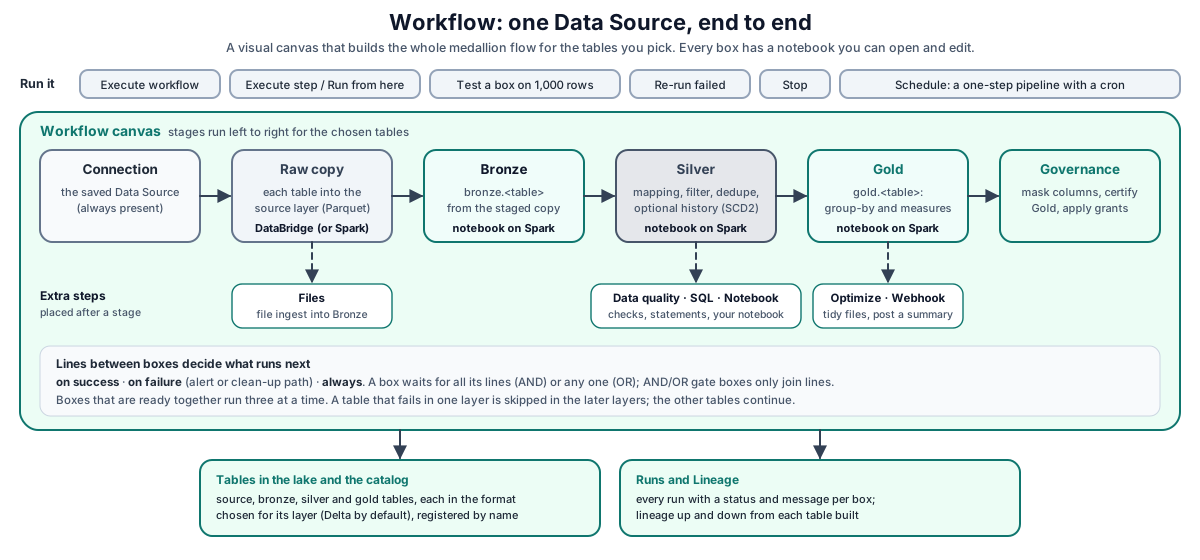
Walk-through:
- You create or change the workflow on the canvas or through
/api/workflows. Table settings, boxes, steps, lines, gates, formats per layer and catalog grants are checked when you save. - Execute workflow (
POST /:id/run) checks that the workflow is not already running and has tables, starts the run in the background and answers202. - The runner builds the graph from the boxes and lines, refuses a loop, and runs boxes in waves: a box starts when its incoming lines allow it. Boxes whose turn comes together run in parallel, three at a time.
- The canvas colours each box as it finishes. When the run ends, it is added to Runs with a status per box.
- A scheduled run comes from a pipeline whose single step is a workflow step. It runs as the workflow owner.
How it works#
Stages#
| Stage | What it does |
|---|---|
connection |
The saved Data Source. Always present. "Execute step" on it re-tests the connection. |
source |
Raw copy of each table into the lake source layer as Parquet, through DataBridge. A source DataBridge cannot read is copied by a Spark notebook instead. Optional. |
bronze |
Builds bronze.<table> from the staged copy. |
silver |
Builds silver.<table> with the Silver mapping (select, rename, cast, derived columns), filter, dedupe and optional history. |
gold |
Builds gold.<table> with the group-by and measures. |
governance |
Masks the chosen columns on Silver and Gold, certifies Gold tables that passed their checks, and applies the catalog grants. |
A table that fails in one layer is skipped in the later layers. The other tables continue. Formats are chosen per layer (delta default, iceberg, parquet). Built Bronze, Silver and Gold tables are registered in the catalog unless you switch registration off.
Steps#
| Kind | Default after |
What it does |
|---|---|---|
notebook |
silver |
Runs a saved notebook with parameters. It also receives workflow_id, tables and after_layer. Timeout 1 to 240 minutes (default 30). |
sql |
silver |
Runs Spark SQL statements kept in the box's notebook. |
dq |
silver |
Runs data quality rules on a layer's tables. A blocking rule failure fails the step. Rules that cannot run are refused when the workflow is saved. |
files |
source |
Loads CSV, JSON or Parquet files from a landing path into Bronze through DataBridge. Each file is loaded once. |
optimize |
gold |
Runs Delta OPTIMIZE, optional ZORDER BY and VACUUM on the layers the workflow built. |
webhook |
gold |
Posts a JSON summary of the run so far to a URL (10-second timeout). |
The canvas does not offer dbt or Flink boxes. For a dbt project or a Flink SQL job, use a pipeline step.
after must be a stage name#
A step's after only accepts a stage name. Any other value, such as another box's id, is replaced with the kind's default stage (silver for a notebook, gold for a webhook, and so on) without an error, so boxes could run in a different order than you meant. The canvas never sends such a value: it chains boxes with drawn lines. API callers should set after to a stage and use lines (options.graph.edges) for any finer ordering.
Lines, AND/OR and gates#
Without drawn lines, the workflow runs as one chain in flow order: each stage followed by the steps placed after it. The line out of the raw copy is always, and a step set not to stop the workflow also gets an always line.
Once you draw lines (options.graph.custom = true), exactly those lines are used:
success: fires when the box before succeeded.failure: fires when it failed. Use it for an alert or cleanup path.always: fires when it finished either way.
For each box, all (AND) needs every incoming line to fire and any (OR) needs one. A box whose lines do not allow it is recorded as skipped with the reason, for example Not run: Not every incoming line fired: bad failed (line: on success). A box added after the lines were drawn (for example by Sarah) follows the box before it in flow order. A loop is refused with "The lines make a loop, so no step could start."
Run, execute one box, test#
| Action | API call | trigger in Runs |
|---|---|---|
Execute workflow (all boxes, or { "tables": [...] }) |
POST /:id/run |
manual |
| Execute step (one box) | POST /:id/execute { "node": "silver" } |
step |
| Run from here (box and everything after it) | POST /:id/execute { "node": "silver", "downstream": true } |
from-step |
| Test one box on a sample | POST /:id/test { "node": "bronze" } |
test |
| Re-run failed | POST /:id/rerun-failed |
rerun-failed |
| Scheduled | pipeline step | schedule |
Test reads the first 1,000 source or staged rows for the raw copy and Bronze, and reads the _test tables of the layer before for Silver and Gold, writing <layer>_test tables. Test the layers in order. If a layer's input has not been built, the error says which box to run first.
Stop and re-run failed#
- Stop (
POST /:id/stop) marks the run cancelled, interrupts running cells, cancels a running DataBridge copy, and starts nothing new. Pending boxes are recorded as skipped "Stopped by user." - Re-run failed keeps every box that succeeded last time and runs again the boxes that did not, plus everything their lines lead to. If nothing failed it answers
400"Nothing failed in the last run: every step succeeded."
Run history#
GET /:id/runs returns the last runs (default 30, up to 200), newest first, with status, trigger, by, only, test and a nodes map with one status and message per box. The canvas's Runs panel shows the same data. GET /:id/lineage walks the recorded lineage up and down from each table the workflow builds.
Schedule a workflow#
POST /:id/pipeline with { "cron": "0 2 * * *", "timezone": "UTC" } creates (or updates) a pipeline named Workflow: <name> with one workflow step, a 4-hour timeout and one attempt. The defaults are cron 0 2 * * * and time zone UTC; pipelines and notebook schedules created elsewhere default to Asia/Kolkata. A second call updates the same pipeline. Switch the schedule off with the pipeline's toggle on the Pipelines screen.
Silver history (SCD2)#
Set scd2: true on a table. The Silver box then builds a snapshot-style type 2 history:
- It reads the complete current Bronze table, never a delta batch.
- It compares the business columns with the current Silver version per key.
- In one transactional
MERGEit closes changed and vanished rows (__end_at) and inserts new versions (__start_at,__end_atnull). - It needs Delta or Iceberg storage and valid, unique, non-null primary key columns. An existing Silver table without history is converted in place.
For other change-handling patterns, see Declarative tables and change handling.
Concurrent edits#
Every workflow carries a version. A save that sends an older baseVersion is refused with 409 "This workflow was changed by someone else since you opened it."
REST API#
Base URL: https://<your-datasimple-host>. Authenticate with Authorization: Bearer <PERSONAL_TOKEN>.
| Method | Path | Purpose |
|---|---|---|
| GET | /api/workflows |
List workflows with a running flag |
| POST | /api/workflows |
Create (name, connectionId required) |
| GET / PUT / DELETE | /api/workflows/:id |
Read, update, delete (delete refuses while running) |
| POST | /api/workflows/build |
Sarah: build or refine a workflow from a chat message |
| POST | /api/workflows/suggest |
Suggested keys, watermark, SCD2 and PII columns for tables |
| GET | /api/workflows/:id/health |
One status per box with issues and fixes |
| POST | /api/workflows/:id/fix |
Apply one suggested fix |
| POST | /api/workflows/:id/run |
Execute workflow |
| POST | /api/workflows/:id/execute |
Execute one box (node, optional downstream) |
| POST | /api/workflows/:id/test |
Test one layer box on a sample |
| POST | /api/workflows/:id/stop |
Stop the run |
| POST | /api/workflows/:id/rerun-failed |
Re-run failed boxes |
| GET | /api/workflows/:id/runs |
Run history |
| GET | /api/workflows/:id/lineage |
Lineage of the workflow's tables |
| GET | /api/workflows/:id/preview |
A box's output (?node=, &test=1 for test tables) |
| GET | /api/workflows/:id/box/:box |
The notebook a box owns (?cells=1 for its cells) |
| POST | /api/workflows/:id/box/:box/notebook |
Create the box notebook, or { "regenerate": true } to overwrite an edited one |
| PUT | /api/workflows/:id/box/:box/cells |
Save code for the box's notebook |
| POST | /api/workflows/:id/pipeline |
Schedule as a pipeline |
Developer examples#
Create a workflow with a step and drawn lines#
curl -X POST https://<your-datasimple-host>/api/workflows \
  -H "Content-Type: application/json" -H "Authorization: Bearer <PERSONAL_TOKEN>" \
  -d '{
    "name": "Orders flow",
    "connectionId": 16,
    "sourceSchema": "dbo",
    "tables": [
      { "name": "Orders", "primaryKey": "OrderID", "watermark": "ModifiedAt", "scd2": true,
        "goldGroupByCols": ["Region"],
        "goldMeasures": [{ "fn": "sum", "column": "Amount", "alias": "total_amount" }] }
    ],
    "options": {
      "nodes": ["connection", "source", "bronze", "silver", "gold"],
      "formats": { "bronze": "delta", "silver": "delta", "gold": "delta" },
      "steps": [
        { "id": "dq_silver", "kind": "dq", "after": "silver",
          "config": { "layer": "silver", "rules": [
            { "table": "*", "column": "orderid", "check": "not_null", "severity": "block" },
            { "table": "*", "column": "amount", "check": "min", "value": "0", "severity": "warn" } ] } },
        { "id": "alert", "kind": "webhook", "after": "gold",
          "config": { "url": "https://hooks.example.com/abc", "message": "Orders flow failed" } }
      ],
      "graph": {
        "custom": true,
        "edges": [
          { "from": "connection", "to": "source",    "on": "success" },
          { "from": "source",     "to": "bronze",    "on": "always" },
          { "from": "bronze",     "to": "silver",    "on": "success" },
          { "from": "silver",     "to": "dq_silver", "on": "success" },
          { "from": "dq_silver",  "to": "gold",      "on": "success" },
          { "from": "dq_silver",  "to": "alert",     "on": "failure" }
        ]
      }
    }
  }'
after is a stage name. The ordering between dq_silver, gold and alert comes from the lines.
Test, execute, then run from a box#
const wf = "https://<your-datasimple-host>/api/workflows/42";
const headers = { "Content-Type": "application/json", "Authorization": "Bearer <PERSONAL_TOKEN>" };
const post = (path, body = {}) => fetch(`${wf}${path}`, {
  method: "POST", headers, body: JSON.stringify(body),
}).then((r) => r.json());

await post("/test", { node: "bronze" });   // "Testing bronze on the first 1000 staged rows into bronze_test."
await post("/execute", { node: "silver" }); // "Running Silver only."
await post("/execute", { node: "silver", downstream: true }); // "Running from Silver on."
Read the run history and schedule it#
const { runs } = await fetch(`${wf}/runs?limit=5`, { headers }).then((r) => r.json());
for (const r of runs) console.log(r.id, r.status, r.trigger, Object.entries(r.nodes));

const s = await post("/pipeline", { cron: "30 1 * * *", timezone: "UTC" });
console.log(s); // { success: true, pipelineId: 31, cron: "30 1 * * *", timezone: "UTC" }
Code in a box notebook#
An edited box notebook must write through the workflow_table() helper, which the workflow supplies when the box runs. That is how Test redirects the write to <layer>_test; a fixed production table name is refused by Test. An edited Bronze box:
df = read_staged(16, "orders")              # the raw copy staged for connection 16
df = df.filter("amount IS NOT NULL")
df.write.mode("overwrite").saveAsTable(workflow_table("orders"))   # bronze.orders, or bronze_test.orders in Test
Security and permissions#
- Workspace isolation. You see and run only the workflows of your own workspace.
- Permission. The canvas and
/api/workflowsneed the Workflow permission on your role. - Who a run runs as. Canvas runs use the signed-in user. Scheduled runs use the workflow owner (the pipeline's creator). The Governance box uses the owner's current account and role on every run, so masking needs a role that can see raw data and certificates need a role allowed to issue them.
- No stored source passwords in notebooks. Box notebooks that read the source get the connection from the workflow at run time; a box notebook run on its own refuses with a clear message.
- Audit. Create, refine, run, execute, test, stop, re-run failed, schedule and notebook edits are recorded in History.
- Catalog and lineage. Built tables are registered in the catalog with a comment naming the workflow, and appear in Lineage.
Settings you can change#
Everything is stored on the workflow and set on the canvas or through the API: the boxes (nodes), formats per layer, catalog registration and grants, the ingestion mode (batch or streaming), steps and lines. The raw copy and file ingest need a default lake destination, which your administrator sets up. Scheduled runs follow the unattended rules in Schedules and scheduler.
Monitoring and troubleshooting#
- Canvas colours show the last run and live health checks.
- Runs panel: one status per box for each run.
- Lineage panel and the Lineage screen: tables the run produced.
- Log screen: cells of box notebooks. Ingestion screen: DataBridge copies started by the raw copy.
| Message | Meaning |
|---|---|
409 This workflow is already running. |
One run per workflow at a time. |
No tables to run. Pick tables on the Connection node first. |
The workflow has no tables selected. |
The lines make a loop, so no step could start. |
Remove a line in the loop. |
Test runs a Raw copy, Bronze, Silver or Gold step that is on the canvas. |
Test only works on layer boxes that are on the canvas. |
… reads bronze_test.orders, which has not been built yet: test the Bronze step first. |
Run the layers in order. |
History requires Delta or Iceberg storage. / History keys must be unique; configure deduplication |
SCD2 prerequisites. |
409 This workflow was changed by someone else since you opened it. |
Reload and make the change again. |
Run error after a DataSimple restart |
A run in progress during a restart is marked failed. Use Re-run failed. |
Limits#
afteronly takes a stage name. Unknown values are replaced with the step kind's default stage without an error. Use lines for box-to-box order.- One run per workflow at a time.
- No dbt or Flink boxes. The canvas does not offer them. For a dbt project or a Flink SQL job, use a pipeline step.
- Different default time zone. "Schedule as pipeline" defaults to UTC; other schedules default to
Asia/Kolkata. - Promotion. Deployment promotes workflows. The Data Source, notebooks and the scheduling pipeline are matched to their counterparts on the target; a reference that does not match fails that workflow with a message. Run history is not copied.
- Overlap with DataBridge schedules. A DataBridge schedule and a workflow can load the same source tables; neither knows the other is running.