Overview#
The Schedules screen lists every notebook schedule in your workspace. A notebook schedule runs one notebook on a cron, with a time zone, parameters, a compute profile, retries and email or webhook alerts. The DataSimple scheduler checks every minute which notebook schedules, pipeline crons and data quality sweeps are due, and which failed runs are due for a retry.
Data engineers use schedules for "run this notebook every night". For several notebooks in order, or dbt or Flink in the chain, use a pipeline, which has its own cron handled by the same scheduler.
Where it is in the app: left rail → Schedules (Administration calls this permission Jobs). The screen title is Jobs & Schedules. A schedule can also be created from a notebook's menu → Schedule…. See Architecture for how scheduling fits the platform.
Key concepts#
| Term | Meaning |
|---|---|
| Notebook schedule | A notebook, cron, time zone, enabled flag, retries, recipients, webhook, parameters, compute profile and notify_on. |
| Run | One execution of a notebook, with triggered_by, status, attempt and cell results. |
| Cron | 5 fields: minute, hour, day of month, month, day of week. Supports *, */N, ranges a-b, lists a,b,c and @yearly @annually @monthly @weekly @daily @hourly. |
| Time zone | An IANA name such as UTC or Asia/Kolkata. Daylight saving changes are handled. |
| Overlap guard | A schedule never starts a second run while its previous run is still running. |
| Catch-up | After a restart, a cron time missed while DataSimple was unavailable runs once. |
| Interrupted run | A run that was in progress during a restart. It is marked failed when DataSimple comes back. |
| Retry | A failed run is queued for another attempt with a backoff. Queued retries survive a restart. |
| Run states | running, success, partial (a cell failed), error (the run failed as a whole). |
Architecture#
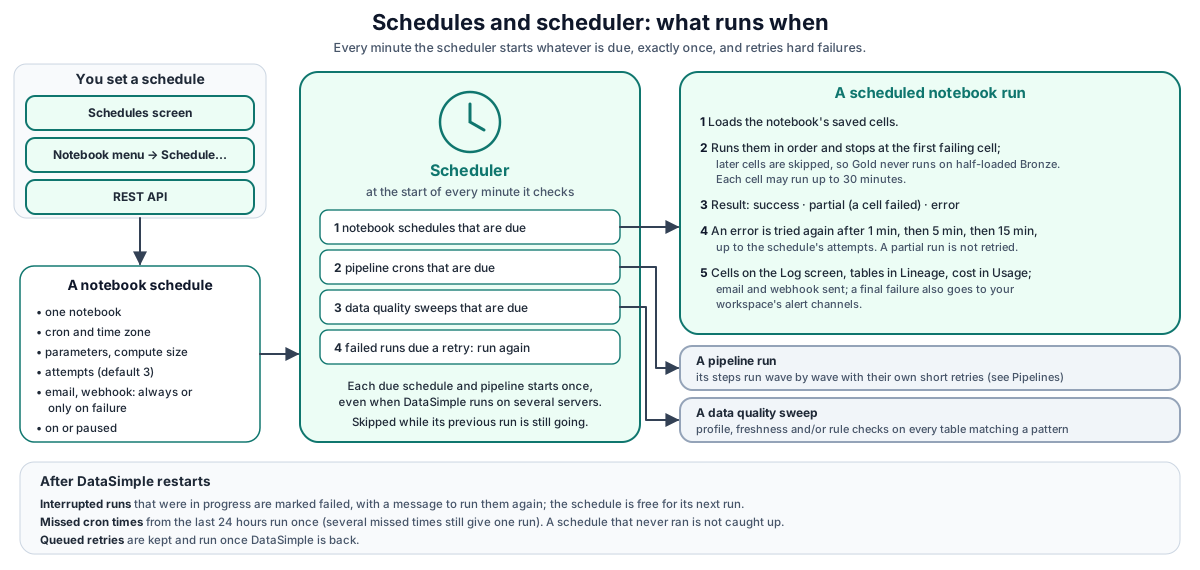
Walk-through:
- You save a schedule from the Schedules screen, the notebook menu or the API. The cron and the time zone are validated before anything is saved.
- At the start of every minute the scheduler checks which enabled schedules, pipelines and data quality sweeps are due.
- Each due schedule and pipeline starts once, even when DataSimple runs on more than one server. Data quality sweeps do not have this guard: when DataSimple runs on more than one server, a due sweep can run once on each server.
- Failed runs whose retry time has come are started again.
- Each run writes its cells to the Log screen, its tables to Lineage, and sends the alerts you configured.
How it works#
Notebook schedules#
POST /api/notebooks/:id/schedules creates a schedule. Only someone who can edit the notebook can schedule it.
| Field | Default | Notes |
|---|---|---|
name |
Scheduled run |
Label shown on the screen. |
cronExpression |
required | Each field must be in range. |
timezone |
Asia/Kolkata |
Must be a valid IANA name, or the request gets 400. |
retryCount |
3 |
Total attempts for a hard failure, 1 to 5. |
recipients |
none | Comma-separated emails for the run digest. |
webhookUrl |
none | Receives a JSON summary of each finished run. |
notifyOn |
always |
always or failure (only runs that did not succeed). |
parameters |
{} |
Flat map. SQL cells see {{name}} substitutions; Python cells get a params dict. |
computeProfile |
serverless |
Spark size for Spark cells. Unknown values fall back to serverless. |
enabled |
true |
Paused schedules do not fire. |
The screen builds the cron from Hourly, Daily, Weekly, Monthly or Custom, and offers a short list of time zones (IST, UTC, Dubai, Singapore, London, New York, Los Angeles). It shows stat cards (Total jobs, Active, Paused, Need attention), the last and next run, and per-row Run now, Pause/Resume and Manage (edit and run history). Runs started by Dataflow appear on the Log screen tagged Dataflow.
What one scheduled run does#
- Loads the notebook's current saved cells.
- Starts the run only when the schedule has no other run in progress. A cron time that finds a run in progress is skipped. Run now answers
409"This schedule is already running." A run that has beenrunningfor more than 24 hours no longer blocks. - Runs the cells. Unattended runs stop at the first failing cell (see below).
- Finishes the run:
success,partial(a cell failed) orerror(the run failed as a whole). - Keeps the most recent runs per notebook (200 by default; older runs are removed).
- Sends the email and webhook according to
notify_on, and keeps the delivery report on the run. - Queues a retry for a hard failure, or sends the final failure to your workspace's alert channels.
Every cell appears on the Log screen under the Scheduled filter. Tables written by a cell appear in Lineage with the job schedule (pipeline steps use pipeline). DDL appears in the object history. Each cell and run is counted on the Usage screen.
Unattended stop-on-error#
Schedules and pipeline steps stop at the first failing cell, so Silver and Gold cells never run on a half-loaded Bronze. Later cells are recorded as skipped. Each cell of an unattended run may run for up to 30 minutes, instead of the 5-minute interactive limit. Your administrator can change both behaviours for the whole installation.
Retries with backoff#
Only a hard failure (error) is retried. A partial run is not: re-running the whole notebook would run the cells that already succeeded again and write their rows twice.
| Attempt that failed | Next attempt after |
|---|---|
| 1 | 1 minute |
| 2 | 5 minutes |
| 3 or later | 15 minutes |
A retry shows triggered_by = retry and the next attempt number. Queued retries are kept through a restart and run once DataSimple is back. Each retry is started exactly once.
Pipeline steps use a different, short backoff (3 s, 10 s, 30 s) inside the run; see Pipelines.
Pipeline crons#
The scheduler also checks enabled pipelines with a cron. No cron means manual only. A due pipeline runs with triggered_by = schedule. If its previous run is still going, the pipeline's overlap guard skips this one.
One run per due minute#
A schedule or pipeline fires once per due minute, even when DataSimple runs on several servers. You never get two runs of the same schedule for the same cron time.
After a restart#
When DataSimple restarts, three things happen on its first scheduler check:
- Interrupted runs are marked failed. Pipeline runs and scheduled notebook runs that were in progress are set to
errorwith the message "Interrupted: the server restarted while this run was in progress. Run it again." Workflow runs that were in progress are set toerrorwith no message. This also unblocks the next run. When several DataSimple servers share one database, your administrator can set an interrupted-run age (for example 4 hours): only runs older than that are marked at once and a younger one is checked again when it reaches that age, so restarting one server never fails runs another is still executing. - Missed cron times run once. For each schedule and pipeline, DataSimple looks back over the last 24 hours (your administrator can change this window, up to 7 days, or turn catch-up off). If a cron time was missed after the item's last run, the item runs once now. Several missed times still give a single run.
- Queued retries continue.
A schedule that has never run is not caught up, so a new schedule never fires by surprise.
Data quality sweeps#
A sweep walks every table matching a pattern such as silver.* on a cron and runs profile, freshness and/or check (the table's registered rules) on each. It has no screen; manage it through /api/notebooks/dq/sweeps. Sweeps never delay notebook schedules. Error tables (*_errors) are never swept. A sweep keeps only its last status (ok, partial, error), the table count and the last error. See Data quality.
Everything you can schedule#
DataSimple has eight kinds of schedule, in three formats. They are separate: a schedule in one is not visible in the others.
| What you schedule | Format | Checked | Where you set it | Default time zone |
|---|---|---|---|---|
| One notebook (notebook schedule) | cron + time zone | every minute | Schedules screen; notebook menu → Schedule…; /api/notebooks/:id/schedules |
Asia/Kolkata |
| A pipeline of steps | cron + time zone | every minute | Pipelines builder; /api/pipelines |
Asia/Kolkata |
| A workflow ("Schedule as pipeline") | cron + time zone | every minute (as a pipeline) | Workflow canvas; POST /api/workflows/:id/pipeline |
UTC |
| A saved DataBridge load | interval in minutes | every 30 seconds | DataBridge → Load History → Schedules | not applicable |
| A notebook, its cells, or a pipeline in Dataflow | cron in Dataflow | by Dataflow | Dataflow screen → New DAG | Dataflow's own setting |
| File ingest of a file connection | interval in minutes | on its interval | File connection auto-ingest option (no screen) | not applicable |
| Data quality sweep | cron | every minute | /api/notebooks/dq/sweeps (no screen) |
always Asia/Kolkata |
| Materialized view refresh | cron | on its cron | SQL SCHEDULE CRON '…' on the view (optional TIMEZONE '…') |
the TIMEZONE given on the view |
REST API#
Base URL: https://<your-datasimple-host>. Authenticate with Authorization: Bearer <PERSONAL_TOKEN>.
| Method | Path | Purpose |
|---|---|---|
| GET | /api/notebooks/jobs |
Every schedule in your workspace with notebook name, last run and next_run_at (the Schedules screen) |
| GET | /api/notebooks/:id/schedules |
Schedules of one notebook |
| POST | /api/notebooks/:id/schedules |
Create a schedule |
| PUT | /api/notebooks/:id/schedules/:sid |
Update fields, including enabled for pause and resume |
| DELETE | /api/notebooks/:id/schedules/:sid |
Delete a schedule |
| POST | /api/notebooks/:id/schedules/:sid/run-now |
Run now (409 while a run is in progress) |
| GET | /api/notebooks/:id/runs |
Last 25 runs of the notebook, with a short summary |
| GET | /api/notebooks/:id/runs/:rid |
One run with full cell results |
| GET / POST / PATCH / DELETE | /api/notebooks/dq/sweeps[/:id] |
Data quality sweeps |
Developer examples#
Create a nightly schedule in UTC with failure-only alerts#
curl -X POST https://<your-datasimple-host>/api/notebooks/12/schedules \
  -H "Content-Type: application/json" -H "Authorization: Bearer <PERSONAL_TOKEN>" \
  -d '{
    "name": "Nightly gold.sales_by_region",
    "cronExpression": "15 2 * * *",
    "timezone": "UTC",
    "retryCount": 3,
    "recipients": "data-team@example.com",
    "notifyOn": "failure",
    "parameters": { "region": "EMEA" },
    "computeProfile": "serverless"
  }'
Response 201 with the schedule and next_run_at. A bad cron returns 400 Invalid cron expression: hour must be 0-23 (got 25).
The notebook cell that uses the parameter#
CREATE OR REPLACE TABLE datasimple.gold.sales_by_region AS
SELECT region, SUM(amount) AS total_amount
FROM datasimple.silver.orders
WHERE region = {{region}}
GROUP BY region
Pause, run now, read the history#
const nb = "https://<your-datasimple-host>/api/notebooks/12";
const opts = { headers: { "Content-Type": "application/json",
                          "Authorization": "Bearer <PERSONAL_TOKEN>" } };

await fetch(`${nb}/schedules/5`, { ...opts, method: "PUT", body: JSON.stringify({ enabled: false }) });

const r = await fetch(`${nb}/schedules/5/run-now`, { ...opts, method: "POST" });
if (r.status === 409) console.log((await r.json()).error);

const runs = await (await fetch(`${nb}/runs`, opts)).json();
console.table(runs.map((x) => ({ id: x.id, by: x.triggered_by, status: x.status, error: x.error })));
Create a data quality sweep#
curl -X POST https://<your-datasimple-host>/api/notebooks/dq/sweeps \
  -H "Content-Type: application/json" -H "Authorization: Bearer <PERSONAL_TOKEN>" \
  -d '{ "name": "Silver nightly", "tablePattern": "silver.*", "cron": "0 3 * * *",
        "actions": ["profile", "freshness", "check"] }'
Security and permissions#
- Workspace isolation. The Schedules screen lists only schedules of notebooks in your workspace. Per-notebook calls check notebook access first: read access to list, edit access to create, change, delete or run.
- Permission. The Schedules screen and
/api/notebooks/jobsneed the Jobs permission. Per-notebook schedule calls need the Notebooks permission. - Who a run runs as. Scheduled runs run as the notebook owner (their user id and username, so grants and the CREATE SCHEMA check see one person) and are attributed to the schedule's creator in run history.
- Audit. Create, update, delete and run now are recorded in History.
- Alerts. A final failure (no more retries) goes to your workspace's alert channels.
Settings you can change#
Per schedule: cron, time zone, retries, recipients, webhook, notifyOn, parameters, compute profile and enabled.
Installation-wide behaviour that your administrator can change: the catch-up window after a restart (default 24 hours, maximum 7 days, or off), whether interrupted runs are marked failed after a restart (default on) and how old such a run must be first (default: at once; set an age when several servers share one database), whether unattended runs stop at the first failed cell (default on), the unattended per-cell limit (default 30 minutes) and how many runs are kept per notebook (default 200).
Monitoring and troubleshooting#
- Schedules screen: last status, last and next run, Need attention count.
- Manage → run history: each run with trigger, status and error; email and webhook delivery reports.
- Log screen: cell rows under the Scheduled filter.
- History screen: who created, changed or ran a schedule.
| Symptom | Meaning |
|---|---|
409 This schedule is already running. |
Overlap guard on Run now. |
| A cron time was skipped | The previous run was still in progress at that time. |
| A schedule did not fire after a restart | It had never run before (no catch-up for new schedules), or the missed time is outside the catch-up window. |
Run error: "Interrupted: the server restarted…" |
DataSimple restarted during the run. Run it again. |
Run partial, no retry |
A cell failed; partial runs are not retried by design. |
| Time looks off by hours | Check the schedule's time zone. Defaults differ between schedule kinds (see the table above). |
| The delivery report says mail is not configured | Mail is not set up for your workspace; ask your administrator. |
Limits#
- Eight kinds of schedule, three formats. Notebook schedules, pipelines, DataBridge schedules, Dataflow, file ingest, sweeps and materialized views are separate. A notebook schedule and a notebook-level Dataflow DAG on the same notebook run it twice; only pipeline-level DAGs are protected.
- Different default time zones. Notebook schedules and pipelines default to
Asia/Kolkata; "Schedule as pipeline" defaults to UTC; data quality sweeps are always evaluated inAsia/Kolkata. - Data quality sweeps and file ingest have no screen.
- A cron that is due only during an outage longer than the catch-up window is skipped.
- Data quality sweeps are not guarded across servers. When DataSimple runs on more than one server, a sweep can run once on each server for the same cron time.