Overview#
A pipeline is DataSimple's built-in orchestrator. It holds a list of steps, and each step names the steps it depends on. DataSimple sorts the steps into waves, runs them in order, applies each step's failure policy, retries hard failures and records one run with every step's result.
Data engineers use pipelines to chain the notebooks that build Bronze, Silver and Gold tables, to add a dbt project or a Flink SQL job to that chain, and to run the whole chain on a schedule.
Where it is in the app: left rail → Pipelines. The list screen is the Pipeline Jobs Dashboard. + Create Pipeline opens the builder. Click a pipeline to open its detail view with the table graph, run history, Stop, the AI Lineage tab, Fix with AI on the Errors tab, and a schedule switch labelled Development / Production. Production turns scheduled runs on; Development pauses them (manual runs still work).
How it fits the platform: a notebook step runs its cells exactly the way a scheduled notebook does. The pipeline's cron is evaluated by the same scheduler as notebook schedules (Schedules and scheduler). A Workflow is scheduled by wrapping it in a one-step pipeline (Workflow). Dataflow can trigger a pipeline from the Dataflow screen (Dataflow). See Architecture for the full map.
Key concepts#
| Term | Meaning |
|---|---|
| Step | One unit of work. Each step has a unique step_key inside its pipeline. |
| Step kind | notebook (default), dbt, flink or workflow. There is no SQL step kind: put SQL in a notebook and use a notebook step. |
depends_on |
List of step_keys that must finish before this step starts. |
| Wave | A group of steps whose dependencies are all finished. Waves run one after another. |
on_failure |
What a failed or partial step does to the rest of the run: stop (default), continue or skip_dependents. |
| Retry limit | retry_count on the pipeline: the total number of attempts per step for a hard failure. Default 3. |
| Timeout | timeout_ms per step. For a notebook step, the running cell is stopped and the step fails when it passes. dbt and Flink steps hand their timeout to their own engines. |
| Run | One execution of the pipeline, with a status and a step_results array. |
| Run states | running, success, partial, error, cancelled. |
| Step states | success, partial, error, skipped. A step kept from an earlier run is success with kept_from_run. |
triggered_by |
manual, schedule, rerun-failed or external_schedule (started from a Dataflow DAG). |
| Run-time parameters | A { name: value } object passed to Run. It overrides each notebook step's own parameters for that run and is kept on the run. |
| Overlap guard | One run per pipeline at a time. A second start returns 409. |
| Notify policy | notify_on: always (default) or failure. Controls the email and webhook sent when a run finishes. |
Architecture#
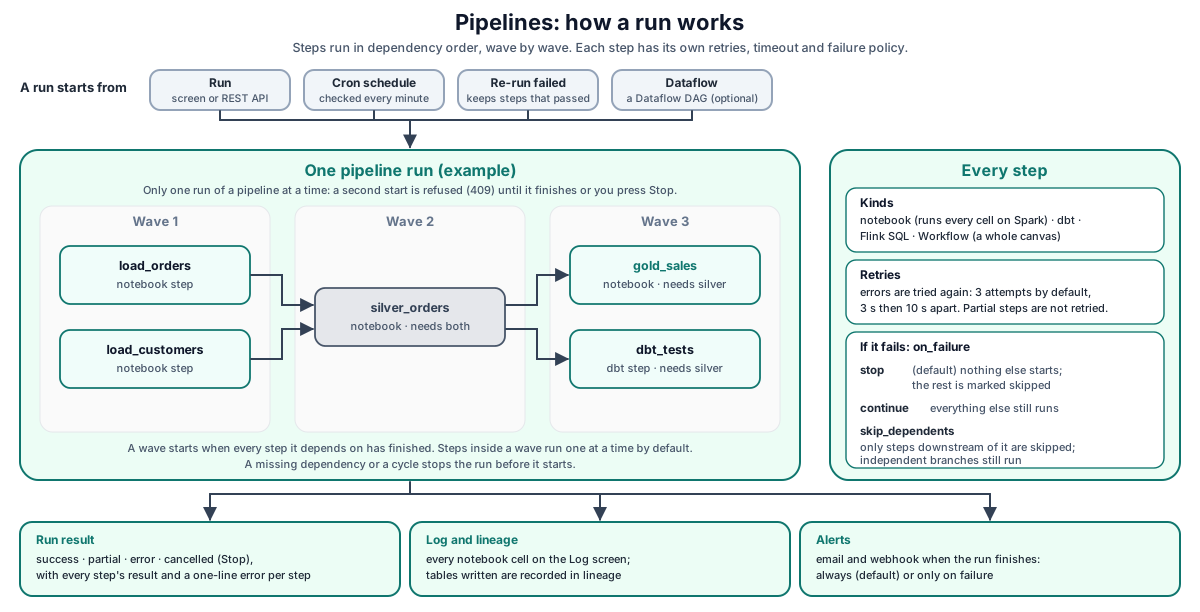
Walk-through:
- You save the pipeline and its steps from the builder or with
POST /api/pipelines/PUT /api/pipelines/:id. Every step and the cron are checked before anything is saved. - A run starts in one of four ways: Run on the screen (or the API), the cron, Re-run failed steps, or a Dataflow DAG with pipeline granularity.
- DataSimple sorts the steps into waves and starts the run only if no other run of the same pipeline is in progress.
- Each step runs by kind. Notebook steps run on the Spark engine, log every cell to the Log screen and record lineage. dbt, Flink and Workflow steps run through their own engines.
- When the last wave finishes, the run gets its final status, the step results and a one-line error summary, and notifications are sent.
How it works#
Steps and their kinds#
A step with a missing or invalid field is rejected with 400 and a message that names the step.
| Kind | Required fields | Default timeout | What runs |
|---|---|---|---|
notebook |
notebook_id |
300 000 ms (5 min) | All cells of the notebook |
dbt |
parameters._dbt.projectDir; command is run, test or compile |
600 000 ms (10 min) | A dbt command; see dbt |
flink |
Flink SQL in parameters._flink |
600 000 ms | A batch or streaming Flink SQL job |
workflow |
parameters._workflow.workflowId |
4 hours (saved, not enforced) | A whole Workflow canvas run; see Workflow |
Notebook steps can also carry ordinary parameters. The builder adds an optional table_format parameter (delta, iceberg or parquet). It sets the default format for save_table and create_managed_table in that step. A format written explicitly in the notebook code wins.
Dependencies and waves#
Steps are sorted by their dependencies. Wave 1 holds the steps with no dependencies. Wave 2 holds the steps whose dependencies all finished in wave 1, and so on. A dependency on an unknown step, or a cycle, stops the run before it starts. The builder shows the wave order before you save.
Inside a wave, steps run one at a time by default. This is the safe choice when several steps share one Spark session. Your administrator can allow more steps of a wave to run at the same time. Flink steps in a wave run in parallel (up to 10 at once by default).
Failure policy#
A step fails with error when it throws or times out. A notebook step is partial when the notebook finished but a cell failed. Both trigger the step's on_failure policy.
| Policy | Effect |
|---|---|
stop (default) |
No further steps start. Steps in the same wave that had not started are recorded as skipped ("Skipped due to upstream failure"). Steps in later waves are recorded as skipped ("Pipeline aborted due to upstream failure"). |
continue |
The failure is recorded. Siblings and dependents still run. |
skip_dependents |
Every step downstream of the failed step is recorded as skipped. Independent branches still run. |
Unattended runs stop a notebook at its first failing cell, so later cells never build Silver or Gold on half-loaded Bronze. Later cells are recorded as skipped. See Schedules and scheduler.
Final run status#
| Condition | Run status |
|---|---|
Any step error |
error |
No error, but a step partial or skipped |
partial |
Every step success |
success |
| Stop pressed during the run | cancelled (kept even when the steps finish later) |
The run's error field holds one line per failed or partial step, for example [silver] AnalysisException: Table or view not found. The line is the exception message, not a full traceback.
Retries with backoff#
A step that ends in error is retried until it reaches the pipeline's retry_count attempts. The waits between attempts are short (3 s, 10 s, then 30 s), because a retrying step holds its wave open. A partial step is not retried: running the whole notebook again could write rows twice for the cells that already succeeded. Retrying stops early if the run is cancelled.
Timeouts#
Each step has timeout_ms. It works differently by step kind:
- Notebook steps. On timeout the running cell is stopped first, then the step reports
Step "<key>" timed out after <n>s; the running cell was stopped. Stopping first means a retry never starts while the old cell is still writing. Each cell of an unattended run also has a 30-minute cell limit on top of the step timeout. - dbt and Flink steps. The timeout is passed to the dbt or Flink engine, which ends the job when it passes. The step then fails with the engine's message.
- Workflow steps. The 4-hour value is saved with the step but not enforced. The step runs until the workflow finishes.
Overlap guard, Stop and Re-run failed#
- Overlap guard. Only one run of a pipeline can be in progress. A manual start answers
409with "already running (run #82). Wait for it to finish, or stop it". A scheduled start that finds a run in progress is skipped. A run that has beenrunningfor more than 24 hours no longer blocks new runs. - Stop.
POST /api/pipelines/:id/stopmarks the running runcancelledand stops the cell the current step is running. Stop usually takes effect within seconds, even for a long-running cell. - Re-run failed steps.
POST /api/pipelines/:id/runs/:runId/rerun-failedstarts a new run. Steps that did not succeed in the earlier run (failed, partial, skipped or new) run again, and so does everything downstream of them. Steps that succeeded keep their earlier result, marked withkept_from_run, and are not run again, so their tables are not written twice. The new run reuses the earlier run's run-time parameters. The call answers202with the counts, or400when nothing failed.
Schedule and toggle#
cron_expression is a 5-field cron (minute, hour, day of month, month, day of week). An empty cron means "run on demand only". timezone is an IANA name; the default is Asia/Kolkata. PUT /api/pipelines/:id/toggle with { "enabled": false } stops scheduled runs without deleting anything. The list returns next_run_at for enabled pipelines with a cron. What happens to a cron time missed while DataSimple was restarting is described in Schedules and scheduler.
Notifications#
When a run finishes, DataSimple sends:
- an HTML email to the comma-separated
recipients, when mail is set up for your workspace; - a JSON
POSTtowebhook_url, with a 10-second timeout.
notify_on = failure sends them only for runs that did not succeed (error, partial, cancelled). A receiver that answers 4xx or 5xx is recorded as not sent. The delivery report is kept on the run (notifications). A failed or partial run also goes to your workspace's alert channels; a Stop does not.
REST API#
Base URL: https://<your-datasimple-host>. Authenticate with Authorization: Bearer <PERSONAL_TOKEN>.
| Method | Path | Purpose |
|---|---|---|
| GET | /api/pipelines |
List your workspace's pipelines with step_count and next_run_at |
| POST | /api/pipelines |
Create a pipeline with its steps |
| GET | /api/pipelines/:id |
One pipeline and its steps (with notebook names) |
| PUT | /api/pipelines/:id |
Replace settings and steps (steps are matched by step_key) |
| DELETE | /api/pipelines/:id |
Delete the pipeline with its steps and run history |
| POST | /api/pipelines/:id/run |
Start a manual run; body { "parameters": { … } } is optional |
| GET | /api/pipelines/:id/runs |
Last 50 runs |
| GET | /api/pipelines/:id/runs/:runId |
One run with its step results |
| POST | /api/pipelines/:id/runs/:runId/rerun-failed |
Re-run failed steps of that run |
| POST | /api/pipelines/:id/stop |
Cancel the running run |
| PUT | /api/pipelines/:id/toggle |
Enable or disable the schedule |
| GET | /api/pipelines/:id/graph |
Table lineage graph of the steps, the latest run and an event log |
| POST | /api/pipelines/:id/ai-lineage |
AI explanation of the tables and their relationships |
| POST | /api/pipelines/:id/fix-error |
AI root cause and suggested fix for a failed cell |
| POST | /api/pipelines/:id/apply-fix |
Write the suggested fix into the cell (a notebook version is saved first) |
Run fields#
A run returned by /runs or /runs/:runId contains id, status, triggered_by, started_at, finished_at, error, parameters, notifications, username and step_results. Each entry of step_results has step_key, step_kind, status, attempts, the step's output or error, and kept_from_run when it was kept by Re-run failed.
Developer examples#
Create a pipeline with three kinds of step#
curl -X POST https://<your-datasimple-host>/api/pipelines \
  -H "Content-Type: application/json" \
  -H "Authorization: Bearer <PERSONAL_TOKEN>" \
  -d '{
    "name": "orders_daily",
    "cron_expression": "0 6 * * *",
    "timezone": "UTC",
    "retry_count": 2,
    "recipients": "data-team@example.com",
    "notify_on": "failure",
    "steps": [
      { "step_key": "bronze", "notebook_id": 12 },
      { "step_key": "silver", "notebook_id": 13, "depends_on": ["bronze"],
        "on_failure": "skip_dependents", "parameters": { "table_format": "delta" } },
      { "step_key": "gold",   "notebook_id": 14, "depends_on": ["silver"], "timeout_ms": 900000 },
      { "step_key": "dbt_marts", "step_kind": "dbt", "depends_on": ["silver"],
        "parameters": { "_dbt": { "projectDir": "dbt/orders", "command": "run" } } }
    ]
  }'
Response 201: { "success": true, "pipeline": { "id": 7, "name": "orders_daily", … } }. A step without a key, a notebook step without notebook_id, or a bad cron returns 400 with a message naming the problem.
A SQL step is a notebook step#
There is no SQL step kind. Create a notebook with the SQL cell, then reference it. A notebook parameter written as {{run_date}} is replaced at run time:
-- notebook "gold_sales_by_region" (id 14)
CREATE OR REPLACE TABLE datasimple.gold.sales_by_region AS
SELECT region, SUM(amount) AS total_amount, COUNT(*) AS orders
FROM datasimple.silver.orders
WHERE order_date = {{run_date}}
GROUP BY region
Run with parameters, watch it, re-run failed steps#
const base = "https://<your-datasimple-host>/api/pipelines/7";
const opts = { headers: { "Content-Type": "application/json",
                          "Authorization": "Bearer <PERSONAL_TOKEN>" } };

// Start a run. Run-time parameters override each notebook step's own parameters.
let r = await fetch(`${base}/run`, { ...opts, method: "POST",
  body: JSON.stringify({ parameters: { run_date: "2026-10-27" } }) });
if (r.status === 409) console.log((await r.json()).error); // already running

// Latest run and its steps
const { runs } = await (await fetch(`${base}/runs`, opts)).json();
const run = runs[0];
console.log(run.status, run.error);
for (const s of run.step_results) console.log(s.step_key, s.status, s.attempts, s.kept_from_run ?? "");

// After fixing the notebook: re-run only what did not succeed
r = await fetch(`${base}/runs/${run.id}/rerun-failed`, { ...opts, method: "POST" });
console.log(r.status, await r.json());
// 202 { "message": "Re-running 1 step(s) from run #79; 2 step(s) keep their earlier result.",
//       "success": true, "rerun": ["gold"], "kept": ["bronze", "silver"] }
Find a pipeline run's cells in the Log screen#
Each cell of a notebook step appears on the Log screen under the Scheduled filter, with the run id pipeline-<pipelineId>-run-<runId> (for example pipeline-7-run-79). Filter on that run id to see each cell's status, duration, row count and error.
Security and permissions#
- Workspace isolation. You see and run only the pipelines of your own workspace.
- Permission. The pipeline, dbt and Flink features need the Pipelines permission on your role. Without it the server refuses the request, not only the menu item.
- Who a run runs as. Manual runs record the user who pressed Run. Scheduled runs and runs started by Dataflow run as the pipeline's creator. Notebook cells run under the notebook owner, falling back to the pipeline creator.
- Dataflow-triggered runs. Runs started from a Dataflow DAG are authenticated with a service connection your administrator sets up; DAG files never contain the credential. These runs show
triggered_by = external_schedule. - Audit. Run, re-run failed, stop, toggle, delete, AI lineage, fix error and apply fix are recorded in History.
- Lineage. Tables written by notebook steps appear in Lineage with the job
pipeline; dbt models with the jobdbt. - Usage. Each step and each cell's Spark time are recorded on the Usage screen.
Settings you can change#
Per pipeline, in the builder or the API: cron_expression, timezone, retry_count, recipients, webhook_url, notify_on, the compute profile, and per step depends_on, on_failure, timeout_ms and parameters.
Your administrator controls how many steps of a wave may run in parallel (default: one at a time, Flink steps up to 10), whether unattended notebook runs stop at the first failed cell (default: they stop), and the unattended per-cell limit (default: 30 minutes).
Monitoring and troubleshooting#
Where to look:
- Pipelines → row → run history. Status, start and end, each step's status, attempts and cell outputs.
- Log screen. One row per cell, filter Scheduled, run id
pipeline-<id>-run-<n>. - Lineage screen. Tables recorded with the job
pipeline. - History screen. Who ran, stopped, re-ran or toggled a pipeline.
- Usage screen. Step and per-cell Spark time.
| Message or symptom | Meaning |
|---|---|
409 … is already running (run #N) |
Overlap guard. Wait, or press Stop. |
Step "x" needs a notebook_id / needs a dbt project folder / needs a workflowId |
The step is missing its required field (400). |
Invalid cron expression "…" |
The cron does not have 5 valid fields (400). |
notify_on must be one of: always, failure |
Unknown notify value (400). |
Nothing failed in run #N: every step succeeded. |
Re-run failed has nothing to do (400). |
Step skipped with "Skipped due to upstream failure" |
A skip_dependents step upstream failed, or a stop step failed in the same wave before this step started. |
Step skipped with "Pipeline aborted due to upstream failure" |
A stop step failed in an earlier wave. |
Step "x" timed out after Ns; the running cell was stopped |
A notebook step ran past its timeout. Raise timeout_ms or make the cell faster. |
Run error: "Interrupted: the server restarted while this run was in progress. Run it again." |
DataSimple restarted during the run. Start it again, or use Re-run failed steps. |
| A manual run with a dependency cycle does nothing | Cycles are detected when the run starts. Check the wave preview in the builder. |
Limits#
- One run at a time per pipeline. By design.
- Serial waves by default. Independent branches run one after another unless your administrator enables parallel steps. In parallel mode, steps already running when a sibling fails with
stoprun to completion. - Graph checks happen at run time. Saving through the API does not reject a cycle or an unknown
depends_on; the run fails when it starts. The builder shows the wave order before you save. - Partial steps are not retried, to avoid writing rows twice. Fix the notebook and use Re-run failed steps.
- Lineage self-edge. A notebook that creates a table and then runs
INSERT OVERWRITEinto it shows a self-edge next to the real edge in Lineage. - Promotion. Pipelines promoted by Deployment land disabled on the target. dbt project files are not copied; only the step settings are compared.