Overview#
DS Tables (DataSimple Tables) is the notebook helper ds, available in every Python cell of the Spark session. You declare each table: what it is made from, how it is written (replace, add, or merge on a key) and which quality rules it must pass. ds.run() builds the tables in dependency order, writes them through the governed path, registers them in the catalog and records lineage. A notebook with declarations is a small pipeline: run it by hand, schedule it, or make it a Pipelines step.
Change handling (slowly changing dimensions) is part of the same helper: ds.apply_changes keeps a current-state (Type 1) or history (Type 2) table from a change feed, and APPLY CHANGES INTO … is its SQL form.
Who uses it: data engineers building Silver and Gold. Where: Notebooks (Python and SQL cells), Schedules, Pipelines. For the platform map see Architecture; for the Spark session these helpers run in, see Spark engine.
Key concepts#
| Term | Meaning |
|---|---|
| Declaration | @ds.table("silver.orders", …) on a function that returns a DataFrame. Nothing runs until ds.run(). |
| Dependency order | ds.run() builds every declared table a body reads (through ds.read) before the table itself. Circular reads stop the run with the chain. |
| Write mode | overwrite (replace), append (add rows), merge (upsert on keys; with sequence_by, a change with the same or a newer sequence replaces a stored row). Default merge. |
| Expectation | A quality rule: fail stops the run, warn reports and keeps the rows, drop removes the failing rows and, with a tag, keeps them in <table>__quarantine__<tag>. |
| SCD Type 1 | One row per key, current state; deletes remove the row. |
| SCD Type 2 | One row per version with __start_at, __end_at, __is_current, __op; deletes close the current version. |
sequence_by |
The column or expression that orders changes. An older change never overwrites newer state. In ds.apply_changes a change must be strictly newer to apply; in merge mode a change with the same sequence also replaces the stored row. |
| Materialized view | A stored query result (a Delta table of the same name) refreshed on demand or on a cron schedule. |
| Star schema / OBT | @ds.dimension, @ds.fact, @ds.obt: dimensions with surrogate keys and history, a fact looked up as of the event time, and one wide table built from the star. |
How it works#
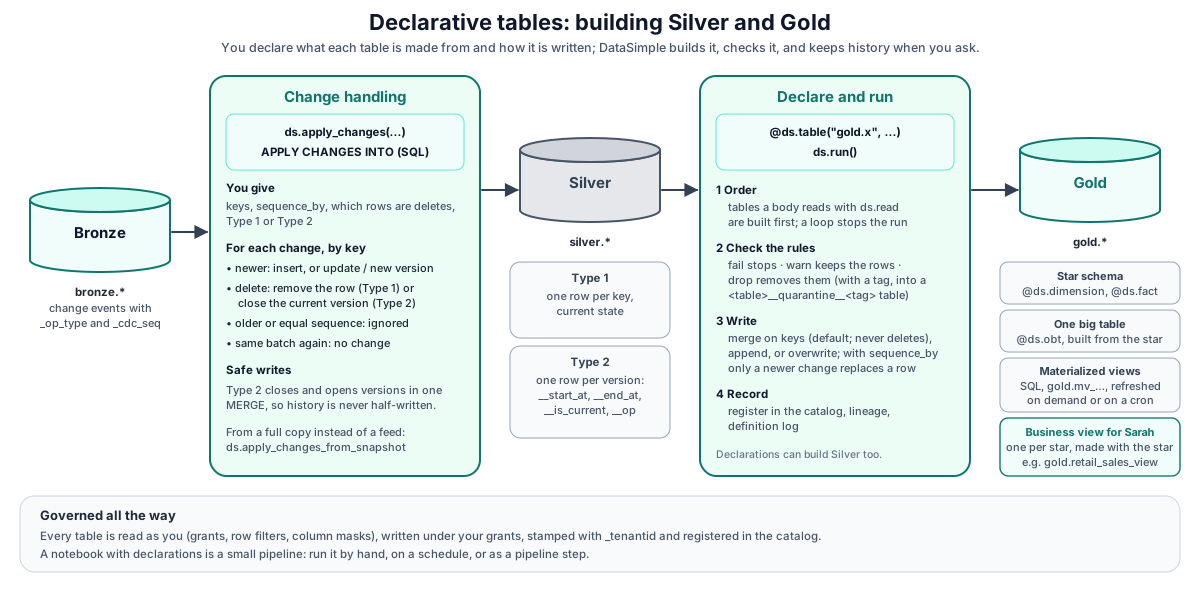
- A Python cell runs in your Spark session, where the
dshelper is always available. - A SQL cell is sent to DataSimple.
APPLY CHANGESruns as ads.apply_changescall on the same session.MERGE CHANGESruns as a DeltaMERGE. Materialized view statements create, refresh and schedule the stored result. - Every table is read as you (grants, row filters, masks), written under your grants, stamped with
_tenantid, registered in the catalog, and logged in the definition log with methodds_tablesorapply_changes. Each built table prints a lineage line, and exactly those edges appear in Lineage.
Declare and run#
@ds.table(name, mode="merge", keys=None, sequence_by=None, expectations=None, comment=None)
def body():
    return ds.read("bronze.public_orders")      # any DataFrame
| Call | What it does |
|---|---|
ds.read(name) |
Inside a run: a declared table, built and stored first (after its rules and merge), or any catalog table, governed. Outside a run: shows what the body returns, without writing. |
ds.expect(df, name, rule, action="fail", tag=None) |
A rule inside a body. |
expectations=[{"name", "rule", "action", "tag"}] |
The same rules on the declaration, applied before the write. |
ds.run() |
Builds every declared table in dependency order; returns {table: rows stored}. Each body runs once per run. |
ds.status() / ds.reset() / ds.checks() |
Show declarations, mode, built flag and reads / clear them / show the join checks of the last run. |
Rules to remember:
mergenever deletes. It inserts and updates. Useds.apply_changes(apply_as_deletes=…)for deletes.- Re-running is safe with
merge+sequence_byand withds.apply_changes: older changes never overwrite newer data. - Quarantine adds up. A
droprule with a tag appends failing rows every run. If the body re-reads all of Bronze, the same bad row is quarantined again.
ds.apply_changes#
ds.apply_changes(target, source, keys, sequence_by,
                 apply_as_deletes=None, stored_as_scd_type=1,
                 except_columns=None, track_history_except_columns=None,
                 history_table=None, track_sequence_changes=False)
| Argument | Meaning |
|---|---|
target |
Catalog name (silver.customers; datasimple. accepted). Created on the first call (Delta by default) and registered. |
source |
A catalog name (read with read_table, governed) or a DataFrame. |
keys, sequence_by |
Required. |
apply_as_deletes |
SQL boolean over the source marking deletes, for example "_op_type = 'D'". |
stored_as_scd_type |
1 current state, 2 history. |
except_columns |
Source columns not stored. May not name _tenantid. |
track_history_except_columns |
Type 2: a change only in these columns opens no version. |
history_table |
Type 1 only: also keep a Type 2 table of that name. |
track_sequence_changes |
Type 2, default False: when sequence_by is a column, a row re-sent with identical data and only a newer sequence opens no version. True records every re-send as a version. A sequence_by expression is never excluded. |
The merge rules:
| Incoming change | Type 1 | Type 2 |
|---|---|---|
| Unknown key, not a delete | inserted | new version, __op = I |
| Known key, newer sequence | row updated | current version closed, new version __op = U |
| Known key, newer sequence, delete | row removed | current version closed, nothing opened |
| Known key, older or equal sequence | ignored | ignored |
| Several changes for one key in one batch | last one wins | every change kept in sequence order |
| Re-run of the same batch | no change | no change |
A change without a sequence value never replaces stored data. Type 1 still inserts it when its key is new. Type 2 does not apply it and prints a warning in the cell output. _tenantid is a system column: a change only in it opens no version.
Type 2 is one MERGE. Closing the current versions and inserting the new ones is a single Spark SQL MERGE, so the table is never left with a closed version and no replacement. Changes older than the stored history are reported, not applied. If the single MERGE cannot run, it fails before writing anything and DataSimple falls back to a two-step update on the last change per key, with a warning in the cell output.
ds.apply_changes_from_snapshot(target, snapshot, keys, stored_as_scd_type=1, snapshot_version=None) works from a full copy instead of a feed: a key missing from the snapshot is removed (Type 1) or closed (Type 2); a row equal in every non-key column is untouched. ds.create_target_table(name, comment=None, columns=None, format="delta") creates a target ahead of time (idempotent).
Bookkeeping columns: __sequence, __updated_at (Type 1); __start_at, __end_at, __is_current, __op (Type 2). A target created earlier without them gets them on the first apply.
SQL: APPLY CHANGES#
The SQL form of ds.apply_changes, for interactive and scheduled SQL cells. FROM takes a table or a (subquery); clauses after it may come in any order. The result is one summary row.
APPLY CHANGES INTO silver.customers
FROM bronze.public_customers
KEYS (customer_id)
SEQUENCE BY updated_at
APPLY AS DELETES WHEN _op_type = 'D'
STORED AS SCD TYPE 2
EXCEPT COLUMNS (_op_type)
TRACK HISTORY EXCEPT COLUMNS (last_login);

APPLY CHANGES FROM SNAPSHOT INTO silver.customers_current
FROM source.dbo_customers
KEYS (customer_id)
STORED AS SCD TYPE 1
SNAPSHOT VERSION 20261027;
There is no SQL clause for history_table or track_sequence_changes; use the Python call for those.
SQL: MERGE CHANGES (older grammar)#
MERGE CHANGES / MERGE SNAPSHOT is an older grammar that runs as a Delta MERGE. It still works and autocomplete still offers it, but it may be retired in a future release. Prefer APPLY CHANGES in new code.
MERGE CHANGES INTO silver.customers
FROM bronze.customers_cdc
KEYS (customer_id)
SEQUENCE BY updated_at
DELETE WHEN _op_type = 'D'
IGNORE COLUMNS (_op_type)
STORED AS SCD TYPE 1;          -- or 2 (history in __start_at / __end_at)

MERGE SNAPSHOT INTO silver.customers
FROM src_customers_today
KEYS (customer_id)
DELETE MISSING
MIN SOURCE ROWS 1000;
Things to know:
- The target must exist first.
APPLY CHANGEScreates it;MERGE CHANGESdoes not. - Audit columns.
MERGE CHANGESadds the DataBridge audit columns (_op_type,_cdc_seq,_source_ts,_load_ts,_batch_id,_row_hash,_is_deletedand others) to the source and adds missing ones to the target.IGNORE COLUMNSdoes not remove those audit columns. TheDELETE WHENrule reads the source's own marker. - Different column names.
MERGE CHANGEShistory uses__start_at/__end_atonly;ds.apply_changesalso writes__is_currentand__op.
Materialized views#
CREATE MATERIALIZED VIEW gold.mv_sales_revenue_daily
  SCHEDULE CRON '30 7 * * 1-5' TIMEZONE 'Asia/Kolkata'
AS SELECT c.region, o.order_date, SUM(o.amount) AS revenue, COUNT(*) AS orders
     FROM silver.orders o
     JOIN silver.customers c ON c.customer_id = o.customer_id AND c.__is_current
    GROUP BY c.region, o.order_date;

REFRESH MATERIALIZED VIEW gold.mv_sales_revenue_daily;
ALTER MATERIALIZED VIEW gold.mv_sales_revenue_daily SET SCHEDULE CRON '0 * * * *';
ALTER MATERIALIZED VIEW gold.mv_sales_revenue_daily DROP SCHEDULE;
DROP MATERIALIZED VIEW gold.mv_sales_revenue_daily;     -- soft drop, like a table
- The query is one read-only
SELECTorWITH. The result is a Delta table of the same name. - Names:
<gold|silver>.mv_<snake_case>, at most 60 characters. A bad name is refused with a corrected suggestion. - Creating needs
CREATE_TABLE; refresh and schedule changes needMODIFYor ownership; drop follows the table rules. - An existing table with the same name is never replaced.
- If the first build fails (a column the query names is missing, for example), the view is still saved with
last_status = 'error', and a secondCREATE MATERIALIZED VIEWof the same name says it already exists. Correct the query withCREATE OR REPLACE MATERIALIZED VIEW. - A scheduled refresh runs as the owner and needs scheduling to be enabled on your platform (ask your administrator).
- Freshness:
information_schema.materialized_views(last_refreshed,next_refresh,last_status,row_count,refresh_ms).
Star schema and one big table#
| Declaration | Builds |
|---|---|
@ds.dimension(name, keys, scd=1 or 2, sequence_by=None, track=None, surrogate_key=None, unknown=True, target="lakehouse", path=None, format=None) |
One row per key (Type 1) or per version (Type 2). Adds a surrogate key (gold.dim_customer → customer_key) that never changes once given, and an Unknown row with key -1. The first Type 2 version starts in 1900 so older facts still find a row. |
@ds.fact(name, grain=[…], measures=[…], dimensions={fk: dim}, event_time=…, mode="overwrite", max_unknown_ratio=None) |
Fact rows with each foreign key swapped for the dimension's surrogate key; for Type 2 the version in force at event_time. No match gives -1 and is counted. |
@ds.obt(name, fact=…, as_of="event" or "current", columns=None) |
The fact joined to its dimensions in one wide table. |
Join checks run on every build and stop the run on anything that would make numbers wrong: one_row_per_key (dimension; a failure without sequence_by, only a warning with it, because rows sharing a key are then kept as history or as the latest), natural_key_present (warning), grain_unique (fact), join row count (a lookup must not multiply rows), known_<fk> (warning, or failure above max_unknown_ratio), rows_match_fact (OBT). Results print under the cell, come back from ds.checks(), and are stored on the Data Quality page (suite join checks), where a failure raises an alert.
Storage: target="lakehouse" (managed Delta, or Iceberg with format="iceberg") or target="lake", path=…, format="parquet"|"delta" (files at the path, registered as an external table).
Business view. After a successful ds.fact or ds.obt build, DataSimple creates or refreshes one business view for the star in Gold, for example gold.retail_sales_view: the One Big Table when there is one, otherwise the fact joined to its dimensions, without surrogate keys or SCD columns, with its meaning saved (grain, measures and whether they add up, date column, dimensions). Sarah answers from these views. Reads of a view go through its tables, so their grants, row filters and masks apply. The view is built as the person who ran the build; a build that is not allowed to change the table does not change its model. See Assistants.
REST API#
Base URL https://<your-datasimple-host>, header Authorization: Bearer <PERSONAL_TOKEN>.
| Method | Path | Purpose |
|---|---|---|
| POST | /api/notebooks/spark/run |
Run Python code ({ notebookId, cellId, code, params }) |
| POST | /api/notebooks/spark/sql |
Run SQL ({ notebookId, cellId, sql, previewRows }) |
| POST | /api/notebooks/spark/run-notebook |
Run a whole notebook |
Developer examples#
1. Silver and Gold in one cell#
ds.reset()

ds.apply_changes("silver.customers", "bronze.public_customers",
                 keys=["customer_id"], sequence_by="updated_at",
                 apply_as_deletes="_op_type = 'D'", except_columns=["_op_type"],
                 stored_as_scd_type=2)

@ds.table("silver.orders", mode="merge", keys=["order_id"], sequence_by="updated_at",
          expectations=[{"name": "amount_present", "rule": "amount IS NOT NULL",
                         "action": "drop", "tag": "no_amount"}])
def orders():
    return ds.read("bronze.public_orders").filter("_op_type <> 'D'").drop("_op_type")

@ds.table("gold.sales_by_region", mode="overwrite", comment="Revenue by region and day")
def sales_by_region():
    o = ds.read("silver.orders")
    c = ds.read("silver.customers").filter("__is_current").select("customer_id", "region")
    return o.join(c, "customer_id", "left").groupBy("region", "order_date") \
            .agg(F.round(F.sum("amount"), 2).alias("revenue"), F.count("*").alias("orders"))

ds.run()        # builds silver.orders, then gold.sales_by_region
ds.status()
2. Star schema#
ds.reset()

@ds.dimension("gold.dim_customer", keys=["customer_id"], scd=2, sequence_by="updated_at", track=["name", "region"])
def dim_customer():
    return ds.read("silver.customers").select("customer_id", "name", "region", "updated_at")

@ds.fact("gold.fact_orders", grain=["order_id"], measures=["amount"],
         dimensions={"customer_id": "gold.dim_customer"}, event_time="order_ts")
def fact_orders():
    return ds.read("silver.orders")

@ds.obt("gold.obt_orders", fact="gold.fact_orders")
def obt_orders(df):
    return df

ds.run()
ds.checks()
Example result, for two customers where Ann moved from North to East between her two orders: gold.dim_customer has 4 rows (Unknown -1; Ann North from 1900 to the move date; Ann East current; Bob South); gold.fact_orders has 2 orders, each carrying the customer_key in force at the order time (the order after the move gets Ann's East key); gold.obt_orders joins order, amount, name and region. All join checks pass, a re-run changes nothing, and Lineage shows Silver → dimension and fact → OBT.
3. Type 2 with re-sends#
r = ds.apply_changes("silver.customer_history", "bronze.public_customers",
                     keys=["customer_id"], sequence_by="seq", stored_as_scd_type=2)
print(r)    # {'target': 'datasimple.silver.customer_history', 'type': 2, 'versions_added': …, 'closed': …}
Example: three batches containing two same-data re-sends give 4 history rows with the default and 6 with track_sequence_changes=True.
4. Run a SQL apply through the API#
const res = await fetch("https://<your-datasimple-host>/api/notebooks/spark/sql", {
  method: "POST",
  headers: { "Content-Type": "application/json", Authorization: "Bearer <PERSONAL_TOKEN>" },
  body: JSON.stringify({
    notebookId: 42, cellId: "apply-orders",
    sql: `APPLY CHANGES INTO silver.orders_current FROM bronze.public_orders
          KEYS (order_id) SEQUENCE BY _load_ts
          APPLY AS DELETES WHEN _op_type = 'D'
          STORED AS SCD TYPE 1 EXCEPT COLUMNS (_op_type)`,
  }),
}).then(r => r.json());
// { success, df: { columns, rows }, rowCount, stdout, error, durationMs, trace, notes? }
Security and permissions#
- Reads go through
read_table: grants, row filters, column masks and the tenant filter apply. - Writes need
MODIFYon the target, orCREATE_TABLEon the schema the first time. - Tenant column is stamped on every write;
except_columnsandEXCEPT COLUMNSmay not remove_tenantid. - Definition log entries use method
ds_tablesorapply_changes(orschedulerin a scheduled run). - AI guardrail: Sarah and the Agent never run a rebuild that replaces data. An AI-made star must use new
gold.*names; a person rebuilds an existing one.
Monitoring and troubleshooting#
- Each table prints rows stored;
ds.run()returns{table: rows};ds.apply_changesprints+inserted ~updated -deletedorversions +n closed m. - Lineage shows the exact edges each body read. Data Quality shows join checks and quarantine counts. History shows each Delta version a run wrote.
| Message | Meaning |
|---|---|
ds.apply_changes: keys is required … / sequence_by is required … |
Pass both. |
ds.apply_changes(…): key column(s) … are not in the source |
Check the source columns. |
… _tenantid is a protected column … (except_columns cannot remove it) |
Remove _tenantid from except_columns. |
WARNING the single-MERGE history update … could not run … |
DataSimple fell back to the two-step update; the result is correct. Tell your administrator if it repeats. |
Circular read error with a chain (gold.a -> silver.b -> gold.a) |
Break the cycle. |
DELTA_MERGE_UNRESOLVED_EXPRESSION on MERGE CHANGES |
A column in the statement does not resolve; check the names, or switch to APPLY CHANGES. |
Limits#
- Several ways to keep history exist: DataBridge's Silver apply (
__seq),ds.apply_changes/APPLY CHANGES(__sequencefor Type 1,__start_at/__end_atfor Type 2),MERGE CHANGES, and the Workflow SCD2 checkbox. Their bookkeeping columns differ;ds.apply_changes/APPLY CHANGESis the recommended one. - DataBridge Silver apply does not receive deletes found by key comparison; build Silver from the Bronze change log with
ds.apply_changesfor those. MERGE CHANGESneeds an existing target.- Quarantine grows when a body re-reads all of Bronze.
- Existing Type 2 history is not rewritten when you change
track_sequence_changes. - No SQL clause for
history_tableortrack_sequence_changes.
Related content#
- Lakehouse and governance · Lake storage · Spark engine
- Notebooks · Bronze loads · Pipelines · Data quality
- User guide: DS Tables, Silver: Apply changes
- Delta
MERGE INTO: https://docs.delta.io/latest/delta-update.html - Apache Iceberg Spark procedures: https://iceberg.apache.org/docs/latest/spark-procedures/
- Spark SQL reference: https://spark.apache.org/docs/latest/sql-ref.html
- Kimball slowly changing dimensions: https://www.kimballgroup.com/data-warehouse-business-intelligence-resources/kimball-techniques/dimensional-modeling-techniques/type-2/