Overview#
The Data Source screen is the registry of saved connections. One entry describes one database, API, file location, Kafka cluster, Camel connector or lake destination. Each entry gets a public number, DS-<id>. DataBridge, Workflow, notebooks and Deployment refer to a connection by that number, so hosts and passwords stay inside DataSimple.
Who uses it:
- Data engineers add and test connections to source systems before a DataBridge load.
- Administrators create the tenant's lake destinations (Target data sources) that every load writes to.
- Developers manage connections from scripts through the REST API and pass connection numbers to DataBridge calls.
Where it is: left rail → Data Source. The same list appears in step 1 of the DataBridge wizard and in the notebook's source pickers.
How it fits the platform: a saved connection is the input of every ingestion path. DataSimple turns DS-n into real credentials only at the moment it connects to the source or the lake. See Architecture.
Key concepts#
| Term | Meaning |
|---|---|
Data Source (DS-n) |
One saved connection. n is its id; the public code is DS-<id>. |
| Engine | The connection type: mssql, postgres, mysql, oracle, snowflake, hana, sap_odata, salesforce, kafka, camel, file engines, target engines and more. GET /api/notebooks/engine-catalog lists the types the Connect dialog offers. |
| Source connection | A connection DataBridge reads from. Owned by the user who created it. |
| Target data source | A lake destination with engine target_s3 (shown as Target_AWS), target_adls (Target_Azure) or target_gcs (Target_GCP). Created by an administrator and shared by the whole tenant. Every DataBridge run writes to one. |
extraConfig |
Engine-specific fields (warehouse, role, project id, Salesforce domain, Kafka security protocol, ...). The standard secret fields in it are encrypted. Other fields whose names suggest a secret are shown as *** in responses. |
| Connection test | Connects, lists schemas (or topics, or checks the bucket), and records the last status and last error on the connection. |
How it works#
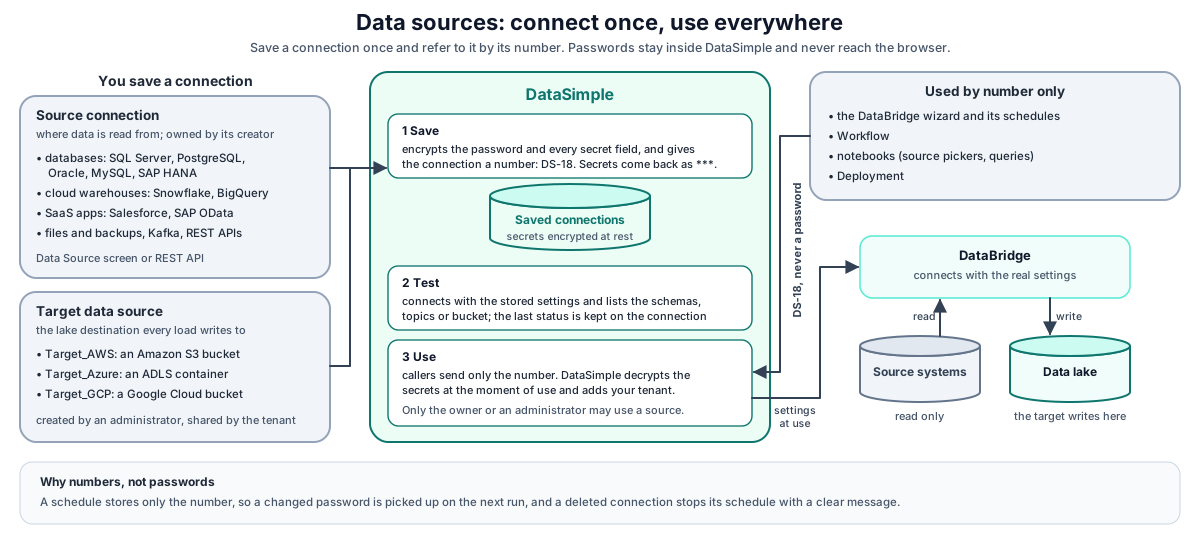
- You save a connection. DataSimple encrypts the password and any secret fields, stores the connection and returns it without secrets.
- Test connection connects with the stored settings and records the result on the connection.
- The DataBridge wizard (or your script) sends only
connectionId(source) andtargetConnectionId(destination). DataSimple supplies the real settings to DataBridge. The browser never sees them. - A DataBridge schedule stores only the numbers. Every run looks the connection up again, so a changed password is picked up. If a connection was deleted, each scheduled run is skipped and the reason is shown on the schedule. The schedule stays on until you pause or delete it.
Saving a connection#
In the UI: Data Source → Connect, pick the engine, fill in the form, click Test connection, then Save connection. When you edit a saved connection, the buttons are Test connection and Save changes.
Through the API, POST /api/notebooks/external-connections needs only engine and name.
- A connection may be saved before its driver is installed; driver availability is checked when the connection is used.
- Standard fields are
host,port,database,user,password,ssl,fileandallowMultiStatement. Anything else goes inextraConfig. - A name that already exists returns 409
A saved connection with that name already exists. - An engine starting with
target_returns 403 unless you are an administrator. - The response is
201 { success, connection }, whereconnectionhasid,code(DS-<id>), the non-secret fields,hasPassword,lastStatus,lastErrorand timestamps. Secret fields inextraConfigcome back as***.
Editing and deleting#
PUT /api/notebooks/external-connections/:id updates only the fields sent.
- A password left out keeps the stored one. An empty password clears it.
- In
extraConfig, a secret sent back as***(the redacted value you received) or left out keeps its stored value. A secret sent explicitly empty is cleared. Non-secret fields follow what you send. DELETE /api/notebooks/external-connections/:idremoves the connection.
Only the owner, or an administrator of the same tenant, may read the full connection, edit, delete or use it. Target data sources are listed for everyone in the tenant.
Secrets#
Passwords and the standard secret fields (keys, tokens, client secrets, private keys and passphrases, account keys, Camel URIs) are encrypted at rest and never returned to the browser or the API.
Other
extraConfigfields whose names suggest a secret (for example a name containing password, secret, token, key or credential) are not encrypted, but they come back as***in every response.Secrets are decrypted only at the moment a connection is used: a test, a query, or a DataBridge load.
If a secret cannot be decrypted (for example a connection copied from another environment):
- a secret field in
extraConfigis treated as empty; - a password makes the test or load fail.
In both cases, enter the secret again and save.
- a secret field in
Testing a connection#
In the UI: open the connection and click Test connection. Through the API: POST /api/notebooks/external-database/inspect with { "savedConnectionId": 18 } (or a full unsaved connection in the body).
| Engine | What the test does | Success response |
|---|---|---|
target_* |
Checks the bucket or container is reachable with these keys. | { success: true, schemas: [], target, message: "Target reachable: ..." } |
kafka |
Connects to the brokers and lists topics. | { success: true, topics, brokers, message } |
| Database engines | Needs host, user and database (or file for file databases). Lists schemas. |
{ success: true, savedId, schemas, ... } |
| Installed driver engines | The engine decides what is required. | Same shape. |
A failed test returns HTTP 200 with success: false, a plain error, errorCategory, errorDetail and driverMissing, and the connection's last status becomes error. For a server-level connection with no database, call POST /api/notebooks/external-database/list-databases first, then inspect with databaseOverride.
How DataBridge uses a connection#
On any DataBridge call (discovery, loads, schedules, file ingest, delete reconciliation) you pass connectionId and, for loads, targetConnectionId. DataSimple fills in the rest:
- Database or API connection. Host, database, user, password, port, SSL and engine fields (Snowflake, Salesforce, AWS services, BigQuery, Camel, MongoDB) are supplied for you. Engine aliases are accepted (
sqlserverformssql,postgresqlforpostgres). For Kafka only the connection part is stored (brokers, security protocol, SASL, CA); topics and message options are chosen in the wizard for each load. - File connection. Engines
file,files,file_stream,s3fileandobject_storageresolve to a file source: landing prefix, format and table. - File drop or backup drop over a Target data source. When the source is a file drop or backup drop and you pick a Target data source, the path is the bucket, then the Target's root folder, then the folder you type. A full storage URL is used exactly as typed. The bucket keys are supplied for you.
- Folder name. The connection's name becomes the folder name in the lake, so the source copy and the Bronze change log of a table always land under the same name.
A Target data source supplies the bucket (S3 or S3-compatible GCS with HMAC keys) or container (ADLS), its keys and an optional root folder. Blank keys on an S3 target mean DataSimple uses its own cloud identity. The bucket field may carry a root folder after the bucket name (<bucket>/<root folder>).
Every DataBridge call also carries your tenant and records you as the person who started the load.
REST API#
Call these with Authorization: Bearer <PERSONAL_TOKEN>.
| Method | Path | Purpose |
|---|---|---|
| GET | /api/notebooks/external-connections |
Your connections plus the tenant's Target data sources, without secrets. |
| POST | /api/notebooks/external-connections |
Create. 201, or 409 on a duplicate name, or 403 for a target by a non-administrator. |
| PUT | /api/notebooks/external-connections/:id |
Update the fields sent. |
| DELETE | /api/notebooks/external-connections/:id |
Delete. |
| POST | /api/notebooks/external-database/inspect |
Test and list schemas, topics or bucket reachability. |
| POST | /api/notebooks/external-database/list-databases |
List the databases on a server-level connection. |
| POST | /api/notebooks/external-database/query |
Run a query against a saved connection. |
| GET | /api/notebooks/engine-catalog |
Source types offered by the Connect dialog. |
Developer examples#
1. Save and test a SQL Server source#
const base = "https://<your-datasimple-host>/api/notebooks";
const headers = { "Content-Type": "application/json", "Authorization": "Bearer <PERSONAL_TOKEN>" };

const created = await fetch(`${base}/external-connections`, {
  method: "POST", headers,
  body: JSON.stringify({
    name: "Sales-SQL", engine: "mssql",
    host: "<database host>", port: 1433, database: "Sales",
    user: "<user>", password: "<password>", ssl: true,
  }),
}).then(r => r.json());
// { success: true, connection: { id: 18, code: "DS-18", name: "Sales-SQL", engine: "mssql",
//   hasPassword: true, lastStatus: null, ... } }

const test = await fetch(`${base}/external-database/inspect`, {
  method: "POST", headers,
  body: JSON.stringify({ savedConnectionId: created.connection.id }),
}).then(r => r.json());
// success: { success: true, savedId: 18, schemas: [...] }
// failure: { success: false, error: "...", errorCategory: "...", driverMissing: false }
2. Change the password without touching other secrets#
curl -s -X PUT https://<your-datasimple-host>/api/notebooks/external-connections/18 \
  -H "Content-Type: application/json" -H "Authorization: Bearer <PERSONAL_TOKEN>" \
  -d '{ "password": "<new password>" }'
Only the password changes. Fields not sent keep their values.
3. Create a Target data source (administrator)#
curl -s -X POST https://<your-datasimple-host>/api/notebooks/external-connections \
  -H "Content-Type: application/json" -H "Authorization: Bearer <PERSONAL_TOKEN>" \
  -d '{ "name": "Target_AWS", "engine": "target_s3",
        "extraConfig": { "bucket": "<bucket>/<root folder>", "region": "<region>" },
        "user": "<access key id>", "password": "<secret>" }'
Leave user and password empty to use DataSimple's own cloud identity. Test it with inspect; the message names the reachable location.
4. Use the numbers in a DataBridge call#
await fetch("https://<your-datasimple-host>/api/databridge/api/tables", {
  method: "POST",
  headers: { "Content-Type": "application/json", "Authorization": "Bearer <PERSONAL_TOKEN>" },
  body: JSON.stringify({ connectionId: 18, database: "Sales" }),
});
DataSimple supplies the full source settings for connectionId: 18. See DataBridge for starting a load.
Security and permissions#
- Secrets never reach the browser. List and read responses carry
hasPasswordand***for secret fields. Secrets are decrypted only at use time. - Ownership. A source connection is visible to and usable by its owner and the tenant's administrators. Target data sources are shared by the tenant and only administrators create them.
- Tenant. Connections belong to a tenant. Targets are listed per tenant. Scheduled loads run as their owner and are refused if the owner is no longer in the schedule's tenant.
- Screen access. The Data Source screen needs the Data Source permission in your role. The notebook editor also lists your connections in its source pickers.
- Audit. Create, update, delete and every test or query appear in History (
connection.create,connection.update,connection.delete,connection.query). A failed test is recorded as an error even though the HTTP status is 200. - Logs. Error text in History and the Log screen has hosts, addresses, storage locations and personal tokens removed.
Monitoring and troubleshooting#
- The list shows each connection's last status and last error, from the last test or use.
- History shows
connection.*actions with who did them and the outcome.
| Message | Meaning |
|---|---|
engine is required / name is required |
The request is missing the field. |
A saved connection with that name already exists. (409) |
Names are unique; pick another. |
Only an administrator can create a Target (AWS / Azure / GCP) data source. (403) |
Ask an administrator. |
host and user are required |
A database engine needs them for a test. |
A database name is required to inspect schemas... |
Call list-databases first, then inspect with databaseOverride. |
Workspace Data Source connection N not found (404) |
The number does not exist, or you are not its owner or an administrator. |
Target connection N not found (or it is not a Target_AWS/Azure/GCP data source) |
targetConnectionId points at a source connection or at nothing. |
| A secret is empty, or a test or load fails on the password, after a copy between environments | It cannot be read in this environment. Enter it again and save. |
Limits and known issues#
- A connection can be saved before its driver exists. The error appears at test or load time.
- Oracle and MySQL change-log capture are not available; under Automatic DataBridge falls back to watermark or full load (see DataBridge).
Related content#
- DataBridge
- Data Lake
- Workflow
- Deployment
- App server and security
- Amazon S3 (concepts only): https://docs.aws.amazon.com/AmazonS3/latest/userguide/Welcome.html
- Azure Data Lake Storage: https://learn.microsoft.com/azure/storage/blobs/data-lake-storage-introduction