Overview#
Every screen in DataSimple and every call from a script goes through the same front door. DataSimple decides, for each request:
- Who is calling: a signed-in person or a personal API token that acts as that person.
- Which tenant the request belongs to: always the caller's own tenant.
- Which screens the caller's role allows.
- Which data the caller may read or change: catalog grants, row filters and column masks.
Nothing in the browser or in your scripts holds a database password, a storage key or an engine address. For the platform overview see 01-architecture.md.
Key concepts#
| Term | Meaning |
|---|---|
| Tenant | An isolated workspace identified by three digits, 000 to 999. |
| User | A person, identified by tenant + username. The same username in two tenants is two different people. |
| Session | What a browser sign-in creates. One active session per user. |
| Personal API token | A dsp_... token for scripts. It acts as its owner, without a browser. See 18-workspace-and-administration.md. |
| Role | Decides which screens (and the API calls behind them) a user may use. |
| Grant | Decides what data a user may read or change (SELECT, MODIFY, MANAGE and so on). |
| Administrator | A user whose role is an administrator role. |
How it works#
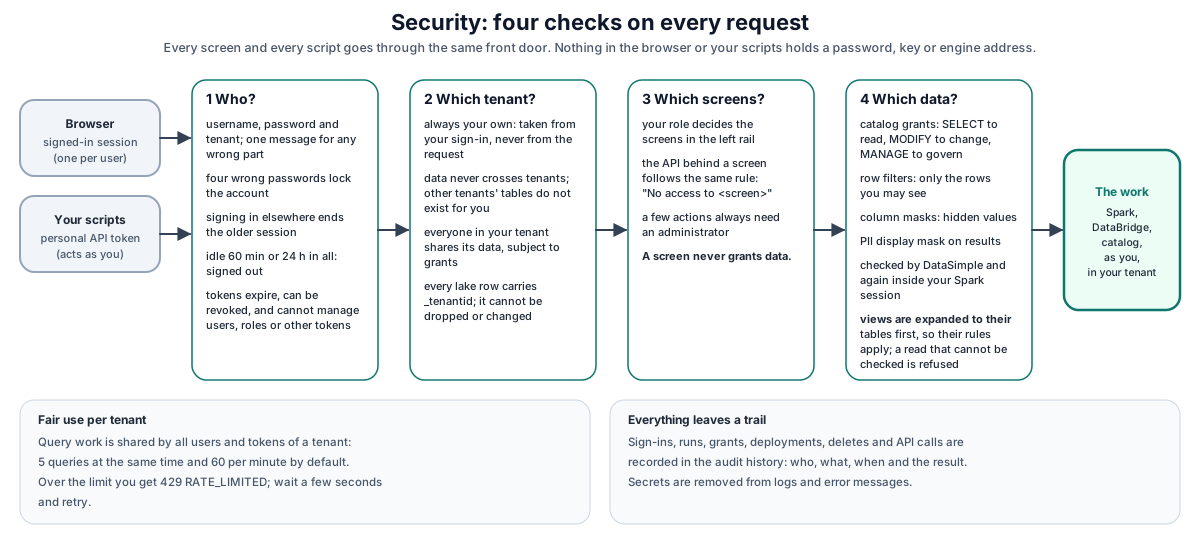
Your browser and your scripts only ever talk to DataSimple. DataSimple calls the Spark engine, DataBridge and the catalog on your behalf, as you, inside your tenant.
Sign-in and sessions#
- Sign in with username, password and tenant. The tenant is exactly three digits (
001); a shorter form such as1is refused, not padded. - A failed sign-in always shows the same message,
Invalid credentials or tenant, whether the username, password or tenant was wrong. - A sign-in with a missing field, or with a tenant that is not a number from
000to999, is refused with 400 before any check:Username, password, and tenantid are requiredortenantid must be an integer between 000 and 999. - Four wrong passwords lock the account. An administrator unlocks it in Administration → Users.
- There is no self-registration. Administrators create users.
- A successful sign-in answers only after your session is saved, so the next request made with the new session cookie is already signed in.
- One active session per user. Signing in on another browser or device ends the older session; any open tab of the older session is signed out with a message.
- A session ends after 60 minutes without activity (your administrator can change this) and in any case after 24 hours. Background refreshes on an open screen do not count as activity.
- Personal API tokens do not create sessions, so a script using a token never signs you out of your browser, and signing in never stops your scripts.
Tenants#
- A person is a tenant plus a username. Every request runs in the caller's own tenant. The tenant is taken from your sign-in or token, never from anything in the request, so a request cannot ask for another tenant.
- Data never crosses tenants. Notebooks, pipelines, workflows, schedules, Data Sources, DataBridge jobs, reports, approval cards, history and lake data are all kept per tenant.
- Lake tables of other tenants do not exist for you.
SHOW TABLES,spark.catalog.listTables()and the Lakehouse screen list only your tenant's tables. Naming another tenant's table in SQL or Python (spark.table,spark.read.table,saveAsTable,insertInto,writeTo) returns Table or view … was not found in your catalog. Reading or writing another tenant's lake folder by path returns The lake path … is not in your catalog. A new table needs a name that is not already used: if the name is taken you get The table name … cannot be used: choose another name. - Within a tenant, users share the tenant's data, subject to grants, row filters and column masks. Two users of the same tenant see the same tables if both are granted access.
- Lake tables carry a
_tenantidcolumn recording the writer's tenant. DataSimple fills it in automatically when you create a table from a query or insert rows. You cannot drop, rename or change the type of_tenantid; such a statement is refused before it runs, from SQL or Python.
Roles and screen access#
Each user has one role. The role decides which screens appear in the left rail, and DataSimple refuses API calls that belong to a screen the role does not have, with 403 No access to <screen> (ask an administrator). Administrators manage roles and screen access in Administration → Roles; the screens, their keys and the role templates are listed in 18-workspace-and-administration.md.
Some features also require an administrator regardless of screens, for example Administration, and adding, editing or removing Deployment environments or approving someone else's promotion request (403 Admin access required). Promoting itself only needs the Deployment screen.
Screen access never grants data. Data access is decided by catalog grants, row filters and column masks; see 07-lakehouse-and-governance.md.
Whose grants apply when no one is typing:
- Scheduled notebooks and pipelines apply the grants, row filters and column masks of the schedule's owner, the same checks as in the editor.
- Assistants (Sarah, the Agent, Everything, and the AI features of Semantics and Workflow) run as the person asking, with that person's session or personal API token. A request with neither is refused.
- Dataflow notebook and cell DAGs run as the principal
dataflow; see 11-dataflow.md. - Groups apply only inside their own tenant. A group of the same name in another tenant is a different group.
Personal API tokens#
Create tokens on Settings → Personal API tokens. A token:
- acts as you: same role, screens, grants and tenant;
- can call every API your role and grants allow;
- cannot create or revoke tokens, sign in or out, change passwords, or administer users or roles (403
TOKEN_NOT_ALLOWED); - cannot create, change, revoke or delete Delta Sharing recipients or dbt clients, or change a dbt client's grants (403
TOKEN_NOT_ALLOWED); listing them is allowed; - stops working when it expires, when you revoke it, when your account is locked, or when you are moved to another tenant.
Details are in 18-workspace-and-administration.md.
Other credentials for outside tools#
| Caller | Credential | Chapter |
|---|---|---|
| Your scripts | Personal API token | This chapter |
| dbt running outside DataSimple | dbt client key | 22-dbt.md |
| Delta Sharing recipients | Recipient token | 14-datashare.md |
Calling the REST API from scripts#
Base URL and authentication#
https://<your-datasimple-host>
Send your token on every request:
Authorization: Bearer <PERSONAL_TOKEN>
Always use HTTPS. Keep tokens out of source control; read them from a secret store or an environment variable in your script.
JSON conventions#
- Send request bodies as JSON with
Content-Type: application/json. Request bodies can be up to 50 MB (file uploads have their own limits). - Most answers are JSON objects with
"success": trueand the data in named fields, for example{ "success": true, "rows": [...] }. - Some long-running features (Sarah, the Agent) stream progress as server-sent events (
text/event-stream); each line starting withdata:holds one JSON event. - Identifiers of catalog objects use the three-part form
catalog.schema.table. Where a two-part name is accepted, the default catalog is used.
Error format#
Errors use an HTTP status code and a JSON body:
{ "success": false, "error": "Too many concurrent queries for this tenant (5/5). Wait for one to finish, or click Stop on a running cell.", "code": "RATE_LIMITED" }
code is present where a script can act on it (for example TOKEN_INVALID, RATE_LIMITED, APPROVAL_NOT_ALLOWED). Check code and the status, not the wording, which may change. Some older endpoints answer { "message": "..." } instead of error.
Error messages never contain server addresses or internal names. If you see (server) in a message, an address was removed from it.
Common status codes#
| Status | Meaning | What to do |
|---|---|---|
| 200, 201 | Success | |
| 400 | The request is malformed or a value is invalid | Fix the request; the error says which value |
| 401 | Not signed in, session ended, or token invalid (TOKEN_INVALID, ACCOUNT_LOCKED, SESSION_IDLE) |
Check the token; for a browser session, sign in again |
| 403 | Signed in but not allowed: missing screen (No access to ...), not an administrator (Admin access required), missing grant, or a token-restricted action (TOKEN_NOT_ALLOWED) |
Ask an administrator for the screen or grant, or do the action signed in to the application |
| 404 | The object does not exist in your tenant | Check the id or name |
| 409 | Conflict with the current state: for example an approval card that is no longer pending, a deployment that needs approval or another stage first, or an object that already exists | Read error, refresh the state, then retry or change the request |
| 429 | Rate limit reached (RATE_LIMITED). Sarah's streamed answer reports this as an error event instead (see Rate limits) |
Wait for the Retry-After seconds, then retry |
| 500, 502, 503 | DataSimple or one of its engines is unavailable or failed | Retry with backoff; if it persists, contact your administrator |
Rate limits#
Query work is limited per tenant, shared by all users and tokens of the tenant:
| Limit | Default |
|---|---|
| Queries running at the same time | 5 |
| Queries started per rolling minute | 60 |
The limit applies to Spark SQL and cell execution, Sarah and the Agent. Requests over the limit are refused at once, not queued. Spark and Agent calls answer 429 RATE_LIMITED with a Retry-After header. Sarah streams her answer, so she reports the limit as an error event with code RATE_LIMITED in the stream instead; wait a few seconds and ask again. Your administrator can change the limits.
Example: run a query#
curl -X POST https://<your-datasimple-host>/api/notebooks/spark/sql \
  -H "Authorization: Bearer <PERSONAL_TOKEN>" -H "Content-Type: application/json" \
  -d '{"sql":"SELECT region, SUM(amount) AS amount FROM gold.sales_by_region GROUP BY region"}'
Example: Python with retry on 429#
import os, time, requests

BASE = "https://<your-datasimple-host>"
HEADERS = {"Authorization": f"Bearer {os.environ['DATASIMPLETOKEN']}"}

def call(method, path, **kw):
    for attempt in range(5):
        r = requests.request(method, BASE + path, headers=HEADERS, timeout=300, **kw)
        if r.status_code == 429:
            time.sleep(int(r.headers.get("Retry-After", "5")))
            continue
        body = r.json()
        if r.status_code >= 400 or body.get("success") is False:
            raise RuntimeError(f"{r.status_code} {body.get('code')}: {body.get('error') or body.get('message')}")
        return body
    raise RuntimeError("Rate limited too many times")

me = call("GET", "/api/auth/me")
rows = call("POST", "/api/notebooks/spark/sql", json={"sql": "SELECT current_date() AS today"})
Where to find each API#
| Area | Chapter |
|---|---|
| Notebooks and Spark SQL | 02-notebooks.md, 23-spark-engine.md |
| DataBridge loads | 04-databridge.md |
| Catalog, grants, row filters, column masks | 07-lakehouse-and-governance.md, 26-unity-catalog-step-by-step.md |
| Pipelines and workflows | 08-pipelines.md, 09-workflow.md |
| Data quality, semantics | 12-data-quality.md, 13-semantics.md |
| Delta Sharing | 14-datashare.md |
| Deployment | 16-deployment.md |
| Sarah, Agent, Everything | 17-assistants.md |
| Tokens, settings, screens | 18-workspace-and-administration.md |
| Full endpoint list | 25-reference.md |
Security and permissions#
A request passes these layers, from outside in:
| Layer | Enforces |
|---|---|
| Identity | A signed-in session or a valid personal API token; idle and maximum session times; one session per user |
| Tenant | Always the caller's own tenant; data never crosses tenants; _tenantid on lake tables is protected |
| Screen access | Which screens' API calls the role may use |
| Feature checks | Administrator-only features, ownership of objects |
| Data grants | Catalog privileges, row filters and column masks on every query |
| AI guardrail | Extra rules for SQL written by Sarah or the Agent (see 17-assistants.md) |
| Secrets | Passwords and keys stay on the server and are masked in answers |
| Audit | Every change is recorded |
Audit trail#
| What | Where | Who can see it |
|---|---|---|
| Feature actions: deployments, grants, catalog changes, token creation and revocation, assistant runs and approvals, guardrail blocks | History screen | Users with the History screen |
| Every change request in the application (who, when, what, result), with passwords, tokens and secrets masked | Ingestion → Activity Logs | Administrators |
| Failed actions | Ingestion → Error Logs | Administrators |
| Each SQL statement run, by notebook, schedule, pipeline or assistant | Log screen | Users with the Log screen |
| Catalog permission changes and access decisions | Administration → Governance → catalog audit | Administrators |
Settings you can change#
| Setting | Where | Who |
|---|---|---|
| Personal API tokens | Settings | Each user |
| Users, locks, roles, screen access | Administration | Administrators |
| Grants, row filters, column masks | Lakehouse, Administration → Governance | Owners with MANAGE, administrators |
Session timeout and rate limits are set by your administrator.
Monitoring and troubleshooting#
| Answer | Meaning |
|---|---|
401 Login required |
No session, or the session ended (for example because you signed in elsewhere) |
401 SESSION_IDLE |
Idle timeout; sign in again |
401 Invalid credentials or tenant |
Wrong username, password or tenant, or a locked account |
400 tenantid must be an integer between 000 and 999 |
The tenant is not a number from 000 to 999 |
400 Username, password, and tenantid are required |
A sign-in field is empty |
401 TOKEN_INVALID |
The token is unknown, expired or revoked |
403 TOKEN_NOT_ALLOWED |
This action needs a person signed in to the application |
403 No access to <screen> |
Your role lacks the screen behind this call |
403 Admin access required |
Administrator-only feature |
429 RATE_LIMITED |
Your tenant's query limit is reached |
| 502 on DataBridge calls | DataBridge is temporarily unavailable; retry, then contact your administrator |
(server) in a message |
An address was removed from the message |
Limits#
- One active browser session per user. Use personal API tokens for scripts.
- Session length: 60 minutes idle (default), 24 hours at most.
- Rate limits: per tenant, 5 concurrent queries and 60 per minute by default.
- Request bodies: up to 50 MB of JSON.
- 25 active personal tokens per user.
Related content#
- 01-architecture.md
- 07-lakehouse-and-governance.md
- 16-deployment.md
- 17-assistants.md
- 18-workspace-and-administration.md
- 25-reference.md
- Unity Catalog (OSS): https://docs.unitycatalog.io/
- Delta Sharing protocol: https://github.com/delta-io/delta-sharing/blob/main/PROTOCOL.md
- HTTP status codes: https://developer.mozilla.org/en-US/docs/Web/HTTP/Status