Overview#
The catalog knows which tables and columns exist. It does not know what "active customer" or "net revenue" means. That gap is where two people get two different numbers from the same data. The Semantics tab closes the gap with business definitions stored next to the catalog:
- Glossary terms: a business word, its agreed definition, synonyms, and the tables and columns that represent it. Documentation only; nothing runs.
- Metrics: a named measure with the SQL that computes it. It is either an aggregate expression over a source table or a full
SELECT. Metrics can be validated, previewed and run on Spark. - Business meaning: plain-language descriptions of tables and columns, with unit and allowed values. It can be exported as
COMMENT ONstatements. See Lakehouse and governance. - Saved joins: join setups from the join builder, saved per user and reloaded later.
Terms, metrics and meanings each have a status. Only approved entries reach the assistants (Sarah and the Agent), so a draft is never presented as settled fact. See Assistants and Architecture.
Key concepts#
| Term | Meaning |
|---|---|
| Term | A glossary entry: term, definition, synonyms[], tables[], columns[], owner, status. Unique per tenant, case-insensitive. |
| Metric | A named measure: name, definition, sql, grain, unit, source_table, dimensions[], owner, status, plus the last run (time, duration, rows, error and value). |
| Status | draft, approved or deprecated. A deprecated metric is kept for history and refuses to run (409). |
| Expression metric | sql such as SUM(total). At run time it becomes SELECT <dims>, <expr> AS <alias> FROM <source_table> [WHERE ...] [GROUP BY <dims>] LIMIT n. Needs source_table. |
| Full-SELECT metric | sql that starts with SELECT or WITH. It runs as written; filters become an outer WHERE; LIMIT is added if missing. |
| Dimensions | Columns to group by (expression metrics only). Saved on the metric; a run can override them. |
| Filters | Run-time { column: value | [values] | null }, turned into =, IN (...) or IS NULL. |
| Params | Run-time values for {{name}} placeholders in the metric SQL. |
| Business meaning | A description of a table or column: meaning, unit, allowed_values, status, source. |
| Saved join | The join builder's setup, saved per user. |
| Context | The approved terms and metrics, rendered as text for assistants (GET /context). |
How it works#
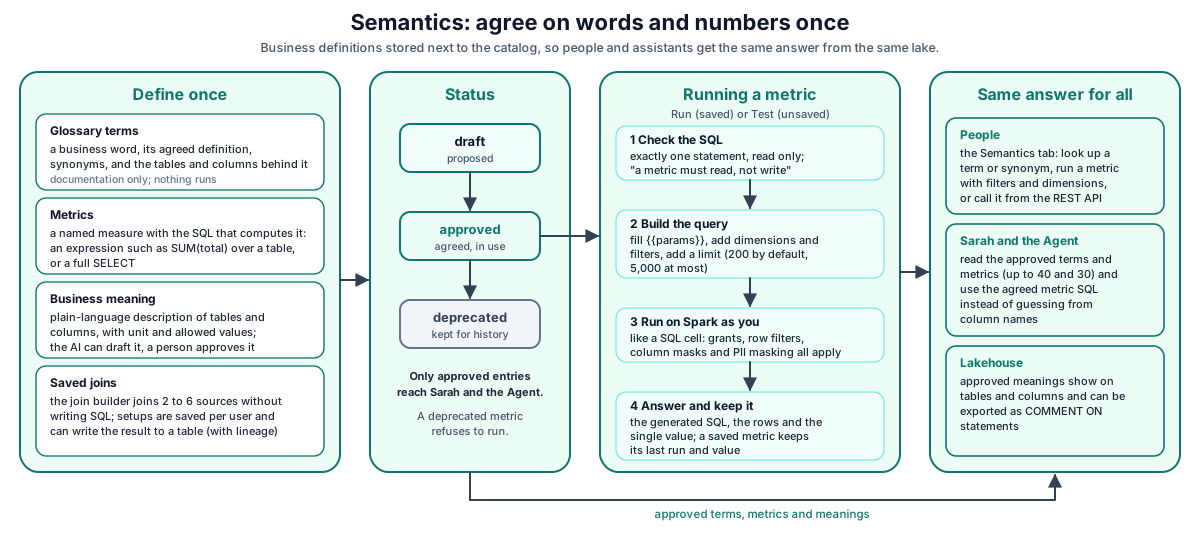
How a metric run works:
- The screen calls
POST /metrics/:id/run(saved metric) orPOST /metrics/preview(unsaved). - DataSimple checks the metric's SQL for write keywords, fills in
{{params}}, adds dimensions, filters and the limit, and checks that the final text is exactly one statement. - The final SQL runs on Spark as you, exactly like a SQL cell. Catalog resolution, grants, row filters, column masks and PII masking all apply.
- The response carries the generated SQL, columns, rows, duration and the single value (when the result is one row and one column). The outcome is kept on the metric as its last run.
Glossary terms#
POST /terms creates or replaces a term by name (case-insensitive). term and definition are required. synonyms, tables and columns accept an array or a comma-separated string. Status defaults to draft.
GET /lookup?q= matches the term, its synonyms, its definition and metric names, with approved entries first. Searching for a synonym finds the term.
Metrics#
Validation (POST /metrics/validate, and on every save) is a static check:
- Empty SQL, or SQL that is only comments, is refused.
- A
;inside the text is refused: one statement only. - Any write keyword (
INSERT,UPDATE,DELETE,MERGE,DROP,ALTER,TRUNCATE,CREATE,GRANT,REVOKE,COPY,CALL) is refused with "a metric must read, not write". - Text that starts with
SELECTorWITHis kindselect. Commands such asSHOW,DESCRIBE,SETorOPTIMIZEare refused. Anything else is kindexpression.
The response is { success, ok, sql, kind } or { success, ok: false, error }.
Running. Run bodies take params, limit (default 200, max 5,000), dimensions and filters:
- For an expression metric,
source_tableis required. Dimensions and filter columns must be plain column names. - For a full SELECT, filters wrap the query:
SELECT * FROM (<query>) AS <alias> WHERE .... - A missing
{{param}}returns 400 withmissingParams. - A Spark error (bad column, missing table) returns 200 with
success: false, the error and the SQL that failed, so you see both. Other refusals keep their status: 403 for a permission problem, 429 when you send too many requests, 503 when the Spark engine is unavailable. - A successful run replaces the last value. When the result has one row and one column, that cell becomes the last value; any other result leaves no last value. A failed run records the error and keeps the previous value.
Example: metric SUM(total) on gold.orders_summary with dimension customer_id generates SELECT customer_id, SUM(total) AS ... FROM gold.orders_summary GROUP BY customer_id LIMIT 200.
Preview runs an unsaved definition (the editor's Test button). Nothing is stored on a metric.
Business meaning#
Meanings describe tables and columns in business words. The routes are under /api/notebooks/semantic/meaning. The full lifecycle (AI drafts when a table is created, approval, coverage, COMMENT ON export) is covered in Lakehouse and governance. In short:
POST /meaningsaves one meaning as approved.schemaandtableare required;column,unitandallowedValuesare optional. The table and column must exist in the catalog.POST /meaning/draftandPOST /meaning/draft-schemaask the AI for drafts, using a few sample rows read with your permissions. They are saved asdraft.POST /meaning/approve,POST /meaning/approve-schemaandPATCH /meaning/:idapprove or edit drafts.GET /meaning/sqlreturns approved meanings asCOMMENT ON TABLEandCOMMENT ON COLUMNstatements, with[unit: ...]and[values: ...]tags.GET /meaning/modelreturns the approved text the AI reads.
Describing a table needs ownership or MANAGE on it; otherwise the answer is 403. A table built by a pipeline usually already has AI-drafted meanings waiting for approval.
Saved joins and the join builder#
The join builder lets you join 2 to 6 sources without writing SQL.
POST /api/notebooks/spark/join takes:
sources: [{ alias, kind: "delta" | "postgres" | "file", ref }]joins: [{ left, right, how, leftKey, rightKey }]. For a composite key, givekeys: [{ leftKey, rightKey }, ...]inside the join instead ofleftKeyandrightKey.howis one ofinner,left,right,outer/full,semi,anti.- Optional
select: [{ col: "alias.column", as }],where,groupBy: ["alias.col"],aggregates: [{ func: SUM|COUNT|AVG|MIN|MAX, col, as }], andwrite: { deltaTable, mode: overwrite|append|ignore|error }.
Validation checks aliases, the number of join conditions (one fewer than the number of sources), and that keys and columns are simple names. A filter may not contain ;. Columns from the right side of a semi or anti join cannot be selected. The response is { success, df, sql, code, stdout, error, durationMs, renames, trace }. Duplicate column names are renamed automatically and listed in renames. When write is set and the join succeeds, lineage is recorded from every source to the target (job join).
Saved joins belong to the user who saved them. Other users in the tenant do not see them.
| Method | Path | Purpose |
|---|---|---|
| GET | /api/notebooks/join-defs |
List my saved joins, newest first |
| POST | /api/notebooks/join-defs |
{ name, definition }; create or replace by name. Name up to 120 characters, definition up to 64 KB. |
| DELETE | /api/notebooks/join-defs/:id |
Delete one of mine |
Context for assistants#
GET /context returns { terms, metrics, rendered }. It includes approved entries only: up to 40 terms and 30 metrics. rendered is the text block given to assistants. It has an "APPROVED BUSINESS TERMS" list and an "APPROVED METRICS — use this SQL rather than writing your own" list, with each metric's SQL and current value. Sarah and the Agent read the same approved set, so an assistant asked about revenue uses the agreed SQL instead of guessing from column names.
API reference (under /api/notebooks/semantic unless shown)#
| Method | Path | Purpose |
|---|---|---|
| GET | /status |
Counts of terms and metrics, approved counts, allowed statuses |
| GET / POST | /terms |
List (?status=) / create or replace a term |
| DELETE | /terms/:id |
Delete a term |
| GET / POST | /metrics |
List (?status=) / create or replace a metric |
| DELETE | /metrics/:id |
Delete a metric |
| POST | /metrics/validate |
Static check of the SQL |
| POST | /metrics/preview |
Run an unsaved definition |
| POST | /metrics/:id/run |
Run a saved metric; keeps the last run |
| GET | /lookup?q= |
Find terms and metrics by business words |
| GET | /context |
Approved terms and metrics for assistants |
| GET / POST | /meaning, /meaning/table, /meaning/coverage, /meaning/model, /meaning/sql |
Business meaning reads and save |
| POST | /meaning/draft, /meaning/draft-schema, /meaning/approve, /meaning/approve-schema |
AI drafts and approval |
| PATCH / DELETE | /meaning/:id |
Edit or remove a meaning |
| POST | /api/notebooks/spark/join |
Run a guided join, optionally write the result |
| GET / POST / DELETE | /api/notebooks/join-defs[/:id] |
Saved joins |
The meaning routes use your workspace's default catalog when no catalog is given.
Developer examples#
1. Save a term and an expression metric#
curl -s -X POST https://<your-datasimple-host>/api/notebooks/semantic/terms \
  -H "Content-Type: application/json" -H "Authorization: Bearer <PERSONAL_TOKEN>" \
  -d '{"term":"Net revenue","definition":"Order value after discounts and returns",
       "synonyms":["net sales","revenue"],"tables":["gold.sales_by_region"],
       "columns":["gold.sales_by_region.net_amount"],"status":"approved"}'

curl -s -X POST https://<your-datasimple-host>/api/notebooks/semantic/metrics \
  -H "Content-Type: application/json" -H "Authorization: Bearer <PERSONAL_TOKEN>" \
  -d '{"name":"Net revenue","definition":"Sum of net amount","sql":"SUM(net_amount)",
       "sourceTable":"gold.sales_by_region","dimensions":["region"],
       "unit":"USD","grain":"region","status":"approved"}'
2. Run it with a filter and other dimensions#
curl -s -X POST https://<your-datasimple-host>/api/notebooks/semantic/metrics/7/run \
  -H "Content-Type: application/json" -H "Authorization: Bearer <PERSONAL_TOKEN>" \
  -d '{"dimensions":["region","year"],"filters":{"year":[2025,2026]},"limit":100}'
Response (shortened):
{
  "success": true,
  "sql": "SELECT region, year, SUM(net_amount) AS net_revenue FROM gold.sales_by_region WHERE year IN (2025, 2026) GROUP BY region, year LIMIT 100",
  "kind": "expression",
  "columns": ["region", "year", "net_revenue"],
  "rows": [{ "region": "EMEA", "year": 2025, "net_revenue": 1203400.5 }],
  "rowCount": 1,
  "ms": 812,
  "last_value": null,
  "id": 7,
  "name": "Net revenue"
}
last_value is set only when the result is a single cell.
3. A full-SELECT metric with a parameter, tested before saving#
curl -s -X POST https://<your-datasimple-host>/api/notebooks/semantic/metrics/preview \
  -H "Content-Type: application/json" -H "Authorization: Bearer <PERSONAL_TOKEN>" \
  -d '{"name":"Orders in period",
       "sql":"SELECT COUNT(*) AS orders FROM silver.orders WHERE order_date >= {{from}}",
       "params":{"from":"2026-01-01"}}'
# { "success": true, "sql": "...", "kind": "select", "rows": [...], "last_value": ... }
DataSimple quotes the value itself, so do not put quotes around {{from}}. Without params.from, the response is 400 with missingParams: ["from"].
4. Run a join and write the result#
curl -s -X POST https://<your-datasimple-host>/api/notebooks/spark/join \
  -H "Content-Type: application/json" -H "Authorization: Bearer <PERSONAL_TOKEN>" \
  -d '{"sources":[{"alias":"o","kind":"delta","ref":"silver.orders"},
                  {"alias":"c","kind":"delta","ref":"silver.customers"}],
       "joins":[{"left":"o","right":"c","how":"left","leftKey":"customer_id","rightKey":"customer_id"}],
       "groupBy":["c.region"],
       "aggregates":[{"func":"SUM","col":"o.amount","as":"total"}],
       "write":{"deltaTable":"gold.sales_by_region","mode":"overwrite"}}'
Security and permissions#
- Tenant isolation. You only see and change your own tenant's terms, metrics and meanings. A request without a session or token gets 401.
- Tab access. The Semantics API needs access to the Semantics tab.
- Runs use your rights. Metric runs, previews, AI sample reads and joins run as the signed-in user. Grants, row filters, column masks and PII display masking all apply. A metric cannot show data the person running it cannot read.
- Read only. Metrics refuse write keywords and multiple statements. Write keywords are checked in the metric's own SQL, when saved and before each run, before
{{params}}are filled in. The final generated SQL is checked again to be exactly one statement. - Describing tables needs ownership or MANAGE on the table.
- Approved-only context. Assistants see approved terms, metrics and meanings only.
- Audit. History records every change and run, for example
semantic.term_upsert,semantic.metric_upsert,semantic.metric_delete,semantic.metric_run,semantic.metric_preview,semantic.meaning_approveandsemantic.meaning_ai_draft. Joins appear asnotebook.spark_run. Metric SQL also appears in the Log tab like any SQL run.
Monitoring and troubleshooting#
- History shows every term, metric and meaning change and every metric run.
- Log shows the SQL each metric run sent to Spark.
- Lineage shows edges from written joins.
Common errors:
| Message | Meaning |
|---|---|
a metric must read, not write |
The SQL contains a write keyword |
a metric is one statement — remove the ";" |
Remove the semicolon |
an expression metric needs a source table |
Set sourceTable, or write a full SELECT |
dimension "x" is not a plain column name |
Dimensions and filter columns must be simple identifiers |
400 with missingParams |
A {{param}} has no value |
409 ... is deprecated and will not run |
Set the metric back to draft or approved |
403 describing ... requires ownership or MANAGE |
Ask the table owner, or get MANAGE |
Need N join condition(s) for M sources |
Add one join per extra source |
Limits#
- Run size. A metric run or preview returns 200 rows by default, at most 5,000.
- Assistant context. Assistants receive at most 40 approved terms and 30 approved metrics.
- Grand totals. A metric with saved dimensions always groups by them when run from the Semantics tab. Over the API, send
dimensions: []to replace the saved list and get one total row. - Filters are equality only (
=,IN,IS NULL). Use a full-SELECT metric with{{params}}for ranges. - Metric runs are not cached. Each run is a Spark query.
- Saved joins are private to the user who saved them; they cannot be shared in the tenant.
- Terms and metrics have no separate review step. Their status is set by whoever saves the entry. Business meaning requires ownership or MANAGE on the table.
Related content#
- Lakehouse and governance: business meaning, comments, grants, masks
- Notebooks: SQL cells and parameters
- Assistants: how Sarah and the Agent use the approved context
- Data quality
- Observability
- Spark SQL reference: https://spark.apache.org/docs/latest/sql-ref.html
- Unity Catalog (OSS): https://docs.unitycatalog.io/