Run dbt projects against the DataSimple lake or a saved warehouse, as API calls or as pipeline steps, and see table lineage from the dbt manifest.
Overview#
DataSimple runs dbt-core projects that transform tables already in the lakehouse. A dbt project is a folder with a dbt_project.yml. DataSimple finds projects in the project folders your administrator has made available, builds the connection profile for the chosen warehouse, runs the dbt command and returns its output, run results and model list.
There are three ways to use it:
- As a pipeline step. A
dbtstep runsrun,testorcompileinside a pipeline, with dependencies, retries and a timeout like any other step. This is the normal path. - Through the dbt API.
/api/notebooks/dbtparses, lists, runs and tests a project on demand. - From your own dbt. An administrator creates a dbt connection. Your own dbt (VS Code, the dbt CLI, or dbt's cloud IDE) then reads governed tables and builds models in DataSimple through the dbt SQL gateway at
/dbt-sql(or the Spark endpoint for dbt's cloud IDE).
Where it is in the app: dbt has no rail entry of its own. It appears in the Pipelines builder (step type dbt). See Architecture.
dbt is normally run as a pipeline step. Workflows can also run dbt on the workspace warehouse, but the Workflow canvas does not offer it as a step you can add.
Key concepts#
| Term | Meaning |
|---|---|
| dbt project | A folder with dbt_project.yml, models, sources and tests, in one of the project folders available to DataSimple. GET /api/notebooks/dbt/projects lists them. |
| Warehouse | Where dbt runs. workspace (default, "This workspace (Spark / Delta)") or a saved Data Source code DS-xxxx. |
| Workspace warehouse | dbt runs on DataSimple's Spark engine with the dbt-spark adapter and writes to the same lake as notebooks. Default schema silver, file format Delta, catalog datasimple. The profile is named datasimple. A model's +schema is the schema it builds in (gold means gold), unless the project has its own generate_schema_name. Tables a run builds are registered in the catalog under your tenant, like notebook writes. |
| External warehouse | A saved Data Source. dbt runs with that warehouse's adapter and a profile built from the connection. |
useProjectProfile |
Opt-in: use the project's own profiles.yml instead of the one DataSimple builds. |
parameters._dbt |
Where a dbt pipeline step keeps its settings: projectDir, command, select, schema, connectionId, useProjectProfile. |
| Manifest lineage | After a successful run on the workspace warehouse (or build in a workflow), model dependencies from the dbt manifest appear in Lineage with the job dbt. |
| dbt client | An outside reader with a bearer token and a catalog principal client:<tenant>:<name>. The name is put in lower case, and any character other than a letter, digit, underscore or hyphen becomes a hyphen. It reads only tables it has an explicit grant on. |
| SQL gateway | The /dbt-sql endpoint that serves read statements to dbt clients under catalog governance. |
Architecture#
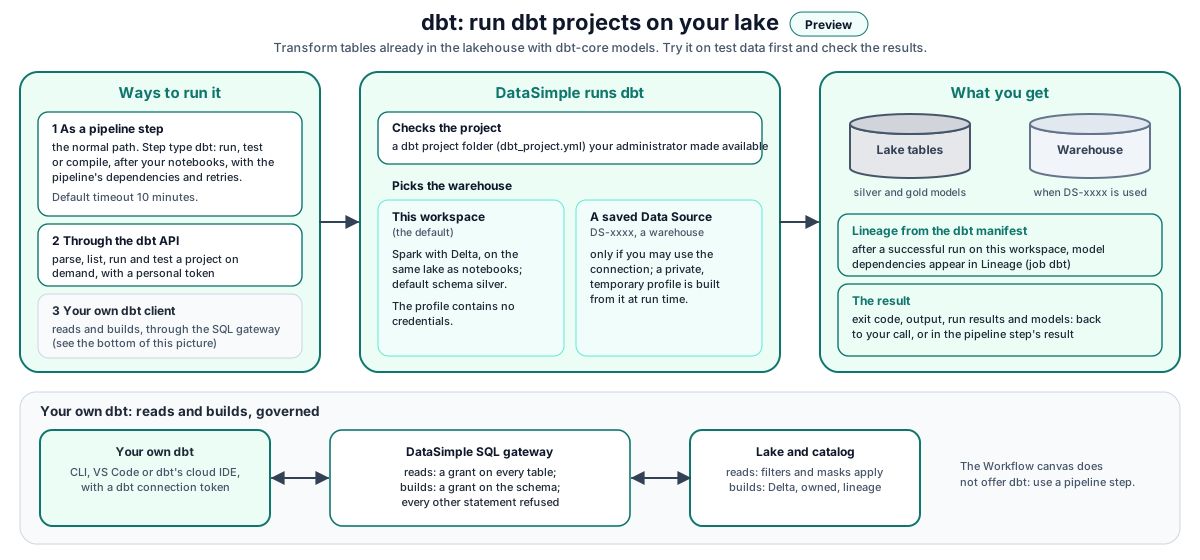
Walk-through:
- A pipeline step or an API call asks for a dbt command on a project folder.
- DataSimple checks the folder is an available project, then picks the warehouse.
- Workspace: dbt runs on the Spark engine with a generated profile that contains no credentials.
- Saved Data Source: DataSimple checks that you may use the connection, builds a private, temporary profile from it at run time, and runs dbt against that warehouse.
- After a successful
runon the workspace, the manifest's dependencies are recorded in Lineage. The result (exit code, output, run results) goes back to the caller or into the pipeline step result.
How it works#
The workspace warehouse#
The first workspace run installs dbt on the Spark engine, in a folder of its own that notebooks do not use, and later runs reuse it. Each run takes the project with it (the files under the project folder, not target/, logs/ or packages), runs dbt in your Spark session, and brings back manifest.json and run_results.json: Lineage and the pipeline step result read them as usual. Every table the run builds is registered in the catalog under your tenant. dbt's anonymous usage reporting is switched off.
Commands#
| Where | Commands |
|---|---|
| Pipeline step | run, test, compile |
/api/notebooks/dbt |
parse, ls, run, test |
select is passed to dbt as --select (not for parse). Colours are turned off so logs read cleanly. A dbt job that runs past its timeout is stopped.
The dbt pipeline step#
A step is a dbt step when step_kind is dbt or its parameters contain _dbt. When you save it:
projectDiris required: "Step "x" needs a dbt project folder (parameters._dbt.projectDir)".commandmust berun,testorcompile.- With no warehouse and no
useProjectProfile, the warehouse isworkspace. - Default timeout is 10 minutes (600 000 ms).
The step runs as the pipeline's creator, with the pipeline's compute profile. Its entry in the run's step_results carries:
{
  "step_key": "dbt_marts",
  "step_kind": "dbt",
  "notebook_name": "dbt run · dbt/orders",
  "status": "success",
  "dbt": {
    "exitCode": 0,
    "log": "…last 8000 characters of dbt output…",
    "runResults": { "elapsed": 41.2, "results": [ { "uniqueId": "model.orders.fct_orders", "status": "success", "executionTime": 12.4, "message": "OK" } ] }
  }
}
A non-zero exit code makes the step error with the start of dbt's error output as its message, so the pipeline's retry and on_failure rules apply.
Lineage from the manifest#
After a successful run, DataSimple reads the project's manifest and records one lineage entry per model:
- Targets are models and snapshots, named
schema.alias(orschema.name). - Sources are the models, seeds, snapshots and dbt sources each target depends on, named the same way (
schema.identifierfor dbt sources). - Self-references are dropped. A manifest that cannot be read gives no lineage, but does not fail the run.
Lineage is recorded only after a successful run (or a build in a workflow), that is exit code 0, and only on the workspace warehouse (where the tables are lake tables). A test or compile records no lineage. The parse and run API responses also return the parsed models, tests, sources and edges. The test response returns only exitCode, the output and runResults.
Where projects must live#
A project must be in one of the project folders your administrator has made available, and must contain dbt_project.yml. Anything else is refused. GET /api/notebooks/dbt/projects lists every available project; the builder offers them in a dropdown. Each project in the list has a dir and a name. Use the dir value as projectDir (for example dbt/orders).
The SQL gateway for your own dbt client#
The SQL gateway lets your own dbt (the datasimple adapter type in its profiles.yml, or dbt's Spark adapter) read governed tables and build models in DataSimple:
- Each request carries the client's bearer token. Tokens are stored only as hashes and shown once, when the client is created.
POST /dbt-sql/v1/statementswith{ "sql": "…" }. The gateway parses the statement and lists every table it touches. If it cannot parse it confidently, it refuses.- Deny by default. Grant
SELECTon each table the client should read. ASELECTorMANAGEgrant on the table itself both count. A grant on a schema does not open its tables to the gateway. Administrator rights do not apply to dbt clients. - Row filters, column masks and PII policies are applied before the client's own filters and aggregates. If a policy cannot be checked, the query is denied.
- Every statement, allowed or denied, is written to the client access log.
- Writes (
CREATE … AS SELECT, views,INSERT,MERGE,DROP) follow the rules in Build in DataSimple from your own dbt.
Administrators manage clients through /api/notebooks/dbt/clients: create a client (the token is shown once, inside a ready-made profiles.yml), grant and revoke privileges, revoke or delete a client, and read the access log. For the gateway, grant on each table, not on the schema. A client can also be created against a saved PostgreSQL, MySQL or Snowflake Data Source; then a real role is created on that database and DataSimple does not store the credential.
REST API#
Base URL: https://<your-datasimple-host>. Authenticate with Authorization: Bearer <PERSONAL_TOKEN> (the /dbt-sql endpoints use the dbt client token instead).
| Method | Path | Purpose |
|---|---|---|
| GET | /api/notebooks/dbt/status |
Is dbt available in this installation |
| GET | /api/notebooks/dbt/projects |
Available dbt projects |
| GET | /api/notebooks/dbt/warehouse |
The workspace warehouse (catalog, default schema, format) |
| POST | /api/notebooks/dbt/parse |
dbt parse and the parsed manifest |
| POST | /api/notebooks/dbt/ls |
dbt ls as a list of nodes |
| POST | /api/notebooks/dbt/run |
dbt run, manifest and run results |
| POST | /api/notebooks/dbt/test |
dbt test and run results |
| GET / POST | /api/notebooks/dbt/clients |
List or create dbt clients (administrator) |
| GET | /api/notebooks/dbt/clients/:id/profile |
The client's profiles.yml again, without the token |
| POST | /api/notebooks/dbt/clients/:id/grants, /revoke-grant |
Grant or revoke privileges for the client principal |
| GET | /api/notebooks/dbt/clients/:id/grants |
Grants on a securable |
| POST / DELETE | /api/notebooks/dbt/clients/:id/revoke, /api/notebooks/dbt/clients/:id |
Revoke or delete a client |
| GET | /api/notebooks/dbt/clients/access-log |
Gateway access log |
| GET | /dbt-sql/v1/debug |
Client identity check (principal, workspace, catalog) |
| POST | /dbt-sql/v1/statements |
Run one read statement for a dbt client |
The dbt API POST bodies accept projectDir, connectionId (default workspace), schema, select and useProjectProfile. Failures answer HTTP 200 with success: false; always check success and exitCode, not only the HTTP status.
Step by step: source to Gold with dbt#
The normal path: DataBridge loads a source system into Bronze, a pipeline runs dbt to build Silver and Gold on the workspace, and dbt tests check the result. The Retail demo project dbt/retail_dbt is a complete example (tested walkthrough: Developer Guide, chapter 8b).
- Load the source. DataBridge: pick the Data Source, tick the tables, change detection Database change log (or an
updated_atwatermark), tick Auto-apply to Bronze. Later loads: Monitoring → Ingestion → Ingestion Jobs → the job → Re-run; only the changes come. - Write the project in a dbt project folder (your administrator makes the folders available):
dbt_project.yml:profile: datasimple;+schema: silver/+schema: gold,+materialized: table,+file_format: delta.models/sources.yml: the Bronze tables (schema: bronze).- Silver models: the current row per key from Bronze (latest
_source_ts, drop_op_type = 'D'), clean types, business rules. - Gold models: facts and aggregates from Silver.
- Tests:
unique,not_null,relationships,accepted_valuesinschema.yml, and SQL tests intests/for business rules (a test passes when its query returns no rows).
- Make the pipeline. Pipelines → Create Pipeline → Pipeline Steps: step 1 Type dbt, dbt project folder your project, Command dbt run, Warehouse This workspace (Spark / Delta); step 2 the same with dbt test, depending on step 1. Save Changes, then Run.
- Check. Pipelines → the pipeline's row → Workflow history → the run: each dbt step lists dbt results (every model and test) and the dbt log. The tables are in Lakehouse under
silverandgold, and Lineage shows Bronze → Silver → Gold (job dbt). - Keep it current. After each load, run the pipeline again (or give it a schedule). dbt reads the latest load of every source the project declares.
The Bronze audit columns dbt can use: _source_ts (when the change happened in the source), _load_ts (when it was loaded), _op_type (I, U, D), _is_deleted, _batch_id, _datasource.
Build in DataSimple from your own dbt#
Developers can also run dbt on their own machine (VS Code or the dbt CLI with the dbt-datasimple adapter) or in dbt's cloud IDE, and build into DataSimple, the way dbt builds into any data warehouse. An administrator creates a connection under Administration → dbt connections (the profiles.yml is shown once), allows it to Read source tables and Build in schemas, and the developer runs dbt debug, dbt seed, dbt run, dbt test, dbt snapshot and dbt docs generate as usual. DataSimple serves the adapter at /downloads/dbt-datasimple (the install lines are on the same screen).
| dbt sends | DataSimple does |
|---|---|
CREATE OR REPLACE TABLE … AS SELECT (table, incremental first run, seed, snapshot first run) |
writes Delta to the lake's managed folder <schema>/<table>, registers it in the catalog owned by the connection, records lineage and the definition |
CREATE OR REPLACE VIEW … AS SELECT |
stores the view's definition in the catalog; reads expand it, so the base tables' filters and masks apply |
MERGE INTO / INSERT INTO (incremental, snapshot, seed rows) |
adds the rows to the table's Delta folder |
DROP TABLE / DROP VIEW |
soft drop (Trash) |
SHOW SCHEMAS / SHOW TABLES / SHOW TABLE EXTENDED / DESCRIBE |
answered from the catalog; dbt docs generate reads its columns the same way |
Checks: CREATE_TABLE on the schema for a new object, MODIFY on an existing one (the connection owns what it builds), SELECT on every table read; reads are governed before anything is written. Anything else (schemas, ALTER, GRANT, storage paths, other catalogs) is refused. Grants to a connection never change people's access. Step by step: Developer Guide, chapter 11.
dbt's cloud IDE and dbt's Spark adapter. dbt's cloud IDE accepts only adapters it ships, so DataSimple also answers HiveServer2 (Thrift over HTTPS) at /sql/protocolv1/o/<organization>/<cluster>, which dbt's Apache Spark connection (method HTTP) uses. Organization and cluster are not used; the token (HTTP basic password, user token, or a bearer token) decides the connection and its tenant. Every statement goes through the same checks as above. On top, per session:
CREATE TEMPORARY VIEWis kept in the session and put in place where a later statement reads it (incremental models).CREATE TABLE t (columns) USING delta(seeds) becomes an empty table built from a query; the rows follow asINSERT … VALUES.- A table re-created after a drop gets a new folder; the dropped table's files are not overwritten.
- A
MERGEwhose source is a view (snapshots) merges from the view's query. SET,USE,REFRESHand cache statements do nothing.
Developer examples#
A minimal project on the workspace warehouse#
dbt/orders/
  dbt_project.yml
  models/
    sources.yml
    silver/stg_orders.sql
    gold/fct_orders.sql
# dbt_project.yml
name: orders
version: '1.0'
config-version: 2
profile: datasimple
models:
  orders:
    silver: { +materialized: table, +file_format: delta }
    gold:   { +materialized: table, +file_format: delta }
-- models/silver/stg_orders.sql
select id, amount, region, _load_ts
from {{ source('staged_bronze', 'orders') }}
where not coalesce(_is_deleted, false)

-- models/gold/fct_orders.sql
select region, sum(amount) as total_amount
from {{ ref('stg_orders') }}
group by region
The workspace profile is named datasimple, so the project's profile: must match it.
Parse, then run, through the API#
const dbt = "https://<your-datasimple-host>/api/notebooks/dbt";
const call = (cmd, body) => fetch(`${dbt}/${cmd}`, {
  method: "POST",
  headers: { "Content-Type": "application/json", "Authorization": "Bearer <PERSONAL_TOKEN>" },
  body: JSON.stringify(body),
}).then((r) => r.json());

const job = { projectDir: "dbt/orders", connectionId: "workspace", schema: "silver" };

const parsed = await call("parse", job);
console.log(parsed.success, parsed.models.map((m) => m.name), parsed.edges);
// edges: [{ target: "silver.stg_orders", sources: ["bronze.orders"] },
//         { target: "silver.fct_orders", sources: ["silver.stg_orders"] }]

const run = await call("run", { ...job, select: "fct_orders+" });
if (!run.success) console.error(run.error || run.stderr);
console.table(run.runResults.results);
dbt as a pipeline step after the notebooks#
POST /api/pipelines
{
  "name": "orders_with_dbt",
  "cron_expression": "0 3 * * *",
  "timezone": "UTC",
  "steps": [
    { "step_key": "bronze", "notebook_id": 12 },
    { "step_key": "dbt_run", "step_kind": "dbt", "depends_on": ["bronze"],
      "parameters": { "_dbt": { "projectDir": "dbt/orders", "command": "run", "schema": "silver" } } },
    { "step_key": "dbt_test", "step_kind": "dbt", "depends_on": ["dbt_run"], "on_failure": "continue",
      "parameters": { "_dbt": { "projectDir": "dbt/orders", "command": "test" } } }
  ]
}
Check lineage recorded by dbt#
Open Lineage and filter on the job dbt, or open a model's table in the catalog and look at its upstream and downstream tables. The edges returned by parse and run show the same dependencies before and after a run.
Security and permissions#
- Project folders are restricted to the folders your administrator made available.
- Credentials. A saved Data Source is used only if you may use it in your workspace. Its password is never written into your project; DataSimple builds a private, temporary profile at run time. Workspace profiles contain no credentials. Do not commit generated profiles or
target/artifacts. - Permission.
/api/notebooks/dbtneeds the Pipelines permission. dbt client administration also needs an administrator. - Outside readers. Gateway access is deny-by-default with explicit grants per client principal, governed policies and a full access log.
- Audit. Client creation, grants, client revocation and client deletion are recorded in History. Removing a single grant is not recorded there.
- Deployment. When a pipeline is promoted, the dbt step settings are compared and a
DS-xxxxwarehouse is matched by name on the target. The dbt project files are not copied; move them through your own version control.
Settings you can change#
Per call or per step: projectDir, command, select, schema, connectionId, useProjectProfile and the step timeout_ms.
A pipeline dbt step stops after 10 minutes by default; change it with the step's timeout_ms. A dbt step in a workflow defaults to 30 minutes (1 to 240).
Your administrator decides which project folders are available, makes dbt available for the workspace warehouse and for external warehouses (check with GET /api/notebooks/dbt/status), and can change the default timeout for dbt API calls (10 minutes).
Monitoring and troubleshooting#
- Pipelines → run → step: the
dbtblock with the log tail and run results. - Lineage screen: entries with the job
dbt. - dbt client access log: every gateway statement, allowed or denied.
| Message | Meaning |
|---|---|
dbt project must sit under … |
The folder is not one of the available project folders. Pick one from the project list, or ask your administrator. |
No dbt_project.yml in … |
Wrong folder. |
dbt could not be made ready in the Spark session: … |
The first workspace run installs dbt (dbt-core 1.10, dbt-spark 1.10) on the Spark engine in its own folder, apart from the notebook packages. The message says why that failed (usually no access to the Python package index from the Spark engine). |
dbt is not installed on this server. |
dbt is not available for external warehouses. Ask your administrator. |
Saved Data Source not found. |
The DS-xxxx code is wrong or not shared with you. |
dbt command must be run, test, or compile |
Pipeline steps accept only those three. |
dbt timed out after Ns |
Raise the step timeout_ms. |
| Models land in an unexpected schema | dbt's schema naming appends custom schemas to the target; add a generate_schema_name macro if you need exact schema names. |
Gateway 403 PERMISSION_DENIED |
The client principal has no SELECT (or MANAGE) grant on a table in the statement. A schema grant is not enough. |
Limits#
- Lineage only on the workspace warehouse, and only after a successful
run(or abuildin a workflow). - The Workflow canvas does not offer dbt as a step. Run dbt as a pipeline step.
- Storage is DataSimple's. A model's own
location,partition_byor table properties are refused. - Project files are not promoted by Deployment; keep them in your own version control.
Related content#
- Architecture
- Pipelines
- Lakehouse and governance
- Observability
- Deployment
- dbt: https://docs.getdbt.com/docs/introduction
- dbt-spark adapter: https://docs.getdbt.com/docs/core/connect-data-platform/spark-setup
- Apache Spark SQL reference: https://spark.apache.org/docs/latest/sql-ref.html
- Delta Lake: https://docs.delta.io/latest/index.html