Overview#
The Notebooks screen is the main place where developers and data engineers work with data in DataSimple. A notebook is a document of cells. Each cell is code (SQL, Python, Scala, R or shell), text (Markdown), a chart, or a parameter block. Code cells run in a Spark session that DataSimple starts for you. That session has helper functions preloaded, so reading and writing lake tables by catalog name is one line of code.
Who uses it:
- Data engineers build Bronze, Silver and Gold tables, apply changes and declare tables with
ds.*helpers. - Analysts query Gold tables in SQL cells and chart the results.
- Developers test helpers, inspect run traces and automate notebooks through the API or a schedule.
Where it is: left rail → Notebooks. The same editor opens when you click Open in notebook from Everything, or Open in a new notebook from the Kinetic page.
How it fits the platform: every cell you run is checked against your permissions, runs on the Spark engine, and is recorded in the run log, the audit history, lineage and usage. Tables that a cell creates are registered in the catalog automatically. See Architecture for the full picture.
Key concepts#
| Term | Meaning |
|---|---|
| Cell type | sql, python, spark (Spark / Delta), scala, r, shell, markdown, chart, params. Code cells are sql, python, spark, scala, r, shell. |
| Spark session | Your personal Spark session. Depending on how your platform is set up, you have one Spark session for all your notebooks (variables are shared) or one per notebook, up to a per-user limit. It starts at sign-in when possible, or when you open a notebook. Capacity is shared fairly between users. Variables live in it until it is restarted. |
| Helpers | Python functions available in every session without an import: read_table, save_table, merge_delta, check_table, ds.* and more. They resolve catalog names and apply grants, row filters and column masks. |
| Catalog name | datasimple.<layer>.<table>, <layer>.<table> or a bare <table>. Layers are source, bronze, silver, gold. |
| Parameters | Values declared in a Params cell. Python uses the variable; SQL uses {{name}}. A schedule or pipeline can pass other values. |
| Preview | The rows a cell returns to the screen. Default 200 rows. The table itself is not limited. |
| Compute profile | The size of the Spark session. Today only Serverless (use all available capacity) is offered. |
| Run log | One entry per cell run, shown on the Log screen. |
| Fast path | A plain read of registered lake tables can be answered by an always-on SQL engine instead of your session, which is faster. The run trace says warm SQL engine when this happens. |
How it works#
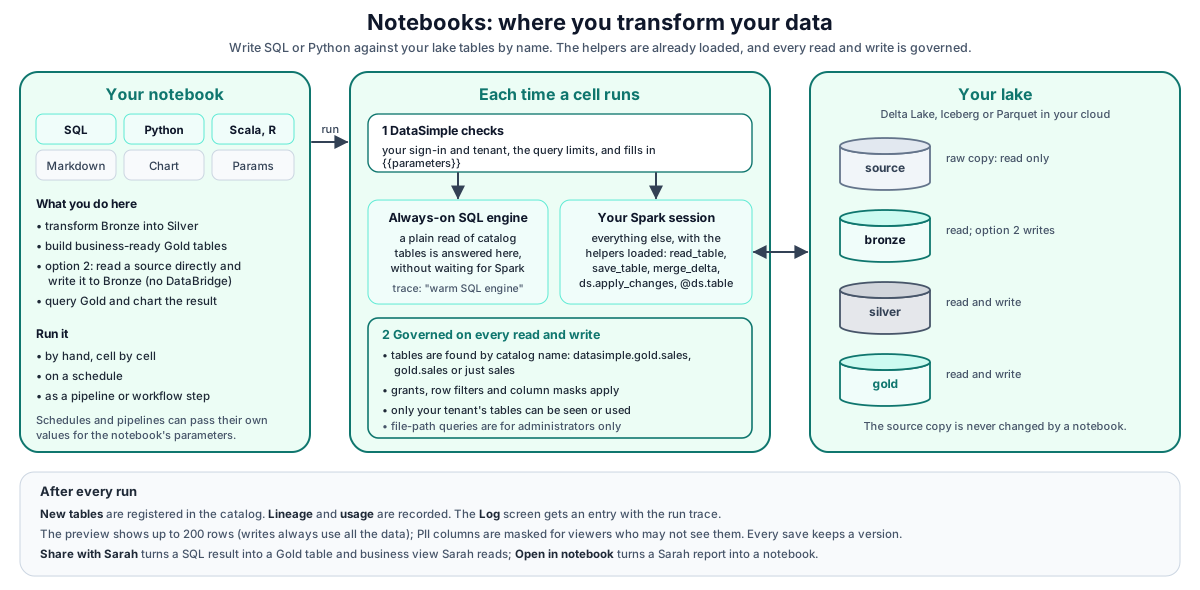
What happens when you run a cell:
- DataSimple checks your sign-in, your tenant's rate limit and any storage-path restrictions, and for SQL substitutes
{{parameters}}. - A SQL cell that is a plain read of registered lake tables may be answered by the always-on SQL engine. Everything else runs in your Spark session.
- The code runs with the helpers loaded. Grants, row filters and column masks apply on every read by name.
- New tables are registered in the catalog, lineage and usage are recorded, and PII columns are masked in the preview for viewers without access.
- The screen shows the result grid, and a run-log entry with the run trace is written.
Running cells#
| Cell type | What happens |
|---|---|
| SQL | Parameters are substituted. Statements are split on ; and run one by one. The last statement's result is the preview. Catalog names are resolved, grants and masks applied, new tables registered and lineage recorded. |
| Python, Spark | The code runs in your Spark session with the helpers loaded. The value of the last expression, if it is a DataFrame, becomes the preview. |
| Scala, R, shell | The code runs in a session for that language on the Spark engine. |
| Markdown, Chart, Params | Rendered in the browser. A chart redraws from the result of the cell above it. |
Request limits: a cell source is at most 200 KB. Tables dragged into a Python cell as pandas data can be up to 25 MB.
First-line options: %sql, %python, %md#
Type an option on the first line of a cell and the cell switches to that type. The option line is removed, so it never reaches Spark. Upper or lower case both work, and %% works the same as %.
| First line | Cell becomes | Also accepted |
|---|---|---|
%sql |
SQL | %%sql |
%python |
Python | %py, %%python |
%pyspark |
Python on Spark | %spark |
%md |
Markdown | %markdown |
%sh |
Shell | %shell |
%scala |
Scala | |
%r |
R |
Only the first line counts. %run, %pip and %fs are not available: use a pipeline to run notebooks in order, ask your administrator for packages, and read files as tables.
Markdown cells#
Markdown cells render headings (#, ##, ###), bold, italic, `code`, bullet lists, quotes (>), links, images and pipe tables (:---: centres a column, ---: right-aligns it). Numbered lists, fenced code blocks and HTML are not rendered. The toolbar inserts each of them; Show preview shows the result.
Keyboard shortcuts#
| Keys | Does |
|---|---|
| Ctrl+Enter (⌘+Enter on a Mac) | Run the current cell |
| Shift+Enter | New line inside the cell |
| Ctrl+S | Save the notebook (and keep a version) |
| Ctrl+P | Command palette |
Every SQL command and Python helper, with examples, is in SQL, Python and streaming reference.
Python helpers#
Every session has the helpers without an import, plus spark, ds, F (pyspark.sql.functions), Window and T (pyspark.sql.types). In the editor, autocomplete shows each helper's signature and description; the same list is available from GET /api/notebooks/spark/helpers.
| Helper | Purpose |
|---|---|
read_table(name) |
Governed read. Resolves Parquet, Delta or Iceberg from the catalog, checks SELECT, applies row filters and column masks. |
read_delta(name_or_path), read_parquet(...), read_iceberg(...) |
Same as read_table for a catalog name. A raw lake path that belongs to a registered table is resolved to that table and read the governed way. |
read_delta_at(name, version=None, timestamp=None), list_delta_history(name) |
Delta time travel and history. |
save_table(df, name, mode="overwrite", partition_by=None, merge_schema=False, fmt=None) |
Writes a Delta table (or Iceberg with fmt="iceberg"), applies enforce-on-write quality rules, registers the table and records lineage. |
merge_delta(target, source_df, on, ...), write_delta(...) |
Delta MERGE and append/overwrite writes. |
check_table(name_or_df, checks, ...), profile_table(name), table_freshness(name), suggest_checks(name) |
Data quality. Results appear on the Data Quality screen. |
grant(...), revoke(...) |
Catalog grants. Administrators or MANAGE holders only. |
optimize_table(name), drop_table(name, purge=True) |
Compaction and drop. Files are purged only for managed tables. |
ds.apply_changes(...), ds.apply_changes_from_snapshot(...), @ds.table, ds.run(), @ds.dimension, @ds.fact, @ds.obt |
Change handling (Type 1 and Type 2) and declared tables. See Declarative tables and change handling. |
ds.load_control() |
The DataBridge load-control rows for your tenant (read only). See DataBridge. |
A plain df.write.save(...) to a path works, but the table is not registered and no lineage is recorded. Use the helpers.
SQL cells and catalog names#
In a SQL cell:
datasimple.<layer>.<table>works for the four layers, whatever the table's format (Parquet, Delta or Iceberg).- Grants, row filters and column masks apply per statement.
GRANTandREVOKEare recorded in the catalog.CREATE TABLE ... USING DELTAwith a column list, andCREATE TABLE ... AS SELECT, create a managed table and register it.DROP TABLEis a soft drop (files kept,UNDROP TABLErestores).DROP TABLE ... PURGEdeletes files.- Path queries such as
delta.`s3a://...`are refused unless you are a catalog administrator for your tenant. APPLY CHANGES [FROM SNAPSHOT] INTO ...andMERGE CHANGESare supported. See Declarative tables and change handling.
Scheduled and pipeline runs apply rules 1 and 2 the same way, with the grants, row filters and column masks of the notebook owner (pipeline steps fall back to the pipeline creator).
Where SQL cells run. The notebook header shows Lakehouse and a Query a source system switch. Off, SQL cells run on the Lakehouse (POST /api/notebooks/spark/sql). On, you pick one Data Source from a grouped, searchable list (Databases, Cloud warehouses, Business apps, Streams, Files & storage); SQL cells then run on it read-only (POST /api/notebooks/external-database/query), and the cell badge shows its name. Kafka sources, file drops and storage targets are listed greyed: read Kafka with STREAM KAFKA('<Data Source>', '<topic>') in a Lakehouse cell, and load files with Databridge. The app's own database is never a notebook source; an old notebook saved with it opens on the Lakehouse.
Combine sources. A SQL cell can read several slots, each the Lakehouse or one Data Source, and join them with a combine query over the slot aliases (POST /api/notebooks/cross-query; Python cells get each slot as a pandas DataFrame through POST /api/notebooks/cross-fetch). Slot SQL must be read-only (SELECT / WITH). A slot saved with the old local source, or with no source, is read from the Lakehouse.
Known limit: three-part names in Python spark.sql. spark.sql("SELECT * FROM datasimple.gold.sales_by_region") in a Python cell fails with REQUIRES_SINGLE_PART_NAMESPACE. A Python spark.sql on a table loaded by DataBridge can also fail with "table not found" until a SQL cell has used it. Use read_table("gold.sales_by_region") in Python, or put the query in a SQL cell.
Parameters#
Add a Params cell and declare values such as region_id = 3. Python cells use the variable directly. SQL cells write {{region_id}}; a cell with a parameter that has no value is refused with Parameter {{region_id}} has no value. Schedules and pipeline steps pass their own values with the same substitution, so one notebook serves many regions or dates.
Previews#
The preview is a LIMIT on the last result. Writes, counts and aggregations always run on the full data. See Limits and known issues for the numbers.
Compute profiles#
Only Serverless is offered: the session uses all capacity the Spark engine allows. Notebooks and schedules that saved an older size (small, medium, large) run as Serverless, so a saved value never breaks a run.
Run log, versions and history#
- Each cell run is recorded with cell type, status, duration, rows, error, the first 4,000 characters of code and the run trace. The trace shows steps such as warm SQL engine, the tables read and written, and the DataBridge origin for loads. Errors and the run trace hide storage locations, internal addresses and tokens. Cell code is shown as written, so keep passwords out of code.
- A save that changes the cells is kept as a version. The latest 100 versions of each notebook are kept. Notebook menu → Version history… lists them and restores one.
- Notebook menu → Audit log… shows one notebook's timeline: edits, versions, scheduled runs and queries.
REST API#
Call these from your own scripts with Authorization: Bearer <PERSONAL_TOKEN>.
| Method | Path | Purpose |
|---|---|---|
| GET, POST | /api/notebooks |
List notebooks; create one. |
| GET, PUT, DELETE | /api/notebooks/:id |
Read, save (keeps a version), delete. |
| POST | /api/notebooks/spark/sql |
Run a SQL cell. |
| POST | /api/notebooks/spark/run |
Run a Python or Spark cell. |
| POST | /api/notebooks/spark/run-kernel |
Run a Scala, R or shell cell (language, code). |
| POST | /api/notebooks/spark/run-notebook |
Run a whole notebook, stopping on the first error. |
| POST | /api/notebooks/spark/cancel |
Stop a running cell. |
| GET | /api/notebooks/spark/status |
Your session state: cold, starting, ready or busy. |
| POST | /api/notebooks/spark/prewarm |
Start your session in the background. |
| GET | /api/notebooks/spark/helpers |
Helper names, signatures and descriptions. |
| GET | /api/notebooks/run-log?notebookId=&status=error&mine=1&limit= |
Run-log entries, as on the Log screen. |
| GET | /api/notebooks/:id/versions |
Version history. |
| POST | /api/notebooks/:id/versions/:vid/restore |
Restore a version. |
| GET | /api/notebooks/:id/timeline |
One notebook's timeline. |
| GET, POST | /api/notebooks/:id/schedules |
Schedules for this notebook. See Schedules and scheduler. |
Errors from the run endpoints:
| Status | Meaning |
|---|---|
| 400 | code is required, sql is required, or a parameter with no value (missingParams lists them). |
| 403 | A storage path in the code is outside the locations allowed for your tenant; a path query was used by someone who is not a catalog administrator for your tenant; the AI guardrail blocked SQL sent by Sarah or the Agent (code: "AI_GUARDRAIL"); DROP TABLE or UNDROP TABLE without ownership or MANAGE; or RESTORE by someone who is not an administrator. |
| 413 | The cell source or the dragged data is too large. |
| 429 | Your tenant's rate limit is reached (code: "RATE_LIMITED"). |
| 503 | The Spark engine is not available, or every Spark session is busy (All Spark sessions are busy; try again in a minute). |
Developer examples#
1. A SQL cell that builds a Gold table#
CREATE TABLE IF NOT EXISTS datasimple.gold.sales_by_region AS
SELECT o.region, SUM(o.amount) AS revenue, COUNT(*) AS orders
FROM datasimple.silver.orders o
WHERE o.order_date >= {{from_date}}
GROUP BY o.region;

SELECT * FROM datasimple.gold.sales_by_region ORDER BY revenue DESC;
The first statement creates and registers a managed table. The second returns the preview. from_date comes from the Params cell or the schedule. Text and date values are quoted for you; do not add quotes around a parameter.
2. A Python cell with governed reads and writes#
orders = read_table("silver.orders")                      # grants, filters and masks apply
live = orders.filter("NOT _is_deleted")
by_region = (live.groupBy("region")
                 .agg(F.sum("amount").alias("revenue"),
                      F.count("*").alias("orders")))

save_table(by_region, "gold.sales_by_region")             # Delta, registered, lineage recorded
check_table("gold.sales_by_region",
            lambda c: c.isComplete("region").isUnique("region"))
read_table("gold.sales_by_region")                        # last expression -> preview
3. Run a SQL cell through the API#
const res = await fetch("https://<your-datasimple-host>/api/notebooks/spark/sql", {
  method: "POST",
  headers: {
    "Content-Type": "application/json",
    "Authorization": "Bearer <PERSONAL_TOKEN>",
  },
  body: JSON.stringify({
    notebookId: 12,
    cellId: "c-3",
    sql: "SELECT region, revenue FROM datasimple.gold.sales_by_region WHERE revenue > {{min_rev}}",
    params: { min_rev: 1000 },
    previewRows: 50,
  }),
});
const out = await res.json();
// {
//   "success": true,
//   "df": { "columns": ["region", "revenue"], "rows": [{ "region": "West", "revenue": 48210.5 }] },
//   "rowCount": 1,
//   "stdout": "", "stderr": "", "error": null,
//   "durationMs": 912,
//   "trace": [ ... ]
// }
A write statement (INSERT, MERGE, UPDATE, DELETE) also returns affectedRows. Send notebookId and cellId so the run is tied to that notebook. A SQL run from a script is not added to the run log by itself (the editor writes its own entry); to record one, call POST /api/notebooks/run-log. A Python run from a script (example 4) is recorded when the request includes "source": "script".
4. Run a Python cell from a script#
curl -s https://<your-datasimple-host>/api/notebooks/spark/run \
  -H "Content-Type: application/json" \
  -H "Authorization: Bearer <PERSONAL_TOKEN>" \
  -d '{ "notebook_id": 12, "cell_id": "c-4",
        "code": "df = read_table(\"gold.sales_by_region\")\ndf.orderBy(F.desc(\"revenue\"))" }'
Both notebookId and notebook_id are accepted. The response has success, stdout, stderr, df, error, durationMs and trace.
Security and permissions#
- Sign-in and access. Every call needs a session or a personal token, and your role must include the Notebooks screen.
- Tenant isolation. Your session and catalog names are resolved for your tenant. Every table a cell writes carries
_tenantid; cells may not drop, rename or retype it. - Data access. Reads by name check SELECT and apply row filters and column masks. Writes need
CREATE_TABLEon the schema orMODIFYon an existing table. PII columns are masked in the preview for viewers without access. - Storage locations. Your administrator can restrict which storage locations notebook code may use. When restrictions are set, every
s3://,s3a://,gs://orabfs(s)://path in a cell must start with an allowed prefix, or the cell is refused with HTTP 403. - AI guardrail. SQL sent by Sarah or the Agent can never drop, delete, truncate, alter, overwrite or replace. A person running the same SQL is governed by their own role.
- Audit. Cell runs and whole-notebook runs appear in History. Definitions (CREATE, ALTER, DROP) go to the definition log.
Settings you can change#
| Setting | Where | Effect |
|---|---|---|
| Parameters | Params cell, schedule, pipeline step, or params in the API |
Values substituted into {{name}} and set as Python variables. |
| Preview rows | previewRows in the API |
Rows returned for this call, up to 5,000. A read answered by the always-on SQL engine returns up to that many; a result from your Spark session is capped at 200 rows. |
| Compute profile | Notebook header | Only Serverless today. |
Your administrator can lower the default number of preview rows, change the cell time limit, and enable CREATE TABLE ... USING ICEBERG. Spark session capacity and fair sharing are covered in Spark engine.
Monitoring and troubleshooting#
- Log screen: one line per cell run with status, duration, rows, error and trace. Filter by notebook, errors only and origin.
- History screen: actions such as created, run, scheduled, deleted.
- Notebook menu → Audit log…: one notebook's full timeline.
- Spark status chip in the notebook header: starting... 12 s, ready, or nothing when no session runs.
| Symptom | Likely cause |
|---|---|
REQUIRES_SINGLE_PART_NAMESPACE in a Python cell |
Three-part name in spark.sql. Use read_table or a SQL cell. |
Parameter {{x}} has no value |
Add x to the Params cell or pass it from the schedule. |
Spark session restarted with a reason |
Your idle session was closed to free capacity. Re-run earlier cells or Run all. |
All Spark sessions are busy (503) |
Every session is running a cell. Try again in a minute. |
| HTTP 403 for a storage path | Ask an administrator to allow the location for your tenant, or read by catalog name. |
| The first cell is slow | The session is starting. It starts at sign-in when possible, or when you open a notebook. |
Limits and known issues#
| Limit | Default |
|---|---|
| Preview rows per cell | 200 (up to 5,000 from the always-on SQL engine when previewRows asks for more; the table itself is not limited) |
| Cell time limit | 5 minutes |
| Cell source size | 200 KB |
| Data dragged into a Python cell | 25 MB |
- Three-part names do not work in Python
spark.sqlyet (see above). - Statements in a SQL cell are split on
;. A semicolon inside a string literal is not handled; run such a statement on its own. - Only the Serverless compute profile exists.
- The first cell of a new session can take up to about a minute while the session starts.
- Lineage from notebook code does not see table names built dynamically (for example f-strings); the lineage view reports how many such cells it could not attribute.
Related content#
- Architecture
- Declarative tables and change handling
- Spark engine
- SQL, Python and streaming reference
- Lakehouse and governance
- Schedules and scheduler
- Observability
- Apache Spark: https://spark.apache.org/docs/latest/
- Spark SQL reference: https://spark.apache.org/docs/latest/sql-ref.html
- Delta Lake: https://docs.delta.io/latest/index.html
- Apache Iceberg: https://iceberg.apache.org/docs/latest/