Overview#
Every table in the DataSimple lake is known by name, not by path. The catalog is the registry that maps a name such as datasimple.silver.orders to its format, storage location, columns, owner and policies. It follows the Unity Catalog model. Every read by name (SQL cell, Python read_table, scheduled run, metric, Sarah, the Agent) and every write (DataBridge load, Bronze apply, save_table, ds.*, SQL DDL) goes through it.
Where you find it in the app:
| Screen | Menu | What it shows |
|---|---|---|
| Lakehouse | Left rail → Lakehouse | The catalog tree: datasimple → schema → format folder → table, plus information_schema, Trash and right-click actions |
| Governance | Administration → Governance | Grants, row filters, column masks, groups, volumes, functions, models, storage objects, catalog audit |
| Meaning | Semantics → Meaning | Business meaning of tables and columns, AI drafts, coverage per schema |
The catalog sits between the screens and the lake. See Architecture for the platform map and Lake storage for what the catalog points at. For a full step-by-step walk-through of governance, see Unity Catalog step by step.
Key concepts#
| Term | Meaning |
|---|---|
| Catalog | One catalog per tenant, named datasimple by default. |
| Schema (layer) | source, bronze, silver, gold are the medallion layers. You may create more schemas (for example analytics). source is read-only for users. |
| Three-level name | datasimple.<schema>.<table>. A notebook also accepts <schema>.<table>, or a bare table name searched across layers. |
| Securable | Something you can grant on: catalog, schema, table, volume, function, model, share. |
| Privilege | USE_CATALOG, USE_SCHEMA, CREATE_TABLE, CREATE_SCHEMA, CREATE_VOLUME, SELECT, MODIFY, MANAGE, BROWSE, EXECUTE, READ_VOLUME, WRITE_VOLUME. |
| Principal | A user name, a custom group, or account users (everyone in the tenant). |
| Owner | The user who registered the table. The owner may drop, describe and undrop their own table. |
| Row filter / column mask | A Spark SQL predicate or expression stored in the catalog and applied whenever the table is read by name. |
| PII masking | A display mask set per column on the Data Quality page (PII type, sensitivity, mask style). It masks values in results for users who may not see them raw. It is a display rule, not access control. |
| Definition log | Every CREATE / ALTER / DROP / WRITE / REFRESH of a table, view or materialized view, with full text, who, when and how. Read it through information_schema.object_history. |
| Soft drop / Trash | DROP TABLE moves the table to Trash and keeps the files. UNDROP TABLE brings it back while it is still in Trash, that is, until it is purged. |
How it works#
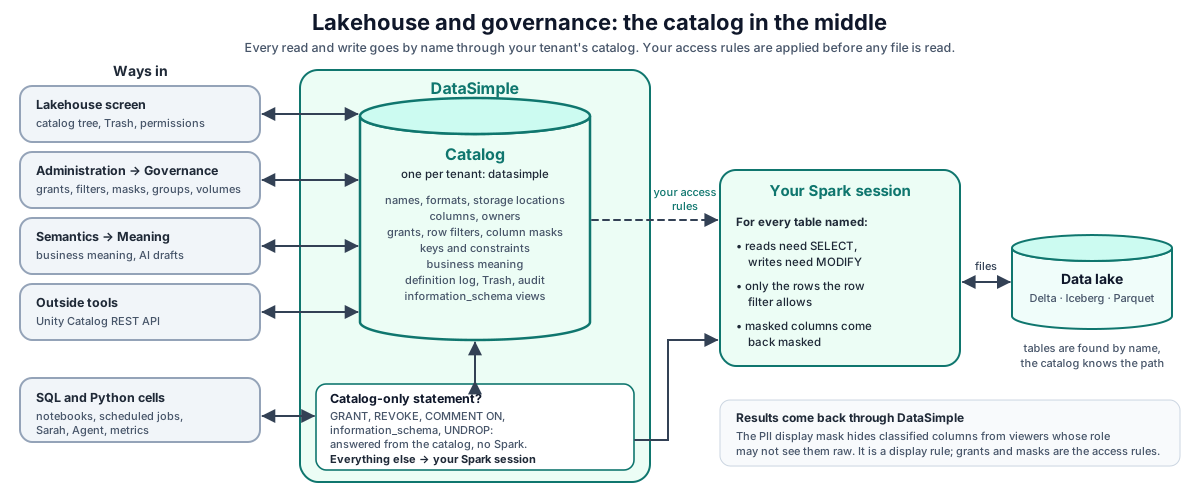
- The Lakehouse screen shows only the catalog of your tenant. The tree lists only your tenant's tables, the same rule as
SHOW TABLES. It is read from the catalog's records, so it opens in a few seconds without starting Spark; if those records cannot be read, the tree falls back to Spark and the first load is slower. - Governance changes (grants, filters, masks, drops) are checked against your role and privileges. Grants, filters, masks and drops made from the Lakehouse menu or the API are recorded in the catalog audit. A
DROPorUNDROPtyped in a SQL cell is recorded in the definition log (information_schema.object_history) instead. - A SQL cell is sent to DataSimple. Catalog-only statements (
GRANT,REVOKE,COMMENT ON,information_schemaqueries, a softDROP/UNDROPof an Iceberg table) are answered by the catalog straight away, without waiting for Spark. Everything else runs in your Spark session with your access rules applied: which tables are governed, whether you may read (SELECT) or write (MODIFY), and the row filters and masks that apply to you (Spark engine). - The Unity Catalog REST endpoints (
/api/2.1/unity-catalog) serve the same catalog in the open-source protocol shape, includinginformation_schema.
Registration#
Tables are registered by DataBridge (one entry per format copy, see Lake storage), by Bronze and Silver applies, by the notebook writers (save_table, create_managed_table, ds.*), by SQL CREATE TABLE / CREATE VIEW, by plain Spark writes in Python (saveAsTable, insertInto, writeTo), by dbt and through the API (POST /api/notebooks/unity-catalog/register, POST /api/notebooks/unity-catalog/tables and POST /api/2.1/unity-catalog/tables). Registering a table through the API needs CREATE_TABLE on the schema once the schema is governed (see When protection starts below); until then it is open to everyone in your tenant.
Creating a schema works the same way. Once the catalog is governed (any grant on the catalog in your tenant, or default deny on), the Lakehouse Create schema menu, the schema API and a SQL CREATE SCHEMA / CREATE DATABASE / CREATE NAMESPACE in a SQL cell or in spark.sql(...) in a Python cell (in the editor and in scheduled runs) need CREATE_SCHEMA on the catalog. Catalog administrators always pass; an administrator role alone does not, the same rule as registering a table.
Row counts and "last changed"#
Every write updates the table's numbers at once, with a timestamp: an INSERT, MERGE, UPDATE, DELETE, INSERT OVERWRITE or CREATE TABLE … AS SELECT in a SQL cell (in the editor and in scheduled runs), a notebook writer (save_table, write_delta, merge_delta, apply_changes, ds.*), a streaming table or materialized view refresh, a DataBridge load (every format copy, Bronze and Silver) and a dbt model. A moment after the write, DataSimple reads the table's own log (Delta version, Iceberg snapshot, Parquet footers; no Spark) and stores the row count, size, files, version, the operation, the rows it inserted, updated and deleted, when the data changed, and who changed it.
The Lakehouse tree shows these numbers straight away, also after a restart; hover a table to see, for example, Rows 1,024 · 5.4 KB · updated 2 min ago by admin (MERGE). Tables with no stored numbers yet are read from their files when you open the schema, and the nightly storage scan re-checks every table. DROP TABLE hides the numbers, UNDROP brings them back and re-reads them, PURGE removes them. From SQL:
SELECT table_schema, table_name, row_count, size_bytes, last_operation, data_changed_at, updated_by
  FROM information_schema.table_stats
 ORDER BY data_changed_at DESC;
Grants and privileges#
- Inheritance. A grant on a catalog or schema applies to every table under it.
- When protection starts. A table becomes gated when any grant exists on it, its schema or its catalog. Until then everyone in the tenant may read it. Your administrator can switch the platform to default deny, in which case a securable with no grants is readable only by catalog administrators and holders of a matching schema or catalog grant.
- MANAGE implies the other privileges on that securable and allows changing its grants, filters and masks and dropping it.
- Who may change governance: a user with an administrator role, people your platform administrator has made catalog administrators for your tenant (by default, your tenant's own
adminaccount), a principal withMANAGEon the securable or its schema or catalog, or the table's owner (for that table's grants, filters and masks). Everyone else gets a message that names the action and ends in requires an administrator or MANAGE privilege, for example Changing grants…, Revoking grants…, Changing a row filter… or Changing a column mask…. - Groups. A grant to a group applies to every member, everywhere a privilege is checked. A group belongs to one tenant and never applies in another.
account usersmeans everyone in the tenant.
Volumes and shares#
Volumes. A volume is a named folder of files registered in your catalog. Its grants work like table grants:
- A volume becomes gated when any grant exists on it, its schema or its catalog (or when default deny is on). Until then everyone in your tenant may list and change its files.
- Once gated, listing its files in the file browser needs
READ_VOLUME, and uploading, creating a folder, moving or deleting files inside it needsWRITE_VOLUME, on the volume, its schema or its catalog.MANAGEcovers both. Deleting or moving a folder that contains a volume checks that volume too. - The person who created the volume, administrators and catalog administrators always pass.
- Creating a volume needs an administrator,
MANAGEon the schema, orCREATE_VOLUMEon the schema or catalog. Changing or dropping an existing volume needs its creator,MANAGEon it (or its schema or catalog), or an administrator. Dropping a volume removes its catalog entry; the files stay. - Another tenant's volume is never reachable, whatever the grants. New volumes get a folder of their own per tenant by default.
- The list of volume names (in the catalog tree and Administration) is visible to everyone in your tenant, like table names.
Volume grants protect the platform's file screens. Code in a notebook that reads a storage path directly is not checked against volume grants; keep files that need protecting out of paths your users can reach that way, as you would for table files.
Shares. MANAGE on a share (GRANT MANAGE ON SHARE partner_sales TO maria) lets that person change and delete the share and its recipients, like the share's creator. Who may put a table in a share is described in DataShare: its owner, a MANAGE holder or an administrator.
Row filters, column masks and PII masking#
Row filters and column masks are stored per table, with an optional list of principals (an empty list means everyone). They apply to every read by name:
read_table(...)returns only the rows the filter allows, with masked columns already masked.- A plain SQL
SELECT … FROM schema.tablereads the same filtered and masked data. - A view is read through its tables: before the statement runs, each reference to a registered view is replaced by its stored definition, so the tables' filters and masks apply to whoever reads the view. A statement that would still read a view unchecked (for example by a bare name such as
FROM retail_sales_view) is refused; writeFROM gold.retail_sales_view. - Tables in a FROM list separated by commas (
FROM a, b) are filtered like tables after FROM and JOIN. - Not covered yet:
INSERT … SELECTfrom a filtered table copies rows under the writer's grants without the row filter; restrict who may write where filtered data must not be copied.
PII masking is separate: it masks values in the results shown to a viewer who may not see them raw. The two are set on different screens; treat column masks as the access rule and PII masking as the display rule.
information_schema#
datasimple.information_schema is a set of read-only views over the catalog. They are live: a table registered a second ago is visible now. Each view shows only your tenant's objects.
| Group | Views |
|---|---|
| namespace | schemata, tables, columns, views, materialized_views, object_history, business_meaning |
| constraints | table_constraints, key_column_usage, referential_constraints, check_constraints |
| privileges | table_privileges, column_privileges, row_filters, column_masks |
| objects | routines, volumes, table_lineage, table_tags |
| usage | usage, table_usage, table_stats |
There is no schema_privileges view. To read grants on a schema or catalog, use Lakehouse → Permissions or GET /api/notebooks/unity-catalog/grants?securable_type=schema&full_name=<catalog.schema>.
Rules: one SELECT or WITH statement, no ;, no writes, no function that reaches outside the views, no table outside information_schema. Default limit 1,000 rows, maximum 10,000.
Redaction. For a governed table you have no SELECT on, the row still appears (name, type, owner, dates) but definition, view_definition, routine_definition and statement read (hidden: needs SELECT on …). The decision uses the same access rules your Spark session enforces. If access cannot be checked, definitions are hidden. Administrators see everything. This applies to SQL cells, the REST endpoints and read_table("information_schema.…"). In read_table, only catalog administrators skip redaction; the administrator role alone does not.
COMMENT ON and business meaning#
COMMENT ON TABLE / COMMENT ON COLUMN and ALTER TABLE … ALTER COLUMN … COMMENT in a SQL cell are saved as the business meaning, and the cell answers at once. Optional [unit: …] and [values: …] tags inside the text become the column's unit and allowed values. Describing a table needs ownership or MANAGE.
After the meaning is saved, the same comment is written to the table itself in the background, so DESCRIBE TABLE EXTENDED shows it. This happens only when your Spark session is already running and idle: a comment never starts Spark or waits behind a running cell. The catalog meaning stays the source of truth.
The Meaning screen can draft meanings with AI. The draft reads five stored rows and the row count, with your own access rights. New tables also get a meaning drafted automatically about 30 seconds after they are created; your administrator decides whether this is on, which schemas it covers and whether drafts are approved automatically. Only approved meanings reach Sarah, the Agent and Kinetic.
Constraints#
PRIMARY KEY and FOREIGN KEY on CREATE TABLE / ALTER TABLE … ADD CONSTRAINT are stored in the catalog (Spark and Delta do not enforce them themselves) and checked by DataSimple when you write through the notebook helpers: the primary key must be unique and not null, and every foreign key must have a parent. The helpers enforce_pk and enforce_fk run the same checks by hand. Constraints appear in information_schema.table_constraints; Data Quality rules marked enforce on write appear as CHECK constraints.
Definition log#
Every change to a table, view or materialized view is recorded with the whole statement or cell code (never cut). The method column says how the change was made: sql_cell, python_cell, ds_tables, apply_changes, scheduler, uc_api, databridge, dbt, agent, ai_<assistant> for SQL run by an assistant other than the Agent, pipeline_build, materialized_view for a scheduled materialized view refresh, and backfill for objects that existed before the log started. Failed DDL is recorded with status = 'error'. information_schema.tables takes created / created_by from the first create, so re-running a notebook does not reset them.
Soft drop, Trash, UNDROP and RESTORE#
| Action | Who may do it | What happens |
|---|---|---|
DROP TABLE x (SQL, the tree, DELETE /tables/:full_name) |
Owner, MANAGE on table/schema/catalog, or a catalog administrator |
Table moves to Trash, with who dropped it and when; files kept |
DROP TABLE x PURGE |
Same | Files deleted |
UNDROP TABLE x (SQL or Trash → Restore) |
Owner, the person who dropped it, MANAGE, or a catalog administrator |
Delta: re-attached over the kept files. Iceberg: marked live again (the Iceberg table was never removed) |
| Everything agent undrop table | Administrators only, to ask and to approve | Runs UNDROP TABLE |
RESTORE TABLE x TO VERSION AS OF n |
Administrators only | Refused for others with Only administrators can restore a table to an older version… |
| Everything agent restore table | Administrators only | Takes a backup first, then restores a Delta version or Iceberg snapshot |
| Trash retention | Automatic, when enabled by your administrator (off by default); a catalog administrator can also purge by hand | Purges trashed tables older than the retention window (default 7 days) |
A dropped table stays in Trash until it is purged, and UNDROP works for any table still there. All three restore entry points (Trash button, SQL UNDROP, agent) behave the same. The Trash lists every dropped table only for a catalog administrator; everyone else sees the tables they own or dropped. A MANAGE holder who does not see a table in Trash can still run UNDROP TABLE in SQL. A dropped view has no data, so the Trash shows its definition instead of a Restore button.
REST API#
Base URL https://<your-datasimple-host>, header Authorization: Bearer <PERSONAL_TOKEN>.
| Method | Path | Purpose |
|---|---|---|
| GET | /api/notebooks/unity-catalog/tree |
Catalog tree |
| POST | /api/notebooks/unity-catalog/register |
Register a table (format, layer, location, columns, primary key) |
| POST / DELETE | /api/notebooks/unity-catalog/schemas |
Create / delete a schema |
| DELETE | /api/notebooks/unity-catalog/tables/:full_name |
Soft drop (to Trash) |
| GET | /api/notebooks/unity-catalog/object-history?full_name= |
Definition log of one object (needs SELECT) |
| GET | /api/notebooks/unity-catalog/constraints?table= |
Declared keys of a table |
| GET / POST / DELETE | /api/notebooks/unity-catalog/grants |
List / grant / revoke |
| GET | /api/notebooks/unity-catalog/access?full_name= |
Your effective access to a table |
| GET / POST / DELETE | /api/notebooks/unity-catalog/row-filters, /column-masks |
Row filters and column masks |
| GET / POST | /api/notebooks/unity-catalog/groups, /groups/:name/members |
Custom groups |
| GET | /api/notebooks/unity-catalog/audit?limit= |
Catalog audit |
| GET | /api/notebooks/spark/trash |
Dropped tables: all of them for a catalog administrator, otherwise the ones you own or dropped |
| POST | /api/notebooks/spark/trash/purge-expired |
Purge expired trash (catalog administrator) |
| GET | /api/2.1/unity-catalog/information-schema |
List the views and their columns |
| GET | /api/2.1/unity-catalog/information-schema/:view |
One view, filtered |
| POST | /api/2.1/unity-catalog/information-schema/query |
Your own SELECT over the views |
| GET / POST | /api/notebooks/semantic/meaning, /meaning/draft, /meaning/approve, /meaning/draft-schema, /meaning/approve-schema |
Business meaning |
Developer examples#
1. Grant, filter and mask, then check from SQL#
GRANT SELECT ON TABLE silver.orders TO analyst;          -- recorded in the catalog
SELECT grantee, privilege_type, table_name
  FROM information_schema.table_privileges
 WHERE table_schema = 'silver' AND table_name = 'orders';
// Row filter and column mask through the API (administrator, catalog administrator, or MANAGE)
const base = "https://<your-datasimple-host>/api/notebooks/unity-catalog";
const headers = { "Content-Type": "application/json", Authorization: "Bearer <PERSONAL_TOKEN>" };

await fetch(`${base}/row-filters`, { method: "POST", headers, body: JSON.stringify({
  fullName: "datasimple.silver.orders", filterName: "eu_only",
  filterExpr: "region = 'EU'", principals: ["analyst"] }) });

await fetch(`${base}/column-masks`, { method: "POST", headers, body: JSON.stringify({
  fullName: "datasimple.silver.orders", columnName: "email",
  maskExpr: "concat(left(email, 1), '***')" }) });

const access = await fetch(`${base}/access?full_name=datasimple.silver.orders`, { headers }).then(r => r.json());
2. Describe a table and declare a join#
COMMENT ON TABLE  datasimple.gold.sales_by_region IS 'One row per region and day, net of returns';
COMMENT ON COLUMN datasimple.gold.sales_by_region.revenue IS 'Net revenue [unit: USD]';
ALTER TABLE datasimple.gold.orders ADD CONSTRAINT fk_customer
  FOREIGN KEY (customer_id) REFERENCES datasimple.gold.customers (customer_id);
Then, in a cell of its own (an information_schema query is one statement per cell):
SELECT table_name, column_name, meaning, unit, status FROM information_schema.business_meaning
 WHERE table_schema = 'gold'
3. How was a table built, and who changed it?#
SELECT changed_at, action, method, changed_by, definition
  FROM information_schema.object_history
 WHERE table_schema = 'gold' AND table_name = 'sales_by_region'
 ORDER BY changed_at DESC;
curl -s "https://<your-datasimple-host>/api/2.1/unity-catalog/information-schema/query" \
  -H "Authorization: Bearer <PERSONAL_TOKEN>" -H "Content-Type: application/json" \
  -d '{"sql":"SELECT table_name, created_by, last_altered_method FROM information_schema.tables WHERE table_schema = '\''gold'\''"}'
4. Drop, look in Trash, undrop#
DROP TABLE gold.sales_by_region;      -- soft drop: hidden, files kept
UNDROP TABLE gold.sales_by_region;    -- back, with data and history
const trash = await fetch("https://<your-datasimple-host>/api/notebooks/spark/trash", {
  headers: { Authorization: "Bearer <PERSONAL_TOKEN>" } }).then(r => r.json());
// { success: true, tables: [{ schema_name, table_name, format, storage_location, dropped_at, dropped_by, ... }] }
Security and permissions#
- Tenant isolation. You only ever see and change your own tenant's catalog.
information_schemaviews are filtered to your tenant and no tenant column appears in results. - Where governance applies: notebook reads by name (interactive, scheduled, pipeline), SQL
GRANTand thegrant()helper, table registration, schema creation (including SQLCREATE SCHEMAin a SQL cell), the dbt SQL gateway, fast SQL previews, the files of a registered volume in the file browser (READ_VOLUME/WRITE_VOLUME), building and changing shares (owner,MANAGEor administrator), and Delta Sharing (which refuses tables with filters or masks). - Use catalog names. Always read and write tables by their catalog name so that grants, filters and masks apply.
- Screen access. The Lakehouse screen and its API need the Lakehouse screen permission on your role.
- Audit. Grants, revokes, filters, masks, drops from the Lakehouse menu or the API, and catalog-wide changes are recorded in the catalog audit with the actor.
DROPandUNDROPtyped in a SQL cell (and Trash → Restore) are not in the catalog audit; find them ininformation_schema.object_history. Meaning changes and AI refusals are recorded in the platform audit. - AI guardrail. Sarah and the Agent can never drop, delete, truncate, alter,
RESTOREorVACUUM, for any user.GRANT/REVOKEfrom AI go through an approval card.
Settings your administrator controls#
These are platform settings; ask your administrator if you need one changed.
| Behaviour | Default |
|---|---|
| Catalog name | datasimple |
| Default deny for securables with no grants | Off |
| Catalog administrators for your tenant | Your tenant's admin account |
| Trash retention window | 7 days |
| Automatic purge of expired trash | Off |
| Automatic AI meaning drafts for new tables, and auto-approval | On |
Monitoring and troubleshooting#
- Catalog audit: Administration → Governance, or
GET /api/notebooks/unity-catalog/audit. - Definition history: Lakehouse → table → Definition & history, or
information_schema.object_history. - Lineage: left rail → Lineage, or
information_schema.table_lineage.
| Message | Meaning |
|---|---|
Missing privilege SELECT on table … / Unity Catalog: principal '…' lacks SELECT on … |
The table is gated and you have no grant. Ask the owner or an administrator. |
A message ending in requires an administrator or MANAGE privilege. (for example Changing grants…, Revoking grants…, Changing a row filter…, Changing a column mask…) |
You are not an administrator, a catalog administrator, the table's owner or a MANAGE holder. |
Reading files in volume … needs READ_VOLUME / Changing files in volume … needs WRITE_VOLUME |
The volume is gated and you have no grant. Ask its creator or an administrator. |
This volume is not in your catalog. |
The path belongs to another tenant's volume. |
You can share only tables you own or hold MANAGE on. |
Ask the table's owner to share it, or to grant you MANAGE. |
Permission denied: UNDROP … requires ownership or MANAGE. |
Only the owner, the dropper, MANAGE or a catalog administrator may undrop. |
Nothing to UNDROP: no dropped table '…' within the retention window. |
The table is no longer in Trash (already purged), or it was never dropped. |
Only administrators can restore a table to an older version… |
RESTORE is administrator-only. |
(hidden: needs SELECT on …) in information_schema |
Redaction; you can see the object but not its definition. |
Table … is not in the catalog (COMMENT ON) |
Register the table first. |
Limits#
- Two masking mechanisms (column masks and PII masking) are set on different screens.
- Version restore with a safety backup is available only through the Agent (administrator-only); there is no "Restore this version" button in the Lakehouse.
- No semicolons inside a COMMENT text: use a comma.
- Objects created before the definition log have one
backfillentry until their next change.
Related content#
- Architecture · Lake storage · Declarative tables and change handling · Spark engine · Unity Catalog step by step
- Data quality · Semantics · DataShare · Observability · Assistants
- User guide: Lakehouse governance
- Unity Catalog (OSS): https://docs.unitycatalog.io/
- Spark SQL reference: https://spark.apache.org/docs/latest/sql-ref.html
- Delta Lake: https://docs.delta.io/latest/index.html