Overview#
DataShare implements the open Delta Sharing protocol. A data owner groups tables into a share, creates a recipient for one or more shares, and sends the recipient a profile file. The recipient points a standard Delta Sharing client at that file. The client asks DataSimple which files make up the table, gets short-lived pre-signed URLs, and downloads the Parquet files straight from object storage. DataSimple never streams the data itself.
There are two parts:
- The sharing endpoint at
/delta-sharing. It uses no DataSimple session and authenticates every call with the recipient's bearer token. - Administration on the DataShare tab, and in the API at
/api/notebooks/sharing. This is where you create shares and recipients, get the profile, read the access log and revoke access. It needs a normal sign-in or personal token, except that creating and revoking a recipient need a signed-in session: a personal token is refused there with 403TOKEN_NOT_ALLOWED.
DataShare is the last step of the platform's flow: Bronze, then Silver, then Gold, then share. See Architecture.
Key concepts#
| Term | Meaning |
|---|---|
| Share | A named list of tables in your tenant. An object can be "catalog.schema.table", "schema.table", or { fullName, shareAs?, storageLocation?, format? }. |
| Recipient | An outside reader: name, the shares it may read, optional expiry and revoked flag. Lists show a short token prefix so you can tell tokens apart. |
| Bearer token | A random secret, returned once when the recipient is created and stored only as a hash. A lost token is replaced, never recovered. |
| Profile file | JSON with shareCredentialsVersion, endpoint, bearerToken and, if set, expirationTime. The recipient loads this into their client. |
| Pre-signed URL | A time-limited download link for one data file. It lasts 15 minutes by default. |
| Access log | Sharing calls with recipient, share, table, action, file count, status and remote address: listing shares, metadata and query, plus bad tokens, shares not granted and tables not found. You see your own tenant's activity. |
| Read policy | Row filters, column masks or PII masks on a table. A table with any of these is refused over Delta Sharing. |
How it works#
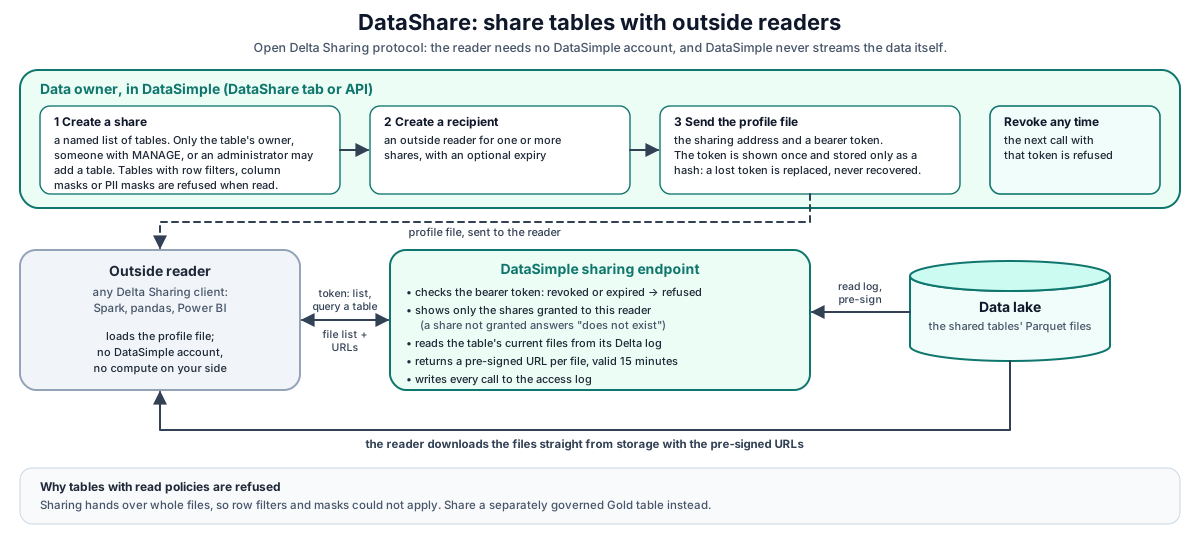
Walk-through:
- The owner creates a share listing tables (
POST /api/notebooks/sharing/shares), then a recipient for that share (POST /recipients). The response contains the profile with the token. This is the only time the token is visible. - The recipient's client calls
GET /delta-sharing/shares,.../schemas,.../tableswithAuthorization: Bearer <token>. DataSimple identifies the recipient, rejects it if revoked or expired, and shows only the shares granted to that recipient. - For
metadataandquery, DataSimple finds the table's storage location in the catalog, checks for read policies, reads the Delta transaction log to find the current files, pre-signs a URL for each file, and returns NDJSON. - The client downloads the files directly from object storage before the URLs expire.
- Listing shares,
metadataandquerycalls are written to the access log. So are refusals for a bad token, a share not granted to the recipient and a table not found. Other successful calls (one share, schemas, tables, table version) and read-policy refusals are not logged.
Administration API (/api/notebooks/sharing)#
| Method | Path | Purpose |
|---|---|---|
| GET | /status |
Endpoint recipients should use, share and recipient counts, active recipients, urlTtlSeconds |
| GET | /shares |
List your shares |
| POST | /shares |
{ name, objects: [...], comment? }. Creates the share, or replaces its table list if the name exists and you may manage it (see Who may share). |
| DELETE | /shares/:name |
Delete the share. Its creator, someone with MANAGE on it, or an administrator. |
| GET | /recipients |
List recipients: id, name, token prefix, shares, expiry, revoked, last used |
| POST | /recipients |
{ name, shares: [...], comment?, expiresInDays? }. Returns recipient, profile and a warning. shares must be non-empty and every share must exist. |
| POST | /recipients/:id/revoke |
Revoke. New requests are refused at once. Needs the right to manage every share the recipient reads. |
| DELETE | /recipients/:id |
Delete the recipient. Same rule as revoke. |
| GET | /access-log?limit= |
Your tenant's access log, newest first (default 100, max 1,000) |
Creating a recipient with an existing name (case-insensitive) issues a new token for it, clears the revoked flag and sets the new expiry. Use this to reissue a lost profile. Reissuing needs the right to manage the shares the recipient reads today as well as the ones you give it.
Who may share#
A share sends tables outside the platform, so opening the DataShare tab is not enough on its own.
| Action | Who may do it |
|---|---|
| Put a table in a share | The table's owner, someone with MANAGE on the table, its schema or its catalog, an administrator, or a catalog administrator of your tenant. SELECT alone is not enough. |
| Change an existing share (its tables or comment) | The person who created the share, someone with MANAGE on the share, an administrator, or a catalog administrator. Tables already in the share stay; each table you add must pass the rule above. |
| Delete a share | Same as changing it. |
| Create, reissue, revoke or delete a recipient | Someone who may manage every share the recipient reads. A recipient whose share was deleted can still be revoked or deleted by the person who created it. |
To let a colleague look after a share with you, grant them MANAGE on it:
GRANT MANAGE ON SHARE partner_sales TO `maria`;
The share's creator, anyone with MANAGE on the share, an administrator or a catalog administrator may make this grant. Anyone else gets 403 "GRANT in a notebook requires an administrator or MANAGE privilege."
Changing a share someone else created is refused with a message that names who may act, for example "Changing share partner_sales is limited to the share's creator (created by ann), someone with MANAGE on the share, or an administrator." A name that already belongs to someone else's share is refused the same way; it no longer replaces their share. Listing shares and recipients is open to everyone in your tenant who can open the DataShare tab.
The endpoint in the profile is your workspace's public sharing address. Your administrator can set it explicitly when DataSimple sits behind a proxy; otherwise it is taken from the address you used to reach DataSimple, plus /delta-sharing.
Shares can also be created and deleted from the catalog's governance screens and API (/api/notebooks/unity-catalog/shares). See Lakehouse and governance.
Delta Sharing endpoints (/delta-sharing)#
| Method | Path | Response |
|---|---|---|
| GET | /shares |
{ items: [{ name, id }], nextPageToken? }. Only the recipient's granted shares. |
| GET | /shares/{share} |
{ share: { name, id } } |
| GET | /shares/{share}/schemas |
{ items: [{ name, share }] } |
| GET | /shares/{share}/schemas/{schema}/tables |
{ items: [{ name, schema, share }] } |
| GET | /shares/{share}/all-tables |
All tables in the share, across schemas |
| GET | /shares/{share}/schemas/{schema}/tables/{table}/version |
Empty JSON body, Delta-Table-Version header |
| GET | /shares/{share}/schemas/{schema}/tables/{table}/metadata |
NDJSON: a protocol line and a metadata line |
| POST | /shares/{share}/schemas/{schema}/tables/{table}/query |
NDJSON: protocol, metadata, then one file line per data file with a pre-signed url |
Details:
- Paging. List endpoints accept
maxResults(up to 500) andpageToken. - Errors use the protocol shape
{ errorCode, message }:UNAUTHENTICATED(401),RESOURCE_DOES_NOT_EXIST(404),PERMISSION_DENIED(403),INVALID_PARAMETER_VALUE(400),INTERNAL_ERROR(500 or 503). - A share that was not granted returns 404, not 403, so a caller cannot learn that a share exists.
- Metadata line.
metaDatahasid(share.schema.table),name,format.provider = "parquet", a SparkschemaStringbuilt from the catalog columns, and no partition columns. If the catalog has no columns for the table, they are read from the table's own Delta log. - Versions. For Delta tables, the version is the current Delta log version. For Parquet-only tables, a timestamp from the catalog registration stands in for it.
- Query.
predicateHintsandlimitHintare optional in the protocol and are ignored; the full current file set is returned. Delta tables are read through their_delta_log. Plain Parquet locations are listed. Iceberg tables are served from their current snapshot. - Pre-signed URLs last 15 minutes by default (your administrator can change this).
Tables with read policies are refused#
Before version, metadata or query, DataSimple checks the table's read policies (row filters, column masks, and PII masks on columns that exist in the table). If there is any, the answer is 403 PERMISSION_DENIED, with the message "This table has read policies. Use the governed SQL connection or publish a separately governed Gold export…". File-level sharing cannot apply a filter or mask, so sharing the raw files would bypass them. If the policies cannot be checked, the answer is 503; DataSimple never shares a table it could not check.
To share such data, build a Gold table that already has the filter and mask applied, and share that table instead.
Tokens, expiry and revocation#
- Revoked or expired recipients get 401 "Token is invalid, revoked, or expired". Every call with a valid token updates the recipient's last used time, even when the call is then refused.
expiresInDayssets the expiry. The profile then carriesexpirationTime, so clients can warn the recipient.- Revoke stops new requests at once. Pre-signed URLs that were already issued keep working until they expire. That window is the URL lifetime, which is why it is short.
Developer examples#
1. Create a share and a recipient#
curl -s -X POST https://<your-datasimple-host>/api/notebooks/sharing/shares \
  -H "Content-Type: application/json" -H "Authorization: Bearer <PERSONAL_TOKEN>" \
  -d '{"name":"partner_sales","objects":["datasimple.gold.sales_by_region"],"comment":"Monthly sales for Partner A"}'

# Creating a recipient needs a signed-in session (a personal token is refused with 403 TOKEN_NOT_ALLOWED)
curl -s -X POST https://<your-datasimple-host>/api/notebooks/sharing/recipients \
  -H "Content-Type: application/json" -H "Cookie: <SESSION_COOKIE>" \
  -d '{"name":"partner_a","shares":["partner_sales"],"expiresInDays":30}'
Response (the token appears only here):
{
  "success": true,
  "recipient": { "id": 12, "name": "partner_a", "shares": ["partner_sales"], "expires_at": "2026-11-27T10:00:00.000Z" },
  "profile": {
    "shareCredentialsVersion": 1,
    "endpoint": "https://<your-datasimple-host>/delta-sharing",
    "bearerToken": "<TOKEN_SHOWN_ONCE>",
    "expirationTime": "2026-11-27T10:00:00.000Z"
  },
  "warning": "The bearer token is shown once and stored only as a hash. ..."
}
Save profile as partner_a.share and send it over a secure channel.
2. Read the share with the Python client#
# pip install delta-sharing
import delta_sharing

profile = "partner_a.share"
client = delta_sharing.SharingClient(profile)
print(client.list_all_tables())
# [Table(name='sales_by_region', share='partner_sales', schema='gold')]

df = delta_sharing.load_as_pandas(f"{profile}#partner_sales.gold.sales_by_region")
print(df.head())
With Spark and the Delta Sharing connector:
df = (spark.read.format("deltaSharing")
      .load("partner_a.share#partner_sales.gold.sales_by_region"))
3. Call the protocol with curl#
TOKEN="<BEARER_TOKEN>"
BASE="https://<your-datasimple-host>/delta-sharing"

curl -s -H "Authorization: Bearer $TOKEN" "$BASE/shares"
curl -s -H "Authorization: Bearer $TOKEN" "$BASE/shares/partner_sales/all-tables"
curl -s -i -H "Authorization: Bearer $TOKEN" \
  "$BASE/shares/partner_sales/schemas/gold/tables/sales_by_region/version"   # Delta-Table-Version header

curl -s -X POST -H "Authorization: Bearer $TOKEN" -H "Content-Type: application/json" \
  -d '{}' "$BASE/shares/partner_sales/schemas/gold/tables/sales_by_region/query"
The query answer is NDJSON (shortened):
{"protocol":{"minReaderVersion":1}}
{"metaData":{"id":"partner_sales.gold.sales_by_region","name":"sales_by_region","format":{"provider":"parquet"},"schemaString":"{\"type\":\"struct\",\"fields\":[...]}","partitionColumns":[],"configuration":{}}}
{"file":{"id":"<file id>","url":"<PRE_SIGNED_URL>","partitionValues":{},"size":48211}}
4. Check the access log and revoke#
AUTH="Authorization: Bearer <PERSONAL_TOKEN>"
curl -s -H "$AUTH" "https://<your-datasimple-host>/api/notebooks/sharing/access-log?limit=50"
# { "entries": [ { "at": "...", "recipient": "partner_a", "table_name": "sales_by_region",
#                  "action": "query", "status": "ok", ... } ] }

# Revoking a recipient needs a signed-in session, like creating one
curl -s -X POST -H "Cookie: <SESSION_COOKIE>" "https://<your-datasimple-host>/api/notebooks/sharing/recipients/12/revoke"
# The next sharing call with that recipient's token returns 401 UNAUTHENTICATED.
Security and permissions#
- Two ways to sign in. The sharing endpoint accepts recipient bearer tokens only and never uses a DataSimple session. Administration needs a normal sign-in or personal token and access to the DataShare tab; creating or revoking a recipient needs a signed-in session, because a personal token is refused there (403
TOKEN_NOT_ALLOWED). - Owner or MANAGE only. Only a table's owner, a MANAGE holder or an administrator can put it in a share, and only a share's creator, a MANAGE holder on the share or an administrator can change or delete it and its recipients. See Who may share.
- Tenant isolation. Each recipient belongs to one tenant and can only reach that tenant's shares and tables.
- Least disclosure. An empty
shareslist means no shares, not all shares. A share that was not granted answers 404. - Governed tables are refused. Tables with row filters, column masks or PII masks are never shared as files.
- No standing cloud credentials. Recipients get only time-limited URLs for the exact files of one table.
- Tokens are stored only as hashes, with a short prefix kept for identification in lists.
- Access log. The access log shows your tenant's sharing activity only. Calls with an invalid token are not attributed to any tenant.
- Audit. History records
sharing.share_upsert,sharing.share_delete,sharing.recipient_create,sharing.recipient_revokeandsharing.recipient_delete. Creating a share also recordsCREATE_SHAREin the catalog audit (Administration, then Governance, then UC Audit).
Monitoring and troubleshooting#
- DataShare tab, then Access log: listing shares, metadata and query calls, and refused calls (share not granted, table not found), with status
ok,denied,not_foundorerror. Other successful calls and read-policy refusals are not logged. Calls with a bad token are logged but belong to no tenant, so they do not appear here. - History: who created shares and recipients, and who revoked them.
- Recipient list: the last used time shows whether a recipient is still active.
| Error the recipient sees | Cause |
|---|---|
401 Missing bearer token |
The client sent no Authorization header; check the profile path |
401 Token is invalid, revoked, or expired |
Reissue the profile (create the recipient again with the same name) |
404 Share '...' does not exist |
The share is not granted to this recipient, or does not exist |
403 This table has read policies |
Share a governed Gold export instead |
500 ... has no storage location registered in the catalog |
Ask the share owner to register the table in the catalog |
500 No column metadata registered |
Ask the share owner to re-register the table so its schema is known |
400 No readable _delta_log at the table location |
Ask the share owner to check the table: the location is not a Delta table, or cannot be read |
| Error the share owner sees | Cause |
|---|---|
403 You can share only tables you own or hold MANAGE on |
Ask the table's owner to share it, or to grant you MANAGE on it |
403 ... is limited to the share's creator |
The share belongs to someone else. Ask them for MANAGE on the share, or pick another name |
403 ... needs the right to manage share ... |
The recipient reads a share you do not manage |
| Download fails with an expired-URL error | The client took longer than the URL lifetime; query again |
Limits#
- No change data feed and no time travel. The query always returns the current snapshot. Hints and version parameters are ignored.
- No partition values.
partitionColumnsis always empty. - No row-level sharing. Tables with filters or masks are refused rather than filtered.
- Revocation is not instant for downloads already started. Issued URLs live until they expire (15 minutes by default).
POST /sharesreplaces the table list of a share you manage with the list you send; send every table you want to keep.- List endpoints return at most 500 items per page.
Related content#
- Lakehouse and governance: shares in the catalog, grants, filters, masks
- Lake storage: Delta and Parquet layout
- Observability
- App server and security
- Delta Sharing protocol: https://github.com/delta-io/delta-sharing/blob/main/PROTOCOL.md
- Delta Lake: https://docs.delta.io/latest/index.html
- Apache Parquet: https://parquet.apache.org/docs/
- Apache Iceberg: https://iceberg.apache.org/docs/latest/