Overview#
Bronze is the first layer after the raw source copies. A Bronze table, datasimple.bronze.<schema>_<table>, holds the rows as they came from the source with the bookkeeping columns kept: when and by which run a row arrived, what operation it was (insert, update, delete), and whether the key is deleted. Deletes are kept as markers, never removed, so Bronze can always answer "what did we receive, and when".
The Bronze loads screen shows load control for every loaded table, the state of Bronze apply, and controls to apply the latest DataBridge job of a source into Bronze.
Who uses it:
- Data engineers check that each table's watermark moved, re-run Bronze for a source, and reset or adjust a table's position.
- Administrators retry failed Bronze applies.
- Developers read Bronze in notebooks and build Silver from it.
Where it is: left rail → Bronze loads. Extraction itself belongs to DataBridge and Schedules; nothing on this screen reads a source system.
How it fits the platform: Bronze is written by DataBridge, right after a load (auto-apply) or on demand from this screen. Silver is built from Bronze with ds.apply_changes or APPLY CHANGES INTO. See Architecture, DataBridge and Declarative tables and change handling.
Key concepts#
| Term | Meaning |
|---|---|
| Bronze apply | The step that takes a DataBridge job's source copies and writes Bronze. Runs at the end of a load when Auto-apply to Bronze CDC after extract is on (the default in the wizard; not available for bulk loads), or on demand. The automatic apply runs only when every table succeeded, including change-log runs; it is skipped only when a table's change-log write failed. |
| Bronze format | Follows the load: Delta when Delta and Parquet are both among the formats, Iceberg when Iceberg and Parquet are, otherwise Parquet. Delta and Iceberg Bronze need an S3 target. |
| Transactional Bronze | Delta or Iceberg Bronze. An apply merges by key: new keys inserted, changed keys updated, deleted keys kept with _op_type = 'D' and _is_deleted = true. |
| Append Bronze | Parquet Bronze. Each run appends; the insert, update and delete events of an incremental run are also written to the change log next to the table. |
| Change log | The per-table event log: one event per insert, update or delete, ordered by _cdc_seq. |
| Load control | One row per loaded table: load type, method, watermark column, committed high watermark, last window, last run, rows. |
| Change detection | Key plus watermark per table, driven by DataBridge jobs. |
How it works#

Delta Lake is a trademark of LF Projects, LLC. Apache, Apache Iceberg, Iceberg, Apache Parquet and Parquet are trademarks of The Apache Software Foundation. The logos identify the open formats DataSimple reads and writes.
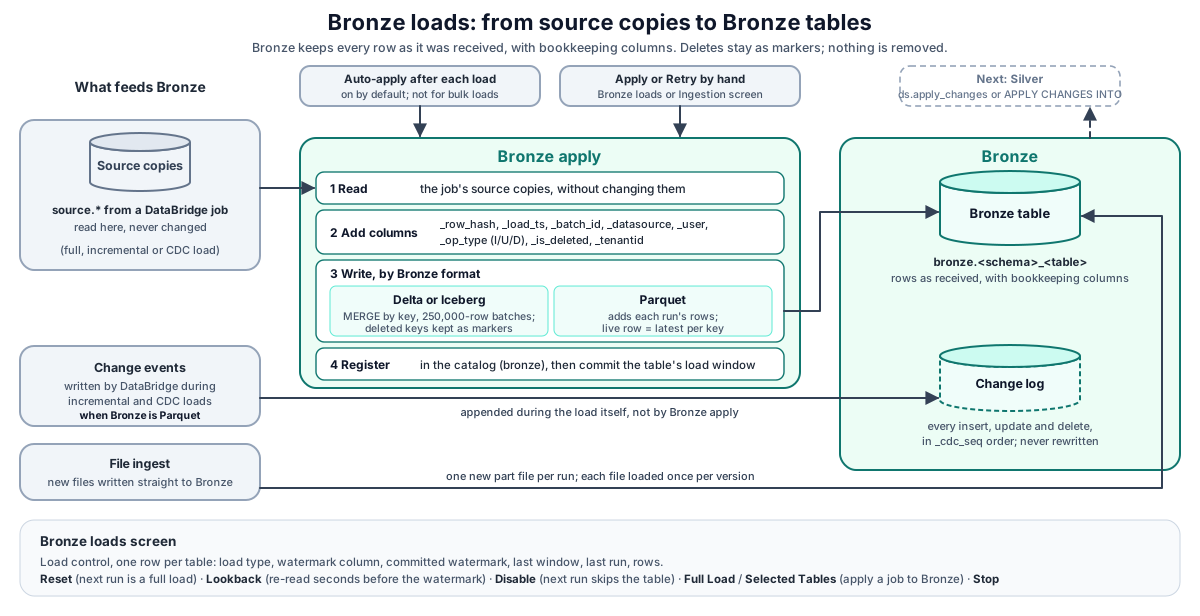
- A DataBridge job writes the source copies. When Bronze is Parquet, the change-log events of watermark and change-log runs are recorded during the load itself. If auto-apply is on, the job is applied to Bronze at its end when every table succeeded, change-log runs included. If a table's change-log write failed, nothing is applied automatically: run the load again, or use Apply on this screen.
- On the screen, Apply finds the latest finished job of the chosen source and applies it (all tables, or the selected ones).
- Bronze apply reads the source copies without changing them, adds the Bronze columns, and merges (Delta, Iceberg) or appends (Parquet). It registers the table in the catalog in the
bronzelayer and records the apply in the history on this screen.
What Bronze holds#
| Column | Meaning |
|---|---|
| Business columns | As the source sent them. |
_row_hash |
SHA-256 over the source columns; the same input always gives the same hash. |
_source_ts, _extracted_at, _load_ts |
Change time in the source; when the read finished; when the row was written to the lake. |
_batch_id |
The DataBridge job that last touched the key. |
_datasource, _user |
Which Data Source, and who or which schedule started the run. |
_op_type, _is_deleted |
Latest operation for the key (I, U, D); true for a deleted key. |
_tenantid |
The tenant that wrote the row. |
_source_file, _file_etag |
File drops and file ingest: the file a row came from and its version. |
_kafka_topic, _kafka_partition, _kafka_offset, ... |
Kafka sources: where the message sat. |
In notebook results these columns are hidden by default; Audit columns (n) shows them. The event order _cdc_seq is kept in the change log only, not in Bronze tables.
Bronze apply#
| Bronze format | What an apply does | Live rows |
|---|---|---|
| Delta or Iceberg | Delta: one MERGE by key, with the batch read in chunks of 250,000 rows. Iceberg: merged by key and rewritten in one commit. Deleted keys stay as markers. | WHERE NOT _is_deleted |
| Parquet | A full load appends the whole table. An incremental run (change log or watermark) appends only the rows it read, each marked I (new key), U (key already in Bronze) or D (deleted); it also appends events to the change log. A run that read nothing appends nothing (Zero data extract). |
Latest event per key. |
Apply rules:
- The source copies are never modified.
- A table without a key is still loaded. Its result warns
No primary key: rows appended, duplicates possible; declare a key. Delta Bronze matches its rows by row hash. Iceberg Bronze needs a key for applies after the first load. - A failed apply is listed with its error under Recent bronze applies and can be retried: Ingestion → Retry Bronze,
POST /api/databridge/api/jobs/{id}/bronze/retry, or Apply on this screen. - Stop makes the running apply skip the tables it has not started. It also cancels a job started by
POST /api/bronze-replication/rerun-source(API only; there is no button for it on this screen).
The change log#
The change log is written only when Bronze is Parquet. For watermark and change-log runs, DataBridge compares each batch with the table's change log and appends the events. On S3 targets the log is a folder cdc/ under the Bronze table, with one Parquet file per run that had events; files and folders whose names start with _ are bookkeeping, not events. Events are never rewritten. On ADLS targets the log is a single file. Details: DataBridge, The CDC change log.
Delete events also come from Detect deletes (keys gone from the source) and from Salesforce recycle-bin records. Nothing is ever removed from the log.
File ingest into Bronze#
File ingest (/api/databridge/api/files/run, a scheduled file connection, or a Workflow Files step) writes Bronze directly: one new part file per run under the table folder, one run per source and table at a time, and each file loaded once per version. See DataBridge, File ingest.
The Bronze loads screen#
| Area | What it shows and does |
|---|---|
| Load control | One row per loaded table: load type (full, initial, delta, cdc, stream), method, watermark column, committed high watermark, last window (from, to], last run, status, rows. Filter by load type, search by table or source. Click a table for its run ledger. |
| Row actions | Reset (forget the position; the next run is an initial load), Lookback (re-read this many seconds before the committed watermark; 0 turns it off), Disable / enable (the next run skips the table and says so). |
| Status | Whether DataBridge is reachable, what is in progress (idle, Bronze apply, or a rerun job), and the last apply. |
| Statistics | Tables applied, rows applied, failed applies, last job. |
| Change detection | Method: key plus watermark per table (job based). |
| Apply to bronze | Pick a source; Full Load applies every table of its latest job, Selected Tables only the tables you tick from that job's table list. Stop stops between tables. |
| Recent bronze applies | The latest applies with status and error. |
REST API#
Call these with Authorization: Bearer <PERSONAL_TOKEN> against https://<your-datasimple-host>.
| Method | Path | Purpose |
|---|---|---|
| GET | /api/bronze-replication/status |
Status card. |
| GET | /api/bronze-replication/stats |
Statistics. |
| GET | /api/bronze-replication/sources |
Source names from past jobs. |
| GET | /api/bronze-replication/tables?source_name= |
Tables of a source's latest finished job. |
| GET | /api/bronze-replication/apply-history?limit= |
Recent applies. |
| POST | /api/bronze-replication/start-snapshot |
Apply a source's latest job. Body { mode: "full" | "selected", source_name, tables }; selected needs at least one table. |
| POST | /api/bronze-replication/apply/{job_id} |
Apply one job; optional { tables: [...] }. |
| POST | /api/bronze-replication/rerun-source |
Run the last job of a source again (re-extracts). API only. |
| POST | /api/bronze-replication/stop |
Stop the running apply or rerun job. |
| GET | /api/databridge/api/load-control |
Load-control rows. |
| POST | /api/databridge/api/load-control/{connection_key}/{table}/reset, /lookback, /enabled |
Load-control row actions. |
| GET | /api/databridge/api/load-runs |
The run ledger. |
Developer examples#
1. Read live Bronze rows#
-- Delta or Iceberg Bronze: one row per key
SELECT * FROM datasimple.bronze.dbo_Orders WHERE NOT _is_deleted;

-- What one run changed
SELECT OrderID, _op_type, _batch_id, _load_ts
FROM datasimple.bronze.dbo_Orders
WHERE _batch_id = 74
ORDER BY OrderID;

-- Parquet Bronze (append): latest event per key
SELECT * FROM (
  SELECT b.*, ROW_NUMBER() OVER (PARTITION BY OrderID
                                 ORDER BY _load_ts DESC, _batch_id DESC) AS rn
  FROM datasimple.bronze.dbo_Orders b
) WHERE rn = 1 AND NOT _is_deleted;
2. Build Silver from Bronze in Python#
bronze = read_table("bronze.dbo_Orders")
ds.apply_changes(
    target="silver.orders",
    source=bronze,
    keys=["OrderID"],
    sequence_by="_load_ts",
    apply_as_deletes="_op_type = 'D'",           # a SQL boolean over the source
    stored_as_scd_type=1,
)
Type 2 history, snapshots and the SQL form are in Declarative tables and change handling.
3. Apply the latest job of a source, selected tables only#
await fetch("https://<your-datasimple-host>/api/bronze-replication/start-snapshot", {
  method: "POST",
  headers: { "Content-Type": "application/json", "Authorization": "Bearer <PERSONAL_TOKEN>" },
  body: JSON.stringify({ mode: "selected", source_name: "Sales-SQL", tables: ["dbo.Orders"] }),
});
4. Reset a table's position and watch the next run#
H="Authorization: Bearer <PERSONAL_TOKEN>"
curl -s https://<your-datasimple-host>/api/databridge/api/load-control -H "$H"
curl -s -X POST "https://<your-datasimple-host>/api/databridge/api/load-control/<connection_key>/dbo.Orders/reset" -H "$H"
curl -s "https://<your-datasimple-host>/api/bronze-replication/apply-history?limit=20" -H "$H"
Take connection_key and the table name from the load-control row, and URL-encode them.
Security and permissions#
Stop affects only your tenant. Stop on the Bronze loads screen stops the Bronze work your tenant started; another tenant's running work is never touched.
Sign-in and access. Every call needs a session or a personal token. The Bronze loads screen needs the Bronze loads permission in your role; load-control calls also need Databridge.
Tenant. Statistics, tables, sources, history and the rerun-source call are limited to your tenant.
Data access. Bronze tables are catalog tables. Reads by name in notebooks apply grants, row filters and column masks like any other table.
Audit. Each apply is listed under Recent bronze applies. DataBridge jobs with Bronze apply report Bronze rows to the Log screen and lineage from the source copy to the Bronze table.
Settings you can change#
| Setting | Where | Effect |
|---|---|---|
| Auto-apply to Bronze | Wizard Auto-apply to Bronze CDC after extract, or auto_bronze_apply on /api/convert |
Apply each load to Bronze automatically. |
| Bronze format | Source layer formats in the wizard | Delta when Delta and Parquet are ticked, Iceberg when Iceberg and Parquet are ticked, otherwise Parquet. Delta and Iceberg need an S3 target. |
| Reset, Lookback, Disable | Load control row actions | Steer a table's position. |
Your administrator can change the batch size used to read rows for a Delta merge (default 250,000 rows).
Monitoring and troubleshooting#
- Bronze loads screen: statistics, recent applies with errors, load-control status per table and the run ledger.
- Ingestion (administrators): per-job Bronze state and Retry Bronze.
- Log: DataBridge lines include
bronze <rows> rowsper table.
| Symptom | Meaning |
|---|---|
| Status card shows offline | DataBridge is not reachable right now (502). Try again shortly. |
Selected Tables needs at least one table (400) |
Tick at least one table, or use Full Load. |
No completed Databridge job for source '...' (404) |
Run a DataBridge load for that source first. |
| A table in the Apply list is greyed out | Its extract failed or is pending; there is nothing to apply. |
| Rows stack up in Bronze | Bronze is Parquet (append). Read the latest event per key, or load with Delta and Parquet among the formats. |
No primary key: rows appended, duplicates possible; declare a key |
The table has no key. Its rows were loaded, but duplicates are possible. Declare a key in the wizard. |
Limits and known issues#
- Bronze change detection is key plus watermark per table, driven by jobs; there is no continuous database replication behind this screen.
- On ADLS targets the change log is one file rewritten per run.
- Change-log files are not compacted, and the change log is not yet registered in the catalog as its own table.
- Bulk (Spark box) loads do not apply to Bronze.
- Bronze apply with Bronze columns, merge and append is available on S3 targets. On ADLS targets the Parquet source copy is registered as the Bronze table as it is.
Related content#
- DataBridge
- Declarative tables and change handling
- Lake storage
- Notebooks
- Observability
- Delta Lake: https://docs.delta.io/latest/index.html
- Apache Iceberg: https://iceberg.apache.org/docs/latest/
- Apache Parquet: https://parquet.apache.org/docs/