Overview#
All table data lives on object storage (Amazon S3, Azure Data Lake Storage Gen2 or Google Cloud Storage), in one bucket or container per environment. An administrator saves it once as a target Data Source. DataBridge, notebooks and the Workflow write under a fixed folder layout inside it, and every table is registered in the catalog, so you read by name (datasimple.silver.orders) and never by path (Lakehouse and governance).
This chapter is for developers who debug a load or need to know what a folder holds. You see the layout in Data Lake (raw folders) and the registered tables in Lakehouse. For the platform map, see Architecture.
Key concepts#
| Term | Meaning |
|---|---|
| Medallion layers | source (raw copies from DataBridge), bronze (one row per key with delete markers, or the change log), silver (cleaned, current state and history), gold (business tables, star schemas, summaries). |
| Lake prefix | An optional prefix under the bucket. With no prefix, layers sit at the root: s3://<lake-bucket>/source/…. |
| Source folder | The saved Data Source name typed in the DataBridge wizard. It is the first folder under the layer and names the source in lineage. |
| Format copy | One source table can be copied as Parquet, Delta and Iceberg side by side. Each copy is its own catalog entry. |
| Managed root | <lake root>/__uc_managed/<layer>/<table>: where tables created in notebooks (save_table, CREATE TABLE … USING DELTA without a location) are written. |
| Part files | A large incremental Parquet copy kept as many files in a generation folder instead of one object. |
| Change log | The Bronze change (CDC) event log of a table: append-only part files under cdc/, plus the latest state per key. |
_tenantid |
Bookkeeping column on lake rows: the tenant (three digits) that wrote the row. Protected. |
How it works#

Delta Lake is a trademark of LF Projects, LLC. Apache, Apache Iceberg, Iceberg, Apache Parquet and Parquet are trademarks of The Apache Software Foundation. The logos identify the open formats DataSimple reads and writes.
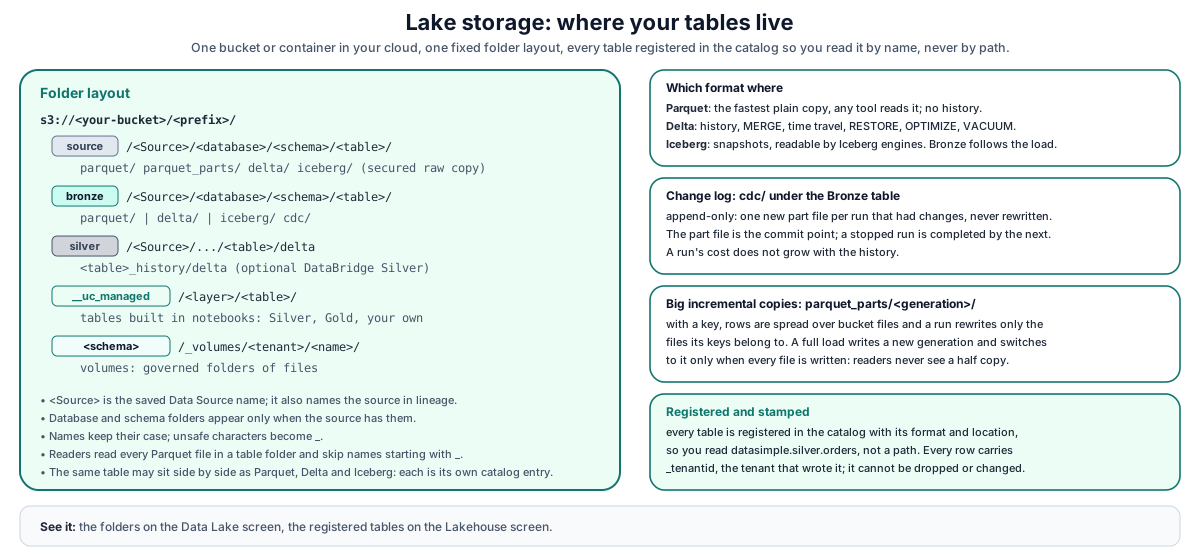
DataBridge writes Parquet, Delta and Iceberg directly; notebooks write through the Spark engine. Both register what they wrote in the catalog. Readers read every Parquet file in a table folder and skip file names that start with _.
Folder layout#
s3://<lake-bucket>/<prefix>/
  source/<Source>/<database>/<schema>/<table>/
      parquet/<TABLE>.parquet                    single-file Parquet copy
      parquet_parts/<generation>/…               part-file Parquet copy (large incremental tables)
      delta/                                     Delta copy (_delta_log/ + data files)
      iceberg/                                   Iceberg copy (data/ + metadata/)
  bronze/<Source>/<database>/<schema>/<table>/
      parquet/<TABLE>.parquet | delta/ | iceberg/   Bronze table in the run's format
      cdc/                                       change log (Parquet Bronze with CDC)
  silver/<Source>/<database>/<schema>/<table>/delta            DataBridge Silver, Type 1
  silver/<Source>/<database>/<schema>/<table>_history/delta    DataBridge Silver, Type 2
  __uc_managed/<layer>/<table>/                  tables created in notebooks (Silver, Gold, your own)
  <schema>/_volumes/<tenant>/<name>/             volumes (default location)
- Database and schema folders appear only when the source has them; a schema equal to the database is not repeated.
- Path segments keep case (Snowflake and Oracle names are upper-case) and replace unsafe characters with
_. - A Silver or Gold table built in a notebook or by
ds.*goes to the managed root unless you name a path (target="lake", path=…).
Change log folder (cdc/)#
On S3 targets, a Bronze change log is append-only:
<table>/cdc/part-<first sequence number, 20 digits>.parquet    one per run that had events
<table>/cdc/_common_metadata                                   schema of the log
<table>/cdc/_state/…                                           latest state per key
- Events are never rewritten. Each run's events are one new file. Two runs can never commit the same events twice.
- The part file is the commit point. If a run stops after its part file is written, the next run completes it automatically. The per-key state is derived and is rebuilt from the part files if needed.
- Cost per run does not grow with history: a run reads only what it needs and writes one new part.
- ADLS targets keep a single change-log file,
cdc/cdc_bronze.parquet.
Part-file Parquet copies#
A table loaded incrementally (watermark, change log or file drop) and large enough to be streamed keeps its Parquet copy as part files:
<table>/parquet_parts/<generation>/bucket-00000.parquet …   with a key: rows spread by a hash of the key
<table>/parquet_parts/<generation>/part-….parquet           no key: one file per batch, appended
<table>/parquet_parts/<generation>/_common_metadata         table schema
- The generation folder is the table's location in the catalog.
- A full load writes a new generation and switches the catalog to it only after every file is written. Readers never see a half-written copy.
- An incremental run with a key rewrites only the files its keys belong to. A key always lives in one file, so a reader sees each key once.
- A schema change (new column, new type, other key) rewrites the generation once.
- One previous generation is kept for readers that started before the switch.
Delta, Iceberg and Parquet#
| Format | Used for | Registered as | Keep in mind |
|---|---|---|---|
| Parquet | Fastest plain copy; any tool reads it | datasimple.source.<schema>_<table> |
No history. A single-file copy is rewritten on every incremental run unless it uses part files. Parquet Bronze appends. |
| Delta | Default for Bronze when ticked; DataBridge Silver; notebook-managed tables | …_DELTA for source copies; plain name in other layers |
History, MERGE, time travel, RESTORE, OPTIMIZE, VACUUM. Columns are written nullable. |
| Iceberg | Snapshots, Iceberg engines and catalogs | …_ICEBERG for source copies; Spark name iceberg.<layer>.<table> |
Must be enabled for notebooks by your administrator; renames are not supported; a soft drop only removes the catalog entry until the table is purged. |
Iceberg tables. An Iceberg table is a folder with data/ and metadata/ on object storage. Tables written by DataBridge are immediately readable in notebooks by their Spark name; snapshots and time travel work in SQL. In SQL cells you may use the catalog name and DataSimple routes it to the Iceberg table automatically.
Bronze format. Bronze follows the formats of the run: Delta if Delta was ticked, else Iceberg, else Parquet.
Registration#
DataBridge registers each copy it writes with its format, layer, type (EXTERNAL) and storage location. Notebook writers register managed tables. Plain Spark writes in Python (saveAsTable, insertInto, writeTo) are registered too. A SQL CREATE TABLE may use the datasimple. prefix and PRIMARY KEY / FOREIGN KEY clauses (stored in the catalog); Iceberg tables are routed to iceberg.<schema>.<table>, and a table without a location goes to the managed root.
Time travel and history#
| Format | Look at history | Read an old version | Roll back |
|---|---|---|---|
| Delta | DESCRIBE HISTORY <table>; Lakehouse → History; list_delta_history(name) |
SELECT … FROM <table> VERSION AS OF n; read_delta_at(name, version=n) or timestamp=… |
RESTORE TABLE (administrators only); Agent restore table (administrators, backup first) |
| Iceberg | SELECT * FROM <table>.snapshots; Lakehouse → History |
Iceberg snapshot reads | Agent restore table (administrators) |
| Parquet | None | None | None |
DESCRIBE HISTORY needs SELECT on the table; RESTORE needs MODIFY and an administrator role.
OPTIMIZE and VACUUM#
| Path | What it does | Rules |
|---|---|---|
| Workflow / Pipelines Optimize step | OPTIMIZE (optional ZORDER BY) then VACUUM … RETAIN n HOURS on the Delta tables of the chosen layers; Iceberg and Parquet layers are skipped |
Vacuum retention defaults to 168 hours. A value between 1 and 167 is refused: VACUUM must keep at least 168 hours (7 days) of history, or set it to 0 to skip VACUUM. |
optimize_table(name, min_files=8) / optimize_tables([...]) in a Python cell |
Compacts a Delta table only when it has at least min_files files (unless force=True) |
Prints files before and after |
SQL OPTIMIZE / VACUUM in a cell |
Runs in Spark | Needs MODIFY on the table. Sarah and the Agent may never run VACUUM. |
| Iceberg maintenance | Rewrites data files and manifests, expires old snapshots and removes orphan files on every Iceberg table | Turned on by your administrator; keeps at least 10 snapshots, expires snapshots older than 7 days, removes orphan files older than 72 hours |
Why 168 hours: a VACUUM with a short retention deletes the files that time travel, RESTORE and readers that started earlier still need.
Tenant column _tenantid#
Every lake row carries the tenant that wrote it:
- DataBridge adds
_tenantidwhen it prepares Bronze rows, from the job's tenant; a row that already has it keeps its value. - Notebook writers (
save_table,write_delta,create_managed_table,merge_delta,ds.apply_changes*,@ds.table) add it when the DataFrame lacks it. A column dropped in Python comes back on write. - SQL in a notebook:
CREATE TABLE … AS SELECTgains the tenant column when the query does not produce it;INSERT INTO/INSERT OVERWRITEinto a table that has the column gets the tenant added. AnINSERT OVERWRITEthat cannot be stamped is refused. - Protected:
ALTER TABLE … DROP / RENAME / ALTER COLUMN … TYPE / CHANGE COLUMNon_tenantid, and aREPLACE COLUMNSlist without it, are refused. - A table written before the column existed gains it on its next append.
- Reads:
read_tableon a table with_tenantidreturns only your tenant's rows (rows with NULL, written before the column existed, still show).
See Spark engine for the other statements the SQL guard refuses.
REST API#
Base URL https://<your-datasimple-host>, header Authorization: Bearer <PERSONAL_TOKEN>.
| Method | Path | Purpose |
|---|---|---|
| POST | /api/notebooks/unity-catalog/register |
Register a table you wrote yourself |
| POST | /api/notebooks/spark/history |
Delta history of a table ({ path, limit }) |
| GET | /api/notebooks/spark/s3-list?path= |
List the data and log files of one Delta table. path is the full path of the table in the lake browse location (as on the Data Lake screen). A path outside the lake browse storage answers 403; a table not in your catalog answers 403 This table is not in your catalog.; a malformed path answers 400 invalid s3 path. When the lake browse location is off, the answer has enabled: false and no files. |
Developer examples#
1. Compare the format copies of one source table#
SELECT COUNT(*) FROM datasimple.source.dbo_orders;            -- Parquet copy
SELECT COUNT(*) FROM datasimple.source.dbo_orders_DELTA;      -- Delta copy
DESCRIBE HISTORY datasimple.source.dbo_orders_DELTA;          -- one version per load
SELECT snapshot_id, committed_at FROM datasimple.source.dbo_orders_ICEBERG.snapshots;
2. Read an older Delta version and compact#
before = read_delta_at("silver.orders", version=3)
now = read_table("silver.orders")
print(now.count() - before.count(), "rows added since version 3")

optimize_table("silver.orders", min_files=8)      # skipped when there are fewer than 8 files
3. Register a table written to your own path#
curl -s -X POST "https://<your-datasimple-host>/api/notebooks/unity-catalog/register" \
  -H "Authorization: Bearer <PERSONAL_TOKEN>" -H "Content-Type: application/json" \
  -d '{"name":"orders_archive","layer":"silver","format":"DELTA","tableType":"EXTERNAL",
       "storageLocation":"s3://<lake-bucket>/<prefix>/silver/archive/orders/delta",
       "columns":[{"name":"order_id","type":"bigint"},{"name":"amount","type":"decimal(18,2)"}],
       "primaryKey":["order_id"]}'
4. The tenant column is kept#
CREATE TABLE gold.sales_by_region AS
SELECT region, order_date, SUM(amount) AS revenue FROM silver.orders GROUP BY region, order_date;
-- the table gets _tenantid automatically

ALTER TABLE gold.sales_by_region DROP COLUMN _tenantid;
-- refused: _tenantid is a protected column: every lake table keeps the tenant that wrote it
Security and permissions#
- Read by name, not by path. Grants, row filters and column masks apply to reads by catalog name (Lakehouse and governance). Always use the catalog name.
- The
sourcelayer is read-only for users; write tobronze,silver,goldor your own schemas. - Tenant column on every row, protected in SQL and re-stamped by every writer.
- Storage names stay private. The Lakehouse tooltip shows the Data Source name; error messages never name storage.
- Audit. DataBridge loads and notebook writes are recorded in the definition log and lineage; drops and undrops in the catalog audit.
Settings your administrator controls#
| Behaviour | Default |
|---|---|
| Part-file Parquet copies for large incremental tables | Automatic |
| Append-only change log | Automatic |
| Iceberg in notebooks | Off |
| Iceberg maintenance | Off (keeps 10 snapshots, 7 days, orphans 72 hours when on) |
| Automatic purge of soft-dropped tables | Off. When your administrator turns it on, tables dropped more than 7 days ago are purged. |
Monitoring and troubleshooting#
- Log tab / job report: DataBridge records each step's time (read, copy, change log, catalog) per job.
- History: Lakehouse → table → History for Delta versions and Iceberg snapshots.
- Data Lake screen: check the folders and files of a table.
| Symptom | Cause and fix |
|---|---|
Iceberg is off: this statement uses an Iceberg table… |
Iceberg is not enabled for notebooks. Read the _DELTA copy, or ask an administrator to enable Iceberg (the first Iceberg cell after that restarts your session once). |
The location holds no Delta table |
Wrong path or table never written. Check the name. |
Iceberg tables in this lake cannot be renamed |
Renames are not supported. CREATE TABLE <new> USING ICEBERG AS SELECT * FROM <old>, then drop the old one. |
Another job wrote this table at the same moment |
Concurrent Delta commit. Run again. |
VACUUM must keep at least 168 hours… |
Optimize step retention too short. Use 168 or more, or 0 to skip. |
TRUNCATE on a Delta table |
Run as DELETE FROM (keeps time travel); Iceberg keeps TRUNCATE. |
Limits#
- Single-file Parquet copies of tables that are not streamed are rewritten whole on each incremental run.
- ADLS targets keep a single-file change log.
- Iceberg in notebooks is off by default because it adds session start-up time.
- Iceberg renames are not supported.
- Parquet has no history, so there is no undo of a Parquet overwrite.
- Bookkeeping columns on Bronze tables can differ slightly between load types (Parquet, Delta/Iceberg merge, change log, file stream).
Related content#
- Lakehouse and governance · Declarative tables and change handling · Spark engine
- DataBridge · Bronze loads · Data Lake · Workflow
- User guide: Lake targets and formats, Audit trail columns
- Delta Lake: https://docs.delta.io/latest/index.html
- Apache Iceberg: https://iceberg.apache.org/docs/latest/
- Apache Parquet: https://parquet.apache.org/docs/
- Amazon S3 (concepts): https://docs.aws.amazon.com/AmazonS3/latest/userguide/Welcome.html
- Azure Data Lake Storage: https://learn.microsoft.com/azure/storage/blobs/data-lake-storage-introduction