Overview#
The example uses a small order system with two source tables, public.customers and public.orders, in a PostgreSQL database. By the end you will have:
| Layer | Table | Built with |
|---|---|---|
| source | datasimple.source.public_orders, datasimple.source.public_customers |
DataBridge watermark load |
| bronze | bronze.public_customers, bronze.public_orders |
Bronze apply from the source copies, with the change log DataBridge records |
| silver | silver.customers (SCD Type 2), silver.orders (current state) |
ds.apply_changes, @ds.table |
| gold | gold.dim_customer, gold.fact_orders, gold.obt_orders, gold.sales_by_region |
@ds.dimension, @ds.fact, @ds.obt, @ds.table |
Then you add a quality rule, a metric, a pipeline with a schedule, a Delta Share, and promote the work to QA.
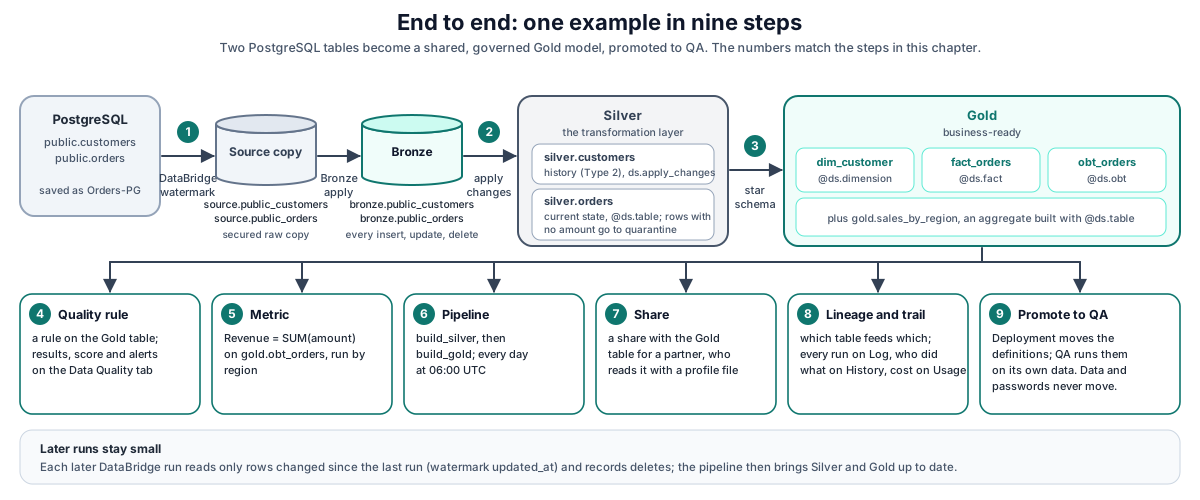
Before you start
- You can sign in to DataSimple, and your role includes the Notebooks, Data Source, Databridge, Pipelines, Data Quality, Semantics and DataShare tabs and, for steps 8 and 9, Lineage, Log, History, Usage and Deployment.
- An administrator has created a lake destination (a Target data source) for your tenant.
- For the HTTP examples:
<PERSONAL_TOKEN>is a personal API token from Settings → Personal API tokens (see Workspace and administration).https://<your-datasimple-host>is the address of your DataSimple workspace.
Step 1. Connect the source and load it into the lake#
Data Source → Add:
- engine PostgreSQL;
- host, port, database, user and password;
- name it
Orders-PG.
The password is encrypted at rest and never returned to the browser.
Databridge:
- pick
Orders-PGand the tablespublic.customersandpublic.orders; - choose format Parquet;
- turn on watermark with column
updated_at; - set Detect deletes on later runs to After every run;
- press Run.
- pick
The same load from a script:
curl -X POST https://<your-datasimple-host>/api/databridge/api/convert \
  -H "Content-Type: application/json" -H "Authorization: Bearer <PERSONAL_TOKEN>" \
  -d '{
        "connection_id": 19,
        "targetConnectionId": 15,
        "tables": ["public.customers", "public.orders"],
        "formats": ["parquet"],
        "bronze_format": "parquet",
        "enable_watermark": true,
        "watermark_column": "updated_at",
        "change_capture": "watermark",
        "detect_deletes": "every_run"
      }'
# → {"job_id": 131, "options": {...}}
What happens:
- DataSimple looks up the saved connection and destination; credentials never leave the server.
- It stamps your tenant on the request.
- DataBridge reads each table and writes:
- a source copy (
source.public_customers,source.public_orders), the secured raw copy; - a Bronze change log (one event per insert, update or delete).
- a source copy (
- Bronze apply (on by default) then builds
bronze.public_customersandbronze.public_ordersfrom the source copies. - All of them are registered in the catalog.
Follow progress:
curl -H "Authorization: Bearer <PERSONAL_TOKEN>" https://<your-datasimple-host>/api/databridge/api/jobs/131
curl -H "Authorization: Bearer <PERSONAL_TOKEN>" https://<your-datasimple-host>/api/databridge/api/jobs/131/tables
Later runs:
- Each later run reads only rows changed since the last run, within a short look-back.
- With Detect deletes on, it also compares the source keys with Bronze and records missing keys as delete events.
- It refuses to record anything if more than 20 % of the keys would disappear, which protects you from a broken or empty source:
curl -H "Authorization: Bearer <PERSONAL_TOKEN>" "https://<your-datasimple-host>/api/databridge/api/delete-capture?job_id=132"
# → {"checks":[{"table":"public.orders","status":"ok","deletes":1,"live_keys":10,"source_keys":9,"delete_ratio":0.1}]}
Check the copy in a SQL cell:
SELECT count(*) AS orders FROM datasimple.source.public_orders;
Details: Data sources, DataBridge, Bronze.
Step 2. Build Silver with change handling#
In a Python notebook cell, apply the Bronze changes to Silver.
- Customers: keep history (SCD Type 2).
- Orders: keep the current state with a quality rule that drops orders without an amount into a quarantine table.
ds.reset()

# Customers: one row per version (SCD Type 2). __start_at, __end_at, __is_current are added.
ds.apply_changes(
    "silver.customers", "bronze.public_customers",
    keys=["customer_id"], sequence_by="updated_at",
    apply_as_deletes="_op_type = 'D'", except_columns=["_op_type"],
    stored_as_scd_type=2,
)

# Orders: current state, merged by key. Rows failing the rule go to a quarantine table.
@ds.table("silver.orders", mode="merge", keys=["order_id"], sequence_by="updated_at",
          expectations=[{"name": "amount_present", "rule": "amount IS NOT NULL",
                         "action": "drop", "tag": "no_amount"}])
def orders():
    return ds.read("bronze.public_orders").filter("_op_type <> 'D'").drop("_op_type")

print(ds.run())   # builds in dependency order; a second run changes nothing
The same change handling in a SQL cell:
APPLY CHANGES INTO silver.orders_current
FROM bronze.public_orders
KEYS (order_id)
SEQUENCE BY updated_at
APPLY AS DELETES WHEN _op_type = 'D'
STORED AS SCD TYPE 1
EXCEPT COLUMNS (_op_type);
Check the history of a customer who moved region:
SELECT customer_id, region, __start_at, __end_at, __is_current
FROM silver.customers
WHERE customer_id = 1
ORDER BY __start_at;
Details: Declarative tables and change handling.
Step 3. Build Gold: a star schema and one big table#
ds.reset()

@ds.dimension("gold.dim_customer", keys=["customer_id"], scd=2, sequence_by="updated_at",
              track=["name", "region"], comment="Customers, one row per version, surrogate key customer_key")
def dim_customer():
    return ds.read("silver.customers").select("customer_id", "name", "region", "updated_at")

@ds.fact("gold.fact_orders", grain=["order_id"], measures=["amount"],
         dimensions={"customer_id": "gold.dim_customer"}, event_time="updated_at",
         comment="Orders, one row per order, customer_key in force at the order time")
def fact_orders():
    return ds.read("silver.orders").select("order_id", "customer_id", "amount", "order_date", "updated_at")

@ds.obt("gold.obt_orders", fact="gold.fact_orders", comment="Orders with their customer, one wide table")
def obt_orders(df):
    return df

print(ds.run())
ds.checks()   # one row per key, unique grain, known customer, OBT rows match the fact
What you get:
gold.dim_customer:- an Unknown member (
customer_key = -1); - one row per customer version.
- an Unknown member (
gold.fact_orders: each order carries the customer key in force at the order time.gold.obt_orders: the fact joined to the customer.- Lineage is recorded for both edges: Silver → dimension and fact, then dimension and fact → OBT.
Step 4. Add a data quality rule#
Create rules on a Gold table and run them:
# Create a rule (Deequ syntax)
curl -X POST https://<your-datasimple-host>/api/notebooks/dq/checks \
  -H "Content-Type: application/json" -H "Authorization: Bearer <PERSONAL_TOKEN>" \
  -d '{"table":"gold.fact_orders","name":"amount positive",
       "code":".satisfies(\"amount > 0\", \"amount positive\")","level":"Warning"}'

# Get runnable code for every rule on the table
curl -H "Authorization: Bearer <PERSONAL_TOKEN>" "https://<your-datasimple-host>/api/notebooks/dq/checks/snippet?table=gold.fact_orders"
Paste the snippet into a cell:
check_table("gold.fact_orders", level="Warning", checks=lambda c: c
    .satisfies("amount > 0", "amount positive"))
Where the results go:
- Results are stored and failures raise an alert.
- The table gets a quality score, visible on the Data Quality screen.
- To block bad rows when a table is written, set enforce on write with a quarantine expression. A second person must approve the rule.
Details: Data quality.
Step 5. Define a business metric#
curl -X POST https://<your-datasimple-host>/api/notebooks/semantic/metrics \
  -H "Content-Type: application/json" -H "Authorization: Bearer <PERSONAL_TOKEN>" \
  -d '{"name":"Revenue","definition":"Sum of order amounts","sql":"SUM(amount)",
       "sourceTable":"gold.obt_orders","dimensions":["region"],"unit":"USD","status":"approved"}'
# → {"success":true,"metric":{"id":9,...}}

curl -X POST https://<your-datasimple-host>/api/notebooks/semantic/metrics/9/run \
  -H "Content-Type: application/json" -H "Authorization: Bearer <PERSONAL_TOKEN>" -d '{"limit":10}'
# → {"sql":"SELECT region, SUM(amount) AS revenue FROM gold.obt_orders GROUP BY region LIMIT 10",
#    "rows":[{"region":"East","revenue":55},{"region":"South","revenue":30}], ...}
Why define it:
- The metric is defined once and returns the same number everywhere it is asked for.
- Sarah, the report assistant, uses the same definition.
Details: Semantics.
Step 6. Orchestrate with a pipeline and schedule it#
Save the Silver and Gold cells as notebooks, for example build_silver (id 75) and build_gold (id 76). Then create a pipeline where Gold depends on Silver:
curl -X POST https://<your-datasimple-host>/api/pipelines \
  -H "Content-Type: application/json" -H "Authorization: Bearer <PERSONAL_TOKEN>" \
  -d '{"name":"orders_daily","retry_count":1,"notify_on":"failure",
       "cron_expression":"0 6 * * *","timezone":"UTC",
       "steps":[{"step_key":"silver","notebook_id":75},
                {"step_key":"gold","notebook_id":76,"depends_on":["silver"]}]}'

curl -X POST https://<your-datasimple-host>/api/pipelines/15/run -H "Authorization: Bearer <PERSONAL_TOKEN>" -d '{}'
curl -H "Authorization: Bearer <PERSONAL_TOKEN>" https://<your-datasimple-host>/api/pipelines/15/runs
How runs behave:
Run states: a failed cell makes the step and the run
partial.Re-run failed steps: re-runs only the failed step and keeps the result of the steps that succeeded:
Shellcurl -X POST https://<your-datasimple-host>/api/pipelines/15/runs/80/rerun-failed -H "Authorization: Bearer <PERSONAL_TOKEN>" # → 202 {"rerun":["gold"],"kept":["silver"]}Schedule: the scheduler fires the cron at the minute. Starting a run while one is running answers 409.
Stop: cancels a run within seconds.
Details: Pipelines, Workflow, Schedules.
Step 7. Share the Gold table with a partner#
# Create a share
curl -X POST https://<your-datasimple-host>/api/notebooks/sharing/shares \
  -H "Content-Type: application/json" -H "Authorization: Bearer <PERSONAL_TOKEN>" \
  -d '{"name":"partner_sales","comment":"Daily sales","objects":["datasimple.gold.sales_by_region"]}'
Create the recipient acme for the share partner_sales on the DataShare screen while signed in. A personal API token cannot create recipients. The recipient's token is shown once. The profile it shows looks like this:
{"shareCredentialsVersion":1,"endpoint":"<your-instance>/delta-sharing","bearerToken":"…"}
The partner saves the profile as acme.share and reads it with the open-source Delta Sharing client:
import delta_sharing
profile = "acme.share"
print(delta_sharing.SharingClient(profile).list_all_tables())
df = delta_sharing.load_as_pandas(f"{profile}#partner_sales.gold.sales_by_region")
How access is controlled:
- Revoking the recipient stops new requests at once.
- Tables with row filters or column masks are refused, because sharing files would bypass them.
Details: DataShare.
Step 8. Read the lineage and the trail#
SELECT source_table, target_table
FROM information_schema.table_lineage
WHERE target_table LIKE '%obt_orders%' OR target_table LIKE '%fact_orders%';
| Screen | Shows for this walkthrough |
|---|---|
| Lineage | source.public_orders → bronze.public_orders → silver.orders → gold.fact_orders → gold.obt_orders |
| Log | Every cell, pipeline step and DataBridge load, with time per step (read, copy, change log, catalog) |
| History | Who created the pipeline, the share and the quality rule |
| Usage | Cost per job and table |
Details: Observability.
Step 9. Promote to QA#
On Deployment:
- Select the QA environment and press Compare. New and changed objects are pre-selected. A pipeline also takes the notebooks and data sources it needs.
- Optionally tick Create on target for the Silver and Gold tables QA does not have yet. They are created empty, structure only, and never overwrite anything.
- Tick Copy grants to copy permissions for users who exist on QA.
- Press Deploy.
What moves and what doesn't:
- Data and passwords never move. On QA, connect the data source to QA's own systems and run the pipeline.
- Roll back returns the deployed definitions to how they were.
Details: Deployment.
What you built#
| Concern | Where it lives |
|---|---|
| Source and change history | source.*, the secured raw copies, and the Bronze tables with their change log |
| Clean current state and history | silver.orders, silver.customers |
| Business model | gold.dim_customer, gold.fact_orders, gold.obt_orders |
| Trust | Quality rules, scores and alerts; lineage; run log |
| Meaning | The Revenue metric and business meaning on columns |
| Delivery | Pipeline with a daily schedule; Delta Share to a partner |
| Promotion | The same definitions on QA, with QA's own data |
Related content#
- Architecture
- Reference
- Delta Lake MERGE and change data: https://docs.delta.io/latest/delta-update.html
- Delta Sharing Python connector: https://github.com/delta-io/delta-sharing#python-connector
- Deequ constraints: https://github.com/awslabs/deequ