Overview#
Dataflow schedules and runs your work as DAGs. A DAG is a set of tasks with an order: which task runs first, which ones wait for others, and what happens when one fails. Dataflow does three things:
- Creates DAGs for you. From a notebook, its cells, or a list of notebooks, it builds a DAG and switches it on.
- Keeps the calendar. It starts each run on time, retries failed tasks, and can backfill past dates.
- Runs the work in DataSimple. Each task asks DataSimple to run the notebook or the pipeline exactly as DataSimple would run it itself, so the run log, lineage and access rules all apply.
Use Dataflow when you want control task by task: one task per cell, a branch on the result, a notebook that runs only on failure, backfills over a date range, and the run grid, graph and logs. For a simple nightly chain, a pipeline with its built-in cron is enough.
Where it is in the app: left rail → Dataflow. + New DAG opens the Create DAG dialog. When Dataflow is not reachable, the screen says so. Select Refresh at the top of the screen to check again. See Architecture.
Key concepts#
| Term | Meaning |
|---|---|
| DAG | A Dataflow workflow: tasks and the order they run in. dagId must match ^[A-Za-z0-9_]{1,80}$. |
| Granularity | The shape of the generated DAG: notebook (one task runs the whole notebook), cell (one task per runnable cell, chained), or pipeline (the steps you enter are saved as a DataSimple pipeline named Schedule: <dagId>, and one task runs it; you cannot pick an existing pipeline). |
| Registration | After you create a DAG, DataSimple asks Dataflow to pick it up and un-pauses it. Depending on your installation this takes seconds, or up to Dataflow's folder scan interval (about 5 minutes by default). |
| Callback | When a task runs, Dataflow asks DataSimple to run the notebook or pipeline, over a service connection your administrator sets up. |
| Mirrored pipeline | For pipeline granularity, the steps are saved as a DataSimple pipeline named Schedule: <dagId>, stored disabled with no cron so only Dataflow triggers it. |
| Backfill | One manual DAG run per interval across a date range. |
Architecture#
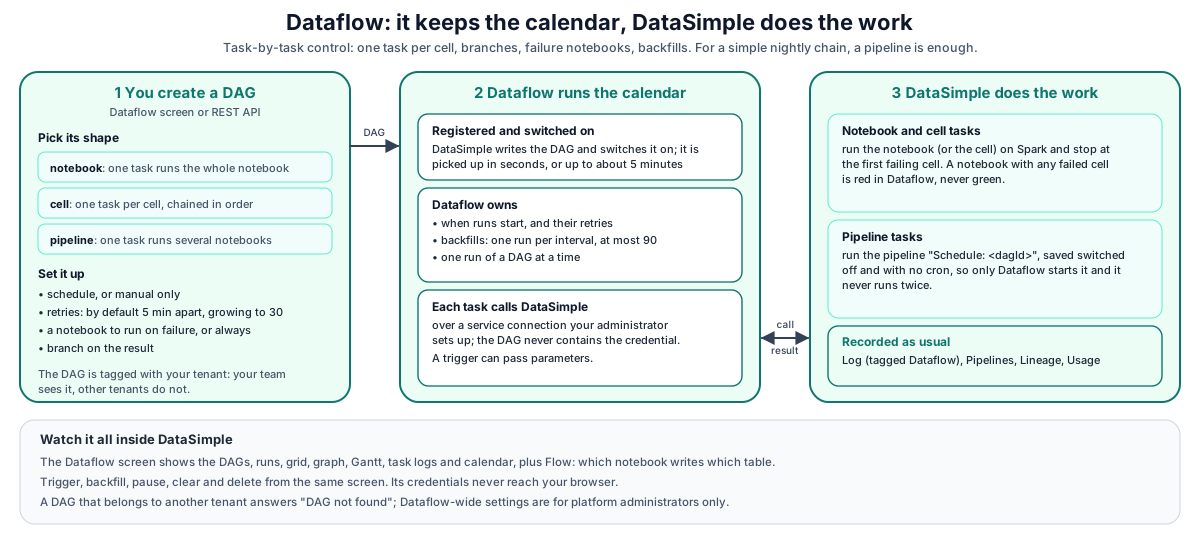
Walk-through:
- Create DAG. You fill in the Create DAG dialog (or call
POST /api/notebooks/airflow/dags). For pipeline granularity DataSimple first saves the mirrored pipeline, then generates the DAG. - Register. DataSimple registers the DAG with Dataflow and un-pauses it (Dataflow creates DAGs paused by default).
- Schedule. Dataflow owns the calendar, retries and backoff from here.
- Callback. When a task runs, Dataflow asks DataSimple to run the notebook, the cell or the pipeline.
- Observe. The Dataflow screen shows runs, task instances, logs, grid and graph. Notebook cells also appear on the Log screen; pipeline runs also appear under Pipelines.
How it works#
The three granularities#
| Granularity | Tasks generated | Best for |
|---|---|---|
notebook |
run_notebook (one task) |
A notebook that should run as a unit |
cell |
cell_0_<type>, cell_1_<type>, … chained in notebook order |
Retrying one cell and halting downstream cells in Dataflow |
pipeline |
run_pipeline (one task that runs the pipeline Schedule: <dagId>, saved from the steps you enter) |
Several notebooks with dependencies; DataSimple owns ordering and failures |
For cell, markdown and chart cells get no task. Dataflow's default all_success rule means a failed cell stops every cell after it.
Every notebook task fails in Dataflow when any cell failed. A partly failed notebook is red, never green.
What the generated DAG contains#
default_argswith the owner,retries,retry_delay(default 5 minutes), exponential backoff (default on) andmax_retry_delay(default 30 minutes).- The schedule (or none for manual only),
start_date(today by default, so turning on catch-up cannot start a flood of old runs),catchup(default off), tags andmax_active_runs=1, so runs and backfills execute one at a time. - HTTP tasks that call back into DataSimple with the notebook, the origin (
notebook,cellorpipeline), the DAG id, the Dataflow run id, andparamsfrom the trigger'sconf. - The settings the DAG was made from, so the Edit dialog reopens with exactly those settings.
The service credential is read from Dataflow's connection at run time and is never written into the DAG. If it is missing, the task fails with "Configure the scheduler credential in the notebook API connection password"; ask your administrator.
Optional extras, for notebook and cell DAGs:
| Option | Task | Rule |
|---|---|---|
Branch on the result (has_rows or all_ok) |
branch_on_result → branch_pass / branch_fail |
Runs one notebook and skips the other |
| If it fails | on_failure |
trigger_rule=one_failed |
| Always run | on_complete |
trigger_rule=all_done, after every leaf |
A manual trigger can pass params through dag_run.conf for every DAG, without editing the DAG. Whole-notebook DAGs also accept notebook_id and stop_on_error. Per-cell DAGs also accept notebook_id. The Code view lets you edit the DAG's Python code by hand and add any operator the scheduling service supports; regenerating from the Edit dialog overwrites hand edits.
Pipeline granularity#
- DataSimple creates or replaces a pipeline named
Schedule: <dagId>, disabled and with no cron. Only the pipeline's owner may replace it. Every step's notebook must belong to your workspace. Steps are notebook steps withon_failure = stop. - A dependency cycle is refused with the steps named, for example "Steps form a dependency cycle: a → b → a".
- If you set Parallel steps, DataSimple creates a Dataflow pool
nb_<dagId>with that many slots for the DAG's task. Only one run of the DAG is active at a time, so the steps inside a run follow the pipeline rule in the next point, not this number. - The DAG has one task,
run_pipeline. DataSimple runs the steps exactly as a pipeline would, withtriggered_by = external_schedule. Inside a run, independent steps run one after another unless your administrator allows parallel steps.
Because the mirrored pipeline is disabled, DataSimple's own scheduler never fires it, so it cannot run twice.
What a callback does#
- Notebook and cell tasks run the notebook (or one cell), stop at the first failed cell by default, and report success only when no cell failed. Parallel Dataflow tasks run independently of each other.
- Pipeline tasks run the pipeline as its creator, in the workspace your administrator configured for Dataflow. See Pipelines.
Runs, tasks, logs, grid and graph#
| Screen view | What it shows |
|---|---|
| DAG list | Every DAG with its last-run state |
| Runs | Runs with duration and landing time |
| Gantt | Task start, end, duration and queue time for one run |
| Grid | Runs × tasks matrix |
| Graph | Declared task dependencies |
| Logs | A task's log as plain text, cleaned: Dataflow's own framework lines, server paths and host names are removed; the notebook output and DataSimple's error messages are kept. If a task has written nothing of its own yet, the log reads No task output yet. |
| Code, Details, Event Log, Calendar | The DAG code, its details (the DAG file is shown by its file name), Dataflow's event log (without host details or command lines), past and upcoming runs |
| Flow | DataSimple's own lineage: which notebook writes which table and who reads it. It shows what the code does, next to what the DAG declares. |
Trigger, backfill, pause, clear, delete#
- Trigger:
POST /dags/:dagId/triggerwith optional{ "conf": { … } }. - Backfill:
POST /dags/:dagId/backfillwithstart,endandinterval(hourly,daily,weekly). It creates one run per interval with idsnbfill__<timestamp>. Intervals that already have a run are skipped, not failed. One backfill creates at most 90 runs by default. - Pause / resume:
PATCH /dags/:dagId/pausedwith{ "isPaused": true }. - Clear and mark state: clear task instances so they re-run; mark a task
success,failedorskipped; change a run's state; delete a run. - Delete DAG:
DELETE /dags/:dagIdremoves the DAG so Dataflow cannot pick it up again, then deletes its Dataflow history. A DAG that was not created by DataSimple is not removed from Dataflow; the response says it will reappear. - Edit code:
PUT /dags/:dagId/codesaves hand edits, keeps a backup of the previous version, and reports an import error when Dataflow cannot load the new code.
Run log rows#
A notebook run started by Dataflow appears on the Log screen with one row per cell, tagged Dataflow ·
REST API#
Base URL: https://<your-datasimple-host>/api/notebooks/airflow. Authenticate with Authorization: Bearer <PERSONAL_TOKEN>. Most errors answer HTTP 200 with { "success": false, "error": "…" }, so always check success. These answers use a status code instead:
- 401 Login required when you are not signed in.
- 404 DAG not found for a DAG that does not exist or belongs to another tenant.
- 403 for Dataflow-wide settings (pools, connections, variables) to anyone who is not a platform administrator, and for overwriting a DAG that belongs to another tenant.
- 400 The DAG must keep its tenant tag in tags=[...]. when edited code removes the DAG's tenant tag.
Creating a DAG with a name that is already in use answers HTTP 200 with success: false and "A DAG named "…" already exists. Choose another name or enable overwrite." Send "overwrite": true to replace a DAG of your own tenant.
| Method | Path | Purpose |
|---|---|---|
| GET | /health |
Is Dataflow reachable, and is its scheduler healthy |
| GET | /dags |
List DAGs with last-run state |
| POST | /dags |
Create a DAG (generate, register, un-pause) |
| DELETE | /dags/:dagId |
Delete the DAG and its history |
| PATCH | /dags/:dagId/paused |
Pause or resume |
| GET | /dags/:dagId/runs |
Runs |
| POST | /dags/:dagId/trigger |
Trigger a run |
| GET | /dags/:dagId/runs/:runId/tasks |
Task instances of a run |
| GET | /dags/:dagId/grid |
Runs × tasks |
| GET | /dags/:dagId/graph |
Task graph |
| POST | /dags/:dagId/clear |
Clear tasks of a run |
| PATCH | /dags/:dagId/runs/:runId/tasks/:taskId/state |
Mark a task |
| PATCH | /dags/:dagId/runs/:runId/state |
Mark a run |
| DELETE | /dags/:dagId/runs/:runId |
Delete a run |
| GET / PUT | /dags/:dagId/code |
Read or save the DAG code |
| GET | /dags/:dagId/config, /details, /events |
Settings, details, event log |
| POST | /dags/:dagId/backfill |
Backfill a date range |
| GET | /calendar, /calendar/upcoming, /calendar/day |
Calendar views |
| GET | /dags/:dagId/runs/:runId/tasks/:taskId/logs, /xcom |
Task logs (cleaned, as on the screen; a platform administrator can add ?raw=1 for the full log) and XCom |
Two examples, step by step#
Example 1: refresh a Gold table every weekday morning, with an alert if it fails#
Goal: run the notebook that builds gold.sales_by_region at 06:00 UTC on weekdays, retry twice, and run an alert notebook if it still fails.
- Left rail → Dataflow → + New DAG.
- DAG name:
gold_sales_daily(letters, numbers and underscore only). - Description:
Builds gold.sales_by_region. - Notebook: pick the notebook that builds the table.
- Run as: One task — whole notebook. The task stops at the first failed cell, and the run is red if any cell failed.
- Schedule: Custom (cron) with
0 6 * * 1-5(weekdays at 06:00 UTC). - Retries:
2,5min before retrying, and tick Double the wait after each failure. - If it fails: pick your alert notebook, for example one that posts to your team channel. It runs only when the main notebook fails.
- On create: keep Enable straight away ticked, so the DAG is ready to run.
- Select Create DAG.
To check it works, select Trigger a run now on the DAG's row. Open the DAG to see the run, its task and its log. Each cell also appears on the Log screen, tagged Dataflow · gold_sales_daily.
Example 2: load Bronze, Silver and Gold in order every night, then backfill last week#
Goal: three notebooks that must run one after another every night at 02:00 UTC, and catch up on the last seven days once.
Dataflow → + New DAG, DAG name:
orders_nightly.Run as: Pipeline — several notebooks.
Steps: add three steps:
bronze: the notebook that loads Bronze;silver: the Silver notebook, ticked to wait forbronze;gold: the Gold notebook, ticked to wait forsilver.
The Execution plan shows the order: bronze → silver → gold. Inside a run, DataSimple runs steps that do not wait for each other one after another, unless your administrator allows parallel steps.
Parallel steps:
2. This reserves two Dataflow slots for the DAG. Only one run of it is active at a time, and inside a run the steps follow the execution plan as described in step 3.Schedule: Custom (cron) with
0 2 * * *.Select Create DAG. Under Pipelines you now also see the pipeline
Schedule: orders_nightly. It is switched off and has no cron of its own, so only Dataflow starts it and it never runs twice.Backfill last week: on the DAG's row, select backfill (Run this DAG once per interval across a past date range). Choose the start and end dates and the interval daily. Dataflow creates one run per day and runs them one at a time. Days that already have a run are skipped.
Watch: open the DAG for its runs, grid and logs. Under Pipelines, each run shows
triggered_by = external_schedule.
Developer examples#
Create a notebook DAG#
curl -X POST https://<your-datasimple-host>/api/notebooks/airflow/dags \
  -H "Content-Type: application/json" -H "Authorization: Bearer <PERSONAL_TOKEN>" \
  -d '{ "dagId": "gold_sales_daily", "notebookId": 12, "granularity": "notebook",
        "schedule": "0 6 * * *", "retries": 2, "retryDelayMinutes": 5,
        "onFailureNotebookId": 19, "description": "Builds gold.sales_by_region" }'
Response: { "success": true, "dagId": "gold_sales_daily", "reserialized": true, "enabled": true, "note": "DAG registered and enabled." }. When Dataflow picks the DAG up on its next scan instead, reserialized is false and the note says when the DAG will appear.
Create a pipeline DAG#
POST /api/notebooks/airflow/dags
{
  "dagId": "orders_pipeline",
  "granularity": "pipeline",
  "schedule": "0 2 * * *",
  "retries": 1,
  "taskTimeoutSeconds": 3600,
  "steps": [
    { "key": "bronze", "notebookId": 12 },
    { "key": "silver", "notebookId": 13, "dependsOn": ["bronze"] },
    { "key": "gold",   "notebookId": 14, "dependsOn": ["silver"] }
  ]
}
The pipeline Schedule: orders_pipeline appears under Pipelines, disabled. Its runs show triggered_by = external_schedule.
Trigger with parameters and read the result#
const base = "https://<your-datasimple-host>/api/notebooks/airflow/dags/gold_sales_daily";
const opts = { headers: { "Content-Type": "application/json",
                          "Authorization": "Bearer <PERSONAL_TOKEN>" } };

const t = await (await fetch(`${base}/trigger`, { ...opts, method: "POST",
  body: JSON.stringify({ conf: { params: { region: "EMEA" } } }) })).json();
console.log(t.dagRunId, t.state);

const { runs } = await (await fetch(`${base}/runs?limit=5`, opts)).json();
const { tasks } = await (await fetch(`${base}/runs/${encodeURIComponent(runs[0].dagRunId)}/tasks`, opts)).json();
console.table(tasks.map((x) => ({ task: x.taskId, state: x.state })));
Find the cells Dataflow ran#
On the Log screen, filter on the Dataflow run id (for example manual__2026-10-27T06:00:00+00:00) or on the Dataflow tag to see each cell's status, duration and error.
Security and permissions#
Each tenant sees its own DAGs. A DAG you create is tagged with your tenant, and everyone on your team sees it; other tenants do not. DAGs created before tagging belong to the tenant of the notebook or pipeline they run. Opening a DAG of another tenant answers DAG not found. Dataflow-wide settings (pools, connections, variables) are visible to platform administrators only. If you edit a DAG's code, keep its
tenant:tag. A DAG name that is already in use is refused unless you choose to overwrite. You can overwrite only DAGs of your own tenant; overwriting another tenant's DAG answers 403 and never replaces it.Credentials stay on the server. Your browser and scripts talk only to DataSimple; Dataflow's credentials are never shown.
Callback authentication. Dataflow's calls use a service connection your administrator sets up, bound to one workspace. DAGs never contain the credential.
Who a Dataflow run runs as. A notebook or cell DAG runs as the principal
dataflow, not as the notebook owner (unlike a schedule, which runs as the owner). Grants, row filters and column masks are applied fordataflow: on a table that uses grants, givedataflowthe access its notebooks need, for exampleGRANT SELECT ON TABLE gold.sales TO dataflow, andMODIFYon tables it writes. A pipeline DAG runs its steps as a pipeline does, as each notebook's owner, with that owner's grants.Safe DAG ids.
dagIdis limited to letters, digits and underscores, and code edits only touch DAGs created by DataSimple.Workspace checks on pipeline DAGs. The mirrored pipeline and its notebooks must belong to your workspace; only the owner may replace it.
Permission. The Dataflow screen and
/api/notebooks/airflowneed the Dataflow permission on your role.Usage. Each pipeline run started by Dataflow is counted on the Usage screen.
Settings you can change#
Per DAG, in the Create/Edit DAG dialog or the API: granularity, schedule, retries, retry delay and backoff, task timeout, catch-up, tags, the on-failure and always-run notebooks, branching, and Parallel steps for pipeline DAGs.
Your administrator sets up the connection to Dataflow and the service connection Dataflow uses to call back. They can also change the backfill cap (default 90 runs) and how long DataSimple waits for Dataflow before giving up (default 15 seconds).
Monitoring and troubleshooting#
- Dataflow screen: runs, grid, Gantt, task logs, event log.
- Pipelines: runs of mirrored pipelines (
Schedule: <dagId>). - Log screen: cell rows tagged Dataflow.
- Dataflow health:
GET /api/notebooks/airflow/health.
| Symptom | Meaning |
|---|---|
| "Dataflow isn't reachable" on the screen | Dataflow is down or not set up. Pipelines and Schedules still work. Ask your administrator. |
| Health passes but every call says "Forbidden" | Dataflow does not accept DataSimple's sign-in method. Ask your administrator. |
| An error that DAG creation is not configured | Dataflow is not set up to create DAGs in this installation. Ask your administrator. |
| DAG created but not listed | Dataflow has not scanned for new DAGs yet; wait up to about 5 minutes. |
| "DAG registered but could not be enabled" | Use Resume on the row. |
| Task red although the notebook mostly ran | A cell failed; notebook tasks fail on any failed cell by design. |
| "That range is N runs, over the 90-run safety cap" | Narrow the backfill range. |
401 Invalid scheduler credential in the task log of a pipeline DAG, or 401 Login required in the task log of a notebook or cell DAG |
Dataflow's service connection does not match DataSimple. Ask your administrator. |
Limits#
- Notebook runs appear twice on the Log screen. A notebook run by Dataflow shows one row per cell tagged Dataflow and a second row per cell under Scheduled.
- Double runs with notebook schedules. A notebook-level DAG plus a notebook schedule on the same notebook runs it twice. Only pipeline-level DAGs are protected, by keeping the mirrored pipeline disabled.
- Scheduling service API version. Dataflow uses version 1 of its scheduling service's REST API.
- Hand edits are overwritten when the DAG is regenerated from the Edit dialog. Use a new DAG id to keep hand-written changes.