Overview#
DataSimple is a very simple data transform application. You extract data from any source system, store it in your own cloud as Delta Lake, Apache Iceberg or Parquet, and keep it current with delta loads: the first run copies the whole table, and every later run brings only what changed.
The work always follows the same path:
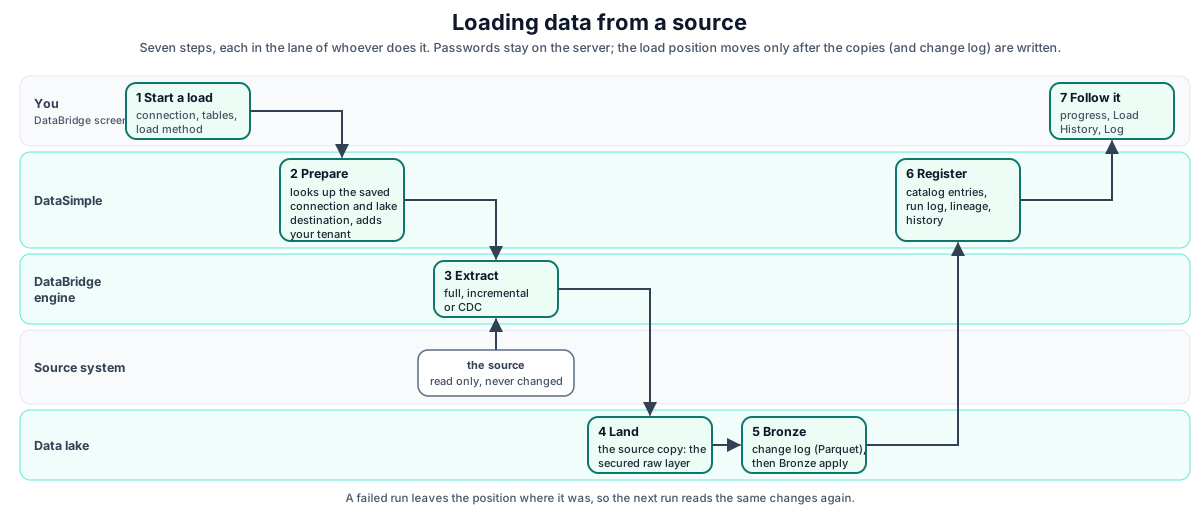
- Extract with DataBridge: a full load, an incremental load past a watermark, or change data capture from the database's own change log.
- Land in the source copy, the raw layer. It is always kept as a secured, read-only copy of the source.
- Bronze keeps every insert, update and delete as history.
- Silver is the transformation layer: cleaned data, current state and history.
- Gold is ready for the business: dimensions, facts and aggregates.
Around that path, DataSimple gives you one catalog, so every table has a governed name such as datasimple.gold.sales_by_region with grants, row filters and masks. It also gives you schedules, pipelines and workflows, data quality, business meaning, sharing with outside readers, and promotion from development to QA to production. Apache Spark does the compute.
This chapter is the map. Each component has its own chapter, listed in the handbook index.
Design principles#
| Principle | What it means in practice |
|---|---|
| Open formats | Tables are Delta, Iceberg or Parquet on object storage. Any engine that reads those formats can read DataSimple data. |
| One catalog, one name | Every table, wherever it was written from, is registered once and addressed as datasimple.<schema>.<table>. |
| Simple first | Extract, store in open formats, keep current with delta loads. Everything else supports that path. |
| Delta loads | After the first full copy, each run brings only what changed, and the position moves only when every write succeeded. |
| Medallion layers | source (the secured raw copy, never changed), bronze (full history), silver (the transformation layer), gold (business-ready). |
| Multi-tenant by default | Every row the platform writes carries a three-digit tenant id. Every request is scoped to the caller's tenant. |
| Governed access | Grants, row filters, column masks and tab access are checked on the server and inside the Spark session, never only in the screen. |
| Nothing is lost silently | Deletes are soft (Trash) or recorded as events. Loads refuse to run when the source looks wrong. Logs record who did what. |
| Everything is promotable | Notebooks, pipelines, workflows, schedules, quality rules and semantics can be promoted from development to QA to production. |
The platform at a glance#
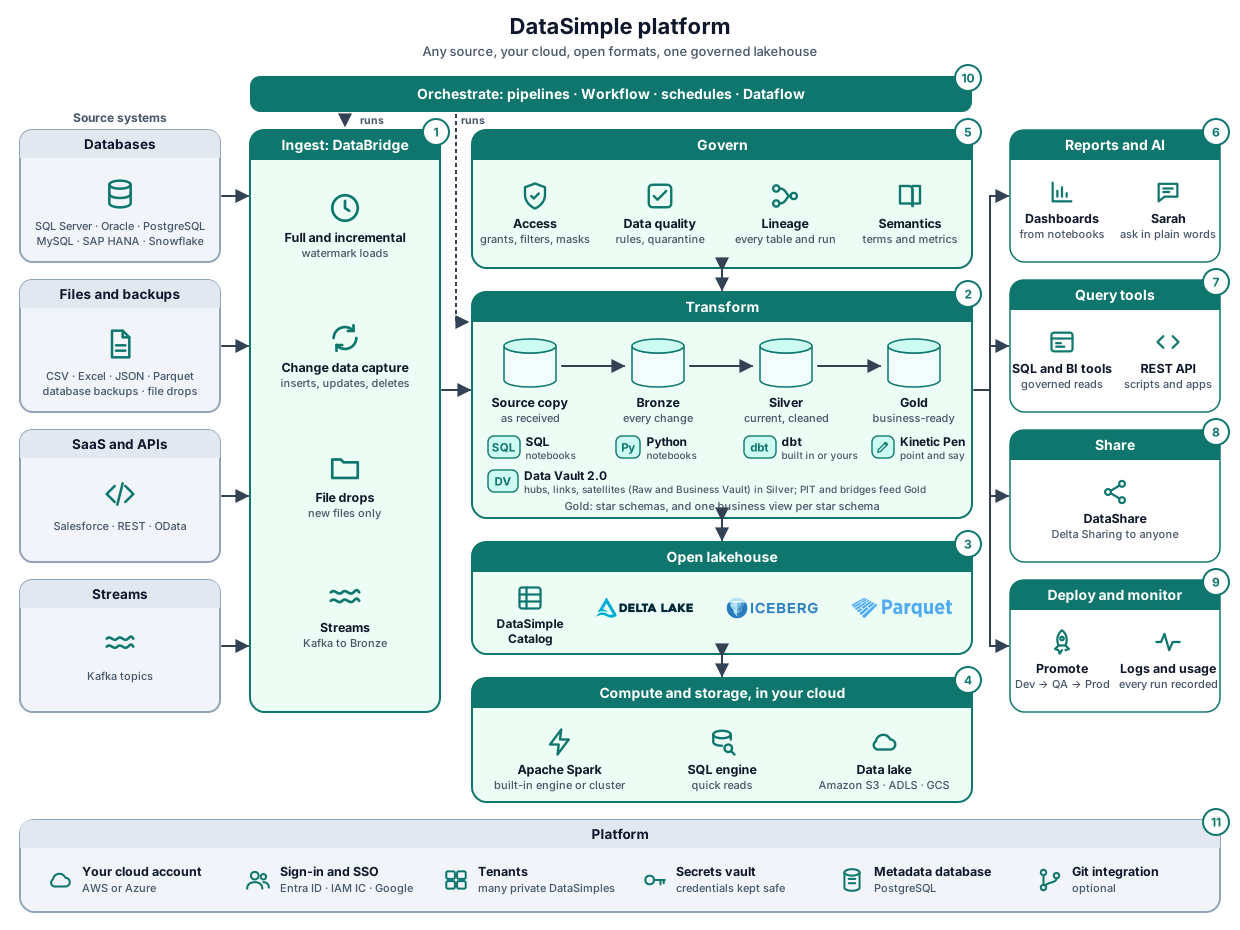
Data moves from left to right. The numbers match the picture.
| # | Block | What it does | Chapter |
|---|---|---|---|
| Source systems | Databases, files and backups, SaaS applications and APIs, Kafka topics. DataSimple reads them and never changes them. | 03 | |
| 1 | Ingest: DataBridge | Copies sources into the lake: full and incremental (watermark) loads, change data capture with inserts, updates and deletes, file drops, streams. | 04, 05 |
| 2 | Transform | Source copy → Bronze (every change) → Silver (current, cleaned) → Gold (business-ready), with notebooks, dbt (built in, or your own dbt CLI, VS Code or cloud IDE), declarative tables and Kinetic Pen rules. A Data Vault 2.0 model (hubs, links, satellites, Raw and Business Vault) can be generated into Silver, with PIT tables and KPI views in Gold. Gold holds the star schemas and one business view per star schema. | 02, 22 |
| 3 | Open lakehouse | The DataSimple Catalog names, describes and governs every table; tables are stored as Delta Lake, Apache Iceberg or Apache Parquet. | 07, 20 |
| 4 | Compute and storage, in your cloud | Apache Spark (the built-in engine or a cluster) does the work, the SQL engine answers quick reads, and the data lake (Amazon S3, ADLS or GCS) holds the files. | 23, 06 |
| 5 | Govern | Access (grants, row filters, masks), data quality, lineage and history, semantics. Applied to every read and write. | 07, 12 |
| 6 | Reports and AI | Dashboards from notebooks, and Sarah, who answers questions in plain words from Gold. | 17 |
| 7 | Query tools | SQL and BI tools, and the REST API for scripts and apps, reading through the same governance. | 19 |
| 8 | Share | DataShare gives governed tables to other organisations through Delta Sharing. | 14 |
| 9 | Deploy and monitor | Promote definitions Dev → QA → Production; every run, load and change is in the logs, usage and history. | 15 |
| 10 | Orchestrate | Pipelines, Workflow, schedules and Dataflow run the loads (1) and the transformations (2) in order, on time: for example a DataBridge load at 06:00, then the dbt or notebook steps that build Silver and Gold. | 08, 09, 10 |
| 11 | Platform | Your own AWS or Azure account, sign-in and single sign-on, tenants (many private DataSimples on one installation), the secrets vault, the metadata database and optional Git integration. | 18, 19 |
Architecture at a glance#
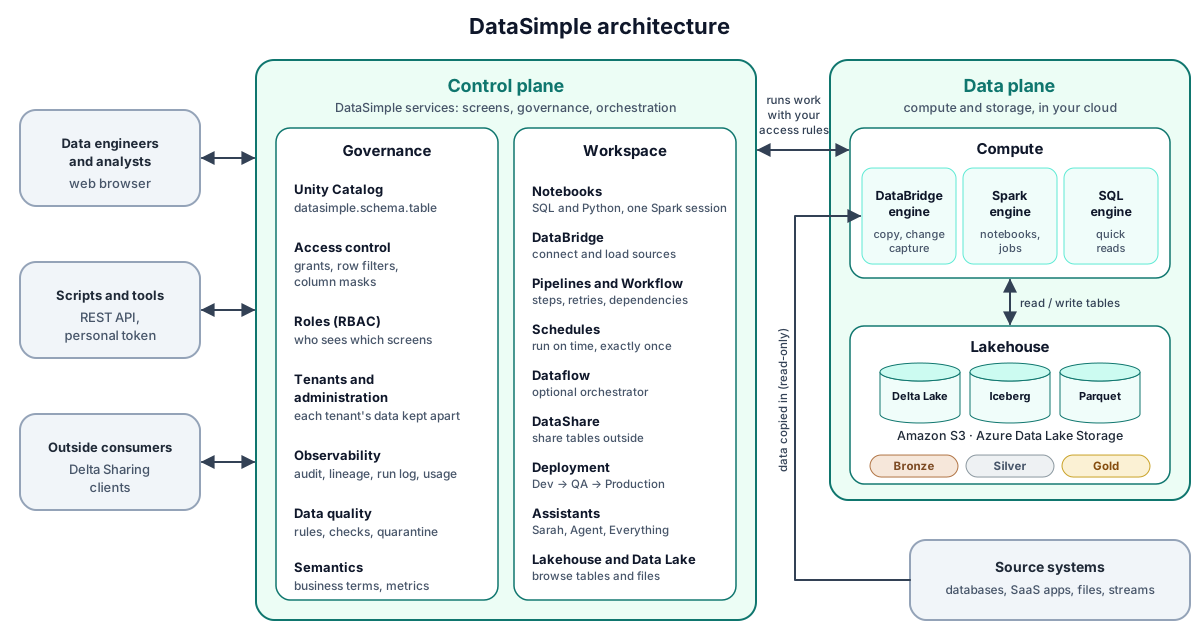
DataSimple has two planes, the same split used by other lakehouse platforms:
- the control plane: the DataSimple services you work with: the screens, governance and orchestration;
- the data plane: the engines that do the work and the data lake that holds your data, in your cloud storage.
| Plane | Part | What it does | Chapter |
|---|---|---|---|
| Control | Unity Catalog and access control | One name per table, grants, row filters, column masks, business meaning | 07, 26 |
| Control | Roles, tenants and administration | Who sees which screens; each tenant's data kept apart | 18, 19 |
| Control | Audit, lineage, run log, usage | Who did what, which table feeds which, what each run cost | 15 |
| Control | Data quality and Semantics | Rules, checks and quarantine; business terms and metrics | 12, 13 |
| Control | Workspace screens | Notebooks, DataBridge, Pipelines and Workflow, Schedules, Dataflow, DataShare, Deployment, Assistants, Lakehouse and Data Lake | See the handbook index |
| Data | Spark engine | Runs notebook cells and scheduled work in Spark sessions, kept warm while you work | 23 |
| Data | SQL engine | Answers simple reads of catalog tables without waiting for a Spark session | 23 |
| Data | DataBridge engine | Copies data from source systems: full, incremental and change-capture loads, file ingest | 04 |
| Data | Data lake | Your tables as Delta, Iceberg or Parquet files on Amazon S3 or Azure Data Lake Storage | 20 |
| Optional | Dataflow, dbt | Run Dataflow DAGs; dbt projects as pipeline steps | 11, 22 |
How data flows#
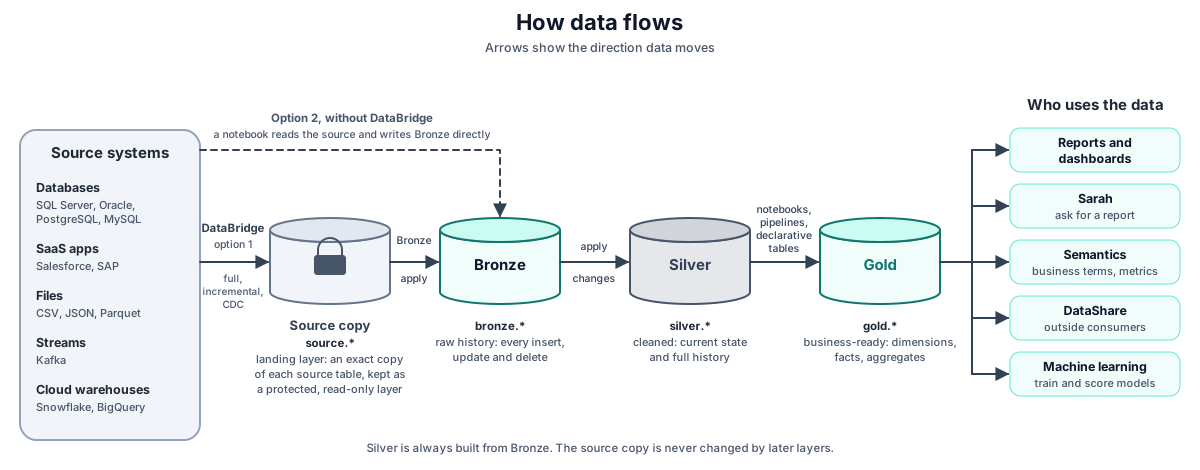
Data moves from your source systems, through the medallion layers, to the people and tools that use it. There are two ways in:
- Option 1, DataBridge (the usual way): DataBridge lands each table in the source copy, the landing layer. Bronze is built from the source copy. The source copy is always kept as an extra, protected layer: later layers never change it.
- Option 2, without DataBridge: a notebook reads the source and writes Bronze directly.
Silver is always built from Bronze.
| Layer | Holds | Written by | Typical format |
|---|---|---|---|
source |
The landing layer: an exact copy of each source table, kept as a protected, read-only layer | DataBridge | Parquet (part files), Delta or Iceberg |
bronze |
Raw history: each change as an event with _op_type (I/U/D) and _cdc_seq |
Bronze apply from the source copy, with the change log DataBridge records during the load (option 1); a notebook writing directly (option 2); file ingest | Delta, Iceberg or Parquet |
silver |
Cleaned data, current state (SCD Type 1) and history (SCD Type 2) | ds.apply_changes, APPLY CHANGES, notebooks, workflows |
Delta (or Iceberg) |
gold |
Business-ready tables: dimensions, facts, one big tables, aggregates | Notebooks, @ds.* declarative tables, pipelines |
Delta |
How a request flows#
Running a notebook cell#
The most common request is a user running a SQL cell. The flow shows where checks happen.
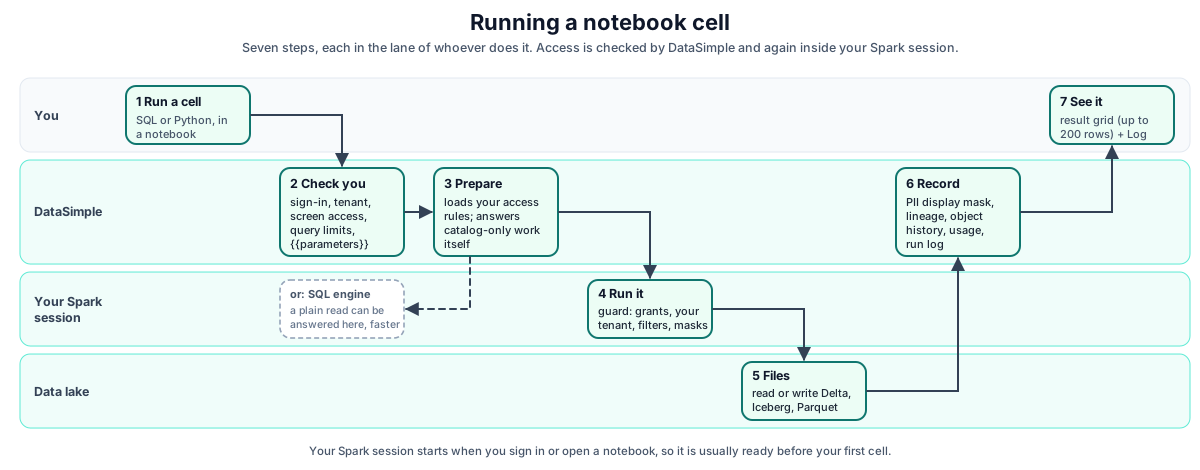
What to remember:
- Checks happen twice. DataSimple checks access before the statement runs, and the Spark session checks it again with your access rules. A user who writes Python that calls
spark.sql(...)goes through the same guard. - Your Spark session starts early. It starts when you sign in or open a notebook, so it is usually ready before your first cell. Depending on how your platform is set up, your notebooks share one session or each notebook has its own, up to a per-user limit. Notebooks run by Dataflow get their own session. See Spark engine for start-up cost and known limits.
- Writes leave a trail: lineage edges, an object log entry for definitions, and a usage row.
Loading data from a source#
Orchestrated work#
Pipelines, workflows and schedules all end in the same places:
- notebook cells run in a Spark session;
- or DataBridge jobs.
The scheduler checks schedules once a minute, and each scheduled run happens exactly once. See Schedules and scheduler.
Nodes, parallel reads and tenants#
Spark, nodes and tasks (MPP)#
DataSimple runs Apache Spark 3.5. Spark splits the work across many CPU cores or machines that work at the same time: massively parallel processing (MPP). One big machine is expensive and rarely fully used; many workers sharing the work are faster and cheaper.
Where Spark runs
| Mode | Driver and workers | Used for |
|---|---|---|
| Built-in engine | Each notebook (or user) has its own Spark session on the DataSimple server; the server's CPU cores are the parallel workers | everyday work, development, small and medium tables |
| Cluster compute | A driver node plus separate worker nodes in your cloud | large loads and heavy transformations |
Nodes
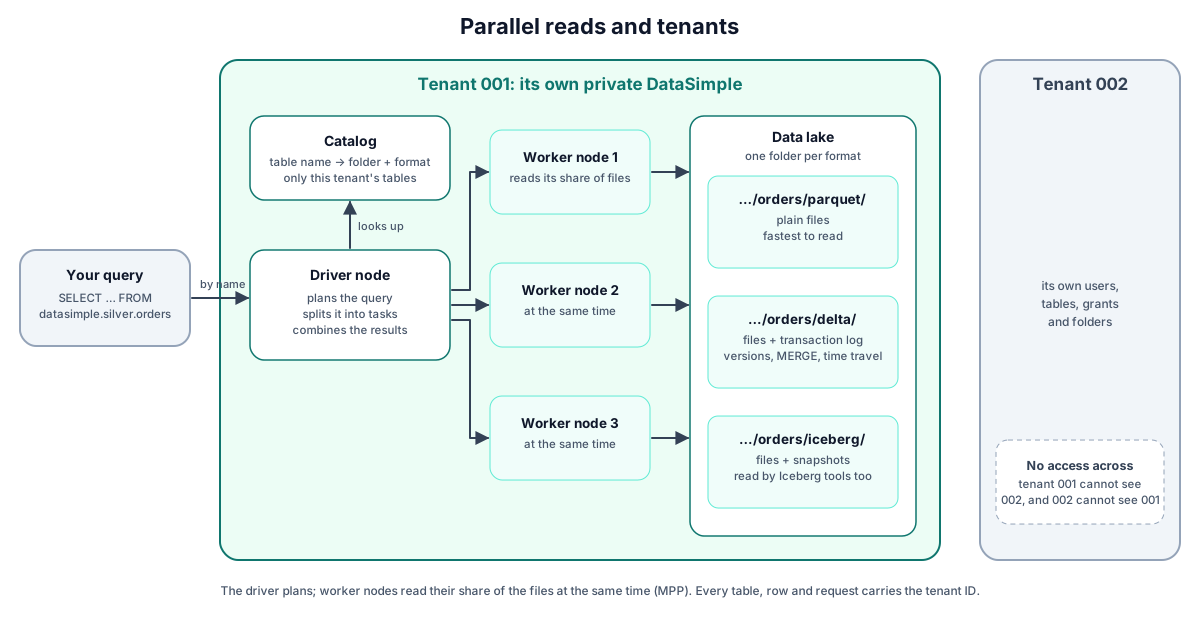
- Driver node. Receives your SQL or Python, builds the plan, splits it into tasks, sends the tasks to the workers and combines the results. If a task fails, it runs it again on another worker.
- Worker nodes. Run the tasks. On the built-in engine each CPU core works as a worker; on a cluster each worker node runs several tasks at once, one per core.
Partitions
A table's files are divided into partitions: slices of the data of roughly equal size. One task processes one partition, so with 8 cores 8 partitions are processed at the same moment, and a table with 80 partitions is done in 10 rounds.
From a query to tasks
| Level | What it is |
|---|---|
| Action | Something that needs a result: show rows, write a table, count. Nothing runs before an action. |
| Job | The work one action starts. |
| Stage | Part of a job that runs without moving data between workers. A new stage starts where data must be regrouped by key (a shuffle), for example for GROUP BY or a join. |
| Task | The smallest unit: one stage on one partition, on one worker core. |
Example: SELECT region, SUM(amount) FROM silver.sales GROUP BY region is one action and one job with two stages. In stage 1, every task reads its partition and adds up amounts per region. Then a shuffle sends each region's partial sums to one place. In stage 2, tasks add the partial sums into the final total per region, and the driver returns the result.
The optimizer
Before anything runs, Spark's optimizer rewrites the query to do less work: it reads only the columns the query uses, applies filters as early as possible, and chooses the cheapest way to join. While the query runs, adaptive execution adjusts the plan with the real data sizes: it merges partitions that turned out tiny and splits partitions that turned out too large.
Formats and layers#
Two words that are easy to mix up:
| Term | Values | Meaning |
|---|---|---|
| Layer | Source, Bronze, Silver, Gold | How refined the data is: a copy of the source, every change received, current and cleaned, business-ready |
| Format | Parquet, Delta, Iceberg | How a table is stored on the lake |

Delta Lake is a trademark of LF Projects, LLC. Apache, Apache Iceberg, Iceberg, Apache Parquet and Parquet are trademarks of The Apache Software Foundation. The logos identify the open formats DataSimple reads and writes.
One source table can be kept in up to three formats, each stored separately in its own folder:
| Folder | What is in it | Good for |
|---|---|---|
…/<table>/parquet/ |
plain data files | fastest reads |
…/<table>/delta/ |
data files plus a transaction log | versions, MERGE, time travel, RESTORE |
…/<table>/iceberg/ |
data files plus snapshot metadata | versions, reading from Iceberg tools |
Bronze, Silver and Gold tables built from these copies are stored in their own folders as well, mostly as Delta.
How a table is read#
You always read a table by its catalog name (datasimple.silver.orders), never by folder. The catalog knows which folder and which format each table uses, and Spark uses the matching reader:
- The driver looks the name up in the catalog: folder, format, and whether you may read it (grants, row filters, masks).
- It finds the files to read.
- Parquet: the files in the folder.
- Delta and Iceberg: the transaction log or snapshot gives the exact files of the current version, so files of older versions are skipped. Per-file statistics (minimum and maximum of each column) let it skip files your filter cannot match.
- The workers read their share of the files at the same time and apply your filters, row filters and masks.
- The driver combines the results and returns them.
The same query works whichever format a table is stored in. Time travel (VERSION AS OF, TIMESTAMP AS OF) reads an older version from the Delta log or Iceberg snapshots.
Tenant ID: one installation, many private DataSimples#
Every user, table, catalog entry, run and log entry carries a three-digit tenant ID (for example 001). Because every piece of data and every action carries it, one installation can serve many companies or departments safely, as if each had its own private DataSimple.
How it is enforced, at several levels:
- Sign-in. A user signs in to a tenant; the tenant ID is part of the sign-in.
- Every request. The server scopes every API call to the caller's tenant.
- Catalog. Each catalog entry belongs to a tenant; the Lakehouse and
information_schemalist only your tenant's tables. - Spark. The Spark session lists only your tenant's tables and refuses any table or lake folder that belongs to another tenant, even in the same bucket.
- The data itself. Rows written to the lake from notebooks carry a protected
_tenantidcolumn that SQL cannot drop, rename or retype. - Background work. Automatic jobs, assistants and dbt connections act inside one tenant (a dbt connection is
client:<tenant>:<name>).
Why it matters:
| Advantage | |
|---|---|
| Security | Data never crosses tenants. Checks at several levels, so one missed check is not a leak. Background work and connections stay inside their tenant. |
| Governance | Each tenant governs itself: users, roles, grants, row filters, masks and screen access are set per tenant, and one tenant's administrator cannot change another's. |
| Audit and compliance | Every run, change and error is recorded with its tenant, so you can show a customer or an auditor exactly what happened in their space. Clear separation helps with privacy requests and contracts. |
| Cost | Many clients or business units share one installation and one compute cluster instead of one installation each. |
| Usage | Compute and activity can be measured per tenant, for showback, chargeback or billing. |
| Onboarding | A new customer or department is a new tenant ID and its configuration: no new servers, no new deployment. |
| No name clashes | Two tenants can each have silver.orders without interfering. |
| Support | Errors and logs carry the tenant, so one customer's problem is easy to find among all the others. |
| Safe testing and demos | A test or demo tenant sits beside real ones on the same system, fully separated. |
Where metadata lives#
| Metadata | Store | Read through |
|---|---|---|
| Table names, columns, owners, formats, locations | Catalog (DataSimple metadata) | Lakehouse screen, information_schema.tables / .columns |
| Grants, row filters, column masks | Governance (DataSimple metadata) | information_schema privileges views, governance API |
| Comments and business meaning | Registry plus Spark table comments | Lakehouse screen, COMMENT ON, Semantics |
| Lineage | Lineage (DataSimple metadata) | Lineage screen, information_schema.table_lineage |
| Definitions over time (CREATE, ALTER, DROP) | Object log | Lakehouse screen, History |
| Table data history | Delta / Iceberg transaction log on the lake | DESCRIBE HISTORY, time travel |
Cross-cutting concerns#
Identity, tenancy and access#
- Sign-in: a session cookie. One active session per user; signing in elsewhere closes the older session.
- Scripts and tools: personal API tokens, with a reduced set of allowed routes.
- Tenant isolation: each user belongs to a three-digit tenant. Every request is scoped by tenant, and rows written from notebooks carry the tenant column. The Spark session lists only your tenant's tables and refuses any table or lake path that belongs to another tenant. See Tenant ID.
- Screen access: roles decide which menu items a user sees, and the same rule applies to the matching REST API calls.
- Data access: grants (
SELECT,MODIFY,MANAGE, …), row filters and column masks are enforced in the Spark session. Tables with filters or masks are never shared as raw files.
Details: Security and API access, Lakehouse and governance.
Observability#
| Signal | Where |
|---|---|
| Every cell, job and load, with status, time and steps | Log screen (run log) |
| Who did what (create, run, delete, grant, deploy) | History screen (audit log) |
| Which table feeds which | Lineage screen |
| Cost and usage per user, job and table | Usage screen |
| DataBridge jobs and their tables | Ingestion screen, DataBridge Load History |
Details: Observability.
Reliability#
| Mechanism | Protects against |
|---|---|
| Overlap guards | A pipeline, schedule or workflow running twice at once. Starting one that is already running is refused (409); for a pipeline the answer names the run in progress. A schedule whose clock time comes while it is still running skips that turn. |
| One run per schedule and minute | A schedule firing twice |
| Recovery on restart | Runs left as "running" when the server stopped |
| Catch-up | A missed schedule minute during a restart (runs once) |
| Load safety limits | Recording mass deletes when a source looks empty or broken |
| Append-only change logs | Losing history when a load fails part-way |
| Soft drop and Trash | Accidental table drops |
Environments and promotion#
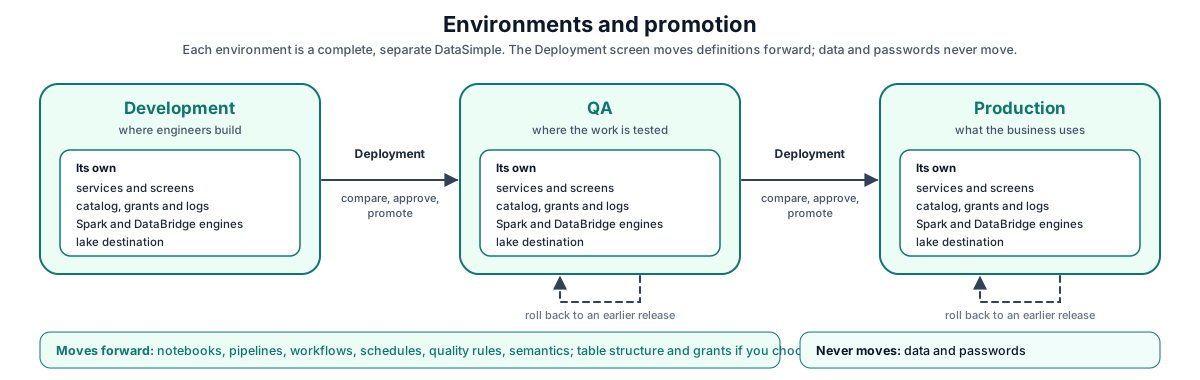
Each environment (development, QA, production) is a complete, separate DataSimple instance with its own services, metadata, engines and lake destination.
Work is promoted between instances by the Deployment screen:
- Definitions move: notebooks, pipelines, workflows, schedules, quality rules and semantics.
- Data and passwords never move. The target can create missing tables (structure only) and copy grants.
Details: Deployment.
Related content#
- Handbook index
- End-to-end walkthrough
- Apache Spark: https://spark.apache.org/docs/latest/
- Delta Lake: https://docs.delta.io/latest/index.html
- Apache Iceberg: https://iceberg.apache.org/docs/latest/
- Unity Catalog (OSS): https://docs.unitycatalog.io/
- Delta Sharing protocol: https://github.com/delta-io/delta-sharing/blob/main/PROTOCOL.md