Overview#
Every Python cell, Spark SQL cell, scheduled notebook, pipeline notebook step, metric run and governed read by Sarah or the Agent runs in a Spark session. DataSimple starts the session for you, loads the notebook helpers into it (read_table, save_table, ds.* and the others), applies your access rules to every cell and returns the output to the notebook.
You meet the Spark session in Notebooks: the session indicator in the header, the "Spark session restarted" notice and the busy message. For the platform map see Architecture; for the helpers themselves see Notebooks.
Key concepts#
| Term | Meaning |
|---|---|
| Spark session | Your own Spark environment with its Python namespace. Variables survive between cells of the same session. |
| Sessions per user | Depending on how your platform is set up, you have one Spark session for all your notebooks (variables are shared) or one per notebook, up to a per-user limit. |
| Compute profile | Serverless: DataSimple sizes your session automatically. You do not choose machine sizes. |
| Access rules | Your grants, row filters, column masks, declared keys and enforce-on-write quality rules. They are refreshed on every cell, so a grant changed a minute ago applies without a restart. |
| SQL guard | Checks in every session that keep the tenant column on lake tables and enforce your grants in SQL. |
| Preview | The rows of a result shown under a cell: 200 by default. A result from your Spark session shows at most 200 rows. A read answered by the always-on SQL engine can show up to 5,000 when you ask for more. |
How it works#
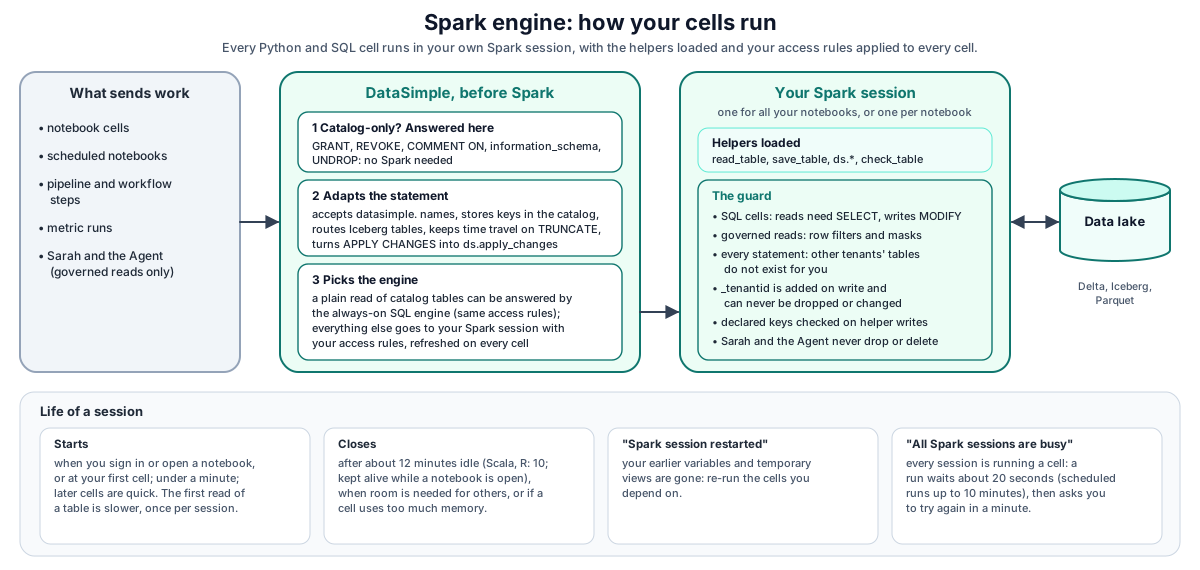
What happens when you run a SQL cell:
- DataSimple reads the statement. Catalog-only work (
GRANT,REVOKE,COMMENT ON,information_schemaqueries, softDROP/UNDROPof an Iceberg table) is answered at once, without Spark. - DataSimple adapts the statement for Spark: the
datasimple.prefix is accepted,PRIMARY KEY/FOREIGN KEYclauses are stored in the catalog, Iceberg tables are routed to the Iceberg catalog,TRUNCATEon a Delta table runs asDELETE FROM(so time travel is kept), andAPPLY CHANGESruns asds.apply_changes(Declarative tables and change handling). - A plain read of registered tables may be answered by a fast, always-ready SQL engine that applies the same access rules. Anything else runs in your session.
- Your session runs the statement with your access rules and returns a preview of the result.
- DataSimple applies PII display masking, adds a short explanation to any error, and records lineage, usage and the definition log.
When your session starts#
- Your session starts when you sign in, when possible, or when you open a notebook. If it is not running yet, the first cell you run starts it. While a notebook is open, DataSimple keeps the session warm.
- Starting takes a while (typically under a minute). The session indicator shows Spark: starting… N s. Sessions start one at a time across the platform, so at busy moments your start can wait behind another user's.
- Later cells reuse the running session and start quickly.
- After a platform update, the next cell may take longer while your session picks up the new version of the helpers.
The first read of a table is slower#
The first time a session reads a table, it loads the table's metadata (and prepares the filtered view for a table with row filters or masks). This takes a few seconds and happens once per table per session. Later reads of the same table in the same session are faster.
When your session closes#
| Situation | What happens |
|---|---|
| Idle | A Python session not used for about 12 minutes is closed. Scala and R sessions close after about 10 minutes. While a notebook is open and visible, DataSimple keeps it alive. |
| Capacity | When the platform needs room for another user, the idle session of a user holding more than their fair share, or the longest-idle session, is closed. A session that is running a cell or still starting is never closed. |
| Memory | A cell that uses too much memory can stop the session. |
When your session was closed, your next run shows the notice "Spark session restarted", with the reason. Variables and temporary views from earlier cells are gone: re-run the earlier cells you depend on.
Your administrator can keep sessions warm during business hours for users who worked recently, so the first cell of the day starts faster.
"All Spark sessions are busy"#
The platform runs a limited number of Spark sessions at once. If every session is running a cell and none can be closed, your run waits about 20 seconds (scheduled runs wait up to 10 minutes), then fails with All Spark sessions are busy; try again in a minute. Wait and run again, or stop one of your own running cells.
The SQL guard#
On every spark.sql() call (SQL cells, Python cells, helpers, scheduled runs):
| Statement | What the guard does | Why |
|---|---|---|
INSERT INTO / INSERT OVERWRITE into a table with _tenantid, written without it |
Adds your tenant | Every lake row keeps the tenant that wrote it |
INSERT OVERWRITE that cannot be stamped |
Refused | Same |
CREATE TABLE … AS SELECT whose query lacks _tenantid |
Adds the tenant column | Same |
ALTER TABLE … DROP / RENAME / ALTER COLUMN … TYPE / CHANGE COLUMN on _tenantid, or a REPLACE COLUMNS list without it |
Refused with _tenantid is a protected column: every lake table keeps the tenant that wrote it |
The tenant column is protected |
| Any statement that names a table of another tenant, or a storage path inside one | Refused with Table or view … was not found in your catalog (or The lake path … is not in your catalog) | Tables of other tenants do not exist for you; SHOW TABLES and spark.catalog.listTables() list only yours |
On SQL cells, additionally:
- Grants. Every table you read or write is checked. Writes,
TRUNCATE,RESTORE,VACUUM,OPTIMIZEandREORGneed MODIFY; creating a table or view that does not exist yet needs CREATE_TABLE on the schema; reads,DESCRIBEandDESCRIBE HISTORYneed SELECT. - Row filters and masks. A governed table is read with the row filters and column masks that apply to you.
- Administrative statements.
RESTORE TABLEis refused unless you are an administrator;DROPis a soft drop that needs ownership orMANAGE;UNDROPrestores from Trash. - AI guardrail. SQL from Sarah or the Agent may never
DROP,DELETE,TRUNCATE,ALTER,VACUUMorRESTORE.
Writes and declared keys#
When you write through the notebook helpers, declared keys are checked (primary key unique and not null, every foreign key has a parent) and the write is rolled back on a violation. read_table returns only your tenant's rows, plus rows with an empty tenant column (rows written before the column existed).
How results come back#
Each cell returns its printed output and a preview of the last result. The SQL endpoint returns:
{ "success": true, "df": { "columns": [], "rows": [] }, "rowCount": 0, "affectedRows": 3,
  "stdout": "", "stderr": "", "error": null, "errorDetail": "…", "durationMs": 812,
  "trace": [{ "step": "…", "ms": 2 }], "constraints": [], "notes": [], "notice": "…" }
- Previews show 200 rows by default.
previewRowscan ask for up to 5,000. A read answered by the always-on SQL engine returns up to that many; a result from your Spark session is capped at 200 rows. For more rows, write the result to a table, or page through it withLIMIT/OFFSETor aWHEREclause. affectedRowsforINSERT/MERGE/UPDATE/DELETEcomes from the Delta commit.erroris a short error with a hint (for example column count mismatch, unresolved column, concurrent write, divide by zero, session stopped);errorDetailkeeps the full text.noticecarries the "Spark session restarted" message when it applies.tracelists the steps of the run and their times.
Performance tips#
- Keep a notebook open while you work, so the session stays warm.
- Read the tables you need once early in the session; later reads are faster.
- Read by catalog name (
silver.orders), not by storage path. Names are faster to find and your access rules apply. - Filter and aggregate in Spark before you
collect()ortoPandas(); previews from your session are limited to 200 rows anyway. - Use SQL cells for quick reads: plain
SELECTs of registered tables are often answered by the fast SQL engine without waiting for your session. - Compact Delta tables with many small files with
optimize_table(name)(Lake storage). - Do not rely on variables across a long break: without an open notebook, an idle Python session closes after about 12 minutes (Scala and R after about 10).
REST API#
Base URL https://<your-datasimple-host>, header Authorization: Bearer <PERSONAL_TOKEN>.
| Method | Path | Purpose |
|---|---|---|
| POST | /api/notebooks/spark/run |
Run Python code ({ notebookId, cellId, code, params }) |
| POST | /api/notebooks/spark/sql |
Run SQL ({ notebookId, cellId, sql, previewRows }) |
| POST | /api/notebooks/spark/run-notebook |
Run a whole notebook |
| POST | /api/notebooks/spark/cancel |
Stop a run ({ runId }; the person who started it, or an administrator) |
| POST | /api/notebooks/spark/prewarm |
Start your session, or keep it warm |
| GET | /api/notebooks/spark/status |
Session status; ?kernelOnly=1 returns only your session status and skips the platform check |
| GET | /api/notebooks/spark/helpers |
Reference of the notebook helpers |
Developer examples#
1. Run SQL and read the result#
curl -s -X POST "https://<your-datasimple-host>/api/notebooks/spark/sql" \
  -H "Authorization: Bearer <PERSONAL_TOKEN>" -H "Content-Type: application/json" \
  -d '{"notebookId": 42, "cellId": "c1", "previewRows": 50,
       "sql": "SELECT region, SUM(revenue) AS revenue FROM gold.sales_by_region GROUP BY region"}'
2. Warm your session before a heavy run#
const base = "https://<your-datasimple-host>/api/notebooks/spark";
const headers = { "Content-Type": "application/json", Authorization: "Bearer <PERSONAL_TOKEN>" };

await fetch(`${base}/prewarm`, { method: "POST", headers, body: "{}" });
const s = await fetch(`${base}/status?kernelOnly=1`, { headers }).then(r => r.json());
console.log(s.kernel.state);      // cold / starting / ready / busy
console.log(s.kernel.sessions);   // liveSessions, scheduledSessions, perUserCap, maxLiveSessions, sharedKernel,
                                  // sessions[]: { notebookId, state (busy / starting / ready), idleMinutes, scheduled }
3. The guard in a Python cell#
spark.sql("""CREATE TABLE gold.region_totals AS
             SELECT region, SUM(amount) AS total FROM silver.orders GROUP BY region""")
spark.sql("DESCRIBE TABLE gold.region_totals").show()   # _tenantid is there

spark.sql("ALTER TABLE gold.region_totals DROP COLUMN _tenantid")
# PermissionError: _tenantid is a protected column: every lake table keeps the tenant that wrote it
4. Stop a long cell#
await fetch("https://<your-datasimple-host>/api/notebooks/spark/cancel", {
  method: "POST",
  headers: { "Content-Type": "application/json", Authorization: "Bearer <PERSONAL_TOKEN>" },
  body: JSON.stringify({ runId: "<RUN_ID>" }) });
Security and permissions#
- Isolation. Your session belongs to you and your tenant. Status shows only your own sessions; the restart notice goes only to you.
- Access rules are applied on every cell: grants, row filters, column masks, tenant filter, declared keys and quality rules.
- Read by catalog name so that your access rules apply.
- Audit and logs. Every run is recorded in the audit trail and in Usage; lineage records SQL and helper writes; the definition log records DDL.
Settings your administrator controls#
These are platform settings; ask your administrator if you need one changed.
| Behaviour | Default |
|---|---|
| Idle timeout | About 12 minutes (Scala and R: about 10) |
| Business-hours warm window | Off |
| Number of Spark sessions running at once | Set for your platform |
| Iceberg in notebooks | Off |
| Deequ data-quality checks in sessions | Off |
| Fast SQL engine for plain reads | On |
Monitoring and troubleshooting#
- Session indicator: shows Spark: starting… N s or Spark: ready, and nothing when no session runs. The status endpoint reports cold / starting / ready / busy.
- Cell trace: each response lists its steps and their times (for example a new session versus a reused one).
- Log tab and Usage: run history and per-cell usage.
| Message | Meaning and action |
|---|---|
All Spark sessions are busy; try again in a minute. |
Every session is running a cell. Wait, or stop one of your running cells. |
All your Spark sessions are busy (limit N per user)… |
Your own sessions are all busy. Wait for a cell to finish or stop one. |
| "Spark session restarted" | Your session was closed (idle, capacity or memory). Re-run earlier cells. |
The Spark session stopped while the cell ran. Run the cell again; a new session starts. |
The session stopped, often because the cell used too much memory. Filter or aggregate earlier. |
Unity Catalog: principal '…' lacks SELECT on … |
Missing grant. Ask the table owner or an administrator. |
_tenantid is a protected column… |
The statement would drop or change the tenant column. Leave _tenantid in place. |
Iceberg is off: … |
Iceberg is not enabled for notebooks; use the _DELTA copy. |
REQUIRES_SINGLE_PART_NAMESPACE from Python spark.sql("… datasimple.gold.t") |
Use gold.t, or a SQL cell. |
Limits#
- A new session takes up to about a minute to start.
- The first read of each table in a session takes a few seconds longer.
- Each cell has a small fixed overhead, even for trivial code.
- Previews from your Spark session show at most 200 rows; reads answered by the always-on SQL engine can return up to 5,000.
- Python cells cannot use three-part names in
spark.sql; useschema.table. A table just loaded by DataBridge may read as "not found" in Python until it has been read once from a SQL cell. - Notebooks may share a Python namespace. Depending on how your platform is set up, you have one Spark session for all your notebooks (variables are shared) or one per notebook, up to a per-user limit.
- Scala and R cells show no "Spark session restarted" notice.
Related content#
- Notebooks · Lakehouse and governance · Lake storage · Declarative tables and change handling
- Schedules and scheduler · Observability · App server and security
- Apache Spark: https://spark.apache.org/docs/latest/
- Spark SQL reference: https://spark.apache.org/docs/latest/sql-ref.html
- Delta Lake: https://docs.delta.io/latest/index.html
- Apache Iceberg: https://iceberg.apache.org/docs/latest/