Overview#
Data Quality lets data engineers say what "good data" means for a table, check it, and act on the outcome. It has three parts:
- Checks in notebook cells.
check_table()runs Deequ constraints in your Spark session. Every result is kept, so you get history, trends and alerts, not just a printout. - Rules per table. Rules belong to a table. They drive generated check cells, scheduled sweeps, quarantine on write and certificates.
- The Data Quality tab. It shows the stored history: health per table, scores per quality dimension, alerts, coverage, quarantine runs and certificates. The table detail page is where you add, validate, approve and enforce rules.
Checks are written in notebooks, and the notebook stays the source of truth. Opening the Data Quality tab only reads stored results; it does not start Spark. Spark runs only when you validate a rule, replay quarantined rows or when a scheduled sweep runs.
Data Quality sits between the transformation layers (Bronze, Silver, Gold) and delivery (Semantics, DataShare). See Architecture for the whole platform.
Key concepts#
| Term | Meaning |
|---|---|
| Check / constraint | One Deequ condition, such as isComplete("customer_id"). One result is stored per constraint, per run. |
| Level | Error or Warning. An Error check that fails raises an exception, so the cell, pipeline step or task fails. A Warning check only records the result. |
| Rule | A saved check for a table: name, dimension, column, Deequ condition, level, and optional enforcement settings. |
| Dimension | The quality area a constraint belongs to: Completeness, Uniqueness, Validity, Accuracy, Volume, Distribution, Consistency. |
| Quality score | Percentage of passing constraints, using the newest result for each constraint. Shown overall and per dimension. |
| Alert | A lasting record of a failure. Repeated failures of the same check stay one alert. Alerts can be acknowledged or resolved. |
| Notification channel | An email address or https:// webhook that receives alerts at or above a minimum severity. |
| Quarantine | Splitting a write into passing rows (written to the table) and failing rows (appended to <table>_errors with the reason). |
| Enforce on write | An approved rule with enforcement switched on and a row condition applies automatically to every save_table() into that table. |
| Max reject ratio | A ceiling on the share of rejected rows. Above it, the whole load is refused and nothing is written to the table. |
| Approval (four eyes) | A rule moves through pending, approved or rejected. The person who submitted a rule cannot approve it. |
| Sweep | A scheduled job that profiles, checks or measures freshness for every table that matches a pattern. |
| Certificate | A signed statement that a table passed a named set of checks at a given Delta version. A person issues it; DataSimple checks the evidence first. |
How it works#
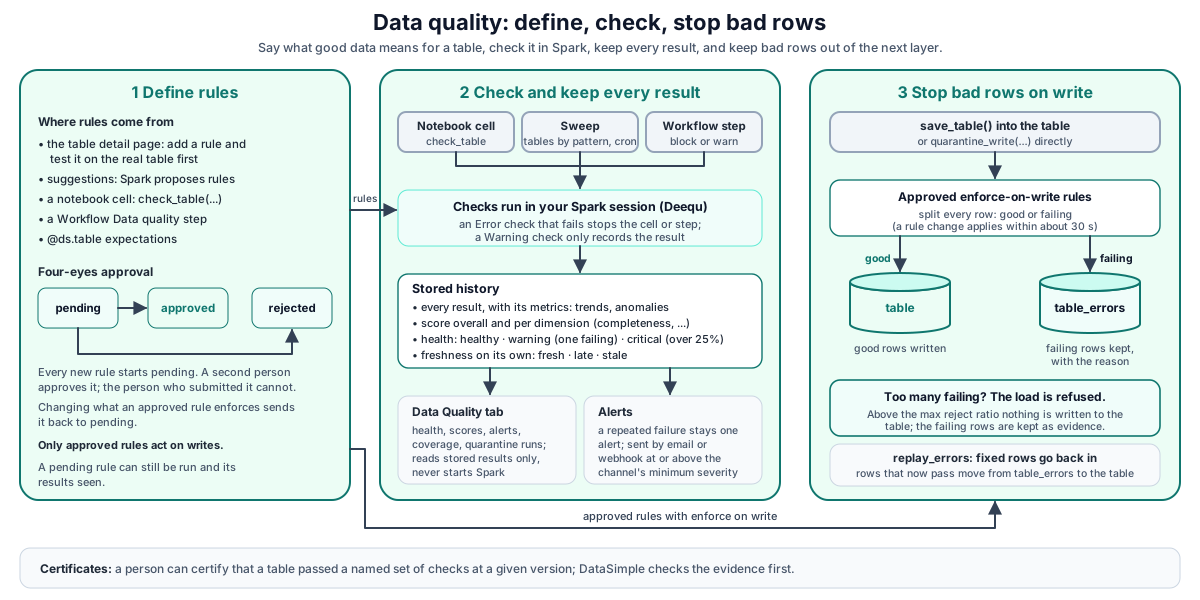
- A cell calls
check_table(...). Deequ runs in your Spark session and prints one line per constraint. - DataSimple stores every constraint result, its metrics, suggestions, profiles, freshness and quarantine runs. A storage problem never fails your cell.
- Failing constraints become alerts. New alerts are sent to your notification channels.
- Approved enforce-on-write rules are applied when you write with
save_table(), which splits good rows from bad rows. - The Data Quality tab and the API read the stored history.
The same behaviour applies to interactive cells, schedules, pipeline steps and orchestrated tasks.
Run checks in a cell#
check_table(name_or_df, checks, table=None, level="Warning", fail_on_error=True) takes a table name (or a DataFrame plus a table label) and a function that builds a Deequ Check. deequ_check is an older name for the same helper.
Data quality checks must be enabled for your workspace by your administrator. GET /api/notebooks/dq/status reports whether they are on and when the last result arrived.
What check_table does:
- Counts rows, runs the Deequ verification suite and prints
[check] <constraint>: <status>for each constraint. - Records the column each constraint applies to, so results can be grouped by column.
- Records the metrics behind each check (for example completeness 0.97). Anomaly detection compares these over time.
- If the level is
Error, any failure raisesValueError("Data quality FAILED for ..."). Passfail_on_error=Falseto record the failures without raising.
Related helpers: suggest_checks() (Deequ proposes rules), profile_table() (column profile and schema snapshot), table_freshness() (last write, Delta version).
Rule kinds#
GET /check-library returns the catalog of supported Deequ checks, grouped by dimension and scope, with how many of your tables use each one. The main kinds:
| Dimension | Checks |
|---|---|
| Completeness | isComplete, hasCompleteness, areComplete, areAnyComplete |
| Uniqueness | isUnique, isPrimaryKey, hasUniqueness, hasDistinctness, hasUniqueValueRatio, hasNumberOfDistinctValues, hasApproxCountDistinct |
| Validity | isContainedIn, hasPattern, containsEmail, containsURL, containsCreditCardNumber, containsSocialSecurityNumber, hasDataType, hasMinLength, hasMaxLength, satisfies |
| Accuracy | isNonNegative, isPositive, hasMin, hasMax, isLessThan, isLessThanOrEqualTo, isGreaterThan, isGreaterThanOrEqualTo |
| Volume | hasSize |
| Distribution | hasMean, hasSum, hasStandardDeviation, hasApproxQuantile; advanced: hasEntropy, hasHistogramValues, kllSketchSatisfies |
| Consistency | advanced: hasCorrelation, hasMutualInformation |
satisfies("<SQL predicate>", "<name>") is the general row rule. Rules you create on the table detail page are saved as satisfies rules, and the same predicate is used as the quarantine condition.
Managing rules#
A rule is unique per table and check. Saving the same check again updates the rule and switches it back on.
POST /checkssaves a rule.tableandcodeare required;leveldefaults toWarning;enforceOnWritedefaults tofalse.POST /checks/adopt-suggestionsturns Deequ suggestions into rules in one call. Adopted rules start disabled and pending, because a suggestion from a sample is a guess.PATCH /checks/:idchangesenabled,level,enforceOnWrite,quarantineExprormaxRejectRatio.GET /checks?table=lists the rules with the latest result for each. If a table has no rules yet, the list shows the checks from its newest check run.GET /coveragelists every known table with its number of rules and enabled rules, and how many suggestions could be adopted. Use it to find tables with no rules at all.
A rule change applies to writes within about 30 seconds, without restarting your Spark session.
Test before saving#
POST /validate-rule with { table, expr } tests a predicate against the real table before anyone saves it:
- Statements are refused: a semicolon or a keyword such as
INSERT,DELETE,DROPorMERGEreturnsvalid: false. - Text with no comparison (often the rule name typed into the condition box) is refused with a plain message.
- Otherwise Spark checks the columns and types without reading any rows. The result must be boolean.
pricealone (a number) is refused, because Spark would silently cast it.
The response is { success, valid, error, columns, validatedAt }. The table detail page validates again on save, even if you never pressed Test.
Validation runs in Spark as you, with your own grants: on a table that uses grants you need SELECT on it, as for any read. The table's owner and anyone with access validate normally.
Generated check cells#
GET /checks/snippet?table= turns the enabled rules into a runnable cell, with one check_table call per level. Error and Warning rules are never mixed in one call, because one raises and the other does not:
check_table("gold.sales_by_region", level="Error", checks=lambda c: c
    .isComplete("region")
    .satisfies("total >= 0", "total not negative"))
Results, history, trend and score#
| Route | Returns |
|---|---|
GET /overview |
Landing page in one call: tables by health band, dimension scores, open alerts, freshness, profiled tables, number of rules |
GET /summary?days= |
Per table, the newest state of each constraint |
GET /results?table=&status=failing|passing&limit= |
Constraint results, newest first (up to 2,000) |
GET /runs |
One row per check run: table, suite, level, constraints, failing |
GET /trend?table=&days= |
Pass rate per day for one table |
GET /score?table= |
Overall and per-dimension score, failing constraints, freshness status |
GET /metrics, GET /anomalies |
Metric history and values that move outside the usual range |
GET /profile, /profiles, /schema |
Newest profile and schema change history |
GET /freshness, PUT /freshness |
Freshness state; set the expected interval in minutes (1 to 10,080) |
Health bands: a table with no failing constraint is healthy. One failing constraint makes it a warning, because one broken key matters even when 40 other checks pass. More than 25% failing is critical. Freshness is scored on its own (fresh, late, stale), so a stale table does not hide behind a good average.
Alerts and notification channels#
A check that fails every night stays one alert, with a growing occurrences count and the latest title and detail.
GET /alerts?status=open|acknowledged|resolved|all&table=lists alerts, high severity first.POST /alerts/:idwith{ "action": "acknowledge" | "resolve" | "reopen" }.- An acknowledged alert opens again if the problem comes back. A resolved alert is closed; a later failure creates a new alert.
- Severity: a failing
Errorcheck giveshigh; a failingWarningcheck givesmedium. Schema changes and quarantine events raise alerts too. A dropped column is always high.
Channels:
| Method | Path | Purpose |
|---|---|---|
| GET | /notify |
List channels. Webhook URLs come back masked. smtpConfigured tells you whether email can be sent at all. |
| POST | /notify |
{ channel: "email"|"webhook", target, minSeverity: "high"|"medium"|"low", kinds? }. Webhooks must use https://. Default minimum severity is high. |
| DELETE | /notify/:id |
Remove a channel |
| POST | /notify/:id/test |
Send a real test alert through the channel |
The webhook body is JSON with text (for Slack-style tools), event (data_quality.alert), severity, kind, table, column, title, detail, occurrences and at. Delivery is best effort with a 10-second timeout. A failed delivery never fails a write.
Quarantine on write#
There are two ways to quarantine rows.
Directly, with quarantine_write(df, target, rules, mode="append", error_table=None, max_reject_ratio=None). Each rule is {"name", "expr"}, where expr must be TRUE for a good row. Passing rows go to target. Failing rows are always appended to <target>_errors with _error_reason, _error_count, _source_table, _quarantined_at, _run_id and _error_id.
Automatically, through save_table(). When a table has rules that are enabled, approved, have enforce on write switched on and have a row condition, every save_table() into that table splits the rows first. Rule table names can be patterns such as bronze.*, which match every table they cover. When several rules set a max reject ratio, the strictest one wins.
When the rejected share is above the max reject ratio, the load is refused. The bad rows are written to the error table as evidence, and the good rows are not written. The cell fails with Load REFUSED for <table> .... A half-loaded table is worse than a load that visibly failed.
Each split records one summary. GET /quarantine?table=&status=rejected returns runs, totals and the rules that reject the most rows, without starting Spark.
Getting rows back:
replay_errors(target, fix=None)in a cell re-tests the rows in the error table, optionally after a repair function. Rows that pass are appended to the target and removed from the error table.POST /quarantine/replay { table }does the same from the screen, without a repair function (code cannot be sent over HTTP). Use it after the source has been corrected.purge_errors(target, older_than_days=90)deletes old error rows in a cell.POST /quarantine/purge { olderThanDays }deletes old summary records only.
Approval workflow (four eyes)#
Only approved rules are enforced on write. Every new rule, whether you create it by hand or adopt it from suggestions, starts as pending: you can run it and see its results, but it has no effect on writes until a second person Approves it. If you change what an approved rule enforces (switch enforce on write on or off, change its row condition, or change its reject limit), it goes back to pending for a new review. Changing its name, level or switching it off does not.
On the table detail page, use Submit, Approve and Reject, or call POST /checks/:id/approve with { action: "submit" | "approve" | "reject", note? }:
submitsets the rule topendingand records you as the submitter.approvesetsapproved, with the approver and the time. If you are the submitter, the answer is 403 "You submitted this rule, so you cannot approve it."rejectsetsrejected.
Sweeps#
A sweep runs quality work on a schedule, so problems are found before anyone opens a dashboard. Sweeps are managed through the API.
| Method | Path | Purpose |
|---|---|---|
| GET | /sweeps |
List sweeps with last run time, status (ok, partial, error), error and table count |
| POST | /sweeps |
{ name, tablePattern, cron, actions }. actions is any of profile, check, freshness (default profile, check). The cron expression is validated. |
| PATCH | /sweeps/:id |
{ enabled: true|false } |
| DELETE | /sweeps/:id |
Remove |
Each due sweep runs the chosen actions for every table that matches the pattern (error tables are skipped). The check action runs the table's saved rules that are enabled, approved, have enforce on write switched on and have a row condition. They run as satisfies checks at Warning level. Rules waiting for approval are not swept. A sweep never invents rules. One failing table does not stop the sweep.
Workflow Data Quality step#
A Workflow can have a Data Quality step (kind: "dq", placed after silver by default). Its rules are simple: not_null, unique, min, max, between, accepted_values, regex, row_count_min, each with severity block or warn, for one table or *. The step runs one Spark aggregate per table, stores its results on the Data Quality page (suite workflow:<name>) and raises alerts. A failing block rule fails the step. See Workflow.
Declarative table expectations#
@ds.table(..., expectations=[{"name", "rule", "action", "tag"}]) and ds.expect(df, name, rule, action=..., tag=...) record their results on the Data Quality page as suite ds.expect. fail raises (Error level); warn keeps every row; drop removes failing rows and, with a tag, appends them to <table>__quarantine__<tag>. See Declarative tables.
Certificates#
GET /certificates/eligibility?table= is a dry run that shows what would be certified and what blocks it. POST /certificates issues; POST /certificates/:id/revoke revokes. By default administrators, data stewards, compliance officers and DPOs can issue certificates; your administrator can allow more roles and can set a minimum column coverage for eligibility.
API reference (all under /api/notebooks/dq)#
| Method | Path | Purpose |
|---|---|---|
| GET | /status |
Checks on or off, result count, last run |
| GET | /overview, /summary, /results, /runs, /trend, /score |
Results and history |
| GET | /suggestions, /metrics, /anomalies, /check-library |
Proposed rules, metrics, catalog |
| GET | /profile, /profiles, /schema |
Profiles and schema history |
| GET/PUT | /freshness |
Freshness state and expected interval |
| GET / POST | /alerts, /alerts/:id |
List and act on alerts |
| GET / POST / PATCH / DELETE | /checks, /checks/:id |
Rules |
| POST | /checks/adopt-suggestions |
Suggestions to rules |
| GET | /checks/snippet |
Rules rendered as a cell |
| GET | /coverage |
Tables with and without rules |
| POST | /validate-rule |
Test a predicate in Spark |
| POST | /checks/:id/approve |
Submit, approve, reject |
| GET / POST | /quarantine, /quarantine/replay, /quarantine/purge |
Quarantine history and actions |
| GET / POST / DELETE | /notify, /notify/:id, /notify/:id/test |
Alert channels |
| GET / POST / PATCH / DELETE | /sweeps, /sweeps/:id |
Scheduled sweeps |
| GET / POST | /certificates, /certificates/eligibility, /certificates/:id/revoke |
Certificates |
In the data lake you will find <table>_errors beside each enforced table, and <table>__quarantine__<tag> for declarative tables.
Developer examples#
1. Check a Gold table in a cell#
check_table("gold.sales_by_region", level="Error", checks=lambda c: c
    .hasSize(lambda n: n > 0)
    .isComplete("region")
    .isUnique("region")
    .satisfies("total >= 0", "total not negative"))
The output has one [check] <Deequ constraint name>: <status> line per constraint, for example [check] CompletenessConstraint(Completeness(region,None,None)): Success. A failing constraint carries Deequ's message, such as "Value: 0.5 does not meet the constraint requirement", in the stored result.
If any of these fail, the cell raises, so a pipeline step stops here.
2. Validate, save and enforce a rule over HTTP#
# 1. Validate the predicate against the real table
curl -s -X POST https://<your-datasimple-host>/api/notebooks/dq/validate-rule \
  -H "Content-Type: application/json" -H "Authorization: Bearer <PERSONAL_TOKEN>" \
  -d '{"table":"silver.orders","expr":"amount >= 0"}'
# {"success":true,"valid":true,"error":null,"columns":["order_id","amount",...],"validatedAt":"..."}

# 2. Save it as an enforce-on-write rule with a 5% reject ceiling
curl -s -X POST https://<your-datasimple-host>/api/notebooks/dq/checks \
  -H "Content-Type: application/json" -H "Authorization: Bearer <PERSONAL_TOKEN>" \
  -d '{"table":"silver.orders","name":"amount not negative",
       "code":".satisfies(\"amount >= 0\", \"amount not negative\")",
       "quarantineExpr":"amount >= 0","enforceOnWrite":true,
       "maxRejectRatio":0.05,"level":"Error"}'
# {"success":true,"id":42}

# 3. Submit it for review; a second person then approves it
curl -s -X POST https://<your-datasimple-host>/api/notebooks/dq/checks/42/approve \
  -H "Content-Type: application/json" -H "Authorization: Bearer <PERSONAL_TOKEN>" \
  -d '{"action":"submit","note":"Negative amounts come from a bad refund feed"}'
# {"success":true,"approvalStatus":"pending"}
Once approved, save_table(df, "silver.orders", mode="append") sends rows with a negative amount to silver.orders_errors. If more than 5% fail, the load is refused.
3. Quarantine directly and replay later#
good, bad = quarantine_write(df, "silver.orders", rules=[
    {"name": "order_id present", "expr": "order_id IS NOT NULL"},
    {"name": "amount positive",  "expr": "amount > 0"},
], mode="append")
print(good, bad)

# After the source is corrected, or with a repair on the way through:
from pyspark.sql import functions as F
replay_errors("silver.orders", fix=lambda d: d.withColumn("amount", F.abs("amount")))
4. A nightly sweep and an alert webhook#
BASE=https://<your-datasimple-host>/api/notebooks/dq
AUTH="Authorization: Bearer <PERSONAL_TOKEN>"

curl -s -X POST $BASE/sweeps -H "$AUTH" -H "Content-Type: application/json" \
  -d '{"name":"gold nightly","tablePattern":"gold.*","cron":"0 2 * * *",
       "actions":["profile","check","freshness"]}'

curl -s -X POST $BASE/notify -H "$AUTH" -H "Content-Type: application/json" \
  -d '{"channel":"webhook","target":"https://<YOUR_WEBHOOK_URL>","minSeverity":"medium"}'
# {"success":true,"id":7}

curl -s -X POST $BASE/notify/7/test -H "$AUTH"
Security and permissions#
- Tenant isolation. Every request works only on your own tenant's results, rules and alerts. There is no parameter to reach another tenant. A request without a session or token gets 401.
- Tab access. The Data Quality API needs access to the Data Quality tab; without it you get 403.
- Four eyes. A submitter cannot approve their own rule (403). Only approved rules are enforced on write.
- Certificates. Only issuer roles can issue them.
- No code over HTTP. Rule validation accepts a single boolean expression only. Replay from the screen takes no repair function.
- Your own grants. Test and Replay from the screen run in Spark as you, so your grants, row filters and column masks apply.
- Webhook targets must be
https://and are masked when listed, because the URL grants posting rights. - Recorded user. Rules, alerts, channels and sweeps record who created them. Results carry the notebook, run and cell, so a result can be traced to the code that produced it. Changes made through the API also appear in History (see Observability).
- Display masking. PII tags set on the table detail page change what DataSimple shows. They are not access control; use grants, row filters and masks for that (Lakehouse and governance).
Settings you can change#
| Setting | Where | Effect |
|---|---|---|
| Expected freshness interval | Table detail page, or PUT /freshness |
Minutes (1 to 10,080) after which a table counts as late |
| Rule level, enabled, enforce on write, row condition, max reject ratio | Table detail page, or PATCH /checks/:id |
How a rule behaves on checks and writes |
| Notification channels | Data Quality tab, or /notify |
Where alerts go and at which minimum severity |
| Sweeps | /sweeps |
Which tables are checked on a schedule |
Enabling data quality checks, the Deequ version, extra certificate issuer roles, minimum certificate coverage and email delivery are set by your administrator. GET /notify reports smtpConfigured, so you can tell "nothing arrived" apart from "email is not set up".
Monitoring and troubleshooting#
- Where results show: Data Quality tab (overview, table detail), the cell output (
[check],[quarantine],[replay]lines), the Log tab for the cell run, and alert channels. - "The quality engine is off" from
/status: data quality checks are not enabled for your workspace. Ask your administrator to enable them, then restart your Spark session. Data quality FAILED for ...: anError-level check failed. This is the check doing its job. Look at the constraint message, or uselevel="Warning"for checks that should only report.Load REFUSED for ...: the reject share was over the max reject ratio. Look at<table>_errors, fix the source, then re-run.quarantine_write(...): none of the N rule(s) can be evaluated: the rule columns do not exist in the DataFrame. Nothing was written.- Rule validation says "not a condition": the box needs a predicate such as
amount > 0, not the rule name. - A sweep shows
partial:last_errorlists which tables failed and the first line of each error. - Nothing arrives on a channel: use
POST /notify/:id/test, then readlastErrorfromGET /notify.
Limits#
- Rules without a column.
GET /checksmatches the latest result by dimension and column, so a rule with no column shows no last result even though results exist. - Sweeps keep only the last status, not a run history.
- Sweep checks run only rules that are enabled, approved, enforce on write and have a row condition, as
satisfieschecks at Warning level. Rules waiting for approval are not swept. - Replay from the screen cannot repair rows; use
replay_errors(..., fix=...)in a cell. - Error tables grow until purged.
dropexpectations in declarative tables append the same bad row again on every full re-read. - Older error tables without an
_error_idcolumn cannot be replayed. - Anomalies are recomputed on every request and cannot be acknowledged; alerts can.
GET /resultsreturns at most 2,000 rows.
Related content#
- Architecture
- Notebooks
- Lakehouse and governance
- Pipelines, Workflow, Schedules and scheduler
- Declarative tables and change handling
- Observability
- Deequ: https://github.com/awslabs/deequ
- Spark SQL reference: https://spark.apache.org/docs/latest/sql-ref.html
- Delta Lake: https://docs.delta.io/latest/index.html