Overview#
DataBridge is the ingestion service of DataSimple. It reads a whole database, selected tables, a folder of exported files, a restored backup or a set of Kafka topics, and writes each table into the lake's source layer in Parquet, Delta and Iceberg. It registers every copy in the catalog as datasimple.source.<schema>_<table>[_DELTA|_ICEBERG]. The first run of a table is a full load. Later runs bring only what changed. After the copies are written, DataBridge records every insert, update and delete in the Bronze change log. Silver and Gold are built afterwards, in notebooks and pipelines. (Optionally, a load can hand its batch straight to Silver apply; this is off by default.)
Who uses it:
- Data engineers run the load wizard, pick load methods, set keys and watermarks, and schedule loads.
- Administrators watch jobs on the Ingestion screen, retry Bronze, and steer watermarks in load control.
- Developers start and follow loads from scripts through the REST API.
Where it is: left rail → Databridge. Load History (top right of the DataBridge page) lists jobs, schedules and load control. Administrators also see jobs on Ingestion.
How it fits the platform: every DataBridge call goes through DataSimple, which checks your sign-in, supplies the saved connection settings and adds your tenant. See Architecture and Data sources.
Key concepts#
| Term | Meaning |
|---|---|
| Job | One load over one or more tables. Has an id (job_id), per-table results and a log. The id is also the _batch_id on every row it wrote. |
| Load method | How a later run finds changes: full load, watermark column, database change log, file drop, backup snapshot, Kafka offsets. Automatic picks the change log when the table is tracked by the database, else the watermark, else a full load. |
| Watermark | A change column (updated_at, change_seq). A later run reads rows past the last committed value. |
| Look-back | For timestamp watermarks, the next run starts this many seconds below the committed value, to catch late rows. New keyed tables start with 300 seconds. |
| Load control | The registry of every loaded table: load type, watermark, committed position, last window, counters, plus the run ledger. |
| Change log | The Bronze event log per table (_op_type I/U/D, _cdc_seq). Written only when Bronze is Parquet. See The CDC change log. |
| Detect deletes | An opt-in key comparison after a watermark run that records delete events for keys gone from the source, with a safety limit. Needs the change log, so Bronze must be Parquet. |
| Target | The lake destination: a Target data source or a saved Data Lake cloud connection. Either way, its keys stay on the server. Every job writes to one. |
| Schedule | A saved load plus an interval in minutes. |
How it works#
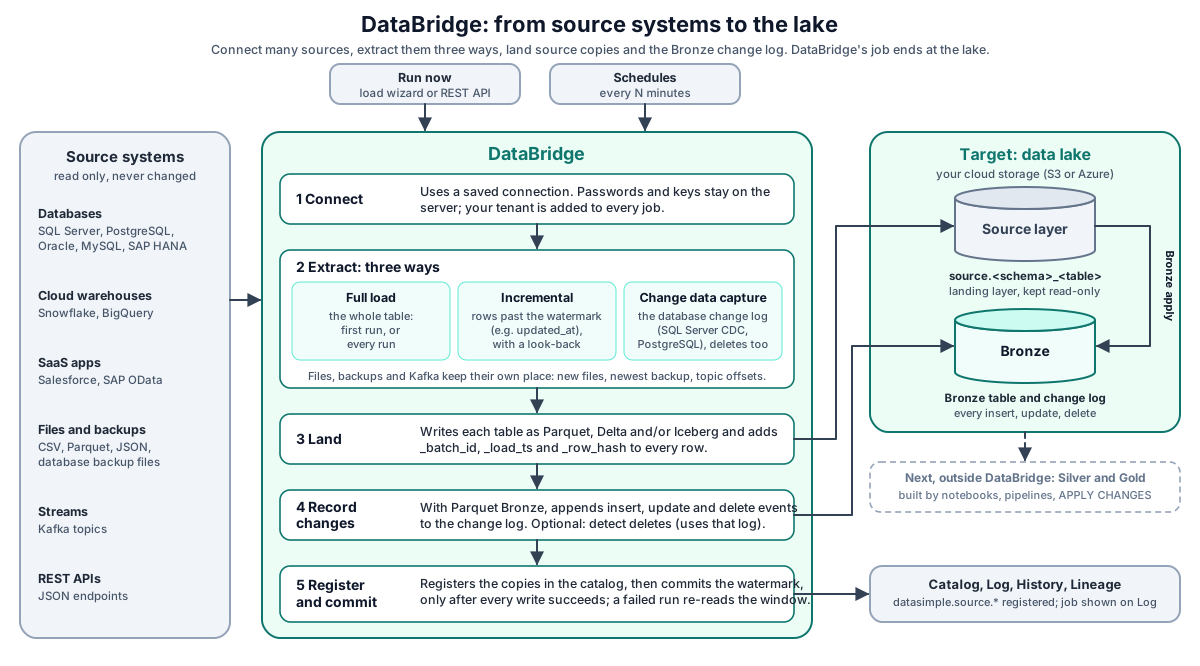
| Step | Purpose |
|---|---|
| 1. Connect | Open a saved connection. Passwords and keys stay on the server. |
| 2. Extract | Read the table one of three ways: full load (the whole table), incremental (rows past the watermark), or change data capture (the database's own change log). Files, backups and Kafka keep their own place. |
| 3. Land | Write the table into the lake's Source layer as Parquet, Delta and/or Iceberg. |
| 4. Record changes | When Bronze is Parquet, append insert, update and delete events to the Bronze change log. |
| 5. Register and commit | Register the copies in the catalog. Commit the watermark only after the copies and the change log are written. |
What happens in a load:
- You start a load from the wizard or
POST /api/databridge/api/convertwithconnectionIdandtargetConnectionId. DataSimple checks your sign-in, supplies the connection settings and adds your tenant. - DataBridge creates a job and starts the tables, up to the chosen parallelism. Very large tables are held back so the service stays within its memory budget.
- For each table it reads the full table, the watermark window, the change-log range, the new files or the Kafka offsets. Rows get the bookkeeping columns (
_batch_id,_load_ts,_row_hashand more; see Bronze loads). - The table is written in the chosen formats, and the copies are registered in the catalog. Silver apply runs next if it is switched on.
- When Bronze is Parquet, for watermark and change-log runs, the batch is compared with the change log and the insert, update and delete events are recorded.
- The position (watermark, log position or offset) is committed after the copies and the change log are written. A failure before that point leaves the position unchanged, so the next run re-reads the same window.
- Detect deletes and the automatic Bronze apply run after the commit. Detect deletes runs per table; the automatic Bronze apply runs at the end of the job.
- The job appears on the Log screen, in History and in lineage.

Delta Lake is a trademark of LF Projects, LLC. Apache, Apache Iceberg, Iceberg, Apache Parquet and Parquet are trademarks of The Apache Software Foundation. The logos identify the open formats DataSimple reads and writes.
Load options in the wizard#
| Option | What it does |
|---|---|
| Process with | DataBridge engine (parallel reads, streams big tables, Bronze auto-apply available) or Spark box (bulk) for very large tables (writes Source staging only). |
| Source layer formats | Parquet, Delta and/or Iceberg. Bronze is Delta when Delta and Parquet are both ticked, Iceberg when Iceberg and Parquet are ticked, otherwise Parquet. Delta and Iceberg Bronze need an S3 target. |
| Parallel threads | Tables read at once (default 16). Higher values load faster but use more memory. |
| Enable watermark + CDC | Turns on incremental loads and, when Bronze is Parquet, the change log into Bronze. |
| Change detection on later runs | Automatic, Watermark column, Database change log, or Full load every run. |
| Watermark column | The change column for watermark loads. |
| Also read rows whose watermark is empty | See Rows with an empty watermark. |
| Detect deletes on later runs | Off, After every run, Once a day. See Detect deletes. |
| Primary key column(s) | Leave blank to use the source's declared key. Without a key, changes can only be appended. Check keys & watermark shows what DataBridge found per table. |
| Apply changes to Silver (MERGE) | Not now, Type 1 (current state, deletes applied), or Type 1 + Type 2 history table. Needs a key. |
| Auto-apply to Bronze CDC after extract | On by default. Writes Bronze right after the load. |
Load methods#
| Method | What a later run reads | Deletes | Position kept |
|---|---|---|---|
| Full load every run | The whole table. Copies replaced, or merged by key when a key exists. | By snapshot comparison | none |
| Watermark column | Rows past the committed watermark, minus the look-back for timestamps. | Only with Detect deletes; Salesforce also via IsDeleted |
last watermark value |
| Database change log | SQL Server CDC or PostgreSQL logical decoding, from the stored position. The first run is a full snapshot, with the position taken before the read. The table must be CDC-enabled on the source. | Yes | log position |
| File drop | Files not seen before under <folder>/<TABLE>/, tracked by object name and version. A file changed in the last two minutes waits for the next run, unless its folder has a _SUCCESS marker. Modes: merged by key, added, snapshot. |
Delete-marker column or snapshot mode | files already loaded |
| Backup drop | The newest backup file, restored into a temporary database, then read like a live connection. | Keys missing from the new backup | none |
| Kafka | Messages from the stored offsets up to the end of each partition, as a micro-batch. By default a run reads at most 1,000,000 messages or for 120 seconds; you can change both per load. | From the operation field | topic offsets |
| Bulk (Spark box) | A very large table read and written in parallel on Spark. Writes Source staging only; Bronze auto-apply is not available. | n/a | as above |
The watermark window#
- A run reads
col > from AND col <= to.fromis the committed watermark; for timestamps it is lowered by the look-back. For sequences, log positions and offsets it is exactly the committed value.tois the source's current maximum when the source can report it, else the largest value read. - The look-back applies only to keyed tables. An unkeyed table is appended, so re-read rows would be stored twice. Rows re-read by the look-back are merged by key and row hash, so they do not create duplicates.
- A run with zero rows still moves the window. A failed run does not.
- Two runs never load the same table at once.
Rows with an empty watermark
A row whose watermark is NULL fits no window. With Also read rows whose watermark is empty (include_null_watermark: true, keyed tables only), each later run also reads rows where the watermark is NULL and merges them by key. This works for SQL databases, BigQuery, Snowflake, HANA, MongoDB, Salesforce and SAP OData. REST API and Camel sources cannot ask for empty values; the option is ignored and the table result says so.
Large loads#
- Streamed first load. When a table is too big to hold in memory, its full load (including the first load of a watermark or change-log table) is read in batches and written as it comes, so memory use is bounded by the batch, not the table. The watermark is stored only after every file is written. Your administrator can set a row count above which every full load is streamed. Streaming applies to S3 targets.
- Part-file Parquet copies. A large incremental table keeps its Parquet copy as a folder of part files. With a key, rows are spread over bucket files by a hash of the key, and an incremental run rewrites only the buckets its keys fall into. Without a key, each batch adds one new part file. A full load or a schema change writes a complete new set of files and switches to it only when every file is uploaded, so readers never see a half-written copy. Small tables keep a single file.
- Retries. A table that fails with a transient error before anything was written is tried again automatically (two attempts by default).
The CDC change log#
The change log is written only when Bronze is Parquet. For watermark and change-log runs, DataBridge then compares each batch with the table's change log and appends insert, update and delete events with a row hash and an increasing _cdc_seq. With Delta or Iceberg Bronze there is no change log; the automatic Bronze apply merges the batch instead.
On S3 targets the change log is a folder under the Bronze table:
<table>/cdc/part-<first _cdc_seq>.parquet   one file per run that had events
<table>/cdc/_common_metadata                 the log's schema
<table>/cdc/_state/...                       latest state per key (bookkeeping)
- Events are never rewritten or removed. Each run's events are one new file.
- A run that stopped after writing its events is completed by the next run.
- A run reads only the part of the per-key state its keys fall into, so the change-log step stays fast as the table's history grows.
- When reading the folder with Spark, read every Parquet file in it; files and folders whose names start with
_are bookkeeping, not events. - ADLS targets keep the change log as a single file.
Detect deletes#
A watermark run never sees a deleted row. With Detect deletes set to After every run (detect_deletes: "every_run") or Once a day ("daily"), after a successful incremental run of a keyed table with Parquet Bronze, DataBridge reads the source's current key set, compares it with the keys live in Bronze, and appends one delete event (_op_type = 'D', _is_deleted = true, with the last known values) per key gone from the source. Nothing in Bronze is removed.
Nothing is recorded, and the table result says why, when:
- the table has no primary key;
- the table has no change log (Bronze is not Parquet, or watermark + CDC is off);
- the key read failed;
- the source returned no keys while Bronze has live rows;
- more than the delete limit of the live keys would be deleted. The default limit is 20% (
max_delete_ratio: 0.2); exactly the limit is allowed. Setmax_delete_ratioper load or per schedule; your administrator can change the default.
A refused check never fails the load.
Salesforce deleted records. With Detect deletes on, an incremental Salesforce read also returns recycle-bin records (IsDeleted = true); each becomes a delete event. Use SystemModstamp as the watermark and Id as the key.
By API. POST /api/reconcile/preview shows what would be marked; POST /api/reconcile/run either stamps _deleted_at on the Bronze Parquet copy or appends delete events (event_log: true).
File ingest#
POST /api/files/run loads every file under a landing prefix that has not been loaded in its current version.
- A new file is loaded; an unchanged file is skipped; a rewritten file is loaded again.
- Each run writes one new Bronze part file under the table folder. Files count as loaded only after that part is written; a retried run replaces its own part.
- Only one run per source and table at a time. A second run is refused with status
busy. A run that died is taken over automatically after six hours. - Landing files are never modified or moved.
POST /api/files/preview shows what the next run would pick up, and GET /api/files/status shows recent runs. POST /api/files/copy copies raw files into the lake without reading rows.
Backup drop#
A backup drop hands DataBridge a database backup file. DataBridge restores it into a temporary database and reads it like a live connection. From the API:
GET /api/backup-drop/healthmust answerok: true.POST /api/backup-drop/preparestarts the restore and returns at once.- Poll
GET /api/backup-drop/status?id=until the phase isready. - Run the load, then
DELETE /api/backup-drop/release?id=to free the temporary database.
Schedules#
A schedule is a saved load plus an interval in minutes. On the last step of the wizard, after a load has run, pick an interval (every 5 minutes up to every day) and click Repeat; each run picks up only what is new. Manage schedules under Load History → Schedules.
- Due schedules are checked every 30 seconds and each starts a normal job, shown with
triggered_by=schedule:<id> <name>. - A schedule whose previous job is still running is skipped and tried again one interval later, so runs never pile up.
- A schedule built from saved Data Sources stores only their numbers and its owner, never the credentials. Each run looks the connections up again, so a changed password is picked up. If a connection was deleted, each run is skipped and the reason is shown on the schedule. The schedule stays on until you pause or delete it.
- Pause or resume, run now, delete, or change Detect deletes per schedule.
Step timings#
Each table result carries the time of each step in milliseconds: _ms_read (read), _ms_copy (the Parquet copy write), _ms_cdc (comparing with and appending to the change log) and _ms_register (catalog registration). The Log screen shows them as read, copy, change log and catalog, for example read 1.2 s, copy 0.8 s, change log 3.1 s, catalog 0.4 s. Load History shows each table's read, write, upload, Delta and Iceberg times. Use them to see where a slow run spent its time.
REST API#
All paths are reached through DataSimple as https://<your-datasimple-host>/api/databridge/<path>, for example /api/databridge/api/convert, with Authorization: Bearer <PERSONAL_TOKEN>.
| Method | Path | Purpose |
|---|---|---|
| GET | /api/engines |
Source engines and whether each is available. |
| POST | /api/test-connection, /api/test-target |
/api/test-connection tests a Kafka source with the settings you send. Test a database source with /api/databases or the Data Source test. /api/test-target tests a destination. |
| POST | /api/databases, /api/tables, /api/tables-for-databases |
Discovery. |
| POST | /api/key-check, /api/loaded-tables |
Keys and watermarks per table; tables already loaded. |
| POST | /api/convert |
Start a job. Returns { job_id, options }. |
| GET | /api/jobs, /api/jobs/{id}, /api/jobs/{id}/tables, /api/jobs/{id}/log, /api/jobs/{id}/report |
Job list, status, per-table results, log, report. |
| DELETE | /api/jobs/{id}/cancel, /api/jobs/{id}/tables/cancel?table= |
Stop a job or one table. |
| POST | /api/jobs/{id}/rerun, /api/jobs/{id}/bronze/retry |
Re-run a job; retry its Bronze apply. |
| POST, GET | /api/schedules |
Create or list schedules. |
| POST | /api/schedules/{id}/toggle?enabled=, /api/schedules/{id}/run |
Pause or resume; run now. |
| DELETE | /api/schedules/{id} |
Delete a schedule. |
| POST | /api/schedules/{id}/delete-capture |
Set Detect deletes and the delete limit for a schedule. |
| GET | /api/delete-capture?schedule_id= |
Your tenant's delete checks, newest first. |
| POST | /api/reconcile/preview, /api/reconcile/run |
Delete reconciliation by API. |
| GET, POST | /api/files/status, /api/files/preview, /api/files/run |
File ingest. |
| POST, GET | /api/files/copy, /api/files/copy/runs |
Copy raw files without reading rows. |
| GET, POST, DELETE | /api/backup-drop/health, /prepare, /status, /release |
Backup restore. |
| GET, POST | /api/load-control, /api/load-control/{connection_key}/{table}/reset, /lookback, /enabled |
Load control and its actions. See Bronze loads. |
| GET | /api/load-runs |
The run ledger. |
Developer examples#
1. Start a watermark load with Detect deletes#
const res = await fetch("https://<your-datasimple-host>/api/databridge/api/convert", {
  method: "POST",
  headers: { "Content-Type": "application/json", "Authorization": "Bearer <PERSONAL_TOKEN>" },
  body: JSON.stringify({
    source:  { connectionId: 18, database: "Sales" },
    target:  { targetConnectionId: 15, parallelism: 4 },
    tables:  ["dbo.Orders", "dbo.Customers"],
    formats: ["parquet"],                 // Detect deletes needs Parquet Bronze
    whole_database: false, connectionId: 18,
    enable_watermark: true, watermark_column: "updated_at",
    change_capture: "watermark",          // "auto", "watermark", "log" or "full"
    primary_keys: { "dbo.Orders": ["OrderID"], "dbo.Customers": ["CustomerID"] },
    auto_bronze_apply: true,
    detect_deletes: "daily", max_delete_ratio: 0.1,
    include_null_watermark: true,
  }),
});
const { job_id } = await res.json();   // e.g. { "job_id": 74, "options": { ... } }
2. Follow the job and read step timings#
H="Authorization: Bearer <PERSONAL_TOKEN>"
curl -s https://<your-datasimple-host>/api/databridge/api/jobs/74 -H "$H"
curl -s https://<your-datasimple-host>/api/databridge/api/jobs/74/tables -H "$H"
curl -s https://<your-datasimple-host>/api/databridge/api/jobs/74/log -H "$H"
The table results carry rows, formats, cdc (I/U/D counts), delete_capture (status, deletes, live_keys, source_keys, delete_ratio, message) and the step times.
3. Schedule the load every hour#
curl -s -X POST https://<your-datasimple-host>/api/databridge/api/schedules \
  -H "Content-Type: application/json" -H "Authorization: Bearer <PERSONAL_TOKEN>" \
  -d '{ "source": { "connectionId": 18, "database": "Sales" },
        "target": { "targetConnectionId": 15 },
        "tables": ["dbo.Orders"], "formats": ["parquet", "delta"],
        "connectionId": 18, "enable_watermark": true, "watermark_column": "updated_at",
        "interval_minutes": 60, "name": "Orders hourly" }'
4. Read load control and a batch from a notebook#
ds.load_control()                 # your tenant's load-control rows, read only
                                  # pass a table name to get one table's row
SELECT OrderID, _op_type, _batch_id, _load_ts
FROM datasimple.source.dbo_Orders_DELTA
WHERE _batch_id = 74
ORDER BY OrderID;
Security and permissions#
- Sign-in. Every DataBridge call needs a session or a personal token, and your role must include the Databridge screen.
- Tenant. Every call carries your tenant. Jobs, schedules and load control are filtered by it, and everything a load writes is stamped with it (lake rows carry
_tenantid, catalog registrations belong to your tenant). - Secrets. Saved connections are resolved inside DataSimple. Schedules store connection numbers, not credentials. Job reports leave out storage locations, hosts and similar details.
- Audit and lineage. Each job appears on the Log screen with per-table steps, in History, and in lineage from the source table to the copies, Bronze and Silver.
Settings you can change#
| Setting | Where | Effect |
|---|---|---|
| Load method, watermark, keys, formats, parallelism | Wizard or /api/convert |
See Load options in the wizard. |
| Detect deletes and delete limit | Wizard, /api/convert, or per schedule |
When to check and how many deletes are allowed (default 20%). |
| Look-back | Load History → Load control → Lookback, or /api/load-control/.../lookback |
Seconds re-read before the committed watermark. 0 turns it off. |
| Reset, Disable | Load History → Load control | Start a table again from a full load, or skip it on later runs. |
| Schedule interval | Repeat on the wizard's last step, or interval_minutes in /api/schedules |
Minutes between runs. |
Your administrator can change service-wide defaults such as the default look-back (300 s), the default delete limit (20%), the File drop settle time (2 minutes), the row count above which full loads are streamed, the number of jobs that run at once (8) and the number of attempts per table (2).
Monitoring and troubleshooting#
- Load History on the DataBridge page: jobs, per-table phases (reading, preparing rows, uploading Parquet, writing Delta, writing Iceberg, applying changes), Match / Merged / Mismatch, schedules and load control.
- Log screen: one line per job with per-table formats, Bronze rows, Silver counts and step timings.
- Ingestion (administrators): the job report, log, rerun, cancel and Retry Bronze.
- History: jobs under the DataBridge filter.
| Symptom | Meaning |
|---|---|
Login required (401) |
No session. Sign in or send a personal token. |
Databridge service unavailable (502) |
DataBridge is not reachable right now. It restarts automatically; try again shortly, or contact your administrator. |
Deletes: not recorded (...) |
Detect deletes refused: no key, failed key read, empty source, or above the delete limit. |
File ingest returns busy |
Another run of the same source and table is in progress. |
Mismatch |
Row counts differ between formats or from the source. Run again. |
| A table says run a full load | The change-log position fell outside the source's retention. Reset the table in load control. |
Limits and known issues#
- Streamed full loads, part-file copies and the change-log folder apply to S3 targets. ADLS targets load in memory and keep a single-file change log.
- Oracle (LogMiner) and MySQL (binlog) change-log capture are not available.
- Apply changes to Silver merges the run's batch only; it does not receive Detect deletes events (it does receive Salesforce
IsDeletedrecords). - Updating the Parquet copy of a keyed table can take several seconds even for a handful of changed rows.
- Change-log files are not compacted yet.
- Bulk (Spark box) loads write Source staging only; Bronze apply is not available for them.
Related content#
- Data sources
- Bronze loads
- Lake storage
- Declarative tables and change handling
- Observability
- Schedules and scheduler
- Apache Parquet: https://parquet.apache.org/docs/
- Delta Lake: https://docs.delta.io/latest/index.html
- Apache Iceberg: https://iceberg.apache.org/docs/latest/
- Amazon S3 (concepts only): https://docs.aws.amazon.com/AmazonS3/latest/userguide/Welcome.html