Overview#
Lakehouse and governance is the reference for the catalog: its screens, views, API and behaviour. This chapter is the process. It explains how the pieces fit together and then walks through the work in the order a team does it on a new project, from planning the schemas to promoting them to QA.
Each step has the same parts:
- Goal: what the step achieves.
- Where in the UI: menu → screen → button.
- SQL or API: a copy-paste example.
- Verify: what you should see.
- Common mistakes.
The examples use the test names gold.sales, silver.orders and the users erin (Data Engineer), alan (Data Analyst) and sara (Data Steward). HTTP examples call https://<your-datasimple-host> with Authorization: Bearer <PERSONAL_TOKEN> (Workspace and administration explains personal tokens).
Part 1: How Unity Catalog works in DataSimple#
The three-level namespace#
Every lake table has a three-part name: catalog.schema.object. Each tenant has one catalog, named datasimple by default.
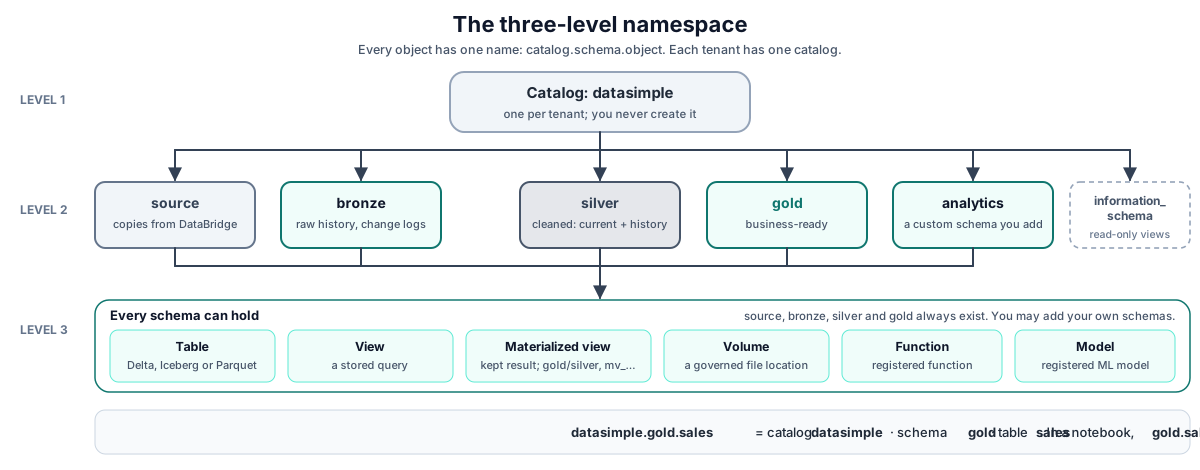
| Level | What it holds | Notes |
|---|---|---|
| Catalog | Every schema of one tenant | One per tenant. You do not create catalogs. |
| Schema | Tables, views, materialized views, volumes, functions, models | source, bronze, silver, gold always exist. You can add custom schemas. |
| Table | Delta, Iceberg or Parquet data in the lake | Registered with its format, storage location, columns and owner. |
| View | A stored query | Registered when CREATE VIEW runs. |
| Materialized view | A stored query whose result is kept and refreshed | Must live in gold (or silver) and be named mv_…. |
| Volume, function, model | Registered objects (file locations, functions, ML models) | Created in Administration → Governance. |
A notebook accepts datasimple.gold.sales, gold.sales, or a bare table name searched across layers. Use at least schema.table in shared code so the meaning never depends on search order.
Objects and metadata#
DataSimple keeps two things apart:
- Objects are the data files in the lake: Delta, Iceberg or Parquet folders.
- Metadata is everything the catalog knows about them: the name, format, location, columns, owner, comments, keys, grants, row filters, column masks, definition history and lineage. It is kept in the catalog, and you read it through the Lakehouse screen,
information_schemaand the Unity Catalog API.
The catalog is the source of truth. The Lakehouse tree, information_schema, Trash, governance checks and the Unity Catalog REST endpoints all read it. A table that is not in the catalog cannot be governed, described or found by name. Always read and write tables by name so that your access rules apply.
What writes to the catalog#
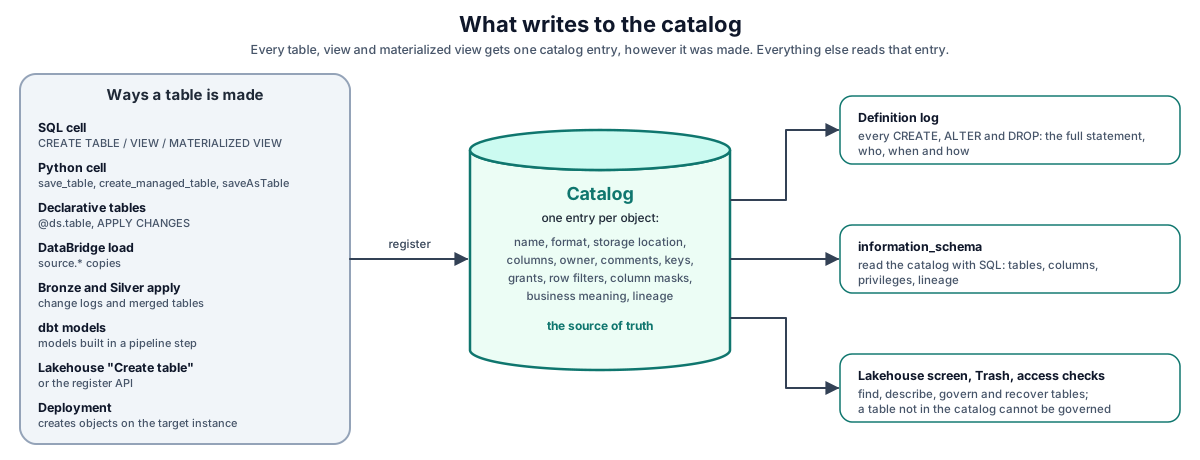
Every change to a table, view or materialized view is also written to the definition log with the full statement or cell code, who made it, when and how (the method: sql_cell, python_cell, ds_tables, apply_changes, databridge, dbt, uc_api, pipeline_build, scheduler, agent, ai_<assistant> for SQL run by an assistant other than the Agent, materialized_view for a scheduled materialized view refresh, and backfill for objects that existed before the log started).
Securables, privileges and inheritance#
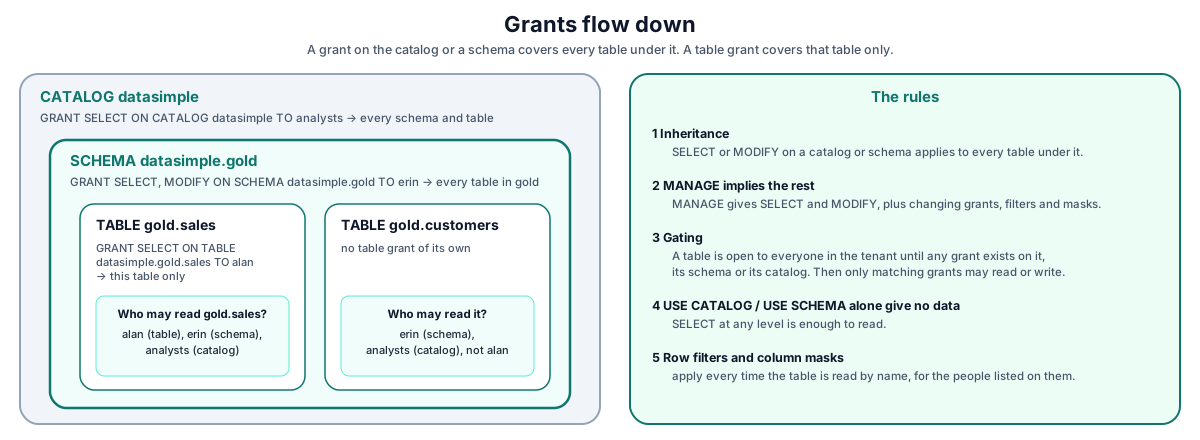
A securable is something you can grant on. For every table, DataSimple looks at grants on three levels:
Rules:
- Inheritance.
SELECTorMODIFYon the catalog or on the schema applies to every table under it. A table-level grant applies to that table only. - MANAGE implies the rest. Every privilege check accepts
MANAGEin place of the privilege asked for.MANAGEon a schema therefore givesSELECTandMODIFYon all its tables, plus the right to change their grants, filters and masks. - Gating. A table is open to everyone in the tenant until any grant exists on it, on its schema or on its catalog. From that moment it is gated, and only principals with a matching grant may read (
SELECT) or write (MODIFY) it. Any privilege counts, so even aUSE_SCHEMAorBROWSEgrant on a schema gates every table in it. Your administrator can switch the platform to default deny, which gates every table from the start. - USE CATALOG and USE SCHEMA are optional.
SELECTat any level is enough to read.USE_CATALOGandUSE_SCHEMAare accepted for compatibility with other Unity Catalog tools. On their own they give no access to data. - Row filters and column masks apply whenever the table is read by name, for the principals listed on them (an empty list means everyone).
Principals: who a grant can name#
| Principal | Example | Notes |
|---|---|---|
| A user name | alan |
The username the person signs in with. |
| A custom group | analysts |
Created in Administration → Governance → Groups. Lower case, 2 to 63 letters, digits or _, starting with a letter. Names such as admin, users, everyone and account users are reserved. |
account users |
`account users` |
Everyone in the tenant. Write it with backticks in SQL. |
| dbt client | client:<tenant>:<name> |
Granted only from the dbt client admin page, never with the general grant API or SQL. See dbt. |
App roles are not principals. A grant to Data Analyst matches nobody. To give a whole role access to data, create a group with the same people and grant to the group. A change in group membership can take up to a minute to apply everywhere.
Owners#
The owner of a table is the user who first registered it (shown as table_owner in information_schema.tables). Re-running a notebook keeps the original owner. Registering the same table again through the register API (POST /api/notebooks/unity-catalog/register) makes the caller its owner. A schema created from the Lakehouse records its creator as schema_owner.
What ownership gives:
- Change the table's grants, row filters and column masks.
- Describe it (
COMMENT ON, business meaning, AI drafts). - Drop it and undrop it.
What ownership does not give: read access to a gated table. The read check looks only at grants. When a table becomes gated, grant its owner SELECT and MODIFY (or MANAGE) like anyone else. There is no ownership transfer statement. To hand a table over, grant the new person MANAGE on it.
How a query is checked#
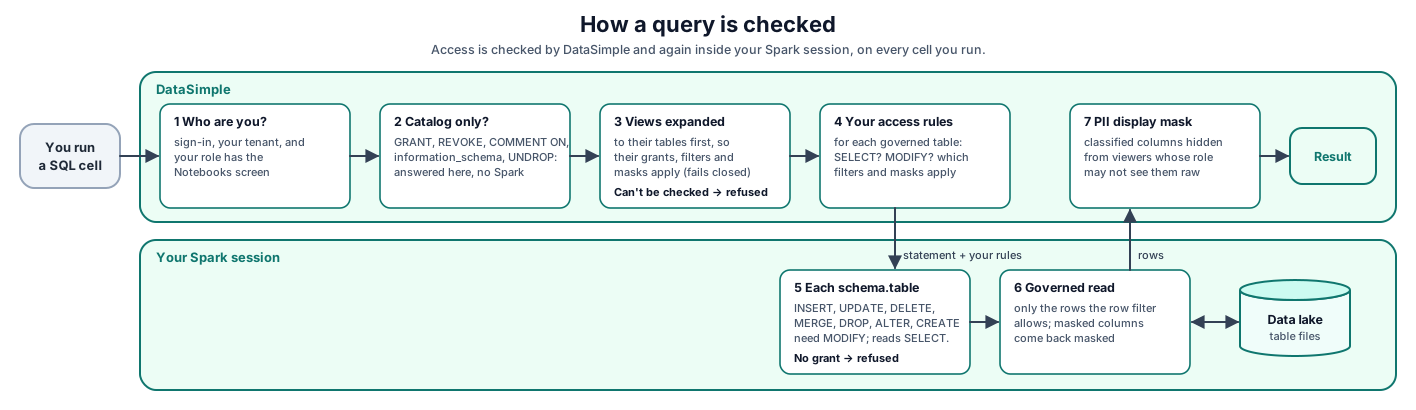
- DataSimple checks that you are signed in, your tenant, and that your role has the Notebooks screen.
- Statements that only touch the catalog never reach Spark.
- For everything else, DataSimple looks up your access rules: for each governed table, whether you may
SELECTorMODIFYit, and which filters and masks apply to you. The rules travel with the cell. - In the Spark session, every
schema.tablereference is checked. A write verb (INSERT,UPDATE,DELETE,MERGE,DROP,ALTER,CREATE,TRUNCATE,RESTORE,VACUUM,OPTIMIZE,REORG) needsMODIFY; everything else needsSELECT.CREATE TABLEorCREATE VIEWof an object that does not exist yet needsCREATE_TABLEinstead; if the object already exists, it needsMODIFY. The tables such a statement only reads needSELECT. - A
SELECTfrom a governed table returns only the rows the filter allows, with masked columns masked.read_table()in Python applies them the same way. - The result goes back through PII display masking, which hides classified columns from viewers whose role may not see them raw.
The access rules are looked up for each cell run, so a new grant applies to your next cell. Fast SQL previews and information_schema redaction use the same rules.
Two layers of access control#
DataSimple has two independent layers. A person needs both.
| Layer | Decides | Set in | Enforced by |
|---|---|---|---|
| Screen and API access | Which screens a person sees and which APIs they may call | Administration → Roles → Screens (role templates as a start) | DataSimple, on every screen and API request |
| Data access | Which tables a person may read or change, which rows, which column values | Grants, row filters, column masks, PII classification | The Spark session, the catalog checks and the PII display mask |
A role template only switches screens on. It never grants data. A Data Analyst role with the Lakehouse tab can open the Lakehouse screen, but cannot read a gated table without a grant. The reverse is also true: a grant on gold.sales is useless to someone whose role has no Notebooks tab.
Administrator has two meanings in the catalog:
- Administrator role: a role named Admin, System Administrator, Super Admin, Super Master or Chief Agent. It may change any grant, filter or mask, create groups and run
RESTORE. It does not skip the read check: an administrator reads a gated table like anyone else, so grant yourself access first. - Catalog administrator: one of the people your platform administrator has made catalog administrators for your tenant (by default, your tenant's own
adminaccount). A person is a tenant plus a username, soalicein one tenant andalicein another are different people; the rights apply in that tenant only. A catalog administrator passes every catalog check in their tenant, including reads.
Who can do what#
| Action | Admin role | Catalog admin | Table owner | MANAGE holder | SELECT / MODIFY holder | No grant |
|---|---|---|---|---|---|---|
| Read a table that is not gated | Yes | Yes | Yes | Yes | Yes | Yes |
| Read a gated table | Only with a grant | Yes | Only with a grant | Yes | Yes with SELECT | No |
| Write to a gated table | Only with a grant | Yes | Only with a grant | Yes | Yes with MODIFY | No |
| Grant, revoke, set filters and masks | Yes | Yes | Yes, own table | Yes, on that securable and below | No | No |
COMMENT ON, approve meanings |
Only as owner or with MANAGE | Yes | Yes | Yes | No | No |
| Drop a table (SQL) | Only as owner or with MANAGE | Yes | Yes | Yes | No | No |
UNDROP |
Only as owner, dropper or with MANAGE | Yes | Yes (and the person who dropped it) | Yes | No | No |
RESTORE TABLE … TO VERSION |
Yes | Only if the role is an administrator | No | No | No | No |
| Create groups, change members | Yes | Yes | No | Yes with MANAGE on the catalog | No | No |
| Users, roles, tab access | Yes | No (needs the admin role) | No | No | No | No |
| Promote to QA (Deploy) | Yes | Yes with the Deployment screen in their role | Same | Same | Same | Same |
The Lakehouse Delete table menu runs a SQL DROP TABLE first, so it follows the SQL rule above: the owner, a MANAGE holder or a catalog administrator. Only a direct call to the table delete API (DELETE /api/notebooks/unity-catalog/tables/:full_name) also accepts the administrator role.
Part 2: Step-by-step process#
Step 1: Plan the catalog#
Goal. Decide where each kind of table lives before anyone writes one, so grants can be set per schema instead of per table.
Where in the UI. Nothing to click yet. Look at the existing tree in Lakehouse (left rail).
Plan.
| Schema | Holds | Written by | Typical readers |
|---|---|---|---|
source |
Raw copies of source tables, one per format | DataBridge only | Engineers |
bronze |
Change-applied raw data with audit columns | Bronze apply, engineers | Engineers |
silver |
Cleaned, conformed tables and change history | Engineers, Silver apply | Engineers, stewards |
gold |
Business-ready tables, views, materialized views | Engineers | Analysts, stewards, Sarah, reports |
Custom (for example analytics, sandbox) |
Team or project space | Its team | Its team |
Naming rules:
- Schema and table names: letters, digits and underscore, starting with a letter or underscore (Reference).
- DataBridge copies are named
source.<schema>_<table>, for examplesource.public_orders. - Materialized views:
gold.mv_<name>(orsilver.mv_…), lower case. - Use lower case everywhere;
information_schemais lower case.
Verify. Write the plan down with the grants you intend per schema (Step 6). Gating happens per schema, so a schema is the right unit of access.
Common mistakes.
- Mixing sensitive and open tables in one schema, then needing table-level grants everywhere.
- Writing your own tables into
source. It belongs to DataBridge. Build inbronzeand above.
Step 2: Create a schema#
Goal. Add a custom schema to the catalog with a comment.
Where in the UI. Lakehouse → right-click the datasimple catalog → Create schema → enter the name → Create. This registers the schema in the catalog and creates it in the Spark session in one step.
API.
curl -s -X POST "https://<your-datasimple-host>/api/notebooks/unity-catalog/schemas" \
  -H "Authorization: Bearer <PERSONAL_TOKEN>" -H "Content-Type: application/json" \
  -d '{"catalog":"datasimple","name":"analytics","comment":"Finance team analysis tables"}'
# {"success":true,"catalog":"datasimple","name":"analytics"}
SQL. CREATE SCHEMA analytics in a SQL cell creates the schema in the Spark session. The catalog lists it once the first table is created in it. Prefer the Lakehouse menu or the API, which register it at once and record the comment.
Owner and comment. The creator is recorded as schema_owner. The comment is set when the schema is created. There is no statement to change a schema's owner. To let someone else run the schema, grant them MANAGE on it (Step 6).
Verify.
SELECT catalog_name, schema_name, schema_owner, comment
  FROM information_schema.schemata
 ORDER BY schema_name;
Common mistakes.
- Names with hyphens or spaces are refused: catalog and name must be identifiers.
- Once an administrator governs the catalog (any grant on it, or default deny on), creating a schema from the Lakehouse, the API or a SQL
CREATE SCHEMA/CREATE DATABASE/CREATE NAMESPACEin a SQL cell (in the editor and in scheduled runs) needsCREATE_SCHEMA(orMANAGE) on the catalog: Creating a schema in datasimple needs CREATE_SCHEMA on the catalog. Catalog administrators always pass; an administrator role alone does not.spark.sql("CREATE SCHEMA ...")in a Python cell gets the same check. A catalog nobody governs stays open. - Delete schema sends every table in it to Trash. It needs an administrator, a catalog administrator or
MANAGE.
Step 3: Get tables into the catalog#
Goal. Every table the team uses is registered, with the right format, location and owner.
Where in the UI.
- Lakehouse → right-click a schema → Create table (an empty Delta table to start from).
- DataBridge loads register their copies automatically.
- Notebooks register what they write.
Options.
| Way in | Example | Registered as |
|---|---|---|
SQL CREATE TABLE |
See below | datasimple.<schema>.<table>, owner = you |
SQL CREATE TABLE … AS SELECT |
CREATE TABLE gold.sales AS SELECT … |
Same |
SQL CREATE VIEW |
CREATE VIEW gold.v_sales_eu AS SELECT … |
View, with its definition |
| SQL materialized view | CREATE MATERIALIZED VIEW gold.mv_daily_sales AS SELECT … |
Materialized view (needs CREATE_TABLE on the schema once it has grants) |
Python save_table |
save_table(df, "silver.orders") |
Table, owner = you |
| Declarative tables | @ds.table, APPLY CHANGES INTO |
Table per declared function. See Declarative tables |
| DataBridge load | A job run | source.<schema>_<table> for each format copy. See DataBridge |
| dbt | A model run | Its target table. See dbt |
| Register an existing location | CREATE TABLE … LOCATION or POST /register |
EXTERNAL table |
SQL.
-- Managed table, declared columns and primary key
CREATE TABLE gold.sales (
  order_id       BIGINT,
  region         STRING,
  amount         DECIMAL(12,2),
  customer_email STRING,
  order_date     DATE,
  PRIMARY KEY (order_id)
) USING DELTA;

INSERT INTO gold.sales VALUES
  (1, 'EU',   120.00, 'anna@example.com', DATE'2026-10-01'),
  (2, 'US',    80.00, 'bob@example.com',  DATE'2026-10-01'),
  (3, 'EU',    45.50, 'carl@example.com', DATE'2026-10-02'),
  (4, 'APAC', 200.00, 'dina@example.com', DATE'2026-10-02');
# Python: write a DataFrame and register it
from pyspark.sql import functions as F
df = read_table("silver.orders").groupBy("region").agg(F.sum("amount").alias("amount"))
save_table(df, "gold.sales_by_region")   # name each column: "sum(amount)" is not a valid column name
Registering data that already exists. A column list plus LOCATION registers an EXTERNAL table over files that are already in the lake:
CREATE TABLE silver.ext_orders (order_id BIGINT, status STRING)
USING DELTA LOCATION '<lake-root>/silver/ext_orders';
Or through the API. The layer is source, bronze, silver or gold; any other value registers the table in source:
curl -s -X POST "https://<your-datasimple-host>/api/notebooks/unity-catalog/register" \
  -H "Authorization: Bearer <PERSONAL_TOKEN>" -H "Content-Type: application/json" \
  -d '{"name":"ext_orders","format":"DELTA","layer":"silver","tableType":"EXTERNAL",
       "storageLocation":"<lake-root>/silver/ext_orders",
       "columns":[{"name":"order_id","type":"BIGINT"},{"name":"status","type":"STRING"}],
       "primaryKey":["order_id"]}'
Verify. Use information_schema.tables. It is live, so a table registered a second ago is there now.
SELECT table_schema, table_name, table_type, data_source_format, table_owner, created_by, last_altered_method
  FROM information_schema.tables
 WHERE table_schema IN ('silver', 'gold')
 ORDER BY table_schema, table_name;
SHOW TABLES IN gold shows your Spark session's own list. A registered table appears there only after a statement in the session has used it, so SHOW TABLES can miss tables. Treat information_schema.tables as the answer.
Common mistakes.
- Writing with a raw path (
df.write.save("<lake path>")) instead of a name. Nothing is registered and nothing is governed. - Expecting Spark to enforce
PRIMARY KEY/FOREIGN KEY. DataSimple stores them in the catalog and checks them on write from notebooks (see Step 4). - Using
TRUNCATE TABLEon Delta: the cell turns it intoDELETE FROM, which keeps time travel.
Step 4: Document the tables#
Goal. Every Gold table and column has an agreed business meaning, and the keys that define joins are declared.
Where in the UI.
- Semantics → Meaning: write meanings, draft them with AI, approve drafts, see coverage per schema.
- Lakehouse → right-click a table → Show create or History to see how it was built.
SQL: comments become business meaning.
COMMENT ON TABLE gold.sales IS 'One row per order, net of returns';
COMMENT ON COLUMN gold.sales.amount IS 'Order value after discounts [unit: USD]';
COMMENT ON COLUMN gold.sales.region IS 'Sales region [values: EU|US|APAC]';
ALTER TABLE gold.sales ALTER COLUMN order_date COMMENT 'Date the order was placed';
The text is saved as an approved business meaning. [unit: …] and [values: …] become the column's unit and allowed values. The cell answers at once. In the background, the comment is also written to the Spark table so DESCRIBE TABLE EXTENDED shows it, but only when your Spark session is already running and idle.
AI drafts and approval.
const base = "https://<your-datasimple-host>/api/notebooks/semantic";
const headers = { "Content-Type": "application/json", Authorization: "Bearer <PERSONAL_TOKEN>" };

// Draft meanings for one table (reads a few rows as you, through the governed path)
const draft = await fetch(`${base}/meaning/draft`, { method: "POST", headers,
  body: JSON.stringify({ schema: "gold", table: "sales" }) }).then(r => r.json());

// Review the drafts, then approve them by id
const list = await fetch(`${base}/meaning?schema=gold&table=sales&status=draft`, { headers }).then(r => r.json());
await fetch(`${base}/meaning/approve`, { method: "POST", headers,
  body: JSON.stringify({ ids: ["<meaning id>", "<meaning id>"] }) });
New tables also get AI drafts automatically about 30 seconds after they are created, when your administrator has this switched on (see chapter 07). Only approved meanings reach Sarah, the Agent and Kinetic. See Semantics.
Keys.
-- gold.sales already has its primary key (order_id, declared in Step 3).
-- A foreign key needs a parent table with a primary key, and a column to point from:
CREATE TABLE gold.customers (
  customer_id   BIGINT,
  customer_name STRING,
  PRIMARY KEY (customer_id)
) USING DELTA;

ALTER TABLE gold.sales ADD COLUMNS (customer_id BIGINT);
ALTER TABLE gold.sales ADD CONSTRAINT fk_sales_customer
  FOREIGN KEY (customer_id) REFERENCES gold.customers (customer_id);
Keys are stored in the catalog and checked when notebooks write: primary key unique and not null, foreign key has a parent.
Verify.
SELECT table_name, column_name, meaning, unit, allowed_values, status, source
  FROM information_schema.business_meaning WHERE table_schema = 'gold';

SELECT constraint_name, table_name, constraint_type, is_enforced
  FROM information_schema.table_constraints WHERE table_schema = 'gold';
Common mistakes.
- A semicolon inside the comment text splits the statement. Use a comma.
- Table … is not in the catalog: register the table first (Step 3).
- Permission denied: describing gold.sales requires ownership or MANAGE: only the owner, a
MANAGEholder or a catalog administrator may describe a table.
Step 5: Set up roles (screen access)#
Goal. Each person sees the screens their job needs, and no more.
Where in the UI.
- Administration → Roles → create a role from a template: Data Engineer, Data Analyst or Data Steward.
- Administration → Roles → Screens → switch tabs on or off for the role.
- Administration → Users → create the user, choose the role and tenant.
The templates and their tabs are listed in Workspace and administration. In short:
| Template | Catalog-related tabs | Not included |
|---|---|---|
| Data Engineer | Notebooks, Lakehouse, Semantics, Data Quality, DataShare, Lineage, History, Log, DataBridge, Bronze, Pipelines, Deploy | Administration |
| Data Analyst | Notebooks, Lakehouse, Semantics, Data Quality, Lineage | DataBridge, Pipelines, Administration |
| Data Steward | Notebooks, Lakehouse, Semantics, Data Quality, DataShare, Lineage, History, Log | DataBridge, Pipelines, Administration |
Users are created in Administration → Users with a password typed by the administrator. Do not script real passwords.
Verify. Sign in as a user of the role. The left rail shows only the role's tabs. A call to an API behind a missing tab answers 403 No access to <tab> (ask an administrator). A tab change applies within 30 seconds.
Common mistakes.
- Expecting the Data Analyst template to give access to
gold. It only shows screens. Data access is Step 6. - Giving the Data Steward the Administration tab to reach the Governance console. The Administration APIs also require the administrator role. A steward with
MANAGEsets policies through the Lakehouse or the API instead (Steps 6 and 7).
Step 6: Grant data access#
Goal. Each person or group can read or change exactly the tables they should.
Where in the UI.
- Lakehouse → right-click a table → Permissions: shows the table's grants; enter a principal, pick privileges (
SELECT,MODIFY,MANAGE,USE_SCHEMA,CREATE_TABLE,BROWSE), click Grant. The principal box takes a user or group name (letters, digits, underscore). - Administration → Governance → Privileges (administrators): choose the securable type (
catalog,schema,table,volume,share), the full name, the principal and privileges; Grant or Revoke. Use this foraccount usersand for schema or catalog grants. - Administration → Governance → Groups: create a group and add members.
Supported privileges:
| Privilege | Used for |
|---|---|
SELECT |
Read a table (on the table, its schema or the catalog) |
MODIFY |
Write to a table: insert, update, delete, merge, alter, drop |
MANAGE |
Everything above on that securable and below, plus changing its grants, filters and masks |
CREATE_TABLE |
Create a new table or view in a governed schema or catalog (CREATE TABLE / CREATE VIEW in SQL, materialized views, save_table, declarative tables). These also need the right to use the schema: USE_CATALOG + USE_SCHEMA, or SELECT. The register API (POST /register, and POST /tables on both catalog APIs) is checked differently: it needs CREATE_TABLE on the schema itself, only once that schema has grants, and does not ask for the right to use the schema. |
USE_CATALOG, USE_SCHEMA |
Accepted; not needed for reading |
CREATE_SCHEMA |
Create a schema in a governed catalog (Lakehouse Create schema, the catalog API, and SQL CREATE SCHEMA / CREATE DATABASE / CREATE NAMESPACE in a SQL cell) |
READ_VOLUME |
List the files of a governed volume in the file browser (on the volume, its schema or the catalog) |
WRITE_VOLUME |
Upload, create folders, move or delete files inside a governed volume |
CREATE_VOLUME |
Create a volume in a schema (on the schema or the catalog) |
MANAGE on a share |
Change or delete the share and its recipients, like its creator (GRANT MANAGE ON SHARE <name> TO <user>) |
BROWSE, EXECUTE |
For functions and catalog browsing; they do not give read or write access to tables |
ALL PRIVILEGES is not supported and is refused with Unsupported privilege: ALL_PRIVILEGES. Grant MANAGE instead.
SQL. The statement form is:
GRANT | REVOKE <privilege>[, <privilege>…] ON [TABLE | SCHEMA | CATALOG | VOLUME | SHARE] <name> TO | FROM <principal>
Privileges with a space are joined with _ (USE SCHEMA becomes USE_SCHEMA). Without a securable type the name is a table. A one-part schema name gets the catalog in front.
GRANT SELECT ON TABLE gold.sales TO analysts;
GRANT SELECT, MODIFY, CREATE TABLE ON SCHEMA gold TO erin;
GRANT MANAGE ON SCHEMA gold TO sara;
GRANT SELECT ON SCHEMA gold TO `account users`;
REVOKE MODIFY ON SCHEMA gold FROM erin;
Volumes follow the table model. A volume nobody governs stays open to everyone in your tenant. Once any grant exists on the volume, its schema or its catalog, listing its files needs READ_VOLUME and changing them needs WRITE_VOLUME (MANAGE covers both). The volume's creator, administrators and catalog administrators always pass. Another tenant's volume is never reachable.
GRANT READ VOLUME ON VOLUME datasimple.bronze.landing TO analysts;
GRANT WRITE VOLUME ON VOLUME datasimple.bronze.landing TO loader;
Shares. Only a table's owner, a MANAGE holder (table, schema or catalog) or an administrator can put a table in a share. Only the share's creator, a MANAGE holder on the share or an administrator can change or delete it and its recipients. See DataShare.
GRANTandREVOKEtyped in a SQL cell go through the same check as the Lakehouse Permissions dialog (administrator, catalog administrator, the table's owner, orMANAGE). The Lakehouse dialog also inserts the matchingGRANTtext into the notebook as a record; you do not need to run it.
API.
const uc = "https://<your-datasimple-host>/api/notebooks/unity-catalog";
const headers = { "Content-Type": "application/json", Authorization: "Bearer <PERSONAL_TOKEN>" };

// Group, then members (administrator, catalog admin, or MANAGE on the catalog)
await fetch(`${uc}/groups`, { method: "POST", headers,
  body: JSON.stringify({ name: "analysts", description: "Sales analysts" }) });
await fetch(`${uc}/groups/analysts/members`, { method: "POST", headers,
  body: JSON.stringify({ add: ["alan"] }) });

// Grants
await fetch(`${uc}/grants`, { method: "POST", headers, body: JSON.stringify({
  securableType: "schema", fullName: "datasimple.gold", principal: "erin",
  privileges: ["SELECT", "MODIFY", "CREATE_TABLE"] }) });

// Revoke
await fetch(`${uc}/grants`, { method: "DELETE", headers, body: JSON.stringify({
  securableType: "schema", fullName: "datasimple.gold", principal: "erin", privileges: ["MODIFY"] }) });
Viewing grants.
| Question | How |
|---|---|
| Grants on one table | Lakehouse → Permissions, or information_schema.table_privileges |
| Grants on a schema or the catalog | GET /api/notebooks/unity-catalog/grants?securable_type=schema&full_name=datasimple.gold, or Governance → Privileges |
| What one user may actually do on a table | GET /api/notebooks/unity-catalog/access?full_name=datasimple.gold.sales (as that user) |
| Column view of table grants | information_schema.column_privileges (with is_masked) |
SELECT grantee, privilege_type, table_name, grantor, granted
  FROM information_schema.table_privileges
 WHERE table_schema = 'gold';
table_privileges lists table-level grants only. There is no schema_privileges view: schema and catalog grants come from the /grants endpoint (GET /api/notebooks/unity-catalog/grants?securable_type=schema&full_name=<catalog.schema>) or Lakehouse → Permissions. The /access answer is the decision your Spark session will make:
{ "success": true, "access": {
  "fullName": "datasimple.gold.sales", "enforce": true,
  "allowed": { "USE_CATALOG": false, "USE_SCHEMA": false, "SELECT": true, "MODIFY": false, "CREATE_TABLE": false },
  "rowFilters": [{ "name": "region_eu", "expr": "region = 'EU'" }],
  "columnMasks": [{ "column": "customer_email", "expr": "concat('***@', substring_index(customer_email, '@', -1))" }] } }
Inheritance in practice. Grant on the schema for the normal case. Use table grants for exceptions. Remember that the first grant gates the schema for reading and writing together: after GRANT SELECT ON SCHEMA gold TO analysts, even the engineers who build gold need MODIFY (and SELECT) to keep working.
Verify. Sign in as the grantee and run a SELECT (Step 8 shows full examples). Or call /access as that user.
Common mistakes.
- Granting to a role name (
Data Analyst). Grant to a group. - Granting only
USE_SCHEMAand expecting reads to work. GrantSELECT. - Forgetting the builders when the schema becomes gated. Grant them first.
- Looking for schema grants in
table_privileges. Use/grants.
Step 7: Protect sensitive data#
Goal. Some people see only some rows, and sensitive columns are hidden from those who should not see them.
DataSimple has three tools:
| Tool | What it does | Applies to | Set in |
|---|---|---|---|
| Row filter | A Spark SQL predicate; rows that fail it are not returned | Listed principals (empty list = everyone) | Governance → Row / Column, or API |
| Column mask | A Spark SQL expression that replaces the column's value | Listed principals (empty list = everyone) | Governance → Row / Column, or API |
| PII masking | Display mask on results (partial, full or hash) by column name | Every viewer whose role may not see raw values | Data Quality → table → column classification |
Row filters and column masks are access rules: they change what the Spark session returns, in notebooks, scheduled runs and the fast SQL path. PII masking is a display rule: it masks values in the results shown to a viewer, never the data a pipeline computes on. Roles that see raw PII by default: Admin, System Administrator, Super Admin, Chief Agent, Data Steward, Compliance Officer and DPO (your administrator can add more roles). PII masking is keyed by column name, so a classified customer_email is masked in every table, and the strictest style wins.
Who may set them. Filters and masks: administrator role, catalog administrator, the table owner, or MANAGE on the table, its schema or the catalog. PII classification: a role that can already see raw values.
Where in the UI. Administration → Governance → Row / Column (administrators). Fields: table full name, filter name, filter expression, principals (comma-separated); or table, column, mask expression, principals. A steward or owner without the administrator role uses the API, which needs only the Lakehouse tab.
API.
const uc = "https://<your-datasimple-host>/api/notebooks/unity-catalog";
const headers = { "Content-Type": "application/json", Authorization: "Bearer <PERSONAL_TOKEN>" };

// Analysts see only EU rows
await fetch(`${uc}/row-filters`, { method: "POST", headers, body: JSON.stringify({
  fullName: "datasimple.gold.sales", filterName: "region_eu",
  filterExpr: "region = 'EU'", principals: ["analysts"] }) });

// Analysts see only the e-mail domain
await fetch(`${uc}/column-masks`, { method: "POST", headers, body: JSON.stringify({
  fullName: "datasimple.gold.sales", columnName: "customer_email",
  maskExpr: "concat('***@', substring_index(customer_email, '@', -1))", principals: ["analysts"] }) });

// Remove them
await fetch(`${uc}/row-filters`, { method: "DELETE", headers,
  body: JSON.stringify({ fullName: "datasimple.gold.sales", filterName: "region_eu" }) });
await fetch(`${uc}/column-masks`, { method: "DELETE", headers,
  body: JSON.stringify({ fullName: "datasimple.gold.sales", columnName: "customer_email" }) });
// PII classification (Data Quality page uses the same route)
await fetch("https://<your-datasimple-host>/api/notebooks/governance/columns", { method: "PUT", headers,
  body: JSON.stringify({ table: "gold.sales", column: "customer_email",
    piiType: "email", sensitivity: "confidential", masking: "partial" }) });
Test as another user. Sign in as a member of the filtered group and run the query (Step 8). For PII masking, a privileged user can switch on view as a restricted viewer (POST /api/notebooks/governance/preview-mode with {"masked": true}) to see results as a masked viewer, then switch it off again.
Verify.
SELECT table_name, filter_name, filter_expr, principals, enabled FROM information_schema.row_filters  WHERE table_schema = 'gold';
SELECT table_name, column_name, mask_expr, principals, enabled   FROM information_schema.column_masks WHERE table_schema = 'gold';
SELECT table_name, column_name, is_pii, sensitivity, mask_style   FROM information_schema.columns      WHERE table_schema = 'gold' AND is_pii;
Delta Sharing. A table with a row filter, column mask or PII mask is refused over Delta Sharing (403 This table has read policies…). Sharing files cannot apply a filter or mask. Build a Gold table with the rules already applied and share that. See DataShare.
Common mistakes.
- A filter or mask with an empty principal list applies to everyone, including the steward who wrote it.
- Expecting PII masking to stop a user from reading the column in a calculation. It only masks what is displayed. Use a column mask for access.
- Reading the table by a storage path instead of its name. Always read by name so that filters and masks apply.
Step 8: Worked example: three people, one table#
A tenant has four users: admin (Admin role), erin (Data Engineer), alan (Data Analyst, member of group analysts) and sara (Data Steward). Erin created gold.sales in Step 3, so she owns it.
Requirements.
| Person | Should |
|---|---|
| Erin | Build and change everything in gold |
| Sara | Read everything in gold, describe tables, manage grants, filters and masks |
| Alan | Read gold.sales, EU rows only, without customer e-mail addresses |
Setup (as admin, through the API; the comments show the equivalent SQL statements, which you can run in a SQL cell instead):
const uc = "https://<your-datasimple-host>/api/notebooks/unity-catalog";
const headers = { "Content-Type": "application/json", Authorization: "Bearer <PERSONAL_TOKEN>" };
const post = (p, b) => fetch(`${uc}${p}`, { method: "POST", headers, body: JSON.stringify(b) }).then(r => r.json());

await post("/groups", { name: "analysts", description: "Sales analysts" });
await post("/groups/analysts/members", { add: ["alan"] });

// GRANT SELECT, MODIFY, CREATE TABLE ON SCHEMA gold TO erin
await post("/grants", { securableType: "schema", fullName: "datasimple.gold", principal: "erin",
  privileges: ["SELECT", "MODIFY", "CREATE_TABLE"] });
// GRANT MANAGE ON SCHEMA gold TO sara
await post("/grants", { securableType: "schema", fullName: "datasimple.gold", principal: "sara",
  privileges: ["MANAGE"] });
// GRANT SELECT ON TABLE gold.sales TO analysts
await post("/grants", { securableType: "table", fullName: "datasimple.gold.sales", principal: "analysts",
  privileges: ["SELECT"] });

await post("/row-filters", { fullName: "datasimple.gold.sales", filterName: "region_eu",
  filterExpr: "region = 'EU'", principals: ["analysts"] });
await post("/column-masks", { fullName: "datasimple.gold.sales", columnName: "customer_email",
  maskExpr: "concat('***@', substring_index(customer_email, '@', -1))", principals: ["analysts"] });
The order matters. The builders (erin) get their grants first, because the first grant on gold gates every table in it.
What each person sees for SELECT order_id, region, amount, customer_email FROM gold.sales ORDER BY order_id:
| order_id | region | amount | customer_email (Erin, Sara) | customer_email (Alan) |
|---|---|---|---|---|
| 1 | EU | 120.00 | anna@example.com | ***@example.com |
| 2 | US | 80.00 | bob@example.com | (row not returned) |
| 3 | EU | 45.50 | carl@example.com | ***@example.com |
| 4 | APAC | 200.00 | dina@example.com | (row not returned) |
Erin and Sara get all four rows: the filter and mask name only analysts. Alan gets rows 1 and 3 with the domain only. A fifth user tom who is in no group gets Unity Catalog: principal 'tom' lacks SELECT on datasimple.gold.sales ….
What each person can do.
| Action | Erin | Sara | Alan |
|---|---|---|---|
| Screens | Notebooks, Lakehouse, DataBridge, Pipelines, Lineage, Log… | Notebooks, Lakehouse, Semantics, Data Quality, Lineage, History, Log | Notebooks, Lakehouse, Semantics, Data Quality, Lineage |
SELECT any gold table |
Yes (schema SELECT) |
Yes (MANAGE implies SELECT) |
Only gold.sales, filtered and masked |
INSERT INTO gold.sales … |
Yes | Yes | No: lacks MODIFY |
CREATE TABLE gold.new_t … |
Yes | Yes | Not granted |
COMMENT ON TABLE gold.sales … |
Yes (owner) | Yes (MANAGE) |
No: requires ownership or MANAGE |
Change grants or filters on gold.sales |
Yes (owner) | Yes | No |
Change grants on another gold table Erin did not create |
No: requires an administrator or MANAGE privilege | Yes | No |
DROP TABLE gold.sales |
Yes (owner) | Yes | No |
| Open Administration → Governance | No | No | No |
Optional display rule. If Sara also classifies customer_email as email with partial masking on the Data Quality page, Erin sees a••••@example.com in results (the Data Engineer role is not in the raw-PII list). Sara and the administrator still see raw values. Erin's pipelines still compute on the real values.
Check the setup in one query:
SELECT grantee, privilege_type FROM information_schema.table_privileges
 WHERE table_schema = 'gold' AND table_name = 'sales';
Step 9: Use lineage#
Goal. Know where a table's data comes from and what depends on it before you change it.
Lineage is captured automatically. Nobody has to declare it.
| Producer | Recorded as |
|---|---|
SQL cells (CREATE TABLE AS, INSERT, MERGE) |
Sources and target parsed from the SQL |
Python cells (save_table, saveAsTable, Delta writes) |
Parsed code plus the tables the session reports writing |
| Scheduled notebooks and pipelines | Same as notebook cells, job schedule or pipeline |
| Declarative tables | The tables each declared function read |
| DataBridge | Source system table → source copies → Bronze → Silver |
| dbt | The project's model dependencies |
| Workflows and the join builder | Their inputs to their target |
The full list is in Observability.
Where in the UI. Lineage (left rail) draws the tenant graph; focus a table to see its columns, column lineage and producing notebook. From Lakehouse, right-click a table → Lineage opens it focused on that table.
SQL.
-- What feeds gold.sales?
SELECT source_table, job, recorded_at
  FROM datasimple.information_schema.table_lineage
 WHERE target_table = 'gold.sales';

-- What reads gold.sales? (impact analysis)
SELECT target_table, job, notebook_id, recorded_at
  FROM datasimple.information_schema.table_lineage
 WHERE source_table = 'gold.sales';
Impact analysis before a change.
- List downstream tables with the second query, then repeat for each result until nothing new appears.
- For each downstream table, check its owner and readers (
information_schema.tables,table_privileges). - Make the change in Dev, run the downstream notebooks, then promote (Step 12).
Common mistakes.
- Dynamic table names (an f-string) cannot be parsed, so the edge may be missing. Use literal names in shared code.
- Column lineage is matched by column name. A renamed or computed column is not traced.
Step 10: Audit and change history#
Goal. Answer "who changed this table, and how?" and "who granted what?".
| Question | Where |
|---|---|
| How was this table built, and every change since | information_schema.object_history; Lakehouse → table → definition history |
| Who granted, revoked, set a filter or mask, created a group, or dropped a table or schema from the Lakehouse menu or the API | Administration → Governance → UC Audit, or GET /api/notebooks/unity-catalog/audit?limit= |
Who ran DROP TABLE or UNDROP TABLE in a SQL cell (including Trash → Restore) |
information_schema.object_history. These are not written to the catalog audit. |
| Who changed a business meaning | History screen (semantic.meaning_* entries) |
| Which grants exist now | information_schema.table_privileges, column_privileges, row_filters, column_masks |
| Data versions of a Delta table | DESCRIBE HISTORY (Step 11) |
SELECT changed_at, action, method, changed_by, source, status, statement
  FROM information_schema.object_history
 WHERE table_schema = 'gold' AND table_name = 'sales'
 ORDER BY changed_at DESC;
object_history records CREATE, CREATE OR REPLACE, ALTER, RENAME, DROP, UNDROP, WRITE and REFRESH (materialized views), with the whole statement or cell code, never cut. Failed DDL is recorded with status = 'error'. For a governed table you cannot read, the row is shown but definition and statement read (hidden: needs SELECT on …).
curl -s "https://<your-datasimple-host>/api/notebooks/unity-catalog/audit?limit=50" -H "Authorization: Bearer <PERSONAL_TOKEN>"
# { "success": true, "events": [ { "actor": "admin", "action": "GRANT", "securable_type": "schema",
#     "full_name": "datasimple.gold", "detail": { "principal": "erin", "privileges": ["SELECT","MODIFY","CREATE_TABLE"] }, ... } ] }
See Observability for the History, Log and Usage screens.
Step 11: Lifecycle: rename, drop, undrop, restore#
Goal. Change or retire tables safely, and recover from mistakes.
Rename.
ALTER TABLE gold.sales RENAME TO gold.sales_orders;
The catalog entry moves to the new name and takes its grants, row filters, column masks, keys, business meaning and lineage with it. Check with information_schema.object_history (action RENAME, renamed_to). Update notebooks that use the old name.
Drop to Trash.
DROP TABLE gold.sales_orders;         -- soft drop: hidden, files kept
DROP TABLE gold.sales_orders PURGE;   -- files deleted
Or Lakehouse → right-click → Delete table. A soft drop moves the table to Trash and keeps the files. The table stays in Trash until it is purged. Automatic purge is off unless your administrator turns it on; then tables older than the retention window (default 7 days) are purged. A catalog administrator can also purge expired tables by hand. Who may drop: see the table in Part 1.
Undrop.
- Lakehouse → Trash button (top of the tree) → Restore.
- SQL:
UNDROP TABLE gold.sales_orders;
The owner, the person who dropped it, a MANAGE holder or a catalog administrator may undrop, as long as the table is still in Trash. Trash lists every dropped table only for a catalog administrator; everyone else sees the tables they own or dropped. A MANAGE holder who does not see a table there can still run UNDROP TABLE in SQL. A Delta table is re-attached over its kept files; an Iceberg table becomes visible again. A dropped view has no data, so Trash shows where its definition is instead of a Restore button.
Time travel and restore (Delta).
DESCRIBE HISTORY gold.sales;                       -- versions, needs SELECT
RESTORE TABLE gold.sales TO VERSION AS OF 3;       -- administrators only
Lakehouse → right-click → History runs DESCRIBE HISTORY for you. RESTORE is refused for everyone else: Only administrators can restore a table to an older version…. The Everything agent's restore action (administrators only) takes a backup first. See chapter 07.
Common mistakes.
- Nothing to UNDROP: the table was purged, or it was never dropped.
- Dropping a schema sends all its tables to Trash at once.
- Sarah and the Agent never drop, alter, restore or vacuum tables, for any user.
Step 12: Promote catalog objects to QA#
Goal. QA has the same schemas, tables, views and grants as Dev, without copying data.
Where in the UI. Deploy → choose the target → select items → tick Create objects for the tables and views to create on the target, and Copy grants to copy their grants, row filters and column masks. Anyone with the Deployment screen in their role can promote; adding environments needs an administrator. From Lakehouse, right-click a table → Deploy starts from that table.
API.
await fetch("https://<your-datasimple-host>/api/deploy/promote", {
  method: "POST",
  headers: { "Content-Type": "application/json", Authorization: "Bearer <PERSONAL_TOKEN>" },
  body: JSON.stringify({ target: "qa", dryRun: true,
    createObjects: ["gold.sales"], copyGrants: true }),
});
Rules (Deployment has the details):
- Objects are created empty with
IF NOT EXISTS; lake data is never copied. - Grants are only added, never revoked. An existing filter or mask on the target is left alone.
- Only principals that already exist on the target get grants. Missing ones are listed in
missingPrincipals. Create those users and groups on QA first, then promote again. - Users, groups and roles are not deployed.
Verify. On QA, run the Step 6 and Step 7 verification queries and compare with Dev.
Part 3: Checklist for a new project#
| # | Task | Done when |
|---|---|---|
| 1 | Plan schemas and per-schema access | A table of schema → writers → readers exists |
| 2 | Create custom schemas from the Lakehouse | They appear in information_schema.schemata |
| 3 | Create roles from templates; adjust tabs | Each test user sees only their screens |
| 4 | Create users and groups; add members | GET /groups lists the members |
| 5 | Grant builders first (SELECT, MODIFY, CREATE_TABLE on their schemas) |
Builders' /access shows SELECT and MODIFY true |
| 6 | Grant readers (SELECT on schema or table, to groups) |
Readers can query; others are refused |
| 7 | Give stewards MANAGE on the schemas they own |
Stewards can comment and set policies |
| 8 | Load and build tables by name | Every table is in information_schema.tables |
| 9 | Declare keys; describe Gold tables; approve meanings | business_meaning coverage complete for Gold |
| 10 | Add row filters, column masks, PII classification | Tested as a filtered user |
| 11 | Check lineage of Gold tables | Every Gold table has upstream edges |
| 12 | Promote with Create objects and Copy grants | QA grants match Dev; no missingPrincipals |
Part 4: Troubleshooting#
| Symptom or message | Cause | Fix |
|---|---|---|
| Unity Catalog: principal 'x' lacks SELECT on … or Missing privilege SELECT on table … | The table is gated and you have no matching grant | Ask an owner, MANAGE holder or administrator for SELECT on the table or schema |
| … lacks MODIFY on … | You may read but not write | Grant MODIFY |
| A builder lost access after someone granted to analysts | The first grant on the schema gated every table for reads and writes | Grant the builders SELECT, MODIFY and CREATE_TABLE on the schema |
| An administrator is refused a read | The administrator role does not skip the read check | Grant yourself SELECT, or use a catalog administrator account |
| The owner is refused a read | Ownership does not give read access to a gated table | Grant the owner SELECT and MODIFY |
| Unsupported privilege: ALL_PRIVILEGES | ALL PRIVILEGES is not supported |
Grant MANAGE |
| A message ending in requires an administrator or MANAGE privilege. (for example Changing grants…, Revoking grants…, Changing a row filter…, Changing a column mask…) | You are not an administrator, catalog administrator, the table's owner or a MANAGE holder |
Ask the owner, or ask for MANAGE on the schema |
| A new group member is still refused | Group membership changes can take up to a minute to apply | Wait a minute and run the cell again |
| Grant made but the next query still fails | The cell ran before the grant, or the grant is on the wrong name | Re-run the cell; check /access?full_name=… as the user; check the full name (datasimple.gold.sales) and securable type |
Grant to Data Analyst does nothing |
Roles are not principals | Grant to a group |
| No access to catalog (ask an administrator) | The role lacks the Lakehouse tab | Add the tab in Roles → Screens |
| Table not found by name | It is not registered, it is in Trash, or the name is wrong | Check information_schema.tables; look in Trash; use schema.table |
SHOW TABLES does not list a registered table |
Your session lists a registered table only after a statement has used it | Use information_schema.tables |
| Row filter or mask not applied | The user is not in the filter's principals, the filter is disabled, or the table was not read by name | Check information_schema.row_filters / column_masks; read by name |
| Filter applies to the steward too | The principal list is empty (= everyone) | Set principals to the groups it should apply to |
| PII column shown raw | The viewer's role is in the raw-PII list, or the column is not classified | Check information_schema.columns; use preview mode to test |
(hidden: needs SELECT on …) in information_schema |
Redaction: you see the object, not its definition | Ask for SELECT |
| Permission denied: describing … requires ownership or MANAGE. | COMMENT ON or meaning changes need owner or MANAGE |
Ask the owner, or get MANAGE |
| Delta Sharing answers 403 This table has read policies | Tables with filters or masks are never shared as files | Share a Gold table that already applies the rules |
| Reading files in volume … needs READ_VOLUME | The volume is governed and you have no grant | Ask its creator or an administrator for READ_VOLUME |
| You can share only tables you own or hold MANAGE on | Sharing needs ownership or MANAGE on the table |
Ask the owner to share it, or for MANAGE |
| Changing share … is limited to the share's creator | The share belongs to someone else | Ask for MANAGE on the share, or use another name |
Limits#
- There is no ownership transfer and no statement to change a schema's owner. Use
MANAGE. - Row filter and column mask editing has a screen only in the administrator Governance console; others use the API.
BROWSE,EXECUTEand the volume privileges do not give access to tables.- Volume privileges protect the file browser; notebook code that reads a storage path directly is not checked against them.
- Column masks (access) and PII masking (display) are set on different screens.
- There is no
schema_privilegesview ininformation_schema; read schema and catalog grants with the/grantsAPI or Lakehouse → Permissions.
Related content#
- Lakehouse and governance: the reference for the catalog, its views and API
- Architecture · Workspace and administration · Application server and security model
- Observability · Deployment · Semantics · Data quality · DataShare
- DataBridge · Declarative tables and change handling · dbt · Spark engine · Reference
- User guide: Lakehouse governance
- Unity Catalog (OSS): https://docs.unitycatalog.io/
- Spark SQL reference: https://spark.apache.org/docs/latest/sql-ref.html
- Delta Lake (time travel,
DESCRIBE HISTORY,RESTORE): https://docs.delta.io/latest/index.html