Hosting model: in the client's own cloud#
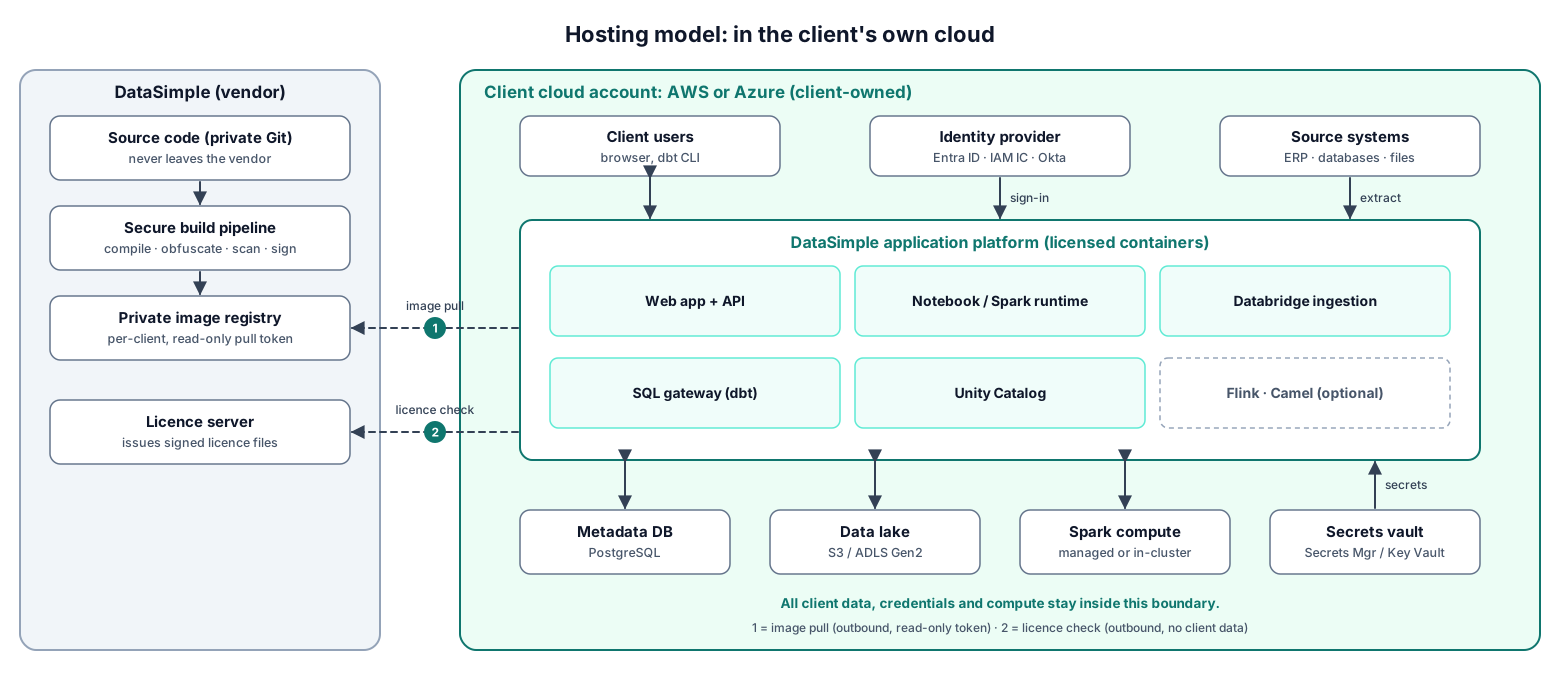
DataSimple runs inside the client's own AWS or Azure account, so all client data, credentials and compute stay in that account. Only two kinds of call go out to the vendor, image pulls and licence checks, and neither carries client data.
Overview#
The Deployment screen moves content between DataSimple environments. Content is what users build inside DataSimple: notebooks, pipelines, workflows, schedules, Data Source definitions, folders, data quality checks, glossary terms, semantic metrics and saved joins. On request it can also create the structure (never the rows) of lakehouse tables and views that the promoted notebooks need on the target environment.
| Promoted with the Deployment screen | Never promoted: lives in each environment |
|---|---|
| Notebooks, pipelines, workflows, schedules, Data Source definitions (without secrets), folders, data quality checks, glossary terms, metrics, saved joins; optionally empty lakehouse tables and views and their grants | Lake data, DataBridge jobs and their load positions, passwords and other secrets, users, groups and roles, run history |
Product upgrades of DataSimple itself are handled by your DataSimple operator, not by this screen.
Anyone whose role includes the Deployment screen can promote. They can compare environments, open item differences, promote, send promotion requests, look at history and roll back. Setting up environments stays with administrators: only an administrator can add, edit or remove an environment and its service-account sign-in, and only an administrator can approve or reject someone else's promotion request. Administrators always have access; anyone else needs the Deployment screen in their role.
Key concepts#
| Term | Meaning |
|---|---|
| Environment | A registered target DataSimple environment (for example qa or prod) with its address, a service account and the tenant to deploy into. |
| This environment's name | Each environment knows its own stage name, set when it is installed. If no name is set, history shows local and stage order cannot be enforced. |
| Stage order | Known names sort in this order: dev/development, test/qa, uat, staging, pre-prod/preprod, prod/production. Unknown names sort after prod. |
| Service account | A DataSimple user on the target. Every change on the target is applied as this user, with the target's own permission checks and logging. |
| Inventory | The list of deployable objects in one environment. |
| Deploy key | A stable identifier that pairs the same object across environments, even though each environment numbers its objects differently. |
| Fingerprint | A summary of an object's definition. Compare uses it to decide New, Changed or Same. |
| Data Source code | DS-12 style references in notebook cells. On promotion they are changed to the target's code for the Data Source with the same name and engine. |
| Promotion request | A promotion waiting for a second administrator, used when an environment is marked Requires approval. |
| Deployment id | One identifier per promotion, shown in the history of both the sending and the receiving environment. |
| Pre-deploy snapshot | The target's definition of each object just before a promotion changed it. Roll back puts these back. |
How it works#
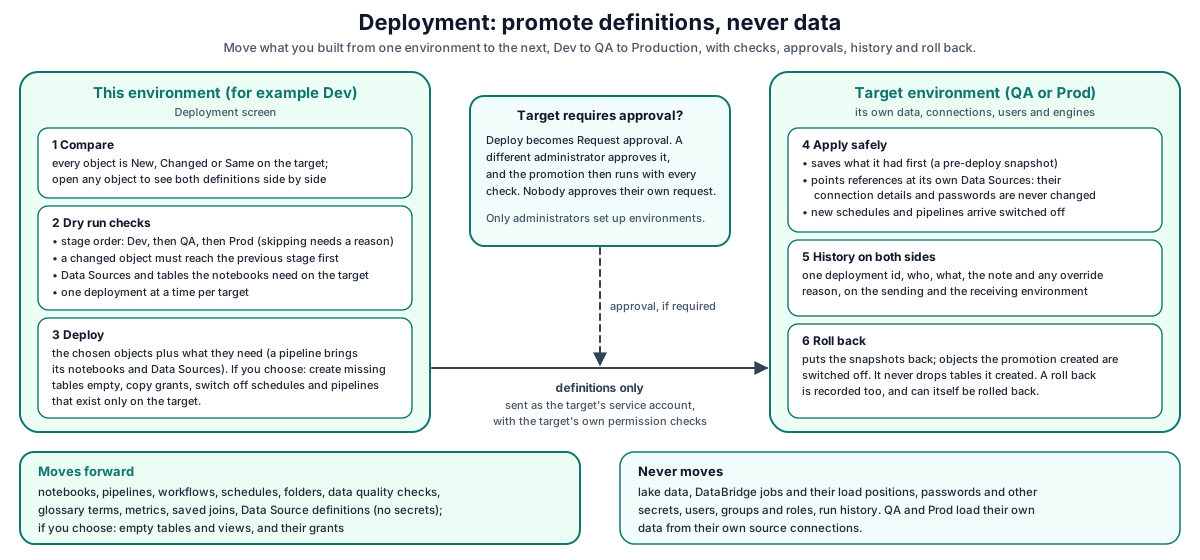
- The screen shows this environment's inventory, the registered environments, the status of each object on every stage, and pending requests.
- Compare fetches the target's inventory and lines it up with the local one.
- Deploy first runs a dry run: stage order, missing Data Sources, missing tables on the target's Data Sources, and missing lakehouse objects.
- The real promotion allows one deployment at a time per target environment, optionally creates missing lake objects, then sends the content.
- The target records what it had, applies the content, writes its own history entry and returns a result for each object.
Passwords for environments are kept on the server and are never shown in the browser.
Register and test an environment#
- Open Deployment and add an environment.
- Enter a name (lowercase, starting with a letter), a label, the target environment's address, the service account's username and password, and the target tenant.
- Optionally switch on Requires approval.
- Test the environment. DataSimple signs in to the target and shows how many objects it holds.
Rules:
- The password is stored encrypted and is never shown again; the screen only shows that one is set.
- An environment cannot use this environment's own name, and promoting to this same environment is refused.
- Enter the target tenant. If you leave it blank, your own tenant is used. DataSimple never signs in to the target without a tenant.
[!TIP] Use a dedicated service account that people do not use interactively. Every change on the target is recorded under that account, and signing in as the service account for a deployment does not end anyone's browser session.
What can be deployed#
| Kind | Notes |
|---|---|
| Notebook | Cells, description, folder, compute profile |
| Pipeline | Steps, schedule, retries; brings in the notebooks and Data Sources it needs |
| Workflow | Tables, keys, mappings, steps; references to Data Sources, notebooks and pipelines are matched on the target |
| Schedule | Notebook schedules |
| Data Source | Name, engine and connection settings (port, database, username, SSL); never the address, the password or other secrets |
| Folder | Notebook folders |
| Data quality check | Check definitions, not results |
| Glossary term, semantic metric | From Semantics |
| Saved join | Saved joins |
Compare and review differences#
Choose a target and select Compare. Every local object is shown as New, Changed or Same, plus objects that exist only on the target. DataSimple also shows how this environment's Data Source codes map to the target's, and which Data Sources have no match.
Select an object to see both definitions side by side: what would be sent (with Data Source codes already changed) and what the target holds now. Secrets are masked, and a Data Source's host, port, username, path and database are not shown.
The stage matrix shows each object's status on every registered stage at once. A stage that does not answer within 15 seconds is marked with its error instead of failing the whole page.
Promote#
Select objects (or all new and changed objects) and select Deploy. Related objects (the notebooks and Data Sources a pipeline uses, for example) are added automatically. Options:
| Option | Effect |
|---|---|
| Note | Free text stored in history |
| Override reason | Lets a promotion skip a stage or go backwards; at least 3 characters, recorded in the audit trail |
| Deploy anyway | Promote even though a Data Source or table is missing on the target, after you reviewed the list (Request approval anyway when the target requires approval) |
| Retire from target | Switch off schedules and pipelines that exist only on the target |
| Create on target | Per missing lakehouse table or view: create it on the target (empty) |
| Copy grants | Copy grants, row filters and column masks for created objects; optionally also for existing tables the notebooks use |
Checks run in this order:
| Check | Result if it fails | Can be bypassed |
|---|---|---|
| Environment requires approval | "Requires approval. Send a promotion request" | Only by an approved request |
| An object you ticked Create on target for is not missing or cannot be created | Refused | No |
| Object is different on the previous stage | "Promote them to qa first" | No. Promote it there first |
| Promoting backwards (prod to qa), or the object never reached the previous registered stage | Override needed | Yes, with an override reason |
| The previous stage could not be checked | Override needed | Yes, with an override reason |
| A notebook's Data Source has no match on the target, or a table it reads there is missing | Needs Deploy anyway | Yes, after reviewing the list |
| Another deployment to the same target is running | "Another deploy to qa is in progress" | Retry later |
A dry run reports what it found and stops after the approval check, so nothing is refused until you deploy.
If the target cannot be reached for the table check, every table counts as unconfirmed, so a failed check never lets a promotion through unseen.
What the target does#
For each object, the target finds its own copy (by deploy key, else by name), saves a pre-deploy snapshot, changes references to its own Data Sources, notebooks and pipelines, and saves the object. A promotion that is retried after a network failure is recognised and not applied twice.
New schedules and pipelines arrive switched off, so nothing starts running on QA or Prod until someone switches it on there.
Data Sources stay owned by the target#
If a Data Source with the same name and engine already exists on the target, it is linked but not changed: its password, host, port, database, SSL and settings stay exactly as the target set them. An existing Data Source on the target is never changed. A new Data Source arrives with its port, database, username and SSL setting, but without its address (host, file path or URL) and without its password or other secrets, so it can never point at the development system by accident. It is marked as needing setup and fails with that message until you open it on the target, enter the target system's address and password, and test it.
Workflows#
A workflow refers to a Data Source, notebooks and possibly a pipeline. On promotion each reference is matched by name and deploy key on the target. A reference that cannot be matched fails that workflow with a message; it never points at the wrong object. Workflows are applied before pipelines, so a pipeline step that runs a workflow finds it. Run history never travels. If the target runs an older DataSimple version that does not support workflow promotion, each workflow is reported as failed, not as successful.
Create missing lake objects on the target#
The dry run lists lakehouse tables and views that the selected notebooks read or write and that the target catalog does not have, plus the tables behind any missing view. Detection reads the notebook text (for example FROM, JOIN, INSERT INTO, MERGE INTO, .table(), saveAsTable()), so table names built at run time can be missed.
Objects that this environment's catalog fully describes show a Create on target box; objects that cannot be created say why. When you tick them, the target:
- creates only schemas, tables, views and materialized views, always with
IF NOT EXISTS; nothing is dropped, replaced, altered or filled; - runs the statements as the service account, so they are permission-checked, registered in the catalog and logged like a notebook cell;
- skips and reports objects that already exist, and refuses objects that exist as another kind or format or are in the trash.
Tables are created empty. Source data is never read.
Copy grants adds the source's grants, row filters and column masks to the created objects (and, if you choose, to existing tables the notebooks use). Grants are only added, never revoked; an existing row filter or mask is left alone; and only users and groups that already exist on the target receive grants. Missing users and groups are listed in the result, not created.
Approvals and requests#
An environment marked Requires approval accepts only promotions that a different administrator approved.
- For such an environment the Deploy button reads Request approval. Anyone who can promote can send a request. Selecting it stores a request instead of deploying. The exact choices (objects, retire, override, force, create objects, copy grants) are stored with the request.
- A different administrator opens Requests and selects Approve. Approval runs the promotion with every check. Two administrators approving at once cannot run it twice.
- The request ends Approved with a deployment id, or Failed with the error.
- An administrator can Reject a request; when the requester does it, the request is withdrawn (Cancelled). Requesters who are not administrators can withdraw their own requests but cannot approve or reject anyone else's.
The requester can never approve their own request, even when the requester is an administrator.
Retire from target#
Retire from target lists target-only objects that this environment no longer has. Only schedules and pipelines can be retired, and they are switched off, never deleted. A snapshot is taken first, so a roll back switches them on again.
History, roll back and restore plan#
Deployment → History lists promotions on both the sending and the receiving environment. Filter by environment, user, kind or object. Each entry shows whether it was sent or received, whether it was a promotion or a restore, the objects, warnings, Git references of Git-linked notebooks, the override reason, the request, whether it can be rolled back, and when it was rolled back. History keeps the newest 1,000 deployments per tenant.
Roll back puts the pre-deploy snapshots back. A roll back is itself recorded and can be rolled back.
- On the environment that received the promotion, open the history entry and look at its restore plan. It lists objects that will be put back and objects the promotion created.
- Roll back. Objects the promotion created are switched off (or archived) by default; you can choose to delete them instead.
From the sending environment you can also ask the target to roll back, except for environments that require approval; roll those back from their own Deployment screen.
Roll back covers workspace objects only. It never drops lakehouse objects a promotion created. Schemas, tables and views stay, and the history entry says which ones were created.
Developer examples#
Anyone who can promote can automate promotions with a personal API token (see 18-workspace-and-administration.md). The token acts as you, so it can do what your role can: promote and roll back with the Deployment screen, and approve or manage environments only with an administrator account.
Dry run, then promote with a missing table created#
curl -X POST https://<your-datasimple-host>/api/deploy/promote \
  -H "Authorization: Bearer <PERSONAL_TOKEN>" -H "Content-Type: application/json" \
  -d '{"target":"qa","items":["notebook:<NOTEBOOK_DEPLOY_KEY>","pipeline:<PIPELINE_DEPLOY_KEY>"],"note":"Sales by region v2","dryRun":true}'
{
  "success": true,
  "missingObjects": [{ "table": "gold.sales_by_region", "status": "missing", "kind": "table", "creatable": true, "usedBy": ["Sales by region"] }],
  "stageGate": { "direction": "forward", "previousStage": null, "blockers": [] }
}
curl -X POST https://<your-datasimple-host>/api/deploy/promote \
  -H "Authorization: Bearer <PERSONAL_TOKEN>" -H "Content-Type: application/json" \
  -d '{"target":"qa","items":["notebook:<NOTEBOOK_DEPLOY_KEY>","pipeline:<PIPELINE_DEPLOY_KEY>"],"note":"Sales by region v2","createObjects":["gold.sales_by_region"],"copyGrants":true}'
# Answer includes deploymentUid, results[], failed[] and missingPrincipals[]
Without items, all new and changed objects are promoted. Find deploy keys with GET /api/deploy/compare?target=qa.
Promotion request for an environment that requires approval#
curl -X POST https://<your-datasimple-host>/api/deploy/requests \
  -H "Authorization: Bearer <PERSONAL_TOKEN>" -H "Content-Type: application/json" \
  -d '{"target":"prod","items":["pipeline:<PIPELINE_DEPLOY_KEY>"],"note":"Release 14"}'

# An administrator other than the requester, with their own token:
curl -X POST https://<your-datasimple-host>/api/deploy/requests/17/approve \
  -H "Authorization: Bearer <OTHER_ADMIN_TOKEN>" -H "Content-Type: application/json" -d '{"note":"OK"}'
Look before rolling back#
curl https://<your-datasimple-host>/api/deploy/history/<DEPLOYMENT_ID>/restore-plan \
  -H "Authorization: Bearer <PERSONAL_TOKEN>"
# { "success": true, "willRestore": [{"kind":"notebook","name":"Sales by region"}], "willRemove": [{"kind":"schedule","name":"Nightly"}] }

curl -X POST https://<your-datasimple-host>/api/deploy/restore \
  -H "Authorization: Bearer <PERSONAL_TOKEN>" -H "Content-Type: application/json" \
  -d '{"deployment_uid":"<DEPLOYMENT_ID>","createdMode":"disable"}'
API summary#
Administrators can make every call; anyone else needs the Deployment screen in their role. Calls marked (administrators) need an administrator account.
| Method | Path | Purpose |
|---|---|---|
| GET | /api/deploy/environments |
List registered environments |
| PUT | /api/deploy/environments |
Add or edit an environment (administrators) |
| DELETE | /api/deploy/environments/:name |
Remove an environment (administrators) |
| POST | /api/deploy/environments/:name/test |
Test the connection to a registered environment |
| GET | /api/deploy/inventory |
This environment's deployable objects |
| GET | /api/deploy/compare?target=<name> |
Status of each object against one target |
| GET | /api/deploy/matrix |
Status across every registered stage |
| POST | /api/deploy/promote |
Dry run or promote |
| GET | /api/deploy/history |
Deployment history (environment, user, kind, object, limit up to 200, offset) |
| GET | /api/deploy/history/:id/restore-plan |
What a roll back would change |
| POST | /api/deploy/restore |
Roll back a promotion this environment received |
| GET, POST | /api/deploy/requests |
List or create promotion requests |
| POST | /api/deploy/requests/:id/approve, /reject |
Approve and run, or reject (administrators other than the requester); the requester can use /reject to withdraw their own request |
Administrators register environments on the Deployment screen; environment passwords should not be sent from scripts.
Security and permissions#
- Deployment screen required. Promoting, comparing, requesting approval and rolling back need the Deployment screen in your role; without it you get 403
No access to deploy (ask an administrator). - Environment set-up and approvals are for administrators. Adding, editing or removing an environment, and approving or rejecting someone else's request, answer 403
Admin access requiredfor everyone else. - Named in the history. Every promotion, request and roll back records the person who ran it.
- Tenant scoped. You see and promote only your tenant's objects, into the target tenant set on the environment.
- Secrets stay put. Environment passwords are encrypted and never returned. Promoted content, diffs and new Data Source definitions have secrets removed or masked. Target Data Sources keep their own credentials.
- Target rules apply. The target applies every change as the service account, so its permissions, catalog registration and logging all apply.
- Lake safety. Create-only statements with
IF NOT EXISTS; grants are only added, only for existing users and groups; roll back never drops lake objects. - Audit. Every step is recorded on the History screen: environment changes, promotions, received promotions, stage overrides, requests, approvals, rejections, remote roll backs, created objects and copied grants.
Settings you can change#
| Setting | Where | Effect |
|---|---|---|
| Requires approval | Per environment, on the Deployment screen (administrators) | Promotions into that environment need a request approved by an administrator other than the requester |
| Create on target, Copy grants, Deploy anyway, Retire | Per promotion | Chosen each time; there are no global defaults |
This environment's own stage name is set by your DataSimple operator.
Monitoring and troubleshooting#
- Deployment → History on both environments.
- History screen for the deployment audit entries, including override reasons.
- Lakehouse and Log screens on the target show created objects and the statements the service account ran.
| Message | Meaning |
|---|---|
No access to deploy (ask an administrator) |
Your role does not include the Deployment screen. |
Admin access required |
Only an administrator can manage environments or decide someone else's request. |
Environment "qa" has no target tenant |
Edit the environment and set the tenant. |
Could not reach the qa environment. Check that it is running and that its address in Deployment is correct. |
DataSimple could not connect to the target at all (it is down, its address is wrong, or the network blocks it). Check the environment's address under Deployment. |
Added by Deployment. Enter the address and password of this environment’s system before using this Data Source. |
On the target: a Data Source that arrived with a promotion has no address or password yet. Open it, enter them and test it. |
... requires approval. Send a promotion request |
Use Request approval. |
... objects are different on qa. Promote them to qa first |
Stage order: the previous stage holds another version. |
... data source(s) ... have no match |
Add the Data Source to the promotion, create it on the target, or select Deploy anyway. |
Another deploy to qa is in progress |
Only one promotion per target runs at a time. |
... is on an older DataSimple version ... |
Ask your operator to upgrade the target first; nothing was deployed. |
No pre-deploy snapshot was recorded |
Roll back from the environment that received the promotion. |
Limits#
- Data never moves. Created tables are empty.
- Roll back keeps created lake objects. Remove them on the target if needed.
- Missing users and groups are listed, not created.
- Table detection reads notebook text. Table names built at run time can be missed.
- A materialized view's first build runs on the target when it is created, reading the target's (possibly empty) tables.
- Only schedules and pipelines can be retired, and only by switching them off.
Related content#
- 01-architecture.md
- 17-assistants.md (promoting from Everything)
- 18-workspace-and-administration.md
- 19-app-server-and-security.md
- Unity Catalog (OSS): https://docs.unitycatalog.io/
- Delta Lake: https://docs.delta.io/latest/index.html
- Apache Iceberg: https://iceberg.apache.org/docs/latest/