Overview#
DataSimple has three assistant entry points and one background AI feature:
| Assistant | Where | What it does | What it produces |
|---|---|---|---|
| Sarah | Left rail → Sarah | Turns one business question into a report built only from Gold tables: KPI tiles, charts, a short narrative and the SQL behind every number | A saved report |
| Agent | Left rail → Agent | Works toward a goal using platform capabilities: reads the catalog, loads, pipelines, quality, lineage and access; proposes changes as approval cards | A run trace and approval cards |
| Everything | A toggle in the header | One box, typed or spoken, that sends each request to Sarah or the Agent; also a daily brief, what-if scenarios and an activity timeline | Through Sarah and the Agent |
| AI business meaning | Semantics screen (Draft with AI) and in the background | Drafts what a table and its columns mean, from the catalog and a few stored rows | Draft business meanings |
All of them use an AI model configured for your DataSimple environment. None of them has privileges of its own: every query and every action runs as a person, with that person's role, tab access and data grants. See 01-architecture.md for how DataSimple, the Spark engine and the catalog fit together.
Key concepts#
| Term | Meaning |
|---|---|
| Gold only | Sarah reads only tables in the gold schema (<catalog>.gold.<table>). Anything else is refused before it runs. |
| Capability | Something the Agent can do, such as read a table's schema or schedule a notebook. Each is either read or write. |
| Read capability | Runs at once; its result goes back to the AI model. |
| Write capability | Never runs directly. It creates an approval card. |
| Approval card | A queued change. When an allowed person selects Approve, it runs as that approver. |
| AI guardrail | Rules applied to every SQL statement an assistant writes: no drop, delete, truncate, alter, overwrite or replace, for anyone. |
| Route | Everything's choice of Sarah or the Agent for a request. @sarah or @agent at the start forces it. |
| Draft meaning | A business meaning proposed by the AI model. It never replaces an approved meaning. |
How it works#
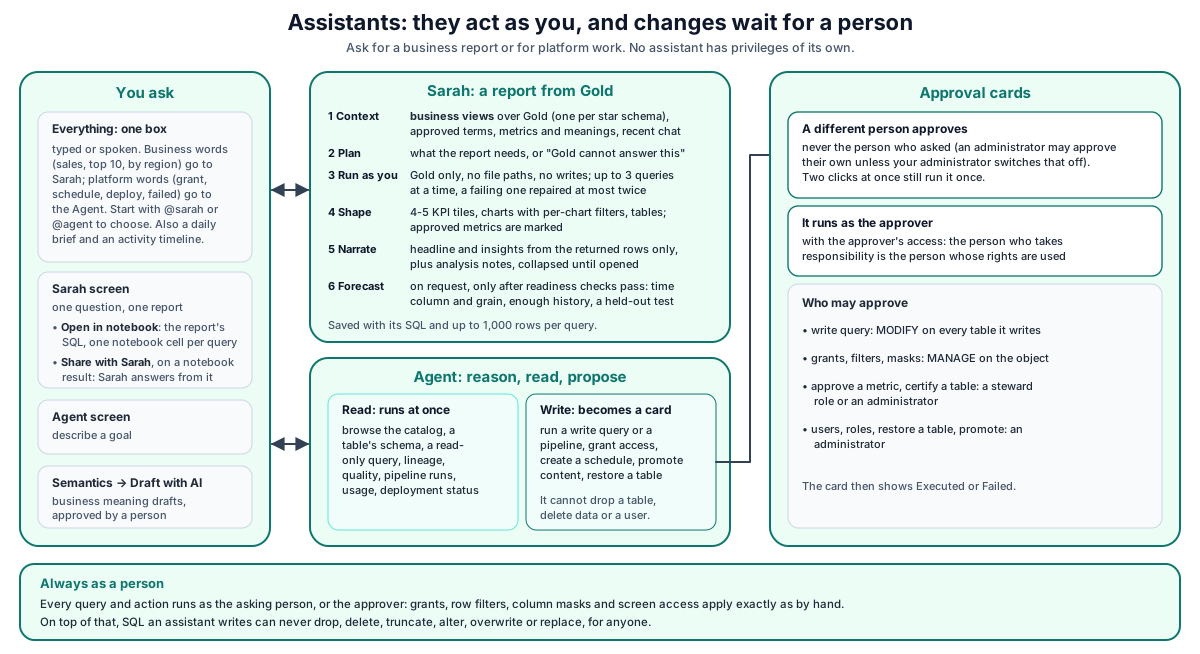
The key point is identity. Every query and action an assistant takes runs as the asking person (or, for an approved change, the approver). Catalog grants, row filters, column masks and tab access therefore apply exactly as they would if the person did it by hand. On top of that, SQL written by an assistant must pass the AI guardrail.
Sarah: one question, one report#
- Context. Sarah looks at the business views of your Gold layer (one view per star schema or One Big Table, with its saved meaning: grain, measures and whether they add up, date column, dimensions, and the columns two models of the same area share), the tables approved metrics name, approved Semantics terms and metrics, approved business meanings, and up to the last 10 turns of the conversation. With no business views yet, she reads the Gold tables as before. With more than 40 models, the ones closest to the question are used. Every query still runs with your access, so data you cannot read gives no rows.
- Plan. The AI model decides whether it needs a few small facts first (up to 3 queries at a time, at most twice), whether Gold cannot answer the question, or what the report should contain. A plan that compares this year so far with the whole of last year goes back once before anything runs.
- Run. Every query is checked: Gold only, no file paths, no write statements. It then runs as you. A failing query, or a KPI tile on a multi-row query, is sent back to the model for repair, at most twice.
- Shape. Results become widgets; the server picks the chart from the shape of each result (
chart-decider.js). A trend whose data passes the forecast checks gets a forecast (forecast.js), and the tile row is filled to 4-5 headline numbers from the report's own charts when the plan has fewer (sarah-tiles.js). A widget that refers to a column that does not exist is kept, with a note in place of the chart, rather than drawn wrong. - Narrate. The model writes the headline, insights and caveats from the returned rows and the patterns found in them only; it may not write null or call a change across a missing period day-on-day.
When an approved metric answers the question, it is used and the widget says Approved. When a named metric is used that is not approved, the widget says Not approved. A business word without an approved definition is computed from Gold columns; its widget gets no badge, and the assumption is listed in the caveats.
The saved report keeps the SQL, timing and up to 1,000 rows per query, so Details reopens it exactly as shown without running anything again.
Business views (server/lib/star-views.js)
One view per star: gold.<area>_<subject>_view. When a One Big Table exists for the fact, the view reads it (no joins, the OBT's own row filters apply); otherwise it joins the fact to its dimensions and the date dimension on the surrogate keys. Surrogate keys, _tenantid and SCD bookkeeping columns are left out. The model's meaning is stored on the view (datasimple.model). Views are refreshed after every ds.fact / ds.obt build (the build prints a model marker; only someone with MODIFY on that table may set its model) and by POST /api/sarah/models/sync. Backups and test tables are skipped unless a person named them (Share with Sarah).
Views read through their tables (server/lib/view-expand.js)
A Spark view would read its tables without their row filters and masks. Before any SQL runs (SQL cells, Sarah, schedules, chart filters), every reference to a registered view is replaced by its stored definition, as a subquery under the view's name, so the base tables get their grants, row filters and masks for the person asking. It fails closed: a statement that still names a view it could not expand (a bare view name, views nested more than 8 deep, a view with no stored definition) is refused with a plain message, and a registry error refuses the statement (503).
Forecasts (server/lib/forecast.js)
Readiness checks first (time grain, history length, two full cycles for seasonality, gaps, incomplete first/last period, totals vs rates, level change, mostly zeros, freshness); any failure means no number, with the reason. Then drift, damped Holt, additive Holt-Winters and seasonal naive are tested on the latest periods held out; the best by WAPE is kept (a clear repeating seasonal pattern wins a close call), and the range is an 80% band from its one-step errors.
Chart filters (server/lib/sarah-filters.js)
At most three main dimensions per chart (plant, store format, region, department, category, line…, never codes or ids, at most 40 values each). Values are read once per model and viewer (cached 10 minutes). A chosen value re-runs that chart's query with the model read through a filtered subquery; values are masked like strings inside the rewrite, so they cannot change the query, and unknown columns are refused.
Notebooks (server/lib/sarah-share.js)
- Open in notebook (page only): creates
Sarah · <title>with an intro cell and one SQL cell per query; its description carries[sarah-report:<id>], which gives the notebook a Back to the Sarah report button. The report reopens the same notebook next time (remembered in the browser). - Share with Sarah:
POST /api/sarah/share {sql, title, meaning}reads the SELECT the governed way (views expanded,_nb_uc_sql_guard,_nb_uc_govern), saves it withsave_tableasgold.shared_<name>(needs CREATE_TABLE, or MODIFY to refresh), records the name and meaning as its model, and builds its business view. A result someone else shared is not overwritten unless you are an administrator.
Agent: reason, read, propose#
Describe a goal in the Agent screen. The Agent repeats a cycle of thinking and acting until it can answer or reaches its step or time budget.
- Read capabilities run at once: browse the catalog, show a table's schema, run a read-only query, show lineage, summarise data quality, show pipeline runs, summarise usage, show deployment status, and others.
- Write capabilities create an approval card: run a write query, run a pipeline, grant access, create a schedule, restore a table to an earlier version, promote content, and others. Before a card is created, the request is checked and may be refused; the card shows a summary and any warnings.
- If the Agent says it made or queued a change but no card exists, it must either create the card or say plainly that nothing changed.
The Agent has no capability to drop a table, delete data or delete a user. The full list, with each capability's risk tier, is available from GET /api/agents/tools.
Approving a card#
- DataSimple checks that you may approve this card. If not, you get 403
APPROVAL_NOT_ALLOWEDand the card stays pending for someone else. - The card is claimed, so two people selecting Approve at the same time run it exactly once.
- The change runs with your access. The person who takes responsibility is the person whose privileges are used.
- The card shows Executed or Failed with the result.
| Card | Who may approve |
|---|---|
| Any card | Never the person who asked. Exception: an administrator may approve their own (your administrator can switch this off) |
| Write query | The SQL passes the AI guardrail, and the approver has MODIFY (or the right to create the table, for a new table) on every table it writes, or is an administrator |
| Grants, revokes, row filters, column masks, table owner | MANAGE on the object, or an administrator |
| Approving a term or metric, certifying a table, a quality rule enforced on write | A steward role (data steward, compliance officer, DPO and similar) or an administrator |
| Table backup | MODIFY on the table, or an administrator |
| Add a user, change a user's role or access, create a group or change its members, restore or undrop a table, promote content | An administrator |
| Everything else | Anyone except the asker |
Administrator-only requests#
Some changes can only be asked for by an administrator: bringing back a dropped table and restoring a table to an earlier version (a backup is taken first). A non-administrator's request is refused before any card exists. Bringing back a dropped table is refused with Only an administrator can bring back a dropped table. Restoring a table is refused with Only an administrator can roll a table back. Ask an admin, or ask for a backup or the table history instead. Bringing back a dropped table works the same as Restore in the Trash or UNDROP TABLE in SQL.
Promoting content through the Agent uses the same promotion as the Deployment screen, with the same checks, history and audit. It never forces past missing Data Sources or tables; creating missing lake objects is offered on the Deployment screen only (see 16-deployment.md).
Everything: one box#
Type or speak in the Everything box. Business words (sales, revenue, top 10, by region) go to Sarah. Platform words (grant, schedule, pipeline, deploy, failed, quality rule, certify, star schema, usage, roll back) go to the Agent. Start with @sarah or @agent to choose yourself; every answer also offers Ask the platform agent instead or Ask the data analyst instead. Up to three requests run at the same time on one Everything page.
Everything also shows:
- a daily brief: failed latest runs, each with Rerun; open quality alerts and stale tables; pending approvals and refused AI requests; and recent changes;
- what changed and an activity timeline;
- what-if scenarios built from Gold tables that have a date and a numeric measure;
- a business summary of any table you drag from the catalog onto the page.
AI business meaning drafts#
On the Semantics screen, Draft with AI drafts the meaning of one table, or of every table in a schema you may describe. The draft reads the catalog and a few stored rows as you. Drafts are marked as AI drafts, never overwrite an approved meaning, and Sarah uses approved meanings only.
DataSimple also drafts a meaning in the background shortly after any table, view or materialized view is created (from SQL, Python, DS Tables, DataBridge or dbt), and periodically for tables that have none. By default these background drafts are approved automatically; your administrator can change this so that a person must approve them.
Developer examples#
Call the assistants from a signed-in session or with your personal API token (Authorization: Bearer <PERSONAL_TOKEN>). Either way they run as you, with your grants and your tenant. The examples below send your session cookie; a token works the same way.
Ask Sarah from a script#
The answer is a stream of server-sent events: progress first, then the finished report.
const res = await fetch("https://<your-datasimple-host>/api/sarah/ask/stream", {
  method: "POST",
  headers: { "Cookie": "<SESSION_COOKIE>", "Content-Type": "application/json" },
  body: JSON.stringify({ question: "Sales by region this quarter versus last" }),
});
const reader = res.body.getReader();
const decoder = new TextDecoder();
for (;;) {
  const { value, done } = await reader.read();
  if (done) break;
  for (const line of decoder.decode(value).split("\n")) {
    if (!line.startsWith("data: ")) continue;
    const evt = JSON.parse(line.slice(6));
    // {type:"phase", phase:"querying"} ... {type:"query", id:"q1", status:"done", rows:12}
    if (evt.type === "done") console.log(evt.report.title, evt.report.queries.length);
    if (evt.type === "error") console.error(evt.error);
  }
}
Run the Agent and approve its card#
curl -X POST https://<your-datasimple-host>/api/agents/run \
  -H "Cookie: <SESSION_COOKIE>" -H "Content-Type: application/json" \
  -d '{"goal":"Schedule the Sales by region notebook every day at 6"}'

# Pending cards for your tenant
curl "https://<your-datasimple-host>/api/agents/actions?status=pending" \
  -H "Cookie: <SESSION_COOKIE>"

# A different person approves; the change runs with their access
curl -X POST https://<your-datasimple-host>/api/agents/actions/42/approve \
  -H "Cookie: <APPROVER_SESSION_COOKIE>"
If the asker tries to approve their own card:
{ "success": false, "error": "You asked for this change, so someone else must approve it (or an admin).", "code": "APPROVAL_NOT_ALLOWED" }
Check code, not the wording.
What a Gold-only refusal looks like#
-- Sarah plans this:
SELECT region, SUM(amount) FROM silver.orders GROUP BY region
-- It is refused before it runs:
-- "silver.orders" is not a Gold table — Sarah reads only datasimple.gold.<table>
-- and the AI model repairs it, for example:
SELECT region, SUM(amount) AS amount FROM datasimple.gold.sales_by_region GROUP BY region
Draft business meaning for a Gold schema#
curl -X POST https://<your-datasimple-host>/api/notebooks/semantic/meaning/draft-schema \
  -H "Authorization: Bearer <PERSONAL_TOKEN>" -H "Content-Type: application/json" \
  -d '{"schema":"gold"}'
API summary#
| Method | Path | Purpose |
|---|---|---|
| GET | /api/sarah/status |
Whether an AI model is available |
| GET | /api/sarah/context |
Business models, Gold tables, approved metrics and terms Sarah can use |
| POST | /api/sarah/ask/stream |
Ask one question; streamed progress, then the report |
| GET | /api/sarah/reports |
Recent reports for your tenant |
| GET, DELETE | /api/sarah/reports/:id |
Open or delete a saved report |
| GET | /api/sarah/reports/:id/filters?widget=N |
The headline filters one chart offers, values as the caller sees them |
| POST | /api/sarah/reports/:id/filter |
Re-run one chart with { widget, filters } |
| GET | /api/sarah/models |
Business models (one view per star) with their meaning |
| POST | /api/sarah/models/sync |
Create or refresh the business views, as the caller ({ prefixes? }) |
| POST | /api/sarah/share |
Share a SQL result with Sarah as a Gold table and business view |
| GET | /api/agents/status |
Available or not; step and time budget |
| GET | /api/agents/tools |
Agent capabilities with risk tiers |
| POST | /api/agents/run, /api/agents/run/stream |
Run the Agent toward a goal |
| GET | /api/agents/runs, /api/agents/runs/:id |
Run history and the full trace of one run |
| GET | /api/agents/actions, /api/agents/actions/:id |
The approval queue |
| POST | /api/agents/actions/:id/approve |
Approve and run one card |
| POST | /api/agents/actions/:id/reject |
Decline one card |
| GET | /api/everything/brief |
Daily brief |
| POST | /api/everything/brief/rerun |
Rerun a failed item from the brief |
| GET | /api/everything/changes, /api/everything/activity |
What changed; activity timeline |
| POST | /api/notebooks/semantic/meaning/draft, /meaning/draft-schema |
AI drafts of business meaning |
Security and permissions#
- As the person. Sarah and Agent reads run with the asker's access; approved changes run with the approver's access. There is no assistant superuser.
- Sign-in required. Call the assistants from a signed-in session or with a personal API token; without either they answer 401. An assistant never falls back to a service identity on your behalf.
- Screen access. Sarah needs the Sarah screen and the Agent needs the Agent screen in your role. Everything sends each request to one of them, so the same rule applies to requests there. Everything's daily brief, what changed and activity views need only sign-in.
- AI guardrail. Never allowed in assistant-written SQL, for anyone: DROP, DELETE FROM, TRUNCATE, ALTER, INSERT OVERWRITE, CREATE OR REPLACE, REPLACE TABLE, MERGE with delete, VACUUM, RESTORE TABLE, UNDROP, GRANT, REVOKE, CREATE FUNCTION, and anything that cannot be classified. Pipeline builds and star schemas must use new table names. The same statement typed by a person in a notebook cell still runs if their role allows it.
- Tenant scoped. Reports, runs and cards are visible only within your tenant.
- Rate limits. Sarah and Agent runs share your tenant's query limits (by default 5 at once and 60 per minute). When the limit is reached, the Agent's non-streamed run (
/api/agents/run) answers 429RATE_LIMITEDwith aRetry-Afterheader. Sarah's stream sends anerrorevent with codeRATE_LIMITED. The Agent's stream sends anerrorevent.
What they log#
| Event | Where |
|---|---|
| Sarah questions and deleted reports | History screen |
| Agent runs, executed cards, rejected cards, refused approvals | History screen |
| SQL blocked by the AI guardrail | History screen and Everything → Activity |
| Draft with AI requests for business meaning (background drafts are not recorded) | History screen |
| Every AI model turn and every capability the Agent used | Agent screen, run trace |
| Each SQL statement an assistant ran | Log screen, like any notebook cell |
Settings you can change#
There are no per-user assistant settings. Your administrator can change the Agent's step and time budget (default 12 steps, 3 minutes), Sarah's time budget (default 4 minutes), whether administrators may approve their own cards, which roles count as stewards, and whether background meaning drafts are approved automatically.
Monitoring and troubleshooting#
- Agent screen: each run's full trace and the approval queue.
- Sarah → Details: every query, its SQL, rows and time.
- Everything → Activity: who asked, how (typed or voice), which assistant answered, and what was approved or refused.
- History screen: the audit entries listed above.
| Message or code | Meaning |
|---|---|
503 AGENT_DISABLED |
No AI model is configured for this environment; contact your administrator |
429 RATE_LIMITED (Agent run), or an error event in a stream |
Your tenant's concurrency or per-minute limit is reached; retry later (the 429 says after how many seconds) |
403 APPROVAL_NOT_ALLOWED |
You may not approve this card (often: you asked for it) |
409 Action is not pending |
Someone else already approved or rejected it |
403 No access to ... |
Your role does not include the Sarah or Agent screen |
"x" is not a Gold table |
Sarah's Gold-only check; the AI model repairs it automatically |
Only an administrator can bring back a dropped table. |
Undrop asked for by a non-administrator |
Only an administrator can roll a table back. Ask an admin, or ask for a backup or the table history instead. |
Restore to an earlier version asked for by a non-administrator |
Limits#
- Sarah reads Gold only. Data in other schemas must be published to Gold first.
- Routing in Everything is keyword based. An ambiguous sentence may go to the wrong assistant; use
@sarahor@agent. - Saved reports keep up to 1,000 rows per query.
- Up to three Everything requests per page run at the same time.
Related content#
- 13-semantics.md
- 16-deployment.md
- 18-workspace-and-administration.md
- 19-app-server-and-security.md
- Spark SQL reference: https://spark.apache.org/docs/latest/sql-ref.html
- Unity Catalog (OSS): https://docs.unitycatalog.io/